

- Local time
- 4:48 PM
- Messages
- 135
Hi,
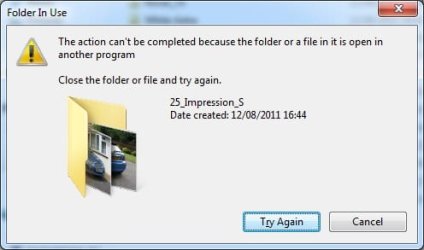
I've started getting this annoying error popup when trying to edit folder names. It doesn't happen consistently and weirdly when I took the attached screenshot, opened Paint, saved and quit and then clicked 'Try again' it worked. It also sometimes eventually works if I just hold my finger on Return, re-trying continuously.
The affected folder(s) is/are never open in any application when this happens.
All suggestions welcome.
I've started getting this annoying error popup when trying to edit folder names. It doesn't happen consistently and weirdly when I took the attached screenshot, opened Paint, saved and quit and then clicked 'Try again' it worked. It also sometimes eventually works if I just hold my finger on Return, re-trying continuously.
The affected folder(s) is/are never open in any application when this happens.
All suggestions welcome.
Attachments
My Computer
- Computer type
- PC/Desktop
- Computer Manufacturer/Model Number
- Home build
- OS
- Windows 7 Professional 64-bit SP1
- CPU
- Pentium Core i5-2500 3.3GHz
- Motherboard
- Gigabyte P61-USB3-B3
- Memory
- 2 x 4GB DDR3 1333MHz
- Graphics Card(s)
- Asus GT440 1GB GDDR5
- Sound Card
- Realtek integrated sound
- Monitor(s) Displays
- LG L1942PE
- Screen Resolution
- 1280 x 1024 @ 60Hz
- Hard Drives
- 2 x 1TB Western Digital WD10EARS, 1 x 1TB Seagate ST1000DM010
- PSU
- EVGA 450BR
- Case
- Novatech Panther ATX
- Cooling
- Sharkoon Silent Eagle 1000 120mm in case rear extracting
- Keyboard
- Logitech K120


