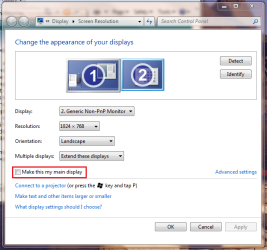
Quick question, why when I choose "Extend" do I lose my icons, start bar ect.. on my main computer(everything shows fine on the HDTV) but when I use "Duplicate" everything is there on both screens? I would like to use the "Extend" option for this way I can setup viewing options for each separately. Also sometimes in "Duplicate" after a few minutes the main computer screen goes black yet the HDTV screen is just fine. To get out of this I have to go to the TV and Quick question, why when I choose "Extend" do I lose my icons, start bar ect.. on my main computer(everything shows fine on the HDTV) but when I use "Duplicate" everything is there on both screens? I would like to use the "Extend" option for this way I can setup viewing options for each separately.
Also sometimes in "Duplicate" after a few minutes the main computer screen goes black/asleep and will not come back but if I go to HDTV screen the desktop is there and operational, the only way to get the desktop or anything back to the Computer Monitor is to set the main computer monitor to be the only "1" viewing the desktop.
As i wrote this my display was set to "Duplicate" and the monitor shut down forcing me to go to the TV and finish this post.. any one else run into this problem?? (Running windows 7 updated nVidia Drivers)
Also sometimes in "Duplicate" after a few minutes the main computer screen goes black/asleep and will not come back but if I go to HDTV screen the desktop is there and operational, the only way to get the desktop or anything back to the Computer Monitor is to set the main computer monitor to be the only "1" viewing the desktop.
As i wrote this my display was set to "Duplicate" and the monitor shut down forcing me to go to the TV and finish this post.. any one else run into this problem?? (Running windows 7 updated nVidia Drivers)
My Computer
- OS
- Windows Vista & 7