
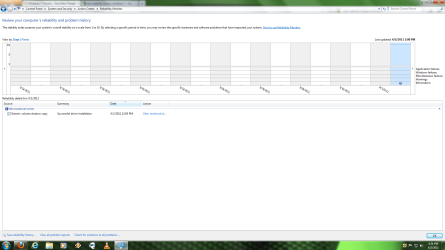
Problem view history reliability

Yuniel

New member
Member
Local time
11:03 AM
Messages
42
i install my windows 7 yesterday and i dont see all programs i install here i push pics here , pls help me
 

Attachments

  • Untitled.png
    Untitled.png
    67.1 KB · Views: 26

My Computer

Computer Manufacturer/Model Number
CyberPower
OS
windows 7 ultimate 64 bit
CPU
Intel Core 2 Quad Q9550 @ 2.83GHz
Motherboard
EVGA 132-CK-NF78 (Socket 775)
Memory
4.0GB Dual-Channel DDR2 @ 399MHz (5-5-5-18)
Graphics Card(s)
1024MB GeForce GTX 285 (EVGA
Sound Card
None
Monitor(s) Displays
SyncMaster @ 1680x1050
Hard Drives
313GB SAMSUNG SAMSUNG HD322HJ SCSI Disk Device (SCSI)
Hello Yuniel,

You would just need to click on the Programs and Features icon in the Control Panel (icons view) instead to see them. :)
 

My Computer

Computer type
PC/Desktop
Computer Manufacturer/Model Number
Self built custom
OS
64-bit Windows 11 Pro for Workstations
CPU
Intel i7-8700K OC'd to 5 GHz
Motherboard
ASUS ROG Maximus XI Formula Z390
Memory
64 GB (4x16GB) G.SKILL TridentZ RGB DDR4 3600 MHz
Graphics Card(s)
ASUS ROG-STRIX-GTX1080TI-O11G-GAMING
Sound Card
Integrated
Monitor(s) Displays
2 x Samsung Odyssey G7 27"
Screen Resolution
2560x1440
Hard Drives
1TB Samsung 990 PRO M.2,
4TB Samsung 990 PRO PRO M.2,
TerraMaster F8 SSD Plus NAS
PSU
Seasonic Prime Titanium 850W
Case
Thermaltake Core P3
Cooling
Corsair Hydro H115i
Keyboard
Logitech wireless K800
Mouse
Logitech MX Master 4
Internet Speed
2 Gb/s Download and 100 Mb/s Upload
Antivirus
Malwarebyte Anti-Malware Premium
Browser
Google Chrome
Other Info
Logitech Z625 speaker system,
Logitech BRIO 4K Pro webcam,
HP Color LaserJet Pro MFP M477fdn,
APC SMART-UPS RT 1000 XL - SURT1000XLI,
Galaxy S23 Plus phone
no no Brink you no understant what i try to say , i no mean on program and Features i mean on the Pics the icon blue say generic volumen shadow copy , day before need say all program i install and this no show

the program you install show on program and Features and who on view history reliability and on this no show me the program i install pls help me


any can help me my problem ?
 
Last edited by a moderator:

My Computer

Computer Manufacturer/Model Number
CyberPower
OS
windows 7 ultimate 64 bit
CPU
Intel Core 2 Quad Q9550 @ 2.83GHz
Motherboard
EVGA 132-CK-NF78 (Socket 775)
Memory
4.0GB Dual-Channel DDR2 @ 399MHz (5-5-5-18)
Graphics Card(s)
1024MB GeForce GTX 285 (EVGA
Sound Card
None
Monitor(s) Displays
SyncMaster @ 1680x1050
Hard Drives
313GB SAMSUNG SAMSUNG HD322HJ SCSI Disk Device (SCSI)
I'm not quite sure what you are trying to say, but the "Reliability Monitor" location in your screenshot is not going to show you what programs you have installed unless their was a problem with it's installation.
 

My Computer

Computer type
PC/Desktop
Computer Manufacturer/Model Number
Self built custom
OS
64-bit Windows 11 Pro for Workstations
CPU
Intel i7-8700K OC'd to 5 GHz
Motherboard
ASUS ROG Maximus XI Formula Z390
Memory
64 GB (4x16GB) G.SKILL TridentZ RGB DDR4 3600 MHz
Graphics Card(s)
ASUS ROG-STRIX-GTX1080TI-O11G-GAMING
Sound Card
Integrated
Monitor(s) Displays
2 x Samsung Odyssey G7 27"
Screen Resolution
2560x1440
Hard Drives
1TB Samsung 990 PRO M.2,
4TB Samsung 990 PRO PRO M.2,
TerraMaster F8 SSD Plus NAS
PSU
Seasonic Prime Titanium 850W
Case
Thermaltake Core P3
Cooling
Corsair Hydro H115i
Keyboard
Logitech wireless K800
Mouse
Logitech MX Master 4
Internet Speed
2 Gb/s Download and 100 Mb/s Upload
Antivirus
Malwarebyte Anti-Malware Premium
Browser
Google Chrome
Other Info
Logitech Z625 speaker system,
Logitech BRIO 4K Pro webcam,
HP Color LaserJet Pro MFP M477fdn,
APC SMART-UPS RT 1000 XL - SURT1000XLI,
Galaxy S23 Plus phone
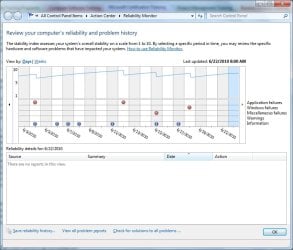
Brink , i download one screen shoot of other user the Reliability Monitor , on this s creen shoot you can see him have error red and X and the icon blue symbol(!) mean programs installers , before i format my PC i see all programs and error my computer have after i format yesterday the Reliability Monitor only show me generic volumen shadow drive , but no show me more nothing ( ccleaner , speccy , ventrilo , world of warcraft , Norton etc....) you understant now what i mean ?

Pics
 

Attachments

  • Reliability-Monitor.jpg
    Reliability-Monitor.jpg
    68.8 KB · Views: 14

My Computer

Computer Manufacturer/Model Number
CyberPower
OS
windows 7 ultimate 64 bit
CPU
Intel Core 2 Quad Q9550 @ 2.83GHz
Motherboard
EVGA 132-CK-NF78 (Socket 775)
Memory
4.0GB Dual-Channel DDR2 @ 399MHz (5-5-5-18)
Graphics Card(s)
1024MB GeForce GTX 285 (EVGA
Sound Card
None
Monitor(s) Displays
SyncMaster @ 1680x1050
Hard Drives
313GB SAMSUNG SAMSUNG HD322HJ SCSI Disk Device (SCSI)
I'm afraid that you lost me. You say that you formatted your computer and installed Windows 7 yesterday. If this is so, then it will take up to 24 hours afterwards before anything will start showing up in "Reliability Monitor". However, the screenshot in your first post dates back to March 14, 2011. The screenshot you posted does not match with what you say.
 

My Computer

Computer type
PC/Desktop
Computer Manufacturer/Model Number
Self built custom
OS
64-bit Windows 11 Pro for Workstations
CPU
Intel i7-8700K OC'd to 5 GHz
Motherboard
ASUS ROG Maximus XI Formula Z390
Memory
64 GB (4x16GB) G.SKILL TridentZ RGB DDR4 3600 MHz
Graphics Card(s)
ASUS ROG-STRIX-GTX1080TI-O11G-GAMING
Sound Card
Integrated
Monitor(s) Displays
2 x Samsung Odyssey G7 27"
Screen Resolution
2560x1440
Hard Drives
1TB Samsung 990 PRO M.2,
4TB Samsung 990 PRO PRO M.2,
TerraMaster F8 SSD Plus NAS
PSU
Seasonic Prime Titanium 850W
Case
Thermaltake Core P3
Cooling
Corsair Hydro H115i
Keyboard
Logitech wireless K800
Mouse
Logitech MX Master 4
Internet Speed
2 Gb/s Download and 100 Mb/s Upload
Antivirus
Malwarebyte Anti-Malware Premium
Browser
Google Chrome
Other Info
Logitech Z625 speaker system,
Logitech BRIO 4K Pro webcam,
HP Color LaserJet Pro MFP M477fdn,
APC SMART-UPS RT 1000 XL - SURT1000XLI,
Galaxy S23 Plus phone
I'm afraid that you lost me. You say that you formatted your computer and installed Windows 7 yesterday. If this is so, then it will take up to 24 hours afterwards before anything will start showing up in "Reliability Monitor". However, the screenshot in your first post dates back to March 14, 2011. The screenshot you posted does not match with what you say.


no no brink the first pics i send is my computer the second pics i download from google for show you what i mean the icon error and icon blue , i format my PC yesterday in this time aproximacly i mean time of east miami florida 11:00PM
 

My Computer

Computer Manufacturer/Model Number
CyberPower
OS
windows 7 ultimate 64 bit
CPU
Intel Core 2 Quad Q9550 @ 2.83GHz
Motherboard
EVGA 132-CK-NF78 (Socket 775)
Memory
4.0GB Dual-Channel DDR2 @ 399MHz (5-5-5-18)
Graphics Card(s)
1024MB GeForce GTX 285 (EVGA
Sound Card
None
Monitor(s) Displays
SyncMaster @ 1680x1050
Hard Drives
313GB SAMSUNG SAMSUNG HD322HJ SCSI Disk Device (SCSI)
The first pic is what I am referring to.

You say you formatted and installed yesterday, but the 1st pic starts at March 14, 2011.
 

My Computer

Computer type
PC/Desktop
Computer Manufacturer/Model Number
Self built custom
OS
64-bit Windows 11 Pro for Workstations
CPU
Intel i7-8700K OC'd to 5 GHz
Motherboard
ASUS ROG Maximus XI Formula Z390
Memory
64 GB (4x16GB) G.SKILL TridentZ RGB DDR4 3600 MHz
Graphics Card(s)
ASUS ROG-STRIX-GTX1080TI-O11G-GAMING
Sound Card
Integrated
Monitor(s) Displays
2 x Samsung Odyssey G7 27"
Screen Resolution
2560x1440
Hard Drives
1TB Samsung 990 PRO M.2,
4TB Samsung 990 PRO PRO M.2,
TerraMaster F8 SSD Plus NAS
PSU
Seasonic Prime Titanium 850W
Case
Thermaltake Core P3
Cooling
Corsair Hydro H115i
Keyboard
Logitech wireless K800
Mouse
Logitech MX Master 4
Internet Speed
2 Gb/s Download and 100 Mb/s Upload
Antivirus
Malwarebyte Anti-Malware Premium
Browser
Google Chrome
Other Info
Logitech Z625 speaker system,
Logitech BRIO 4K Pro webcam,
HP Color LaserJet Pro MFP M477fdn,
APC SMART-UPS RT 1000 XL - SURT1000XLI,
Galaxy S23 Plus phone
The first pic is what I am referring to.

You say you formatted and installed yesterday, but the 1st pic starts at March 14, 2011.

yes i see , that is error ?? or maybe the windows show you other day or motnh , you can see the Line blue start today other day dont have the line blue
 

My Computer

Computer Manufacturer/Model Number
CyberPower
OS
windows 7 ultimate 64 bit
CPU
Intel Core 2 Quad Q9550 @ 2.83GHz
Motherboard
EVGA 132-CK-NF78 (Socket 775)
Memory
4.0GB Dual-Channel DDR2 @ 399MHz (5-5-5-18)
Graphics Card(s)
1024MB GeForce GTX 285 (EVGA
Sound Card
None
Monitor(s) Displays
SyncMaster @ 1680x1050
Hard Drives
313GB SAMSUNG SAMSUNG HD322HJ SCSI Disk Device (SCSI)
Yes, that's a problem since it's not possible to show history that far back when you just did a clean install of Windows 7 only yesterday. The only thing I can think of is if this is a OEM store bought computer, and you did a factory recovery to reinstall Windows 7, then this may be why you are seeing older dates in the screenshot.

If so, then there's nothing to worry about.

The blue line only indicates what date column you have selected. That's all.
 

My Computer

Computer type
PC/Desktop
Computer Manufacturer/Model Number
Self built custom
OS
64-bit Windows 11 Pro for Workstations
CPU
Intel i7-8700K OC'd to 5 GHz
Motherboard
ASUS ROG Maximus XI Formula Z390
Memory
64 GB (4x16GB) G.SKILL TridentZ RGB DDR4 3600 MHz
Graphics Card(s)
ASUS ROG-STRIX-GTX1080TI-O11G-GAMING
Sound Card
Integrated
Monitor(s) Displays
2 x Samsung Odyssey G7 27"
Screen Resolution
2560x1440
Hard Drives
1TB Samsung 990 PRO M.2,
4TB Samsung 990 PRO PRO M.2,
TerraMaster F8 SSD Plus NAS
PSU
Seasonic Prime Titanium 850W
Case
Thermaltake Core P3
Cooling
Corsair Hydro H115i
Keyboard
Logitech wireless K800
Mouse
Logitech MX Master 4
Internet Speed
2 Gb/s Download and 100 Mb/s Upload
Antivirus
Malwarebyte Anti-Malware Premium
Browser
Google Chrome
Other Info
Logitech Z625 speaker system,
Logitech BRIO 4K Pro webcam,
HP Color LaserJet Pro MFP M477fdn,
APC SMART-UPS RT 1000 XL - SURT1000XLI,
Galaxy S23 Plus phone
yeap Brink my computer is OEM from cyberpowerPC i format my computer like 50 time in 2 years my first windows vista but i have windows 7 ultimate full retail like 1 year ago , about Line blue is only i can select , i cant slect other day or motnh march beacuse is yesterday the day start show me beacuse i format start yesterday and more day start now i can slect
 

My Computer

Computer Manufacturer/Model Number
CyberPower
OS
windows 7 ultimate 64 bit
CPU
Intel Core 2 Quad Q9550 @ 2.83GHz
Motherboard
EVGA 132-CK-NF78 (Socket 775)
Memory
4.0GB Dual-Channel DDR2 @ 399MHz (5-5-5-18)
Graphics Card(s)
1024MB GeForce GTX 285 (EVGA
Sound Card
None
Monitor(s) Displays
SyncMaster @ 1680x1050
Hard Drives
313GB SAMSUNG SAMSUNG HD322HJ SCSI Disk Device (SCSI)
Back
Top