Problem when installing windows 7 from xp

Make sure you have the latest BIOS version update #22 11/07 from Abit Support Downloads webpage here: Universal abit > Motherboard, Digital Speakers, iDome, AirPace, Multimedia. If so, reset the CMOS: Clear CMOS - 3 Ways to Clear the CMOS - Reset BIOS

Also in BIOS setup, if you have SATA HD then check that the SATA controller is set to AHCI first, then IDE mode if necessary.

Wipe the HD to get the cleanest possible slate: http://www.sevenforums.com/tutorials/91339-ssd-hdd-optimize-windows-reinstallation.html After Step 1 running Clean All, follow Step 2 #2 to create partition and mark it active.

If install still fails, test your RAM with memtest86 CD for 5-6 passes or overnight: http://www.sevenforums.com/tutorials/105647-ram-test-memtest86.html

Test your HD with maker's diag/repair full CD scan: HD Diagnostic

Thanks.
I will try this.
 

My Computer

OS
Windows 7
CPU
Dual core
Motherboard
Abit AB9 Pro
Memory
3 gb
Graphics Card(s)
Radeon HD4890
Sound Card
Creative x-Fi
Monitor(s) Displays
Samsung 22"
Hard Drives
Samsung 500 gb
Make sure you have the latest BIOS version update #22 11/07 from Abit Support Downloads webpage here: Universal abit > Motherboard, Digital Speakers, iDome, AirPace, Multimedia. If so, reset the CMOS: Clear CMOS - 3 Ways to Clear the CMOS - Reset BIOS

Also in BIOS setup, if you have SATA HD then check that the SATA controller is set to AHCI first, then IDE mode if necessary.

Wipe the HD to get the cleanest possible slate: http://www.sevenforums.com/tutorials/91339-ssd-hdd-optimize-windows-reinstallation.html After Step 1 running Clean All, follow Step 2 #2 to create partition and mark it active.

If install still fails, test your RAM with memtest86 CD for 5-6 passes or overnight: http://www.sevenforums.com/tutorials/105647-ram-test-memtest86.html

Test your HD with maker's diag/repair full CD scan: HD Diagnostic

Thanks.
I will try this.

Hello.

I have done everyhing you ask me to..
Ram was ok, no errors..
Clean all: ok
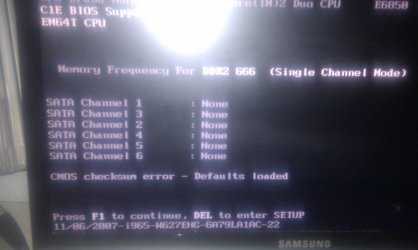
I have also updatet Bios but i get this " CMOS checksum error"
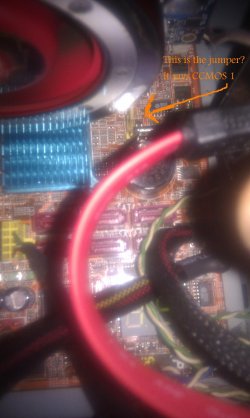
I am not able to clear cmos data with the cmos jumper. Tryed many times...
I have also disconnected the little battery for about 1 hour, but it still the same.
Anybody know what i can do?

IMAG0016.jpg
IMAG0019.jpg
 

My Computer

OS
Windows 7
CPU
Dual core
Motherboard
Abit AB9 Pro
Memory
3 gb
Graphics Card(s)
Radeon HD4890
Sound Card
Creative x-Fi
Monitor(s) Displays
Samsung 22"
Hard Drives
Samsung 500 gb
Can it be that the battery is empty?
I have tryed to replace it with one that i had in the tv controller, but i dident help.
Maybe that battery is almost emty to...
 

My Computer

OS
Windows 7
CPU
Dual core
Motherboard
Abit AB9 Pro
Memory
3 gb
Graphics Card(s)
Radeon HD4890
Sound Card
Creative x-Fi
Monitor(s) Displays
Samsung 22"
Hard Drives
Samsung 500 gb
JanTore , are you clearing the cmos jumper correctly ( remove from pins 1 & 2 and place on pins 2 & 3 ) for about 30 secs this effectively "shorts" the pins , then replace the jumper back on pins 1 & 2 :)
 

My Computer

Computer type
PC/Desktop
Computer Manufacturer/Model Number
self build
OS
win 7 ultimate32bit, Win8.1pro wmc 32bit
CPU
amd phenom x4 9600
Motherboard
asus m2n32-sli deluxe
Memory
corsair twinxs 2x2gb
Graphics Card(s)
2x nvidia 1gb 8500gt
Sound Card
onboard
Monitor(s) Displays
23" PB Viseo 233d
Screen Resolution
1920x1080
Hard Drives
maxtor sata 500gb
maxtor sata 320gb
fujitsu sata200gb
PSU
oryxx tornado 750w
Case
thermaltake xaser lll
Cooling
artic freezer64 pro + 7 case fans
JanTore , are you clearing the cmos jumper correctly ( remove from pins 1 & 2 and place on pins 2 & 3 ) for about 30 secs this effectively "shorts" the pins , then replace the jumper back on pins 1 & 2 :)

Yes I'm doing it correctly.
But nothing happens.
Is there another way to do it?
 

My Computer

OS
Windows 7
CPU
Dual core
Motherboard
Abit AB9 Pro
Memory
3 gb
Graphics Card(s)
Radeon HD4890
Sound Card
Creative x-Fi
Monitor(s) Displays
Samsung 22"
Hard Drives
Samsung 500 gb
If the battery is almost dead will it 'short' the pins effectively?
 

My Computer

OS
Windows 7
CPU
Dual core
Motherboard
Abit AB9 Pro
Memory
3 gb
Graphics Card(s)
Radeon HD4890
Sound Card
Creative x-Fi
Monitor(s) Displays
Samsung 22"
Hard Drives
Samsung 500 gb
A dead or dying battery can cause all sorts of weird issues, and will certainly cause the Bad Checksum error.

If you have an electronics shop nearby go and buy a new 3v CMOS battery. They're cheap.

Otherwise, enter the BIOS and Go to the Exit Tab and "Restore BIOS Defaults". That will clear the checksum error as long as the battery is good.
 

My Computer

Computer type
PC/Desktop
Computer Manufacturer/Model Number
Home Built - Jan 2013
OS
Windows 7 64 Bit Home Premium SP1
CPU
i7-3820
Motherboard
Asus P9X79-PRO - Bios 4608
Memory
GSkill F3-14900CL9Q - 16GB
Graphics Card(s)
EVGA GeForce GTX660 - Driver 352.86
Sound Card
On board Realtek ALC898
Monitor(s) Displays
Acer S271HL
Screen Resolution
1920 x 1080
Hard Drives
#1- Samsung 840 Pro Series
#2- Western Digital WD1002FAEX Sata3 Black
#3- Western Digital WD1002FAEX Sata3 Black
PSU
Corsair CMPSU-850TX-V2 - 850 watt (by Seasonic)
Case
Corsair Obsidian 550D
Cooling
Standard 3 120mm case fans, Cooler Master Hyper 212 EVO
Keyboard
MS KC-0405
Mouse
Intellimouse 5-button
Internet Speed
56 Mbits/Sec (on a good day)
Antivirus
Avast & Malwarebytes
Browser
Firefox
Other Info
Asus DVD - DRW-24B1ST 24X
A dead or dying battery can cause all sorts of weird issues, and will certainly cause the Bad Checksum error.

If you have an electronics shop nearby go and buy a new 3v CMOS battery. They're cheap.

Otherwise, enter the BIOS and Go to the Exit Tab and "Restore BIOS Defaults". That will clear the checksum error as long as the battery is good.

Well now I have changed the old battery with a new one, but it's still the same:(
I can't find an option where it says restore BIOS default. I have only "load optimize and load fail-safe defaults. And exit with save or without;)
Maybe I can take a picture of my screen and show you...
 

My Computer

OS
Windows 7
CPU
Dual core
Motherboard
Abit AB9 Pro
Memory
3 gb
Graphics Card(s)
Radeon HD4890
Sound Card
Creative x-Fi
Monitor(s) Displays
Samsung 22"
Hard Drives
Samsung 500 gb
Load Optimized would be the one to try first. Then if that doesn't work try the Fail Safe ones.

Be sure to make note of you current and preferred settings on all tabs prior to doing this. You will want to set them back once you get rid of the checksum error.
 

My Computer

Computer type
PC/Desktop
Computer Manufacturer/Model Number
Home Built - Jan 2013
OS
Windows 7 64 Bit Home Premium SP1
CPU
i7-3820
Motherboard
Asus P9X79-PRO - Bios 4608
Memory
GSkill F3-14900CL9Q - 16GB
Graphics Card(s)
EVGA GeForce GTX660 - Driver 352.86
Sound Card
On board Realtek ALC898
Monitor(s) Displays
Acer S271HL
Screen Resolution
1920 x 1080
Hard Drives
#1- Samsung 840 Pro Series
#2- Western Digital WD1002FAEX Sata3 Black
#3- Western Digital WD1002FAEX Sata3 Black
PSU
Corsair CMPSU-850TX-V2 - 850 watt (by Seasonic)
Case
Corsair Obsidian 550D
Cooling
Standard 3 120mm case fans, Cooler Master Hyper 212 EVO
Keyboard
MS KC-0405
Mouse
Intellimouse 5-button
Internet Speed
56 Mbits/Sec (on a good day)
Antivirus
Avast & Malwarebytes
Browser
Firefox
Other Info
Asus DVD - DRW-24B1ST 24X
Load Optimized would be the one to try first. Then if that doesn't work try the Fail Safe ones.

Be sure to make note of you current and preferred settings on all tabs prior to doing this. You will want to set them back once you get rid of the checksum error.

Thank you.
Load optimized worked;)
Now its back to the installation of windows 7.
Hopefully it will work now.
 

My Computer

OS
Windows 7
CPU
Dual core
Motherboard
Abit AB9 Pro
Memory
3 gb
Graphics Card(s)
Radeon HD4890
Sound Card
Creative x-Fi
Monitor(s) Displays
Samsung 22"
Hard Drives
Samsung 500 gb
Sorry for coming in late. I when back through the older posts and saw that you might be using a USB DVD writer? Or did I just misunderstand that?

Other than that, if you have SATA HDDs make sure you set the SATA controller to AHCI in the BIOS before you install W7. It's a chore to change it afterward.

And if you have more than one hard drive, be sure to disconnect all but the one you are loading Windows onto.

Good Luck!
 

My Computer

Computer type
PC/Desktop
Computer Manufacturer/Model Number
Home Built - Jan 2013
OS
Windows 7 64 Bit Home Premium SP1
CPU
i7-3820
Motherboard
Asus P9X79-PRO - Bios 4608
Memory
GSkill F3-14900CL9Q - 16GB
Graphics Card(s)
EVGA GeForce GTX660 - Driver 352.86
Sound Card
On board Realtek ALC898
Monitor(s) Displays
Acer S271HL
Screen Resolution
1920 x 1080
Hard Drives
#1- Samsung 840 Pro Series
#2- Western Digital WD1002FAEX Sata3 Black
#3- Western Digital WD1002FAEX Sata3 Black
PSU
Corsair CMPSU-850TX-V2 - 850 watt (by Seasonic)
Case
Corsair Obsidian 550D
Cooling
Standard 3 120mm case fans, Cooler Master Hyper 212 EVO
Keyboard
MS KC-0405
Mouse
Intellimouse 5-button
Internet Speed
56 Mbits/Sec (on a good day)
Antivirus
Avast & Malwarebytes
Browser
Firefox
Other Info
Asus DVD - DRW-24B1ST 24X
Thanks for all the help guys!!!
I finally managed to install windows 7:D:D:D
I needed to update the BIOS.
But i dident set the SATA controller to AHCI.. I forgot that after booting again, but it worked anyway.
So i am a very happy man:D

Thank you, thank you, thank you all!!!
Have a nice life:cool:
Greetings from Norway
 

My Computer

OS
Windows 7
CPU
Dual core
Motherboard
Abit AB9 Pro
Memory
3 gb
Graphics Card(s)
Radeon HD4890
Sound Card
Creative x-Fi
Monitor(s) Displays
Samsung 22"
Hard Drives
Samsung 500 gb
Hello again JanTore.


Good to see you got it running and thanks for the update.


If you want explore setting it to AHCI now have a look at this tutorial at the link below.

AHCI : Enable in Windows 7 / Vista
 

My Computer

Computer Manufacturer/Model Number
* BFK Customs *
OS
W 7 64-bit Ultimate
CPU
Intel Q9550 Yorkfield
Motherboard
ASUS P5Q Pro
Memory
8GB Dominator 8500C5D
Graphics Card(s)
ATI : XFX 5870
Sound Card
Realtek HD Audio 7-1
Monitor(s) Displays
1x 47" LCD HDMI & 3x 26" LCD HDMI
Screen Resolution
1920x1080P & 1920x1200
Hard Drives
1x 80GB Intel X25-M G2 SSD : 1x 500GB & 1x 640GB WD Caviar Black(s)
PSU
Corsair 620HX
Case
Cooler Master RC-690
Cooling
Tuniq Tower 120, 2x 140mm and 3x 120mm case fans
Keyboard
Microsoft 500
Mouse
Razer Diamondback 3G
Internet Speed
14 Mb/s
Other Info
1x Koutech 3Gb/s SATA HDD Hot Swap Rack
Back
Top