Problem With 5.1 Surround Sound Output

Joe Ciaravino

New member
Member
Local time
1:17 AM
Messages
70
Windows 7 64 bit OS with Realtek integrated sound on motherboard. If I go to the Realtek application on my computer and test the speaker output, I get a correct test sound from all front, rear, center, and subwoofer speakers. However, when I play music with WM Player, iTunes, or any other application, I only get stereo sound (front pair speakers work only).
 

My Computer My Computer

Computer type
PC/Desktop
Computer Manufacturer/Model Number
custom build
OS
Win 7 64 bit Home Premium
CPU
AMD A6 6400K
Motherboard
Gigabyte
Memory
8 bg
Hard Drives
SSD plus HDD
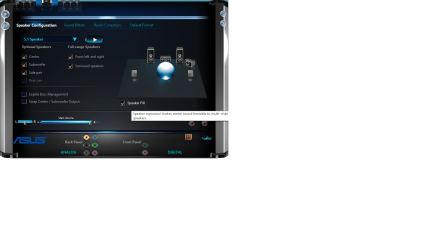
In the Realtek app there should be a box on the configuration page that you should be able to tick.

The box is "Speaker Fill" and when you hover over it: Speaker expansion makes stereo sound hearable to multi-channel speakers!

This is how it looks for me:
speakerfill.png

Cheers, Boris :)
 

My Computer My Computer

Computer type
PC/Desktop
Computer Manufacturer/Model Number
Custom build
OS
Windows 7 Home Premium
CPU
i5-3570k
Motherboard
ASUS Sabertooth z77
Memory
16 GB DDR3 G Skill Sniper
Graphics Card(s)
GIGABYTE GeForce GTX 970 GV-N970WF3OC-4GD
Monitor(s) Displays
ASUS ROG PG278Q
Screen Resolution
2560x1440@60Hz/120Hz/144Hz
Hard Drives
56GB KINGSTON SVP200S37A60G
512GB Crucial MX100
1863GB Seagate ST2000DM001-1CH164
2795GB Seagate ST3000DM001-9YN166
PSU
Corsair GS800
Case
Storm Trooper Stryker White
Keyboard
Logitech G910 Orion Spark
Mouse
Logitech G502
Antivirus
MSE
Browser
Firefox/Chrome
Other Info
Logitech G633
Logitech Mouse Matt
Windows 7 64 bit OS with Realtek integrated sound on motherboard. If I go to the Realtek application on my computer and test the speaker output, I get a correct test sound from all front, rear, center, and subwoofer speakers. However, when I play music with WM Player, iTunes, or any other application, I only get stereo sound (front pair speakers work only).
I know this sounds like a simple question and no disrespect, but is your source multi-channel, or stereo?

CD-audio is only 2-channel stereo, so if that's the the original source for your music then it would also be 2-channel stereo. It's understandable that 2-channel music would be played back through your two L/R fronts.

On the other hand, genuine multi-channel sound (e.g. from playing a BluRay/DVD, or from a media file with multi-channel audio) would of course be heard from all your speakers.
 

My Computer My Computer

Computer type
PC/Desktop
Computer Manufacturer/Model Number
Home-built, two systems (1) and (2)
OS
Windows 7 Pro x64 (1), Win7 Pro X64 (2)
CPU
i5-3350p 3.1Ghz/6MB-cache (1); E8400 3.0Ghz/6MB-cache (2)
Motherboard
ASUS P8Z77-V Pro (1); ASUS P5Q3 (2)
Memory
8GB PC3-12800 DDR3 (1); 4GB PC3-10600 DDR3 (2)
Graphics Card(s)
ATI HD7750 (1), (see TV cards); ATI R7 250 (2)
Sound Card
Realtek ALC892 HD Audio (1); Realtek ALC1200 HD Audio (2)
Monitor(s) Displays
Eizo HD2441W LCD, Eizo S2433W (1); Eizo 24" S2433W (2)
Screen Resolution
1920x1200, 1920x1200 (1); 1920x1200 (2)
Hard Drives
(1) 1TB SATA-II (7200RPM), 2x2TB SATA-III (7200RPM), 250GB SATA-III (10000RPM) for OS; 2x2TB external USB 3.0

(2) 320GB SATA-II (7200RPM), 750GB SATA-II (7200RPM), 150GB SATA-II (10000RPM) for OS; 2TB external USB 3.0
PSU
Nesteq ECS-6001 600W (1); Nesteq ECS-5001 500W (2)
Case
Acousti-Case 360 (1) and (2)
Cooling
Noctua NH-U12P SE2 for CPU, 2x120mm case fans (1) and (2)
Keyboard
IBM PS/2 (1) and (2)
Mouse
Logitech MX Revolution wireless (1); Microsoft wired (2)
Internet Speed
100mbps down / 10mbps up
Antivirus
Microsoft Security Essentials; Malwarebyte Anti-Malware Pro
Browser
Firefox
Other Info
Ceton InfiniTV 4-tuner cablecard-enabled TV card as well as Hauppauge HVR-2250 OTA/ATSC 2-tuner TV card in (1), running under Win7 WMC
In the Realtek app there should be a box on the configuration page that you should be able to tick.

The box is "Speaker Fill" and when you hover over it: Speaker expansion makes stereo sound hearable to multi-channel speakers!

This is how it looks for me:
View attachment 384374

Cheers, Boris :)

Yes that works. Thank you.
 

My Computer My Computer

Computer type
PC/Desktop
Computer Manufacturer/Model Number
custom build
OS
Win 7 64 bit Home Premium
CPU
AMD A6 6400K
Motherboard
Gigabyte
Memory
8 bg
Hard Drives
SSD plus HDD
Windows 7 64 bit OS with Realtek integrated sound on motherboard. If I go to the Realtek application on my computer and test the speaker output, I get a correct test sound from all front, rear, center, and subwoofer speakers. However, when I play music with WM Player, iTunes, or any other application, I only get stereo sound (front pair speakers work only).
I know this sounds like a simple question and no disrespect, but is your source multi-channel, or stereo?

CD-audio is only 2-channel stereo, so if that's the the original source for your music then it would also be 2-channel stereo. It's understandable that 2-channel music would be played back through your two L/R fronts.

On the other hand, genuine multi-channel sound (e.g. from playing a BluRay/DVD, or from a media file with multi-channel audio) would of course be heard from all your speakers.

You have analyzed things somewhat more. When I playback some older recordings, possibly if not probably recorded in monaural, these only emit sound from the "front" speaker pair. When I now play audio (probably) recorded/reproduced in stereo, the sound emits from ALL speakers.

In any event, I am now satisfied with the results, despite the fact that I don't fully understand the process used to simulate 5.1 channel audio. I am grateful for both of your comments as well as your helpful remedies, Animal and DSPerber.

In the final analysis, my system now emits sound from all 6 speakers when playing stereo recordings..............simulated "matrix" sound, which is what I want. When playing older, monaural recordings, the sound emanates from the front speakers only. That is perfectly acceptable. When "true" surround sound is played back, I assume that it is truly reproduced from all 6 speakers, although I cannot discern whether it is "fidelity" reproduction or not.
 

My Computer My Computer

Computer type
PC/Desktop
Computer Manufacturer/Model Number
custom build
OS
Win 7 64 bit Home Premium
CPU
AMD A6 6400K
Motherboard
Gigabyte
Memory
8 bg
Hard Drives
SSD plus HDD
Hey nice to hear you got it fixed, and am happy to help!

Cheers, Boris :)
 

My Computer My Computer

Computer type
PC/Desktop
Computer Manufacturer/Model Number
Custom build
OS
Windows 7 Home Premium
CPU
i5-3570k
Motherboard
ASUS Sabertooth z77
Memory
16 GB DDR3 G Skill Sniper
Graphics Card(s)
GIGABYTE GeForce GTX 970 GV-N970WF3OC-4GD
Monitor(s) Displays
ASUS ROG PG278Q
Screen Resolution
2560x1440@60Hz/120Hz/144Hz
Hard Drives
56GB KINGSTON SVP200S37A60G
512GB Crucial MX100
1863GB Seagate ST2000DM001-1CH164
2795GB Seagate ST3000DM001-9YN166
PSU
Corsair GS800
Case
Storm Trooper Stryker White
Keyboard
Logitech G910 Orion Spark
Mouse
Logitech G502
Antivirus
MSE
Browser
Firefox/Chrome
Other Info
Logitech G633
Logitech Mouse Matt
I don't fully understand the process used to simulate 5.1 channel audio.

there's only four ways to go about it:
1. you are simply copying & pasting the front left to the rear left - the front right to the rear right.
2. you are analzying the audio of stereo that is capable of using virtual speakers & then every time the virtual speaker gets close to either the rear left or rear right, instead of asking all the timing of the speaker & room to do the virtual speaker, you instead simply play the audio from the rear speaker.
3. you could also use the rear speakers to pull & drag on the soundwaves from the front speakers to enhance or strengthen the virtual speakers.
4. using either number 2 or 3, you could add environment effects (including re-mapping of the speaker location).

ever since consumers have been able to buy speaker systems with rear speakers, they've taken half of the phase away from the front speakers and used it for the rear speakers (thus preventing the front speakers from being able to do it while in 'surround' mode - unless those channels are discrete).
i can hear audio from behind me using two front speakers, simply depends on whether the audio file has such an fx in it or not.

i haven't played with all of the different virtual surround modes in existence, but i also know the ones i have played with don't really do 2, 3, or 4.
i also haven't heard anybody talking about systems being able to do it.
seems the headphone industry has been the only subject that gets any attention about it.

here's an audio file that plays audio from behind: https://youtu.be/fSSLQf95-Nc

 

My Computer My Computer

Computer type
PC/Desktop
Computer Manufacturer/Model Number
custom
OS
windows 7 home premium 64bit
CPU
core2quad q6600 @ stock speed
Motherboard
xfx 680i lt
Memory
4gb ddr2
Graphics Card(s)
gtx285
Sound Card
virtual audio cable/realtek hd
Hard Drives
ssd
PSU
seasonic 750w
Case
antec
Keyboard
ergonomic 4000
Mouse
logitech g5 (orange version)
Internet Speed
10mbit down / 2 mbit up
Other Info
www.facebook.com/bobby.rankin.7
Back
Top