Problem with Arial Bold Font

scarrott

New member
Local time
11:48 PM
Messages
4
I am being driven to distraction by this. Every time I boot Windows (64-bit ultimate), there is a problem with Arial Bold. It displays in all programs as the bold italic version. When i went into Control Panel > Fonts, it showed it wasn't installed, but when i downloaded and tried to install it, I was told it was already installed and did i want to overwrite it. I said yes, and it works again. However, on the next boot, i have the same problem.

I found a tweak online that made the fonts folder display as it did in XP, just a simple list of files and found there was about 3 or 4 versions of each style of Arial in the folder. I've managed to delete the duplicates so i just have 1 of each now, but the Arial Bold problem remains. After booting, i can go into the font folder, double click the Arial Bold icon and it shows the preview of it looking fine. I can then click the Install button and it tells me again that it is already installed and do i want to overwrite it. When i say yes, all works fine again until next boot.

I've tried deleting the font so i can put a fresh version in, but nothing works. It says i need permission from TrustedInstaller to do this. When i try to change permissions (I am using an administrator account) it tells me 'access is denied'. I have even tried booting into safe mode but the same result.

Does anyone have any idea how i can solve this before i stick the computer through a window?!
 

My Computer

OS
Windows 7 Ultimate x64
9 Fonts not including Unicode

The Fonts folder shows a single (stacked) icon for Arial on my PC.
It contains 9 fonts!
Fonts - Arial.png
 

My Computer

Computer type
PC/Desktop
Computer Manufacturer/Model Number
n/a
OS
W7 Ultimate SP1, LM19.2 MATE, W10 Home 1703, W10 Pro 1703 VM, #All 64 bit
CPU
AMD Phenom II x6 1100T, 3.3 GHz
Motherboard
ASUS M4A88T-M/USB3 (AM3)
Memory
12GB DDR3 1333 G-Skill (4GB x 2), G-Skill (2GB x 2)
Graphics Card(s)
NVIDIA GeForce GTX 660
Sound Card
Realtek?
Monitor(s) Displays
Samsung S23B350
Screen Resolution
1920x1080
Hard Drives
WD Green 2TB (SATA), WD Green 3TB (SATA), WD Blue 4TB (SATA), WD Blue 6TB (SATA)
PSU
Cooler Master
Case
Antec GX300 Tower
Cooling
3x Antec TRICOOL 120mm Fans
Mouse
Wired Optical
Internet Speed
DSL
Antivirus
Avast
Browser
Pale Moon (64 bit)
Other Info
2018-12-27 Upgraded HDDs
2015-12-10 Upgraded case, graphics card, storage
2015-08-15 Upgraded motherboard & RAM
2015-07-15 Upgraded LM17.1 to LM17.2
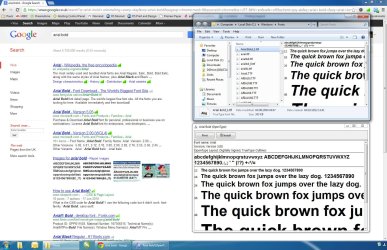
As I said, because I was having so many problems, i've made a change that just shows all the files in the font folder, rather than the groups. I've attached a screenshot to show what is happening. The screenshot shows on the left how the internet browser is replacing Arial Bold with Arial Bold Italic as Windows doesn't think the Bold version is installed, and on the right is my Windows>Fonts folder showing that it contains 3 separate Arial Bold files (Arial Bold_1.ttf, arialbd.ttf and arialbd_0.ttf). You can also see that when i select the Arial Bold font, the preview shows in bold italic, but when i open that font, the preview shows correctly. What the hell is going on.
 

Attachments

  • screen2.jpg
    screen2.jpg
    267 KB · Views: 37

My Computer

OS
Windows 7 Ultimate x64
Fonts Tutorial?

Does it only happen with Arial?
What happens if you change to Segoe or Tahoma?

Have you tried the various options in this tutorial?
http://www.sevenforums.com/tutorials/1175-fonts-change.html


Regarding the "Trusted Installer" problem, do you have access to a Live Linux CD?
I use a Live Ubuntu CD when Windows refuses to let me do something.

:eek: Remember to create a Backup HDD image first. :eek:
 
Last edited:

My Computer

Computer type
PC/Desktop
Computer Manufacturer/Model Number
n/a
OS
W7 Ultimate SP1, LM19.2 MATE, W10 Home 1703, W10 Pro 1703 VM, #All 64 bit
CPU
AMD Phenom II x6 1100T, 3.3 GHz
Motherboard
ASUS M4A88T-M/USB3 (AM3)
Memory
12GB DDR3 1333 G-Skill (4GB x 2), G-Skill (2GB x 2)
Graphics Card(s)
NVIDIA GeForce GTX 660
Sound Card
Realtek?
Monitor(s) Displays
Samsung S23B350
Screen Resolution
1920x1080
Hard Drives
WD Green 2TB (SATA), WD Green 3TB (SATA), WD Blue 4TB (SATA), WD Blue 6TB (SATA)
PSU
Cooler Master
Case
Antec GX300 Tower
Cooling
3x Antec TRICOOL 120mm Fans
Mouse
Wired Optical
Internet Speed
DSL
Antivirus
Avast
Browser
Pale Moon (64 bit)
Other Info
2018-12-27 Upgraded HDDs
2015-12-10 Upgraded case, graphics card, storage
2015-08-15 Upgraded motherboard & RAM
2015-07-15 Upgraded LM17.1 to LM17.2
I'm not sure what you mean. Change what to Segoe UI or Tahoma? It's only currently Arial Bold i'm having this problem with as the message said. Everything else works as normal, just Arial Bold keeps uninstalling itself, or at least not being picked up correctly by Windows.
 

My Computer

OS
Windows 7 Ultimate x64
Font Change tutorial?

I'm not sure what you mean. Change what to Segoe UI or Tahoma? It's only currently Arial Bold i'm having this problem with as the message said. Everything else works as normal, just Arial Bold keeps uninstalling itself, or at least not being picked up correctly by Windows.

I don't see where you said that ONLY Arial is faulty.

The W7 default font is Segoe UI.

  • How are you using Arial, if you haven't changed any settings?
In your picture, Windows Explorer looks normal, but Chrome is broken.

  • Are you saying that EVERY 3rd party program is broken, but Windows is still normal?
  • If it is only happening with Chrome, have you checked that it is set to the correct font?
Tutorial

  • Have you tried the Font Change tutorial?
 

My Computer

Computer type
PC/Desktop
Computer Manufacturer/Model Number
n/a
OS
W7 Ultimate SP1, LM19.2 MATE, W10 Home 1703, W10 Pro 1703 VM, #All 64 bit
CPU
AMD Phenom II x6 1100T, 3.3 GHz
Motherboard
ASUS M4A88T-M/USB3 (AM3)
Memory
12GB DDR3 1333 G-Skill (4GB x 2), G-Skill (2GB x 2)
Graphics Card(s)
NVIDIA GeForce GTX 660
Sound Card
Realtek?
Monitor(s) Displays
Samsung S23B350
Screen Resolution
1920x1080
Hard Drives
WD Green 2TB (SATA), WD Green 3TB (SATA), WD Blue 4TB (SATA), WD Blue 6TB (SATA)
PSU
Cooler Master
Case
Antec GX300 Tower
Cooling
3x Antec TRICOOL 120mm Fans
Mouse
Wired Optical
Internet Speed
DSL
Antivirus
Avast
Browser
Pale Moon (64 bit)
Other Info
2018-12-27 Upgraded HDDs
2015-12-10 Upgraded case, graphics card, storage
2015-08-15 Upgraded motherboard & RAM
2015-07-15 Upgraded LM17.1 to LM17.2
Thanks for your reply. The first line of my initial message said 'Every time I boot Windows (64-bit ultimate), there is a problem with Arial Bold' and the title of the thread is 'Problem with Arial Bold Font'. There don't seem to be any problems with any other fonts. No program recognises that Arial Bold is installed at all, even though it is in the font folder (as shown on the screenshot). Chrome was just one example, but it was replaced with Arial Bold Italic in every program, and in programs such as Word, CorelDraw, Outlook, etc., Arial Bold was not available for selection. The only place that the font displayed correctly was when I double clicked on the font file in the Fonts folder to see the Preview. Even the preview pane shows it incorrectly.
 

My Computer

OS
Windows 7 Ultimate x64
sfc /scannow

Thanks for your reply. The first line of my initial message said 'Every time I boot Windows (64-bit ultimate), there is a problem with Arial Bold' and the title of the thread is 'Problem with Arial Bold Font'. There don't seem to be any problems with any other fonts. No program recognises that Arial Bold is installed at all, even though it is in the font folder (as shown on the screenshot). Chrome was just one example, but it was replaced with Arial Bold Italic in every program, and in programs such as Word, CorelDraw, Outlook, etc., Arial Bold was not available for selection. The only place that the font displayed correctly was when I double clicked on the font file in the Fonts folder to see the Preview. Even the preview pane shows it incorrectly.

OK.
It wasn't obvious that you had tried other fonts and that they ALL worked correctly. :)

If every program does it, it may indicate that the Registry (or Windows itself) has become corrupted.

Have you tried sfc?
You need to open the "Command Prompt" and execute:
sfc /scannow
Tutorial:
SFC /SCANNOW Command - System File Checker


IMO, if that doesn't work, it seems like you have limited options:

  • Don't use Arial (select a different font)
  • Use System Restore (if there is a System Restore point that pre-dates the problem)
  • Re-image your HDD (if you have backup images)
  • Reinstall Windows
  • Wait for another member to offer some extra options
 
Last edited:

My Computer

Computer type
PC/Desktop
Computer Manufacturer/Model Number
n/a
OS
W7 Ultimate SP1, LM19.2 MATE, W10 Home 1703, W10 Pro 1703 VM, #All 64 bit
CPU
AMD Phenom II x6 1100T, 3.3 GHz
Motherboard
ASUS M4A88T-M/USB3 (AM3)
Memory
12GB DDR3 1333 G-Skill (4GB x 2), G-Skill (2GB x 2)
Graphics Card(s)
NVIDIA GeForce GTX 660
Sound Card
Realtek?
Monitor(s) Displays
Samsung S23B350
Screen Resolution
1920x1080
Hard Drives
WD Green 2TB (SATA), WD Green 3TB (SATA), WD Blue 4TB (SATA), WD Blue 6TB (SATA)
PSU
Cooler Master
Case
Antec GX300 Tower
Cooling
3x Antec TRICOOL 120mm Fans
Mouse
Wired Optical
Internet Speed
DSL
Antivirus
Avast
Browser
Pale Moon (64 bit)
Other Info
2018-12-27 Upgraded HDDs
2015-12-10 Upgraded case, graphics card, storage
2015-08-15 Upgraded motherboard & RAM
2015-07-15 Upgraded LM17.1 to LM17.2
As I said, because I was having so many problems, i've made a change that just shows all the files in the font folder, rather than the groups. I've attached a screenshot to show what is happening. The screenshot shows on the left how the internet browser is replacing Arial Bold with Arial Bold Italic as Windows doesn't think the Bold version is installed, and on the right is my Windows>Fonts folder showing that it contains 3 separate Arial Bold files (Arial Bold_1.ttf, arialbd.ttf and arialbd_0.ttf). You can also see that when i select the Arial Bold font, the preview shows in bold italic, but when i open that font, the preview shows correctly. What the hell is going on.
When you installed your Windows system, did you add additional fonts packages... perhaps from some other vendor product? Some other word processor maybe?

I ask, because your physical list of font names in \Windows\Fonts\arial* does not appear to be the "standard" Arial family of 10 TTF font names, at least not in my own Win7 Pro x64 (and I've added additional fonts, but nothing affecting the standard "arial" family).

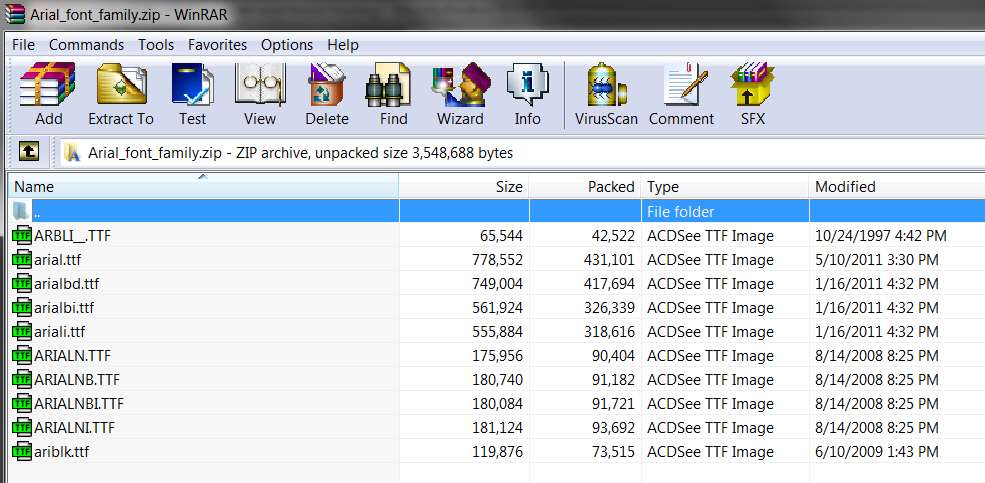
I guess I'm suggesting you remove ("uninstall") your existing Arial family of TTF fonts, and install the set of 10 TTF fonts for Arial in my attachment below. Certainly don't forget to take a system restore point or better yet "system image" backup first, just in case of serious problems.


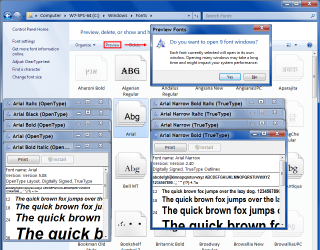
(1) Arial family:

arialfamily.jpg


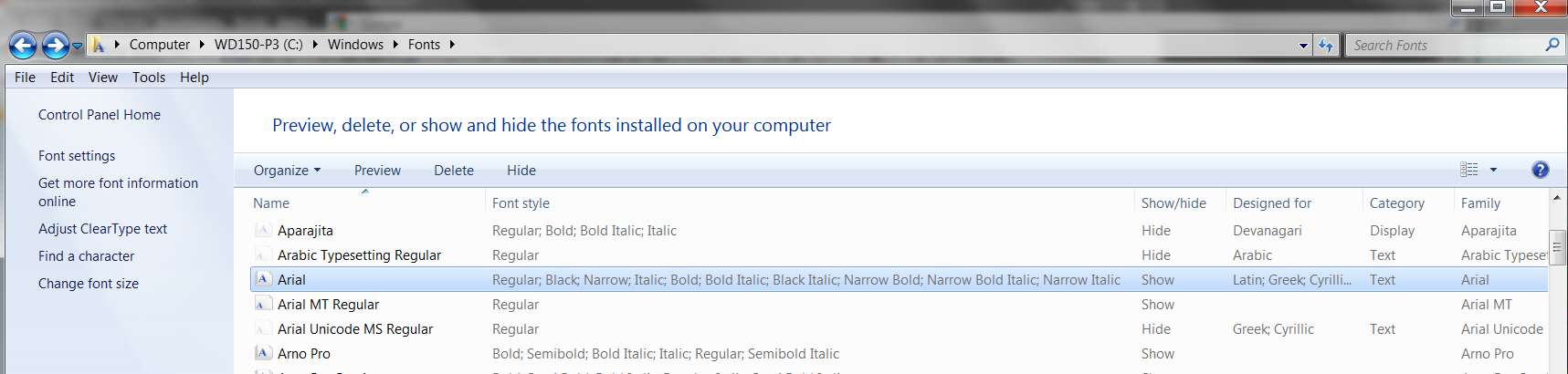
(2) Arial details:

arialdetails.jpg


(3) Arial file names in "fonts" folders:

arialfiles.jpg


(4) Attached Arial "family" of 10 fonts (TTF):

arialfontfamily.jpg
 

Attachments

My Computer

Computer type
PC/Desktop
Computer Manufacturer/Model Number
Home-built, two systems (1) and (2)
OS
Windows 7 Pro x64 (1), Win7 Pro X64 (2)
CPU
i5-3350p 3.1Ghz/6MB-cache (1); E8400 3.0Ghz/6MB-cache (2)
Motherboard
ASUS P8Z77-V Pro (1); ASUS P5Q3 (2)
Memory
8GB PC3-12800 DDR3 (1); 4GB PC3-10600 DDR3 (2)
Graphics Card(s)
ATI HD7750 (1), (see TV cards); ATI R7 250 (2)
Sound Card
Realtek ALC892 HD Audio (1); Realtek ALC1200 HD Audio (2)
Monitor(s) Displays
Eizo HD2441W LCD, Eizo S2433W (1); Eizo 24" S2433W (2)
Screen Resolution
1920x1200, 1920x1200 (1); 1920x1200 (2)
Hard Drives
(1) 1TB SATA-II (7200RPM), 2x2TB SATA-III (7200RPM), 250GB SATA-III (10000RPM) for OS; 2x2TB external USB 3.0

(2) 320GB SATA-II (7200RPM), 750GB SATA-II (7200RPM), 150GB SATA-II (10000RPM) for OS; 2TB external USB 3.0
PSU
Nesteq ECS-6001 600W (1); Nesteq ECS-5001 500W (2)
Case
Acousti-Case 360 (1) and (2)
Cooling
Noctua NH-U12P SE2 for CPU, 2x120mm case fans (1) and (2)
Keyboard
IBM PS/2 (1) and (2)
Mouse
Logitech MX Revolution wireless (1); Microsoft wired (2)
Internet Speed
100mbps down / 10mbps up
Antivirus
Microsoft Security Essentials; Malwarebyte Anti-Malware Pro
Browser
Firefox
Other Info
Ceton InfiniTV 4-tuner cablecard-enabled TV card as well as Hauppauge HVR-2250 OTA/ATSC 2-tuner TV card in (1), running under Win7 WMC
Back
Top