Problem with auto-hide taskbar

Robijn12

New member
Local time
1:47 AM
Messages
9
I use Windows 7 Ultimate 64-bit :D and have a problem with the taskbar. I changed the properties to auto-hide, but I experience problems with Google Chrome and Songbird (Maybe others too, I haven't tried yet). Normally, when I use Internet Explorer for instance, a small edge of the taskbar stays visible when it is hidden and the window is maximized. But not with Crome and Songbird, so I have to resize the window or hit the windows key to access the taskbar. I suspect it's either a bug in Windows 7 or in the other applications on how they size their window, so not ease to fix i fear :(. Any help on this is greatly appreciated. Thanks in advance :D.
 

My Computer

OS
Windows 7 Ultimate 64-bit
Hi and Welcome to SevenForums :party::party:

As you say this will i thing be a difficult issue to solve :(

I would tend to blame the particular apps involved rather than the actual OS as the OS works with the vast majority of applications.

You could try reporting the problem to Google as Chrome is in Beta and the more feedback they get on any issues the more likely they are to be addressed. With the official release of Windows 7 imminent, it's not in Google's interest to have any problems with their browser

One thing to try is to change the app icon for another one to see if the issue is caused by a non standard icon size.
 

My Computers

System One System Two

  • Computer type
    PC/Desktop
    Computer Manufacturer/Model Number
    ChillBlast - Custom to my design
    OS
    Windows 11 Pro x64 [Latest Release and Release Preview]
    CPU
    Ryzen 9 5950X, 3.8 - 5.2 MHz
    Motherboard
    Asus Prime X570-Pro
    Memory
    64GB [2 x 32GB] DDR4 3200MHz
    Graphics Card(s)
    4GB NVIDIA GEFORCE GTX 1650 Ti
    Sound Card
    On-board SPDIF to 5.1 System + HDMI [5.1 system]
    Monitor(s) Displays
    32" UHD 32 Bit HDR Monitor + 43" UHD 4K 32Bit HDR TV
    Screen Resolution
    2 x 3840 x 2160 @60Hz
    Hard Drives
    1TB M2 SSD OS, 500GB Fast Access SSD, 2 x 8TB Data + Various Externals from 1TB to 4TB, 10TB NAS
    PSU
    NZXT C750 80 PLUS Gold 750W Modular PSU
    Case
    Workstation Case [Matt Black]
    Cooling
    NZXT Kraken X63 280mm CPU Cooler +2x Quiet Case fans
    Keyboard
    Logitech Wireless MX Keys & K400 + others
    Mouse
    Logitech Wireless MX Master 3S
    Internet Speed
    920 MB Down 50 MB Up
    Antivirus
    BitDefender Total Security Pro
    Browser
    Chrome (always run latest Non-Beta)
    Other Info
    Also run ...
    Laptop - Quad 8GB - Windows 10 Pro x64
    Nexus 7 Android tablet x2
    Samsung 10.2" tablet
    Blackview TAB 8 4G Android Tablet c/w Keyboard
    Wacom Intuos Pro Medium Pen Pad
    Wacom Intuos Pro Small Pen Pad
    Wacom Expresskeys Remote
    Loopdeck+ Graphics Controller
    Shuttle Pro v2 Control
  • Computer type
    Laptop
    System Manufacturer/Model Number
    Dell XPS 17 10750H
    OS
    Windows 11 Pro x64 Latest RP
    CPU
    Intel I7 10750H 5.0GHz
    Motherboard
    Dell XPS
    Memory
    32GB [2x16GB] DDR4 2933 MHz
    Graphics Card(s)
    nVidia GTX1650Ti 4 GB GDDR6
    Sound Card
    Stock [Realtek] 4 Speaker
    Monitor(s) Displays
    17" IPS UHD+ Infinity Edge Touchscreen
    Screen Resolution
    3840 x 2400
    Hard Drives
    2TB M2 NVMe, 4TB External + various 500GB & 1TB External NVMe (also have access to spinner HDD from
    PSU
    Stock
    Case
    Stock XPS Aluminium & Carbon Fibre
    Cooling
    Stock - Active Fan Control
    Keyboard
    Backlit + Various Logitech
    Mouse
    Stock Track Pad + Logitech MX Trackball
    Internet Speed
    72 MB Down 18MB Up
    Browser
    Chrome
    Other Info
    Also run ...
    Laptop - Quad 8GB - Windows 10 Pro x64
    Nexus 7 Android tablet x2
    10.2" tablet
    Sony Z3 Android Smartphone
    Wacom Intuos Pro Medium Pen Pad
    Wacom Intuos Pro Small Pen Pad
    Wacom Expresskeys Remote
    Loopdeck+ Graphics Controller
    Shuttle Pro v2 Control Pad
    10TB NAS
Ore try to run the App in "Vista compatible Mode" and look if it works out.
 

My Computer

OS
Windows 7 Ultimate 64bit RTM
CPU
Intel C2D E8400 @380FSB/3420MHz@ Standard VCore
Motherboard
Gigabyte GA-EP45-UD3R Rev.1.0 @ Bios F10f
Memory
4x 1GB A-Data Vitesta Extreme Edition PC800@912
Graphics Card(s)
ECS Elitegroup N8800GT-512MX+ HS @ Accelero S1
Sound Card
onboard
Monitor(s) Displays
Samsung SyncMaster 1100p CRT
Screen Resolution
1600x1200
Hard Drives
Samsung SP2504C @ICH10R
Samsung HD252KJ @ICH10R
PSU
X-Spice Croon BF 850 Watt
Case
Antec P180
Cooling
Air - CPU @ Xigmatek HDT-S1283
Keyboard
Cherry Marlin
Mouse
Cherry
Internet Speed
DSL 16000
Thanks Barman58 :) I just installed Windows 7 and Chrome and Songbird are the first applications I installed. Good to hear that most applications don't have this problem. I already posted a message on the Chrome helpforum and there they tend to blame the OS :) especialy because other applications have the same problem (I red somthing about Firefox also having this issue). Well, as you say, for mayor applications this will be fixed after Windows 7 has been out there for a while with enough users. Anyone here having the same issue as me?
 

My Computer

OS
Windows 7 Ultimate 64-bit
I'm using FF 3.5.2 on Win7 32bit (have to restart to look at 64bit) but I don't have that issue in full-screen mode!
Taskbar is still slightly visible and can be accessed.
 

My Computer

OS
Windows 7 Ultimate 64bit RTM
CPU
Intel C2D E8400 @380FSB/3420MHz@ Standard VCore
Motherboard
Gigabyte GA-EP45-UD3R Rev.1.0 @ Bios F10f
Memory
4x 1GB A-Data Vitesta Extreme Edition PC800@912
Graphics Card(s)
ECS Elitegroup N8800GT-512MX+ HS @ Accelero S1
Sound Card
onboard
Monitor(s) Displays
Samsung SyncMaster 1100p CRT
Screen Resolution
1600x1200
Hard Drives
Samsung SP2504C @ICH10R
Samsung HD252KJ @ICH10R
PSU
X-Spice Croon BF 850 Watt
Case
Antec P180
Cooling
Air - CPU @ Xigmatek HDT-S1283
Keyboard
Cherry Marlin
Mouse
Cherry
Internet Speed
DSL 16000
With regards to firefox having this problem - it doesn't for me (v3.5 on Windows7 Pro RTM), and neither does the latest Chrome (2.0.172.43) here.

I've seen it with various apps since XP days. I personally think it may be related to the "on top" status rather than the hide taskbar routines.

Unfortunately some programmers don't test their apps in enough situations and this sort of thing will show itself occasionally due to the huge Windows user base
 

My Computers

System One System Two

  • Computer type
    PC/Desktop
    Computer Manufacturer/Model Number
    ChillBlast - Custom to my design
    OS
    Windows 11 Pro x64 [Latest Release and Release Preview]
    CPU
    Ryzen 9 5950X, 3.8 - 5.2 MHz
    Motherboard
    Asus Prime X570-Pro
    Memory
    64GB [2 x 32GB] DDR4 3200MHz
    Graphics Card(s)
    4GB NVIDIA GEFORCE GTX 1650 Ti
    Sound Card
    On-board SPDIF to 5.1 System + HDMI [5.1 system]
    Monitor(s) Displays
    32" UHD 32 Bit HDR Monitor + 43" UHD 4K 32Bit HDR TV
    Screen Resolution
    2 x 3840 x 2160 @60Hz
    Hard Drives
    1TB M2 SSD OS, 500GB Fast Access SSD, 2 x 8TB Data + Various Externals from 1TB to 4TB, 10TB NAS
    PSU
    NZXT C750 80 PLUS Gold 750W Modular PSU
    Case
    Workstation Case [Matt Black]
    Cooling
    NZXT Kraken X63 280mm CPU Cooler +2x Quiet Case fans
    Keyboard
    Logitech Wireless MX Keys & K400 + others
    Mouse
    Logitech Wireless MX Master 3S
    Internet Speed
    920 MB Down 50 MB Up
    Antivirus
    BitDefender Total Security Pro
    Browser
    Chrome (always run latest Non-Beta)
    Other Info
    Also run ...
    Laptop - Quad 8GB - Windows 10 Pro x64
    Nexus 7 Android tablet x2
    Samsung 10.2" tablet
    Blackview TAB 8 4G Android Tablet c/w Keyboard
    Wacom Intuos Pro Medium Pen Pad
    Wacom Intuos Pro Small Pen Pad
    Wacom Expresskeys Remote
    Loopdeck+ Graphics Controller
    Shuttle Pro v2 Control
  • Computer type
    Laptop
    System Manufacturer/Model Number
    Dell XPS 17 10750H
    OS
    Windows 11 Pro x64 Latest RP
    CPU
    Intel I7 10750H 5.0GHz
    Motherboard
    Dell XPS
    Memory
    32GB [2x16GB] DDR4 2933 MHz
    Graphics Card(s)
    nVidia GTX1650Ti 4 GB GDDR6
    Sound Card
    Stock [Realtek] 4 Speaker
    Monitor(s) Displays
    17" IPS UHD+ Infinity Edge Touchscreen
    Screen Resolution
    3840 x 2400
    Hard Drives
    2TB M2 NVMe, 4TB External + various 500GB & 1TB External NVMe (also have access to spinner HDD from
    PSU
    Stock
    Case
    Stock XPS Aluminium & Carbon Fibre
    Cooling
    Stock - Active Fan Control
    Keyboard
    Backlit + Various Logitech
    Mouse
    Stock Track Pad + Logitech MX Trackball
    Internet Speed
    72 MB Down 18MB Up
    Browser
    Chrome
    Other Info
    Also run ...
    Laptop - Quad 8GB - Windows 10 Pro x64
    Nexus 7 Android tablet x2
    10.2" tablet
    Sony Z3 Android Smartphone
    Wacom Intuos Pro Medium Pen Pad
    Wacom Intuos Pro Small Pen Pad
    Wacom Expresskeys Remote
    Loopdeck+ Graphics Controller
    Shuttle Pro v2 Control Pad
    10TB NAS
Tanks usch65, I tried the "Vista compatible Mode" but no help there :(.

To be a bit more precice about my problem, the edge of the taskbar is there when is start Chrome but it disapears when I minimize and maximize again.
 

My Computer

OS
Windows 7 Ultimate 64-bit
Tanks usch65, I tried the "Vista compatible Mode" but no help there :(.

To be a bit more precice about my problem, the edge of the taskbar is there when is start Chrome but it disapears when I minimize and maximize again.
Mmmm... no problem here.:shock:
 

My Computer

OS
Windows 7 Ultimate 64bit RTM
CPU
Intel C2D E8400 @380FSB/3420MHz@ Standard VCore
Motherboard
Gigabyte GA-EP45-UD3R Rev.1.0 @ Bios F10f
Memory
4x 1GB A-Data Vitesta Extreme Edition PC800@912
Graphics Card(s)
ECS Elitegroup N8800GT-512MX+ HS @ Accelero S1
Sound Card
onboard
Monitor(s) Displays
Samsung SyncMaster 1100p CRT
Screen Resolution
1600x1200
Hard Drives
Samsung SP2504C @ICH10R
Samsung HD252KJ @ICH10R
PSU
X-Spice Croon BF 850 Watt
Case
Antec P180
Cooling
Air - CPU @ Xigmatek HDT-S1283
Keyboard
Cherry Marlin
Mouse
Cherry
Internet Speed
DSL 16000
One thing to try as this is a new install, ( I apologise in advance if you've already gone down this route :) ), you may want to check if there are any updates available for your graphics card.

These change so often that you will regulaly find that the latest and greatest on windows update is superseded on the manufacturers site
 

My Computers

System One System Two

  • Computer type
    PC/Desktop
    Computer Manufacturer/Model Number
    ChillBlast - Custom to my design
    OS
    Windows 11 Pro x64 [Latest Release and Release Preview]
    CPU
    Ryzen 9 5950X, 3.8 - 5.2 MHz
    Motherboard
    Asus Prime X570-Pro
    Memory
    64GB [2 x 32GB] DDR4 3200MHz
    Graphics Card(s)
    4GB NVIDIA GEFORCE GTX 1650 Ti
    Sound Card
    On-board SPDIF to 5.1 System + HDMI [5.1 system]
    Monitor(s) Displays
    32" UHD 32 Bit HDR Monitor + 43" UHD 4K 32Bit HDR TV
    Screen Resolution
    2 x 3840 x 2160 @60Hz
    Hard Drives
    1TB M2 SSD OS, 500GB Fast Access SSD, 2 x 8TB Data + Various Externals from 1TB to 4TB, 10TB NAS
    PSU
    NZXT C750 80 PLUS Gold 750W Modular PSU
    Case
    Workstation Case [Matt Black]
    Cooling
    NZXT Kraken X63 280mm CPU Cooler +2x Quiet Case fans
    Keyboard
    Logitech Wireless MX Keys & K400 + others
    Mouse
    Logitech Wireless MX Master 3S
    Internet Speed
    920 MB Down 50 MB Up
    Antivirus
    BitDefender Total Security Pro
    Browser
    Chrome (always run latest Non-Beta)
    Other Info
    Also run ...
    Laptop - Quad 8GB - Windows 10 Pro x64
    Nexus 7 Android tablet x2
    Samsung 10.2" tablet
    Blackview TAB 8 4G Android Tablet c/w Keyboard
    Wacom Intuos Pro Medium Pen Pad
    Wacom Intuos Pro Small Pen Pad
    Wacom Expresskeys Remote
    Loopdeck+ Graphics Controller
    Shuttle Pro v2 Control
  • Computer type
    Laptop
    System Manufacturer/Model Number
    Dell XPS 17 10750H
    OS
    Windows 11 Pro x64 Latest RP
    CPU
    Intel I7 10750H 5.0GHz
    Motherboard
    Dell XPS
    Memory
    32GB [2x16GB] DDR4 2933 MHz
    Graphics Card(s)
    nVidia GTX1650Ti 4 GB GDDR6
    Sound Card
    Stock [Realtek] 4 Speaker
    Monitor(s) Displays
    17" IPS UHD+ Infinity Edge Touchscreen
    Screen Resolution
    3840 x 2400
    Hard Drives
    2TB M2 NVMe, 4TB External + various 500GB & 1TB External NVMe (also have access to spinner HDD from
    PSU
    Stock
    Case
    Stock XPS Aluminium & Carbon Fibre
    Cooling
    Stock - Active Fan Control
    Keyboard
    Backlit + Various Logitech
    Mouse
    Stock Track Pad + Logitech MX Trackball
    Internet Speed
    72 MB Down 18MB Up
    Browser
    Chrome
    Other Info
    Also run ...
    Laptop - Quad 8GB - Windows 10 Pro x64
    Nexus 7 Android tablet x2
    10.2" tablet
    Sony Z3 Android Smartphone
    Wacom Intuos Pro Medium Pen Pad
    Wacom Intuos Pro Small Pen Pad
    Wacom Expresskeys Remote
    Loopdeck+ Graphics Controller
    Shuttle Pro v2 Control Pad
    10TB NAS
@Barman58, I tried with Chrome 2.0.172.43 and 3.0.195.10 and both have the problem. I can try the development channel.
 

My Computer

OS
Windows 7 Ultimate 64-bit
With regards to firefox having this problem - it doesn't for me (v3.5 on Windows7 Pro RTM), and neither does the latest Chrome (2.0.172.43) here.

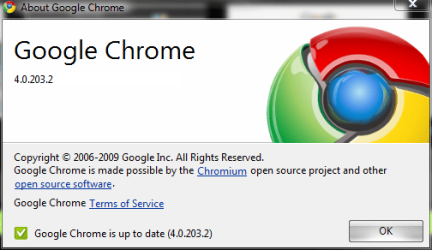
Just installed FireFox 3.5.2 and no problem there :). Also upgraded to Chrome 4.0.203.2 (dev channel) and the problem remains :(.
 

My Computer

OS
Windows 7 Ultimate 64-bit
One thing to try as this is a new install, ( I apologise in advance if you've already gone down this route :) ), you may want to check if there are any updates available for your graphics card.

These change so often that you will regulaly find that the latest and greatest on windows update is superseded on the manufacturers site

I installed the newest GeForce/ION Driver Release 190.62 for my NVIDIA GeForce 7900 GT/GTO. Could this really be a driver issue? I could reinstall Windows 7 without the driver update.
 

My Computer

OS
Windows 7 Ultimate 64-bit
I installed the newest GeForce/ION Driver Release 190.62 for my NVIDIA GeForce 7900 GT/GTO. Could this really be a driver issue? I could reinstall Windows 7 without the driver update.

To be honest - driver issues have been the major issue with windows systems for years - I doubt that it is actually at fault here as the issue does seem specific to the apps(s) concerned

I only suggested that you investigate the option as a new driver install has been known to solve many apparently non driver related problems.

If you have the latest driver I would expect that to be the best available so would not suggest a re-install until all other options have been explored and even then it should be possible to roll back the driver rather than perform a complete re-install
 

My Computers

System One System Two

  • Computer type
    PC/Desktop
    Computer Manufacturer/Model Number
    ChillBlast - Custom to my design
    OS
    Windows 11 Pro x64 [Latest Release and Release Preview]
    CPU
    Ryzen 9 5950X, 3.8 - 5.2 MHz
    Motherboard
    Asus Prime X570-Pro
    Memory
    64GB [2 x 32GB] DDR4 3200MHz
    Graphics Card(s)
    4GB NVIDIA GEFORCE GTX 1650 Ti
    Sound Card
    On-board SPDIF to 5.1 System + HDMI [5.1 system]
    Monitor(s) Displays
    32" UHD 32 Bit HDR Monitor + 43" UHD 4K 32Bit HDR TV
    Screen Resolution
    2 x 3840 x 2160 @60Hz
    Hard Drives
    1TB M2 SSD OS, 500GB Fast Access SSD, 2 x 8TB Data + Various Externals from 1TB to 4TB, 10TB NAS
    PSU
    NZXT C750 80 PLUS Gold 750W Modular PSU
    Case
    Workstation Case [Matt Black]
    Cooling
    NZXT Kraken X63 280mm CPU Cooler +2x Quiet Case fans
    Keyboard
    Logitech Wireless MX Keys & K400 + others
    Mouse
    Logitech Wireless MX Master 3S
    Internet Speed
    920 MB Down 50 MB Up
    Antivirus
    BitDefender Total Security Pro
    Browser
    Chrome (always run latest Non-Beta)
    Other Info
    Also run ...
    Laptop - Quad 8GB - Windows 10 Pro x64
    Nexus 7 Android tablet x2
    Samsung 10.2" tablet
    Blackview TAB 8 4G Android Tablet c/w Keyboard
    Wacom Intuos Pro Medium Pen Pad
    Wacom Intuos Pro Small Pen Pad
    Wacom Expresskeys Remote
    Loopdeck+ Graphics Controller
    Shuttle Pro v2 Control
  • Computer type
    Laptop
    System Manufacturer/Model Number
    Dell XPS 17 10750H
    OS
    Windows 11 Pro x64 Latest RP
    CPU
    Intel I7 10750H 5.0GHz
    Motherboard
    Dell XPS
    Memory
    32GB [2x16GB] DDR4 2933 MHz
    Graphics Card(s)
    nVidia GTX1650Ti 4 GB GDDR6
    Sound Card
    Stock [Realtek] 4 Speaker
    Monitor(s) Displays
    17" IPS UHD+ Infinity Edge Touchscreen
    Screen Resolution
    3840 x 2400
    Hard Drives
    2TB M2 NVMe, 4TB External + various 500GB & 1TB External NVMe (also have access to spinner HDD from
    PSU
    Stock
    Case
    Stock XPS Aluminium & Carbon Fibre
    Cooling
    Stock - Active Fan Control
    Keyboard
    Backlit + Various Logitech
    Mouse
    Stock Track Pad + Logitech MX Trackball
    Internet Speed
    72 MB Down 18MB Up
    Browser
    Chrome
    Other Info
    Also run ...
    Laptop - Quad 8GB - Windows 10 Pro x64
    Nexus 7 Android tablet x2
    10.2" tablet
    Sony Z3 Android Smartphone
    Wacom Intuos Pro Medium Pen Pad
    Wacom Intuos Pro Small Pen Pad
    Wacom Expresskeys Remote
    Loopdeck+ Graphics Controller
    Shuttle Pro v2 Control Pad
    10TB NAS
With regards to firefox having this problem - it doesn't for me (v3.5 on Windows7 Pro RTM), and neither does the latest Chrome (2.0.172.43) here.

Did you use Chrome on Windows 7 Ultimate 64 bit (6.1, build 7600), the version I am using? If so, neither Windows or Chrome whould be the problem but something else.
 

My Computer

OS
Windows 7 Ultimate 64-bit
I just tried with the latest Chrome (dev) build and am on Windows 7 Ultimate RTM 64bit (Version 6.1 (Build 7600)) and I have the same problem.

Capture.PNG
 

My Computers

System One System Two

  • Computer type
    PC/Desktop
    Computer Manufacturer/Model Number
    The Beast Model A (homebrew)
    OS
    Windows 11 21H2 Current build
    CPU
    AMD Ryzen 9 3950X
    Motherboard
    MSI MEG X570 GODLIKE
    Memory
    4 * 32 GB - Corsair Vengeance 3600 MHz
    Graphics Card(s)
    EVGA GeForce RTX 3080 Ti XC3 ULTRA GAMING (12G-P5-3955-KR)
    Sound Card
    Realtek® ALC1220 Codec
    Monitor(s) Displays
    2x Eve Spectrum ES07D03 4K Gaming Monitor (Matte) | Eve Spec
    Screen Resolution
    3x 3840 x 2160
    Hard Drives
    3x Samsung 980 Pro NVMe PCIe 4 M.2 2 TB SSD (MZ-V8P2T0B/AM) } 3x Sabrent Rocket NVMe 4.0 1 TB SSD
    PSU
    PC Power & Cooling’s Silencer Series 1050 Watt, 80 Plus Plat
    Case
    Fractal Design Define 7 XL Dark ATX Full Tower Case
    Cooling
    SteelSeries Apex Pro Wired Gaming Keyboard
    Keyboard
    SteelSeries Apex Pro
    Mouse
    Logitech MX Master 3S | MX Master 3 for business
    Internet Speed
    AT&T LightSpeed Gigabit Duplex Ftth
    Antivirus
    Windows Defender + MB 3
    Browser
    Nightly (default) + Firefox (stable),Chrome, Edge
  • Computer type
    PC/Desktop
    System Manufacturer/Model Number
    Dell Latitude E5470
    OS
    ChromeOS Flex Dev Channel (current)
    CPU
    Intel(R) Core(TM) i5-6300U CPU @ 2.40GHz, 2501 Mhz, 2 Core(s), 4 Logical Processor(s)
    Motherboard
    Dell
    Memory
    16 GB
    Graphics Card(s)
    Intel(R) HD Graphics 520
    Sound Card
    Intel(R) HD Graphics 520 + RealTek Audio
    Monitor(s) Displays
    Dell laptop display 15"
    Screen Resolution
    1920 * 1080
    Hard Drives
    Toshiba 128GB M.2 22300 drive
    INTEL Cherryville 520 Series SSDSC2CW180A 180 GB SATA III SSD
    PSU
    Dell
    Case
    Dell
    Cooling
    Dell
    Keyboard
    Dell
    Mouse
    Logitech MX Master 3S (shared w. Sys 1) | Dell TouchPad
    Internet Speed
    AT&T LightSpeed Gigabit Duplex Ftth
I just tried with the latest Chrome (dev) build and am on Windows 7 Ultimate RTM 64bit (Version 6.1 (Build 7600)) and I have the same problem.

Well, its probable that this version of windows 7 is the cause of this problem than. Or am I to hasty?
 

My Computer

OS
Windows 7 Ultimate 64-bit
It may be related to the Ultimate version ( I am running the Pro 7600 x64Activated), although that would be unusual, versions are normally consistent within builds :confused:.

I can duplicate the issue intermittently in firefox by using F11 to go to Full screen and back. I have tried the same with Chrome but am unable to duplicate the fault.
 

My Computers

System One System Two

  • Computer type
    PC/Desktop
    Computer Manufacturer/Model Number
    ChillBlast - Custom to my design
    OS
    Windows 11 Pro x64 [Latest Release and Release Preview]
    CPU
    Ryzen 9 5950X, 3.8 - 5.2 MHz
    Motherboard
    Asus Prime X570-Pro
    Memory
    64GB [2 x 32GB] DDR4 3200MHz
    Graphics Card(s)
    4GB NVIDIA GEFORCE GTX 1650 Ti
    Sound Card
    On-board SPDIF to 5.1 System + HDMI [5.1 system]
    Monitor(s) Displays
    32" UHD 32 Bit HDR Monitor + 43" UHD 4K 32Bit HDR TV
    Screen Resolution
    2 x 3840 x 2160 @60Hz
    Hard Drives
    1TB M2 SSD OS, 500GB Fast Access SSD, 2 x 8TB Data + Various Externals from 1TB to 4TB, 10TB NAS
    PSU
    NZXT C750 80 PLUS Gold 750W Modular PSU
    Case
    Workstation Case [Matt Black]
    Cooling
    NZXT Kraken X63 280mm CPU Cooler +2x Quiet Case fans
    Keyboard
    Logitech Wireless MX Keys & K400 + others
    Mouse
    Logitech Wireless MX Master 3S
    Internet Speed
    920 MB Down 50 MB Up
    Antivirus
    BitDefender Total Security Pro
    Browser
    Chrome (always run latest Non-Beta)
    Other Info
    Also run ...
    Laptop - Quad 8GB - Windows 10 Pro x64
    Nexus 7 Android tablet x2
    Samsung 10.2" tablet
    Blackview TAB 8 4G Android Tablet c/w Keyboard
    Wacom Intuos Pro Medium Pen Pad
    Wacom Intuos Pro Small Pen Pad
    Wacom Expresskeys Remote
    Loopdeck+ Graphics Controller
    Shuttle Pro v2 Control
  • Computer type
    Laptop
    System Manufacturer/Model Number
    Dell XPS 17 10750H
    OS
    Windows 11 Pro x64 Latest RP
    CPU
    Intel I7 10750H 5.0GHz
    Motherboard
    Dell XPS
    Memory
    32GB [2x16GB] DDR4 2933 MHz
    Graphics Card(s)
    nVidia GTX1650Ti 4 GB GDDR6
    Sound Card
    Stock [Realtek] 4 Speaker
    Monitor(s) Displays
    17" IPS UHD+ Infinity Edge Touchscreen
    Screen Resolution
    3840 x 2400
    Hard Drives
    2TB M2 NVMe, 4TB External + various 500GB & 1TB External NVMe (also have access to spinner HDD from
    PSU
    Stock
    Case
    Stock XPS Aluminium & Carbon Fibre
    Cooling
    Stock - Active Fan Control
    Keyboard
    Backlit + Various Logitech
    Mouse
    Stock Track Pad + Logitech MX Trackball
    Internet Speed
    72 MB Down 18MB Up
    Browser
    Chrome
    Other Info
    Also run ...
    Laptop - Quad 8GB - Windows 10 Pro x64
    Nexus 7 Android tablet x2
    10.2" tablet
    Sony Z3 Android Smartphone
    Wacom Intuos Pro Medium Pen Pad
    Wacom Intuos Pro Small Pen Pad
    Wacom Expresskeys Remote
    Loopdeck+ Graphics Controller
    Shuttle Pro v2 Control Pad
    10TB NAS
It may also be related to how Chrome runs.

I don't ever use auto hide anymore b/c I prefer having it always accessible - I learned way back with XP that auto-hide can sometimes still get hidden, even if Always on top is selected - some apps just did not play nicely. Fx was one of those apps.

So, I opted to not hide my taskbar anymore. However, Fx still plays faultily with auto hiding, and Chrome does every single time I started it.

Best bet - stop using auto hide and the problem is moot. I realize this may not be what you want to hear, but take it from my personal experience - auto-hide never has been perfect, and quite possibly never will, unless you uses 100% Native Windows apps (meaning apps already installed with the OS).
 

My Computers

System One System Two

  • Computer type
    PC/Desktop
    Computer Manufacturer/Model Number
    The Beast Model A (homebrew)
    OS
    Windows 11 21H2 Current build
    CPU
    AMD Ryzen 9 3950X
    Motherboard
    MSI MEG X570 GODLIKE
    Memory
    4 * 32 GB - Corsair Vengeance 3600 MHz
    Graphics Card(s)
    EVGA GeForce RTX 3080 Ti XC3 ULTRA GAMING (12G-P5-3955-KR)
    Sound Card
    Realtek® ALC1220 Codec
    Monitor(s) Displays
    2x Eve Spectrum ES07D03 4K Gaming Monitor (Matte) | Eve Spec
    Screen Resolution
    3x 3840 x 2160
    Hard Drives
    3x Samsung 980 Pro NVMe PCIe 4 M.2 2 TB SSD (MZ-V8P2T0B/AM) } 3x Sabrent Rocket NVMe 4.0 1 TB SSD
    PSU
    PC Power & Cooling’s Silencer Series 1050 Watt, 80 Plus Plat
    Case
    Fractal Design Define 7 XL Dark ATX Full Tower Case
    Cooling
    SteelSeries Apex Pro Wired Gaming Keyboard
    Keyboard
    SteelSeries Apex Pro
    Mouse
    Logitech MX Master 3S | MX Master 3 for business
    Internet Speed
    AT&T LightSpeed Gigabit Duplex Ftth
    Antivirus
    Windows Defender + MB 3
    Browser
    Nightly (default) + Firefox (stable),Chrome, Edge
  • Computer type
    PC/Desktop
    System Manufacturer/Model Number
    Dell Latitude E5470
    OS
    ChromeOS Flex Dev Channel (current)
    CPU
    Intel(R) Core(TM) i5-6300U CPU @ 2.40GHz, 2501 Mhz, 2 Core(s), 4 Logical Processor(s)
    Motherboard
    Dell
    Memory
    16 GB
    Graphics Card(s)
    Intel(R) HD Graphics 520
    Sound Card
    Intel(R) HD Graphics 520 + RealTek Audio
    Monitor(s) Displays
    Dell laptop display 15"
    Screen Resolution
    1920 * 1080
    Hard Drives
    Toshiba 128GB M.2 22300 drive
    INTEL Cherryville 520 Series SSDSC2CW180A 180 GB SATA III SSD
    PSU
    Dell
    Case
    Dell
    Cooling
    Dell
    Keyboard
    Dell
    Mouse
    Logitech MX Master 3S (shared w. Sys 1) | Dell TouchPad
    Internet Speed
    AT&T LightSpeed Gigabit Duplex Ftth
Anyone else here with Windows 7 Ultimate 64-bit (6.1, build 7600) and Chrome who does not has this problem with auto-hide taskbar disappearing? It only occurs after a minimize and maximize of the Chrome window.
 

My Computer

OS
Windows 7 Ultimate 64-bit
Hello all.

In fact I'm having the same problem with my auto-hidden task bar :
1. while with Chrome in full screen, the task bar does not appear.
2. In windows explorer in full screen draging a file to the taskbar, the task bar does not appear.

I found a solution (temporary?) for the first problem: while in chrome press on F11 twice.
But the second problem, the most annoying one, has still no work around without usage of the keyboard...

Please let me know if one of you finds a solution...

Bye, Steph.
 

My Computer

OS
win7
Back
Top