Problem with Chrome

Franky

New member
Member
VIP
Local time
6:57 AM
Messages
472
Location
Kurdistan
Hi,

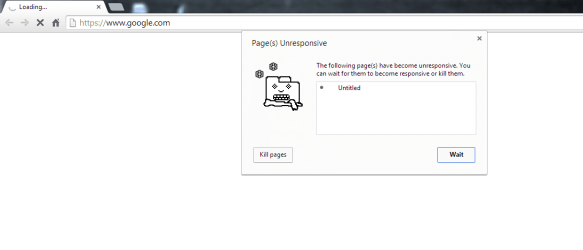
When I put an URL in address bar of Google chrome and press enter, it goes to bring that web file, but after passing long time (more than 20 seconds) it doesn't show anything. When I click on the X sign (on upper left corner) of the chrome (below image), it shows the web page immediately! I don't know what is the problem. I prior to posting problem here, tested some methods like, deleting all history, uninstalling and installing chrome again but no method could solve the problem. My bandwidth is 1024 kbps and Google chrome was working fine before.

Any idea?
 

Attachments

  • Capture.PNG
    Capture.PNG
    2.5 KB · Views: 2

My Computer

Computer type
PC/Desktop
OS
windows 7 32-bit
CPU
Intel(R) Core(TM) i3-2120 CPU @ 3.30GHz
Motherboard
Gigabyte Technology Co., Ltd. P61A-D3
Memory
4.00 GB
Graphics Card(s)
NVIDIA GeForce GTS 450
Sound Card
(1) NVIDIA High Definition Audio (2) NVIDIA Virtual Audio
Monitor(s) Displays
Samsung
Hard Drives
ST500DM002-1BC142 ATA Device
Internet Speed
1 Mbps
Antivirus
KIS 2013
Browser
chrome
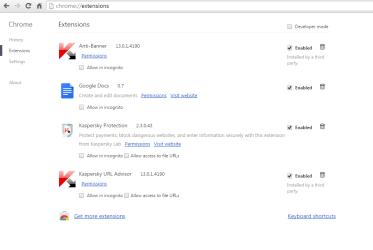
What extensions are installed? What anti-malware software is installed?
 

My Computer

Computer type
PC/Desktop
Computer Manufacturer/Model Number
Golden Mk. I.4
OS
Windows 10 Pro x64 ; Xubuntu x64
CPU
Intel i7 860 @ 2.80 GHz O/C'ed to 4.0GHz
Motherboard
Gigabyte P55A-UD3R Rev.1. Award BIOS F13
Memory
16GB Corsair Vengance DDR3 @ 661 MHz Dual Channel (9-9-9-24)
Graphics Card(s)
EVGA NVidia GTX 560 1024MB
Sound Card
Realtek Integrated
Monitor(s) Displays
Dual Samsung SyncMaster 2494HS
Screen Resolution
1920*1080 and 1920*1080
Hard Drives
1*Samsung 840 EVO 120GB SSD;
1*OCZ Vertex 2 60GB SSD;
2*Samsung F3 SpinPoint 1TB in RAID0;
1*Samsung F1 SpinPoint 1TB;
2*Western Digital 1TB External USB 3.0
1*Western Digital 500GB External USB 3.0
1*Seagate 500GB External USB 2.0
PSU
Thermaltake ToughPower QFan 750W
Case
Thermaltake Element S VK60001W2Z
Cooling
Corsair H60 Water Cooling, 2*230mm and 2*80mm case fans
Keyboard
Logitech G110
Mouse
Logitech MX518
The extensions are as follows. My A-M is KIS 2013 as well.
 

Attachments

  • Capture.PNG
    Capture.PNG
    24.2 KB · Views: 2

My Computer

Computer type
PC/Desktop
OS
windows 7 32-bit
CPU
Intel(R) Core(TM) i3-2120 CPU @ 3.30GHz
Motherboard
Gigabyte Technology Co., Ltd. P61A-D3
Memory
4.00 GB
Graphics Card(s)
NVIDIA GeForce GTS 450
Sound Card
(1) NVIDIA High Definition Audio (2) NVIDIA Virtual Audio
Monitor(s) Displays
Samsung
Hard Drives
ST500DM002-1BC142 ATA Device
Internet Speed
1 Mbps
Antivirus
KIS 2013
Browser
chrome
I think this is normal. There is a time-out for the URL activation. All you have to do is to click on the address bar to activate it again.
 

My Computer

Computer Manufacturer/Model Number
HP, Dell, Gateway, Toshiba - 4 laptops and 2 desktops
OS
Vista, Windows7, Mint Mate, Zorin, Windows 8
CPU
from 1.6GHz Duo to i7
Monitor(s) Displays
2x HP w2207
Hard Drives
5x HDD, 7x SSD, 12x Externals
Keyboard
with trackball - no mices
Mouse
Trackball mice
Internet Speed
DSL 6000
Try disabling the Kaspersky Chrome extensions temporarily to see if page loading speeds up.
 

My Computer

Computer type
PC/Desktop
Computer Manufacturer/Model Number
Golden Mk. I.4
OS
Windows 10 Pro x64 ; Xubuntu x64
CPU
Intel i7 860 @ 2.80 GHz O/C'ed to 4.0GHz
Motherboard
Gigabyte P55A-UD3R Rev.1. Award BIOS F13
Memory
16GB Corsair Vengance DDR3 @ 661 MHz Dual Channel (9-9-9-24)
Graphics Card(s)
EVGA NVidia GTX 560 1024MB
Sound Card
Realtek Integrated
Monitor(s) Displays
Dual Samsung SyncMaster 2494HS
Screen Resolution
1920*1080 and 1920*1080
Hard Drives
1*Samsung 840 EVO 120GB SSD;
1*OCZ Vertex 2 60GB SSD;
2*Samsung F3 SpinPoint 1TB in RAID0;
1*Samsung F1 SpinPoint 1TB;
2*Western Digital 1TB External USB 3.0
1*Western Digital 500GB External USB 3.0
1*Seagate 500GB External USB 2.0
PSU
Thermaltake ToughPower QFan 750W
Case
Thermaltake Element S VK60001W2Z
Cooling
Corsair H60 Water Cooling, 2*230mm and 2*80mm case fans
Keyboard
Logitech G110
Mouse
Logitech MX518
Before, I had chrome with all of those extensions enabled and it would work well. I disabled the extensions but it's still too slow in starting up and after that, sometimes is too slow as well.

But for IE 11, everything is good. It works fine and most of the time faster than chrome. But I used to use of chrome unfortunately! I've heard that chrome is most fast browser among others!!

When the home page of chrome is google.com and I run it, it doesn't show even it and just wheels and wheels and nothing. I should close it open it close it open it again till it can give google.com page!! it's very odd.
 

My Computer

Computer type
PC/Desktop
OS
windows 7 32-bit
CPU
Intel(R) Core(TM) i3-2120 CPU @ 3.30GHz
Motherboard
Gigabyte Technology Co., Ltd. P61A-D3
Memory
4.00 GB
Graphics Card(s)
NVIDIA GeForce GTS 450
Sound Card
(1) NVIDIA High Definition Audio (2) NVIDIA Virtual Audio
Monitor(s) Displays
Samsung
Hard Drives
ST500DM002-1BC142 ATA Device
Internet Speed
1 Mbps
Antivirus
KIS 2013
Browser
chrome
Chrome is by far the fastest browser. Perhaps you could reinstall it....apart from that something is interfering with it thats for sure.
 

My Computer

Computer type
PC/Desktop
Computer Manufacturer/Model Number
Golden Mk. I.4
OS
Windows 10 Pro x64 ; Xubuntu x64
CPU
Intel i7 860 @ 2.80 GHz O/C'ed to 4.0GHz
Motherboard
Gigabyte P55A-UD3R Rev.1. Award BIOS F13
Memory
16GB Corsair Vengance DDR3 @ 661 MHz Dual Channel (9-9-9-24)
Graphics Card(s)
EVGA NVidia GTX 560 1024MB
Sound Card
Realtek Integrated
Monitor(s) Displays
Dual Samsung SyncMaster 2494HS
Screen Resolution
1920*1080 and 1920*1080
Hard Drives
1*Samsung 840 EVO 120GB SSD;
1*OCZ Vertex 2 60GB SSD;
2*Samsung F3 SpinPoint 1TB in RAID0;
1*Samsung F1 SpinPoint 1TB;
2*Western Digital 1TB External USB 3.0
1*Western Digital 500GB External USB 3.0
1*Seagate 500GB External USB 2.0
PSU
Thermaltake ToughPower QFan 750W
Case
Thermaltake Element S VK60001W2Z
Cooling
Corsair H60 Water Cooling, 2*230mm and 2*80mm case fans
Keyboard
Logitech G110
Mouse
Logitech MX518
Thanks so mach for your comments.
 

My Computer

Computer type
PC/Desktop
OS
windows 7 32-bit
CPU
Intel(R) Core(TM) i3-2120 CPU @ 3.30GHz
Motherboard
Gigabyte Technology Co., Ltd. P61A-D3
Memory
4.00 GB
Graphics Card(s)
NVIDIA GeForce GTS 450
Sound Card
(1) NVIDIA High Definition Audio (2) NVIDIA Virtual Audio
Monitor(s) Displays
Samsung
Hard Drives
ST500DM002-1BC142 ATA Device
Internet Speed
1 Mbps
Antivirus
KIS 2013
Browser
chrome
Hi,
Since Google has released the 64 bit version of Chrome you have to figure your security suite add-ons are not quite compatible ;)
Of which you have three active :/
 

My Computer

Computer type
PC/Desktop
Computer Manufacturer/Model Number
Custom assembled by me :}
OS
Win-7-Pro64bit 7-H-Prem-64bit
CPU
i7-5930K 2nd i9-9940x both water blocked VRM's too
Motherboard
ASUS SABERTOOTH X99 2nd ASUS x299 Apex
Memory
Trident-z 3200C14 2nd Trident-z 3600C16
Graphics Card(s)
EVGA 1080ti ftw3 2nd Titan Xp both water blocked
Sound Card
Built-in Realtek
Monitor(s) Displays
1-AOC G2460PG 24"G-Sync 144Hz/ 2nd 1-ASUS VG248QE 24" 144Hz
Screen Resolution
1920 x 1080 144Hz
Hard Drives
2-Samsung M.2 Evo & Evo Plus
2-Samsung 850 EVO 500GB SSD's/ 3-2.5 W.D. Black 1tb-&3-1tb/3-3.5 WD Black 1tb hdd's
PSU
EVGA SuperNOVA 1000-P2 2nd 1200-P2
Case
2-Corsair Obsidian Series 450D Black ATX Mid Tower
Cooling
Custom water loops
Keyboard
Logitech G710+/ 2nd Logitech G910
Mouse
2-RedDragon M901 Perdition 16400 dpi Gaming mouse = wired
Internet Speed
Comcast Ping 19ms 89.31mbps download speed 6.12mbps upload
Antivirus
Malwarebytes Pro/ Superantispyware Pro
Browser
FireFox & Pale moon
Other Info
2nd ASUS X299 Apex/Intel i9-9940x with Custom water loop/7H-Prem-x64/Corsair 450D case/Ram Trident-z 3600C16 4x8gb / Samsung970Evo plus 500gb SSD/Dual ssd EZ swap evo/PSU EVGA SuperNova 1200w-P2 80+Platinum/GPU Titan Xp /8-ML-140 on push-pull on 2-280GTX rads
"When I click on the X sign (on upper left corner) of the chrome (below image), it shows the web page immediately!" This tells me something is holding the page from loading since when you press stop, it cancels the load for whatever it is. Look at the bottom left when this happens. Chrome should give a message like "Waiting for xxxxx website" or "Loading images from xxxxx". You may just need to clean your cookies. Try CCleaner to clean everything. If that doesn't work I would suggest a complete advanced uninstall with RevoUninstaller. Use the advanced choice, and delete all files it finds when done. Then download a fresh copy from Google, and try again.

https://www.piriform.com/

http://www.revouninstaller.com/revo_uninstaller_free_download.html

https://www.google.com/chrome/browser/
 

My Computer

Computer type
Laptop
Computer Manufacturer/Model Number
Dell Inspiron
OS
Windows 7 Ultimate
"When I click on the X sign (on upper left corner) of the chrome (below image), it shows the web page immediately!" This tells me something is holding the page from loading since when you press stop, it cancels the load for whatever it is. Look at the bottom left when this happens. Chrome should give a message like "Waiting for xxxxx website" or "Loading images from xxxxx". You may just need to clean your cookies. Try CCleaner to clean everything. If that doesn't work I would suggest a complete advanced uninstall with RevoUninstaller. Use the advanced choice, and delete all files it finds when done. Then download a fresh copy from Google, and try again.

https://www.piriform.com/

Download Revo Uninstaller Freeware - Free and Full Download - Uninstall software, remove programs, solve uninstall problems

https://www.google.com/chrome/browser/

Thank you for the answer.

I followed ccleaner and then revouninstaller in advanced mode and the installed chrome from beginning. One of the problems is solved. That is it loads and brings webpages as expected like before. But one issue is remained still.
When I turn the machine on and click on the chrome, it takes too much time to brings its google.com homepage, while when I click on the IE 11, it brings its home page (yahoo.com) very faster. After waiting for chrome so that it finally brings the google.com, then it will be fine from that on.

PS: Now in this new chrome, there isn't any item of KIS 2013 to be enabled!
 

Attachments

  • Capture.PNG
    Capture.PNG
    15.2 KB · Views: 0

My Computer

Computer type
PC/Desktop
OS
windows 7 32-bit
CPU
Intel(R) Core(TM) i3-2120 CPU @ 3.30GHz
Motherboard
Gigabyte Technology Co., Ltd. P61A-D3
Memory
4.00 GB
Graphics Card(s)
NVIDIA GeForce GTS 450
Sound Card
(1) NVIDIA High Definition Audio (2) NVIDIA Virtual Audio
Monitor(s) Displays
Samsung
Hard Drives
ST500DM002-1BC142 ATA Device
Internet Speed
1 Mbps
Antivirus
KIS 2013
Browser
chrome
"When I click on the X sign (on upper left corner) of the chrome (below image), it shows the web page immediately!" This tells me something is holding the page from loading since when you press stop, it cancels the load for whatever it is. Look at the bottom left when this happens. Chrome should give a message like "Waiting for xxxxx website" or "Loading images from xxxxx". You may just need to clean your cookies. Try CCleaner to clean everything. If that doesn't work I would suggest a complete advanced uninstall with RevoUninstaller. Use the advanced choice, and delete all files it finds when done. Then download a fresh copy from Google, and try again.

https://www.piriform.com/

Download Revo Uninstaller Freeware - Free and Full Download - Uninstall software, remove programs, solve uninstall problems

https://www.google.com/chrome/browser/

Thank you for the answer.

I followed ccleaner and then revouninstaller in advanced mode and the installed chrome from beginning. One of the problems is solved. That is it loads and brings webpages as expected like before. But one issue is remained still.
When I turn the machine on and click on the chrome, it takes too much time to brings its google.com homepage, while when I click on the IE 11, it brings its home page (yahoo.com) very faster. After waiting for chrome so that it finally brings the google.com, then it will be fine from that on.

PS: Now in this new chrome, there isn't any item of KIS 2013 to be enabled!

I have the same problem with it loading the homepage on first run after a boot. Usually after the first run, and the system settles down, it should open faster after that each time. Your extensions should also re-enable after the next boot. Mine took two times before I had everything back.
 

My Computer

Computer type
Laptop
Computer Manufacturer/Model Number
Dell Inspiron
OS
Windows 7 Ultimate
Thank you for the answer.

The strange thing is that slowness when first running there wasn't exist before, I had it cool at first run and after that as well!
About the extensions too, they haven't been apparent so far!
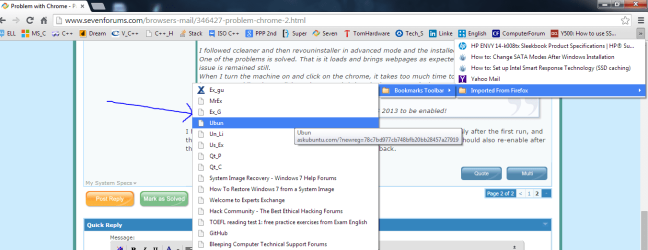
And some new thing has been occurred, my bookmarks that I had imported them from Firefox into the chrome are slipping from bookmark toolbar into downside while their place are suitable and I haven't added new ones to force others to go to down. Below image.
I think Ebola has penetrated into browsers (now just chrome) too! :)
 

Attachments

  • Capture.PNG
    Capture.PNG
    44.1 KB · Views: 1

My Computer

Computer type
PC/Desktop
OS
windows 7 32-bit
CPU
Intel(R) Core(TM) i3-2120 CPU @ 3.30GHz
Motherboard
Gigabyte Technology Co., Ltd. P61A-D3
Memory
4.00 GB
Graphics Card(s)
NVIDIA GeForce GTS 450
Sound Card
(1) NVIDIA High Definition Audio (2) NVIDIA Virtual Audio
Monitor(s) Displays
Samsung
Hard Drives
ST500DM002-1BC142 ATA Device
Internet Speed
1 Mbps
Antivirus
KIS 2013
Browser
chrome
Back
Top