
problem with create homegroup

delbari

New member
Local time
7:09 PM
Messages
7
I have two PC connected using a CROSSOVER Ethernet cable (Cat5E) without a Hub , Switch or Router. first PC connected to internet through D-Link DSL-200 USB ADSL WAN Modem .
First PC network adapters:
1-Realtek RTL8168B/8111B Family PCI-E Gigabit Ethernet NIC (NDIS 6.0)
2-D-Link DSL-200 USB ADSL WAN Modem
Second PC network adapter:
Realtek RTL8168C(P)/8111C(P) Family PCI-E Gigabit Ethernet NIC (NDIS 6.2)
I want to share my files and internet.workgroup names are same .Below image is taken from first PC Network and Sharing Center.
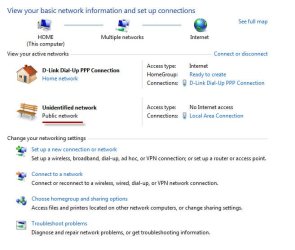
67l6xy.jpg
When I click Ready to create to create homegroup , an error appear whit this message :
A homegroup can only be created on a home network.
To change your network location setting, open Network and Sharing Center in Control Panel.
But my network type for Unidentified network is not clickable and is statistic.
When I click on Multiple Networks on top of this screen both PCs are visible and file sharing is possible but second PC don’t have internet and multiple games can’t find network. ICS (Internet Connection Sharing) is configured .radio buttonsof Turn on network discovery and Turn on file and printer sharing are enabled.
[FONT=&quot]Can anyone help me. Please[/FONT]
 

My Computer

OS
seven
CPU
AMD Athlon 64X2 5200+
Motherboard
Gigabyte MA770
Memory
1 GB DDR II
Graphics Card(s)
NVIDIA GeForce 8400 GS 512MB
Hard Drives
320GB SAMSUNG
I have two PC connected using a CROSSOVER Ethernet cable (Cat5E) without a Hub , Switch or Router. first PC connected to internet through D-Link DSL-200 USB ADSL WAN Modem .
First PC network adapters:
1-Realtek RTL8168B/8111B Family PCI-E Gigabit Ethernet NIC (NDIS 6.0)
2-D-Link DSL-200 USB ADSL WAN Modem
Second PC network adapter:
Realtek RTL8168C(P)/8111C(P) Family PCI-E Gigabit Ethernet NIC (NDIS 6.2)
I want to share my files and internet.workgroup names are same .Below image is taken from first PC Network and Sharing Center.
View attachment 28270
When I click Ready to create to create homegroup , an error appear whit this message :
A homegroup can only be created on a home network.
To change your network location setting, open Network and Sharing Center in Control Panel.
But my network type for Unidentified network is not clickable and is statistic.
When I click on Multiple Networks on top of this screen both PCs are visible and file sharing is possible but second PC don’t have internet and multiple games can’t find network. ICS (Internet Connection Sharing) is configured .radio buttonsof Turn on network discovery and Turn on file and printer sharing are enabled.
[FONT=&quot]Can anyone help me. Please[/FONT]

Do you just want to share between the 2 computers? If so you dont even need a homegroup

Let me know\

Ken

Edit: just noticed you say work group names are. You cant have a work group and a homegroup
 

My Computer

Computer Manufacturer/Model Number
HP Pavillion dv-7 1005 Tx
OS
Win 8 Release candidate 8400
CPU
[email protected]
Memory
4 gigs
Graphics Card(s)
Nvidia 9600M
Sound Card
HD built-in
Monitor(s) Displays
17" Wxga
Screen Resolution
1440x900
Cooling
none
Internet Speed
45Mb down 5Mb up
Looking at your picture above you have your D-Link DSL-200 USB ADSL WAN Modem set to a home network type and your local area connection set to public network. These network types should be switched. Your local area connection should be set to home and your D-Link DSL should be set to public.
 

My Computer

Computer Manufacturer/Model Number
ultraplanet - model 23
OS
Windows 7
CPU
P4 3.0 HT
Motherboard
Intel DQ965GF
Memory
4 gigs of Crucial DDR2
Graphics Card(s)
nVidia GeForce 7800GT 256MB 256-bit w/ ACCELS1 Rev 2
Sound Card
on board
Monitor(s) Displays
HP 2509m
Screen Resolution
1920x1080
Hard Drives
2x 320gb Seagate Barracuda's - SATA 3Gbit/s - RAID-0 array
PSU
650 watt
Case
Antec
Cooling
Cool Master
Keyboard
Logitech diNovo Media Desktop
Mouse
see keyboard
Internet Speed
comcast cable
Other Info
7 Ultimate and 7 Pro twice each at home - Gigabit on the Network - Tomato on the Linksys - I freely share my wireless with my neighbors (8-10 additional devices)
file sharing is OK.but I want internet sharing.
is internet sharing need home group?
 

My Computer

OS
seven
CPU
AMD Athlon 64X2 5200+
Motherboard
Gigabyte MA770
Memory
1 GB DDR II
Graphics Card(s)
NVIDIA GeForce 8400 GS 512MB
Hard Drives
320GB SAMSUNG
Homegroup is not needed for internet sharing. Homegroup only works when all machines are running w7 and is not required for any.
 

My Computer

Computer Manufacturer/Model Number
ultraplanet - model 23
OS
Windows 7
CPU
P4 3.0 HT
Motherboard
Intel DQ965GF
Memory
4 gigs of Crucial DDR2
Graphics Card(s)
nVidia GeForce 7800GT 256MB 256-bit w/ ACCELS1 Rev 2
Sound Card
on board
Monitor(s) Displays
HP 2509m
Screen Resolution
1920x1080
Hard Drives
2x 320gb Seagate Barracuda's - SATA 3Gbit/s - RAID-0 array
PSU
650 watt
Case
Antec
Cooling
Cool Master
Keyboard
Logitech diNovo Media Desktop
Mouse
see keyboard
Internet Speed
comcast cable
Other Info
7 Ultimate and 7 Pro twice each at home - Gigabit on the Network - Tomato on the Linksys - I freely share my wireless with my neighbors (8-10 additional devices)
all machines are running Windows 7 Build 7600 . I have swiched my internet connection type to public but local area connection couldn't be changed.It's not clickable.
Homegroup is not needed for internet sharing Ok but what I to do to have internet sharing?
 

My Computer

OS
seven
CPU
AMD Athlon 64X2 5200+
Motherboard
Gigabyte MA770
Memory
1 GB DDR II
Graphics Card(s)
NVIDIA GeForce 8400 GS 512MB
Hard Drives
320GB SAMSUNG
If you want change Network location, but in Network center is unavialable a shortcut for this, try click on shortcut "Choose homegroup and sharing options" and then (in a warning message window) click on shortcut "What is network location". It will open window for change network location and set Home...
 

My Computer

OS
Windows 7 Ultimate
For Internet sharing:
1.open start menu, type "ncpa.cpl" w/o quotes
2.then right click on your internet connection and click Properties.
3.then click on the Sharing tab and check checkbox"Allow other users......"
 

My Computer

OS
Windows 7 Ultimate
how can I create a shortcut for my network?
 

My Computer

OS
seven
CPU
AMD Athlon 64X2 5200+
Motherboard
Gigabyte MA770
Memory
1 GB DDR II
Graphics Card(s)
NVIDIA GeForce 8400 GS 512MB
Hard Drives
320GB SAMSUNG
Which connection is ICS enabled on? ICS should be configured on your USB DSL connection not on the local area connection.
 

My Computer

Computer Manufacturer/Model Number
ultraplanet - model 23
OS
Windows 7
CPU
P4 3.0 HT
Motherboard
Intel DQ965GF
Memory
4 gigs of Crucial DDR2
Graphics Card(s)
nVidia GeForce 7800GT 256MB 256-bit w/ ACCELS1 Rev 2
Sound Card
on board
Monitor(s) Displays
HP 2509m
Screen Resolution
1920x1080
Hard Drives
2x 320gb Seagate Barracuda's - SATA 3Gbit/s - RAID-0 array
PSU
650 watt
Case
Antec
Cooling
Cool Master
Keyboard
Logitech diNovo Media Desktop
Mouse
see keyboard
Internet Speed
comcast cable
Other Info
7 Ultimate and 7 Pro twice each at home - Gigabit on the Network - Tomato on the Linksys - I freely share my wireless with my neighbors (8-10 additional devices)
By Internet connection I mean connection that is used to connect to the Interent. In this case USB DSL. Of course.. -)))
 

My Computer

OS
Windows 7 Ultimate
By Internet connection I mean connection that is used to connect to the Interent. In this case USB DSL. Of course.. -)))

I just wanted to ask the OP to be sure.

Sanoh do you know if public network gets selected by default on the connection that is running ICS? He is not able to change from Public network on his local connection which makes me think this is the one he has ICS configured on.
 

My Computer

Computer Manufacturer/Model Number
ultraplanet - model 23
OS
Windows 7
CPU
P4 3.0 HT
Motherboard
Intel DQ965GF
Memory
4 gigs of Crucial DDR2
Graphics Card(s)
nVidia GeForce 7800GT 256MB 256-bit w/ ACCELS1 Rev 2
Sound Card
on board
Monitor(s) Displays
HP 2509m
Screen Resolution
1920x1080
Hard Drives
2x 320gb Seagate Barracuda's - SATA 3Gbit/s - RAID-0 array
PSU
650 watt
Case
Antec
Cooling
Cool Master
Keyboard
Logitech diNovo Media Desktop
Mouse
see keyboard
Internet Speed
comcast cable
Other Info
7 Ultimate and 7 Pro twice each at home - Gigabit on the Network - Tomato on the Linksys - I freely share my wireless with my neighbors (8-10 additional devices)
I think that delbari's screenshot was taken before ICS was set. Reason for unavailability of setting type and name of network is, that delbari didn't set default gateway. Pretty stupid, but this is right. Maybe Microsoft will release some hotfix -))))

By Internet connection I mean connection that is used to connect to the Interent. In this case USB DSL. Of course.. -)))

I just wanted to ask the OP to be sure.

Sanoh do you know if public network gets selected by default on the connection that is running ICS? He is not able to change from Public network on his local connection which makes me think this is the one he has ICS configured on.
 

My Computer

OS
Windows 7 Ultimate
yes this screenshot was taken before ICS was set but after setting ICS we have no change (setting type of network is unavailable).
Dear Ultraplanet ICS is setting at USB DSL but IP type in this connection is automatically, change this setting to get static IP (192.168.0.1) cause modem error No 720 when modem attempt to connect
thanx again friends
 

My Computer

OS
seven
CPU
AMD Athlon 64X2 5200+
Motherboard
Gigabyte MA770
Memory
1 GB DDR II
Graphics Card(s)
NVIDIA GeForce 8400 GS 512MB
Hard Drives
320GB SAMSUNG
delbari didn't set default gateway

sanoh is right..... I couldn't understand what he was saying so I hooked up my laptop and configured ICS to an old xp workstation I have. First try I got nothing. After reviewing settings sanoh is absolutly right the default gateway is not configured.....

This is my settings for my local area connection:

IPv4 Address. . . . . . . . . . . : 192.168.137.1(Preferred)
Subnet Mask . . . . . . . . . . . : 255.255.255.0
Default Gateway . . . . . . . . . : 0.0.0.0

I went into the properties for my local area connection -
and properties for the Internet Protocol Version 4 (TCP/IPv4)
and entered a default gateway address of 192.168.137.1 and ......

my xp machine connected via a crossover cable was able to access the internet.

That is the solution. You need to configure the default gateway on your local area connection to match it's IP address.

ipconfig after configuring the gateway

IPv4 Address. . . . . . . . . . . : 192.168.137.1(Preferred)
Subnet Mask . . . . . . . . . . . : 255.255.255.0
Default Gateway . . . . . . . . . : 192.168.137.1
 

My Computer

Computer Manufacturer/Model Number
ultraplanet - model 23
OS
Windows 7
CPU
P4 3.0 HT
Motherboard
Intel DQ965GF
Memory
4 gigs of Crucial DDR2
Graphics Card(s)
nVidia GeForce 7800GT 256MB 256-bit w/ ACCELS1 Rev 2
Sound Card
on board
Monitor(s) Displays
HP 2509m
Screen Resolution
1920x1080
Hard Drives
2x 320gb Seagate Barracuda's - SATA 3Gbit/s - RAID-0 array
PSU
650 watt
Case
Antec
Cooling
Cool Master
Keyboard
Logitech diNovo Media Desktop
Mouse
see keyboard
Internet Speed
comcast cable
Other Info
7 Ultimate and 7 Pro twice each at home - Gigabit on the Network - Tomato on the Linksys - I freely share my wireless with my neighbors (8-10 additional devices)
I still can't change my local area connection - unidentified network from public network - all is working fine after configuring the default gateway.
 

Attachments

  • ics.jpg
    ics.jpg
    26.8 KB · Views: 48

My Computer

Computer Manufacturer/Model Number
ultraplanet - model 23
OS
Windows 7
CPU
P4 3.0 HT
Motherboard
Intel DQ965GF
Memory
4 gigs of Crucial DDR2
Graphics Card(s)
nVidia GeForce 7800GT 256MB 256-bit w/ ACCELS1 Rev 2
Sound Card
on board
Monitor(s) Displays
HP 2509m
Screen Resolution
1920x1080
Hard Drives
2x 320gb Seagate Barracuda's - SATA 3Gbit/s - RAID-0 array
PSU
650 watt
Case
Antec
Cooling
Cool Master
Keyboard
Logitech diNovo Media Desktop
Mouse
see keyboard
Internet Speed
comcast cable
Other Info
7 Ultimate and 7 Pro twice each at home - Gigabit on the Network - Tomato on the Linksys - I freely share my wireless with my neighbors (8-10 additional devices)
Back
Top