Problem with internet Connection (DNS not responding)

alex22

New member
Local time
12:25 AM
Messages
8
Hello, im new to the forum, i hope someone can help me

Windows 7 home premium, adapter wifi link 1000 bgn, router linksys wag320n

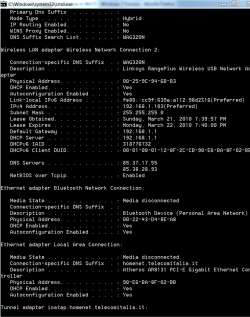
Im having problems with my internet connection, everything seems to work i can access to the internet but my connection is slow at times, when i try to repair it with the troubleshoot i get the following message "your computer appears to be correctly configured, but the device or resource (DNS server) is not responding", i tryed updating the driver, restarting the wireless router, ipconfig/flush, nothing worked, i left the pic with my ipconfig/all screen
if someone can please help me
thanks

alex
 

Attachments
  • ipconfig.PNG
    ipconfig.PNG
    21.7 KB · Views: 304

My Computer

OS
windows 7 home premium
Hello, im new to the forum, i hope someone can help me

Windows 7 home premium, adapter wifi link 1000 bgn, router linksys wag320n

Im having problems with my internet connection, everything seems to work i can access to the internet but my connection is slow at times, when i try to repair it with the troubleshoot i get the following message "your computer appears to be correctly configured, but the device or resource (DNS server) is not responding", i tryed updating the driver, restarting the wireless router, ipconfig/flush, nothing worked, i left the pic with my ipconfig/all screen
if someone can please help me
thanks

alex


Alex

You are using homegroup for your networking. Homegroup can sometimes suffer from slow downs and drops. You can verify this by setting up a new netwrok connection using the "workgroup" model. If the problem clears you can then just kill the homegroup and disable IPv6

Let us know if you need help.

Ken
 

My Computer

Computer Manufacturer/Model Number
HP Pavillion dv-7 1005 Tx
OS
Win 8 Release candidate 8400
CPU
[email protected]
Memory
4 gigs
Graphics Card(s)
Nvidia 9600M
Sound Card
HD built-in
Monitor(s) Displays
17" Wxga
Screen Resolution
1440x900
Cooling
none
Internet Speed
45Mb down 5Mb up
thanks a lot for your fast reply ken,
Im m a moderate pc user, but i dont understand much about networking,
what is a homegroup in this case? because i never activated one in windows.
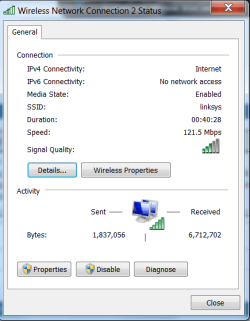
everithing was ok some days ago just noticed that IPv6 (that i dont know what it is sorry) now says no network access as shows in the pic
is there a solution? can be temporary?
thanks a lot
alex
 

Attachments

  • internet.PNG
    internet.PNG
    17.1 KB · Views: 64

My Computer

OS
windows 7 home premium
Click on properties button and you will see whether IPv6 is in play in addition to IPv4
 

My Computer

OS
Windows XP - Now Windows 7 Home Premium (64-bit).
Hello manhunter
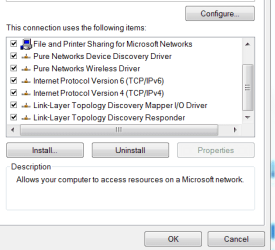
Yes is active, if is this what you mean
thank you
 

Attachments

  • internet2.PNG
    internet2.PNG
    9.5 KB · Views: 22

My Computer

OS
windows 7 home premium
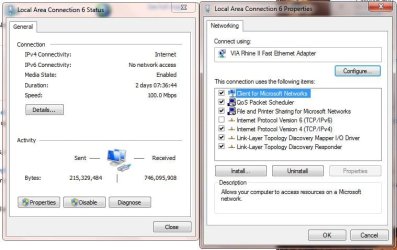
Your router may not be new enough for IPV6 or have the current firmware for it.
So try unchecking IPV6 & re-booting, to see how it works.
 

Attachments

  • LanConnection_NO_IPV6.JPG
    LanConnection_NO_IPV6.JPG
    59.5 KB · Views: 107

My Computer

Computer type
PC/Desktop
Computer Manufacturer/Model Number
Built them myself, Science Experiments !
OS
Win7 Enterprise, Win7 x86 (Ult 7600), Win7 x64 Ult 7600, TechNet RTM on AMD x64 (2.8Ghz)
CPU
AMD fx8350 4ghz, AMD-32 2400mhz, AMD-64 3200mhz, AMDx64 2.8G
Motherboard
SIS 755, ECS-K8M890M-M (Ult 7600), GigaByte & others
Memory
2gb, 4gb on the Ult 7600, 4gb on Technet RTM, 32gb on FX8350
Graphics Card(s)
Draw my own Graphics, several nVidia cards
Sound Card
on motherboard
Monitor(s) Displays
19" flat scr, 28" I-Inc widescr,22" Emprex Widescr, 23" Acer
Screen Resolution
1280 x 1024, 1440 x 900, 1920 x 1080
Hard Drives
6 pata Ide HD's & 2 Sata HD's
added 80gb external on Ult 7600 computer,
numerous extra 1tb, 2TB, 3Tb SATA HD's
A collection of ext HD Docks w/ HDs
PSU
430w, 550w, 600w, 700, 800, etc
Case
All Generic Full Towers
Cooling
Open Air & a few fans, some w/ colored LEDs
Keyboard
Compaq & Dell recycled from GoodWill
Mouse
Made in China Optical Wired Mouse
Internet Speed
Fast Cable InterNet
Antivirus
AVG Free on 24 different Desktops, NO Problems!
Browser
IE 8 is preferred, but use FireFox sometimes
Other Info
Linksys Routers, switches, & Hubs
Too Many USB Flash Drives to count, Biggest is 64GB !
Eight computers in my home network.
Sixteen computers at my business network.
Linked via TeamViewer !
Lots of old used spare computer parts everywhere!
Hello docbrown
This is a new router and have the latest firmware, worked normally for 3 weeks and 2 days ago this started, if is not enough how can i know that?
thanks a lot
alex
 

My Computer

OS
windows 7 home premium
Hello manhunter
Yes is active, if is this what you mean
thank you

Yes alex, exactly that, as others suggested, try unticking the IPv6
 

My Computer

OS
Windows XP - Now Windows 7 Home Premium (64-bit).

My Computer

Computer Manufacturer/Model Number
Home built
OS
Windows 7 Ultimate 32 bit
CPU
Intel(R) Pentium(R) 4 CPU 3.00GHz
Motherboard
ASUS P4P800-VM Motherboard Chipset: Intel 865G + ICH5
Memory
2.50 GB RAM
Graphics Card(s)
NVIDIA GeForce 7600 GS
Sound Card
SoundMax Integrated Digital Audio (Chip)
Monitor(s) Displays
ViewSonic VX 1962 wm
Screen Resolution
1680 X 1050
Hard Drives
Seagate Barracuda 7200.10 80 GB
ST380215A ATA Device 18.6 GB
Western Digital "My Book" external hard drive 750 GB
Cooling
Fan based
Keyboard
Microsoft Comfort Curve Keyboard 2000 v10 USB
Mouse
Logitec optic USB
Internet Speed
3.01 Mb/s download 0.64 Mb/s upload
Thanks a lot for your answers, i will try this, will turning off ipv6 change anything in performance terms of the connection, torrents streaming etc?
 

My Computer

OS
windows 7 home premium
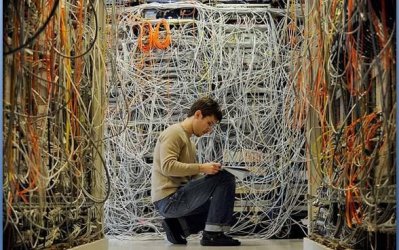
I don't do much with wireless, except to test friends laptops. So my experience is with my wired network. Have had IPV6 unchecked since the early Beta days of win7. Re-Boot your router, also. No should not effect performance. ;)
 

Attachments

  • Network_Nightmare.JPG
    Network_Nightmare.JPG
    78.7 KB · Views: 113

My Computer

Computer type
PC/Desktop
Computer Manufacturer/Model Number
Built them myself, Science Experiments !
OS
Win7 Enterprise, Win7 x86 (Ult 7600), Win7 x64 Ult 7600, TechNet RTM on AMD x64 (2.8Ghz)
CPU
AMD fx8350 4ghz, AMD-32 2400mhz, AMD-64 3200mhz, AMDx64 2.8G
Motherboard
SIS 755, ECS-K8M890M-M (Ult 7600), GigaByte & others
Memory
2gb, 4gb on the Ult 7600, 4gb on Technet RTM, 32gb on FX8350
Graphics Card(s)
Draw my own Graphics, several nVidia cards
Sound Card
on motherboard
Monitor(s) Displays
19" flat scr, 28" I-Inc widescr,22" Emprex Widescr, 23" Acer
Screen Resolution
1280 x 1024, 1440 x 900, 1920 x 1080
Hard Drives
6 pata Ide HD's & 2 Sata HD's
added 80gb external on Ult 7600 computer,
numerous extra 1tb, 2TB, 3Tb SATA HD's
A collection of ext HD Docks w/ HDs
PSU
430w, 550w, 600w, 700, 800, etc
Case
All Generic Full Towers
Cooling
Open Air & a few fans, some w/ colored LEDs
Keyboard
Compaq & Dell recycled from GoodWill
Mouse
Made in China Optical Wired Mouse
Internet Speed
Fast Cable InterNet
Antivirus
AVG Free on 24 different Desktops, NO Problems!
Browser
IE 8 is preferred, but use FireFox sometimes
Other Info
Linksys Routers, switches, & Hubs
Too Many USB Flash Drives to count, Biggest is 64GB !
Eight computers in my home network.
Sixteen computers at my business network.
Linked via TeamViewer !
Lots of old used spare computer parts everywhere!
Myself i have IPv6 ticked and am using Homegroup (perhaps mistakenly?) without any problems but as others mentioned, could all be dependent on router compatibility.
 

My Computer

OS
Windows XP - Now Windows 7 Home Premium (64-bit).
Well, i searched now and it looks like that supports ipv6 as is a new router, the thing i dont understand is why suddenly stopped working if it worked fine before.. the adsl works fine is just the wireless
 

My Computer

OS
windows 7 home premium
Back
Top