Solved Problem with lag on desktop

Zellas

New member
Local time
5:52 AM
Messages
6
Hello,
i got a problem, after i changed standard windows walpaper to a photo from my camera my desktop started to lag. Every window i move starts to like leave a trail of its border for a second. It does not look nice and it is starting to be irritating, changing back to first standard Aero composition does not help. Anyone can help me with this ?
 

My Computer

Computer type
PC/Desktop
OS
Windows 7 Ultimate 64bit
CPU
i7-6700k
Motherboard
MSI Z170A Gaming M3
Graphics Card(s)
MSI Geforce GTX 1070
Hard Drives
TS128GSSD370S 128GB
WDC WD10EZEX 1000GB
WDC WD5000AAKS 500GB
Antivirus
Avast
Browser
Chrome
Please boot your computer into Safe Mode and let us know if the issue resolves within Safe Mode.


  1. Immediately after the computer is powered on or restarted (usually after you hear your computer beep), tap the F8 key in 1 second intervals.
  2. After your computer displays hardware information and runs a memory test, the Advanced Boot Options menu will appear.
  3. Use the arrow keys to select Safe Mode and press Enter key.
 

My Computer

Computer type
PC/Desktop
Computer Manufacturer/Model Number
Custom Build
OS
Windows 10 Pro x64
CPU
Intel Core i5 6600
Motherboard
Gigabyte Technology Z170M-D3H-CF (U3E1)
Memory
Corsair Vengeance LPX 16GB 2666MHz DDR4
Graphics Card(s)
AMD Radeon R9 380 Series
Hard Drives
SSD
HDD
Antivirus
Eset Smart Security
Browser
Mozila Firefox
How many pixels has your Wallpaper photo? If it is a jpg with more than 2MB you can try to reduce it to about 600K.
 

My Computers

System One System Two

  • Computer type
    PC/Desktop
    Computer Manufacturer/Model Number
    custom build
    OS
    Windows 7 HP 64
    CPU
    i5 6600K - 800MHz to 4200MHz
    Motherboard
    GA-Z170-HD3P
    Memory
    4+4G GSkill DDR4 3000
    Graphics Card(s)
    IG - Intel 530
    Monitor(s) Displays
    Samsung 226BW
    Screen Resolution
    1680x1050
    Hard Drives
    (1) -1 SM951 – 128GB M.2 AHCI PCIe SSD drive for Windows 7 and Lubuntu
    (2) -1 WD SATA 3 - 1T for Data
    (3) -1 WD SATA 3 - 1T for backup
    PSU
    Thermaltake 450W TR2 gold
    Keyboard
    Old and good Chicony mechanical keyboard
    Mouse
    Logitech mX performance - 9 buttons (had to disable some)
    Internet Speed
    500Mb/s
    Browser
    Firefox 64
    Other Info
    TinyWall firewall
  • Computer type
    Laptop
    System Manufacturer/Model Number
    Asus Q550LF
    OS
    Windows 7 Pro
    CPU
    i7-4500U 800MHz to 3.0GHz
    Motherboard
    Asus Q550LF
    Memory
    (4+4)G DDR3 1600
    Graphics Card(s)
    IG intel 4400 + NVIDIA GeForce GT 745M
    Sound Card
    Realtek
    Monitor(s) Displays
    LG Display LP156WF4-SPH1
    Screen Resolution
    1920 x 1080
    Hard Drives
    BX500 120G SSD for Windows and programs +
    1T HDD for data
    Internet Speed
    500 Mb/s
    Browser
    Firefox
    Other Info
    TinyWall firewall
I had some problems starting Safe Mode, when i tried computer would restart itself on Windows Welcome screen. I used last Known Good configuration and it went to Safe Mode, with black walpaper, and the problem was even worse there. I dont think it has anything with resolution of the photo since it is not working better on Safe Mode. What else can i do ?
 

My Computer

Computer type
PC/Desktop
OS
Windows 7 Ultimate 64bit
CPU
i7-6700k
Motherboard
MSI Z170A Gaming M3
Graphics Card(s)
MSI Geforce GTX 1070
Hard Drives
TS128GSSD370S 128GB
WDC WD10EZEX 1000GB
WDC WD5000AAKS 500GB
Antivirus
Avast
Browser
Chrome
Have you opened Task Manager (right click on the taskbar) and looked for anything hogging up your CPU and HDD in the processes tab?

Make sure to install latest version of your computer graphic card driver. You can download graphic card driver from either your computer manufacturer website or from graphic card manufacturer website.

Use CCleaner to delete all temporary files.


I would like you to check the system integrity of your Windows OS installation.


  • Please type cmd.exe into Start Menu search box.
  • Please right click cmd.exe and select "Run as administrator".
  • Please type the following command and press the <Enter> key: sfc /scannow (Please note that there is a space between 'sfc" and "/scannow".)
  • It should take about 20 minutes to run, if there are no serious errors.
  • If the System File Checker reports that some errors were fixed, but some remain; please reboot your computer and run the System File Checker from an Administrator Command Prompt, again.
  • If the System File Checker again reports that some errors were fixed, but some remain, please reboot your computer and run it a third time.
  • If "Resource Integrity Violations" (errors) are reported that could not be corrected, or were not corrected after a third SFC run, then please navigate to the folder: C:\Windows\Logs\CBS and copy the file "cbs.log" to your desktop immediately. I am asking you do that because that file is dynamic, so I want to be able to examine a copy that is unchanged from the time that the System File Checker was run.
  • If there are errors that couldn't be corrected, let me know and I will provide you with instructions as to how to upload the file.
 

My Computer

Computer type
PC/Desktop
Computer Manufacturer/Model Number
Custom Build
OS
Windows 10 Pro x64
CPU
Intel Core i5 6600
Motherboard
Gigabyte Technology Z170M-D3H-CF (U3E1)
Memory
Corsair Vengeance LPX 16GB 2666MHz DDR4
Graphics Card(s)
AMD Radeon R9 380 Series
Hard Drives
SSD
HDD
Antivirus
Eset Smart Security
Browser
Mozila Firefox
my bad
 

My Computer

Computer type
PC/Desktop
OS
Windows 7 Ultimate 64bit
CPU
i7-6700k
Motherboard
MSI Z170A Gaming M3
Graphics Card(s)
MSI Geforce GTX 1070
Hard Drives
TS128GSSD370S 128GB
WDC WD10EZEX 1000GB
WDC WD5000AAKS 500GB
Antivirus
Avast
Browser
Chrome
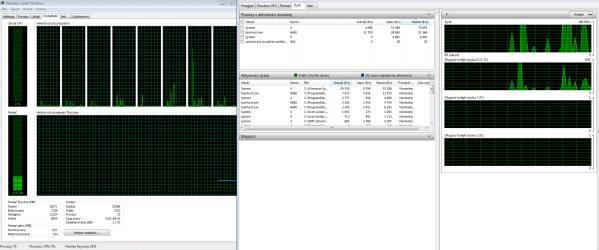
I got some activity at task menager but i think its not enough to make so much trouble, i upload picture of it:
I did sfc scan and it said some files could not be repaired, how do you want the CBS file send to you? It is 2,3 MB.

Post above is my mistake of too much clicking, sorry.
 

Attachments

  • Bez tytu?u.png
    Bez tytu?u.png
    48.4 KB · Views: 3

My Computer

Computer type
PC/Desktop
OS
Windows 7 Ultimate 64bit
CPU
i7-6700k
Motherboard
MSI Z170A Gaming M3
Graphics Card(s)
MSI Geforce GTX 1070
Hard Drives
TS128GSSD370S 128GB
WDC WD10EZEX 1000GB
WDC WD5000AAKS 500GB
Antivirus
Avast
Browser
Chrome
You can paste CBS.log to PasteBin and post the URL address of the pasted CBS.log.
 

My Computer

Computer type
PC/Desktop
Computer Manufacturer/Model Number
Custom Build
OS
Windows 10 Pro x64
CPU
Intel Core i5 6600
Motherboard
Gigabyte Technology Z170M-D3H-CF (U3E1)
Memory
Corsair Vengeance LPX 16GB 2666MHz DDR4
Graphics Card(s)
AMD Radeon R9 380 Series
Hard Drives
SSD
HDD
Antivirus
Eset Smart Security
Browser
Mozila Firefox
PasteBin had a restriction of 512 kb per file so i put it here:

CBS (2).log
 

My Computer

Computer type
PC/Desktop
OS
Windows 7 Ultimate 64bit
CPU
i7-6700k
Motherboard
MSI Z170A Gaming M3
Graphics Card(s)
MSI Geforce GTX 1070
Hard Drives
TS128GSSD370S 128GB
WDC WD10EZEX 1000GB
WDC WD5000AAKS 500GB
Antivirus
Avast
Browser
Chrome
Most corrupted files has been repaired but one of the file could not be repaired which is Sfc.exe file which you have use to repair corrupted Windows system files. I suggest you perform a repair install of Windows 7 this will preserve your user accounts, data, programs, and system drivers.
 

My Computer

Computer type
PC/Desktop
Computer Manufacturer/Model Number
Custom Build
OS
Windows 10 Pro x64
CPU
Intel Core i5 6600
Motherboard
Gigabyte Technology Z170M-D3H-CF (U3E1)
Memory
Corsair Vengeance LPX 16GB 2666MHz DDR4
Graphics Card(s)
AMD Radeon R9 380 Series
Hard Drives
SSD
HDD
Antivirus
Eset Smart Security
Browser
Mozila Firefox
Thanks for all this help.
 

My Computer

Computer type
PC/Desktop
OS
Windows 7 Ultimate 64bit
CPU
i7-6700k
Motherboard
MSI Z170A Gaming M3
Graphics Card(s)
MSI Geforce GTX 1070
Hard Drives
TS128GSSD370S 128GB
WDC WD10EZEX 1000GB
WDC WD5000AAKS 500GB
Antivirus
Avast
Browser
Chrome
We are glad to hear your issue has been resolved, thank you for letting us know that all is now well!
 

My Computer

Computer type
PC/Desktop
Computer Manufacturer/Model Number
Custom Build
OS
Windows 10 Pro x64
CPU
Intel Core i5 6600
Motherboard
Gigabyte Technology Z170M-D3H-CF (U3E1)
Memory
Corsair Vengeance LPX 16GB 2666MHz DDR4
Graphics Card(s)
AMD Radeon R9 380 Series
Hard Drives
SSD
HDD
Antivirus
Eset Smart Security
Browser
Mozila Firefox
Back
Top