Solved Black screen with "loading cursor" and no login screen on Boot.

ExacT

New member
Local time
12:09 AM
Messages
15
Black screen with "loading cursor" and no login screen on Boot.

Hello everyone,

First of all, I will divide my statement by sections so it would be easier to read.

Section 1: The problem - description of it.
Section 2: How I manage the problem.
Section 3: Things and methods that I have tried - all unsuccessfully.
Section 4: My own findings to help with further analysis.

So here we go

Section 1

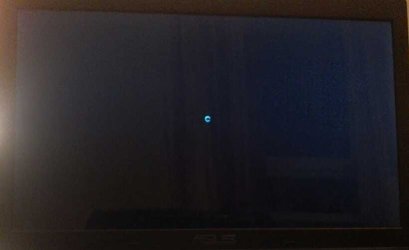
Whenever I start windows it will boot normally up until Windows logo screen(where 4 balls meet to form windows 7 logo) at this logo screen I can already notice slow pace as it stays in it for a good minute. Afterwards it will be just black screen for a minute. Then mouse cursor will appear(with faster sensitivity than my usual) and it will transform into a loading wheel cursor after another minute. And now it reached state in which it can stay for hours. Only black screen and loading mouse wheel(note that it is always spinning and I can always move it, it is not frozen).

Section 2

So the only way for me to login is to leave it be for at least about 5 hours and it will start itself. Usually I do this overnight and in the morning it is already at the desktop and works like nothing ever happened. I can do whatever then, everything will work perfectly fine. Crysys 3 works fine, YouTube works fine - no trace of any problem. So while I can always just Hibernate and sleep my PC, I need to restart it sometimes.

EDIT: Now after those 5 hours or more, it will simply display ordinary mouse pointer on a black screen and act as if I am in login screen. For example it will sleep after 30mins of no movement and instantly wake up on activity.

Section 3

So far I have tried those methods:

1. Clean boot
2. All of F8 advanced boot options. (Only safe mode and repair windows work)
3. sfc /scannow in Safe Mode.
4. Uninstalling video card driver and reinstalling with the latest compatible.
5. CCleaner while in normal mode.
6. Other anti virus and malware softwares.
7. Windows restore (no back up point).
8. Deleting network drivers.
9. Reinstalling them.
10. Disabling all network related devices in the Device Manager.

Section 4

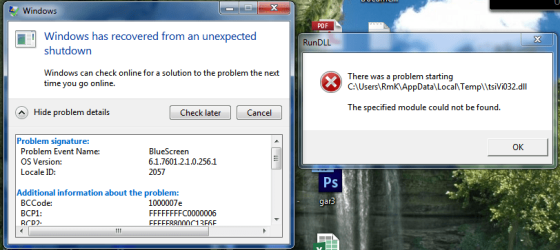
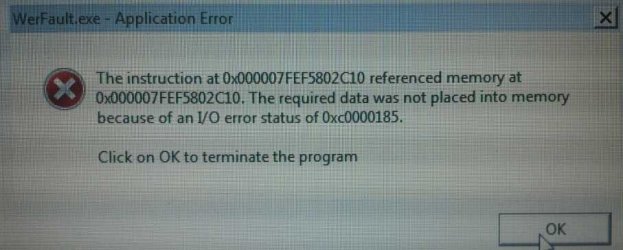
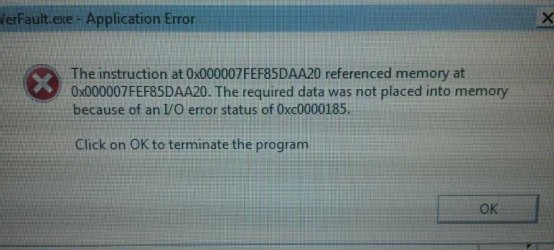
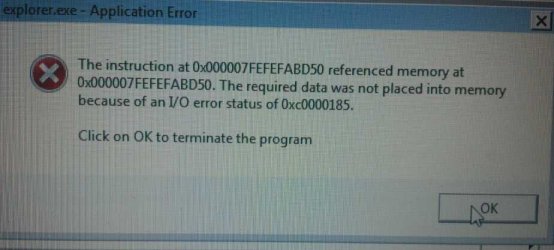
While Fail Safe mode works neatly. Fail safe mode with networking support loads but freezes after about 30 seconds. And won't unfreeze, only mouse will be movable, but everything will be irresponsive and will give me errors like shown on the post 10 here, below in the replies.

It appears to be happened after I downloaded windows update for Virtual machine support. During the update I went away from my laptop(when I left it was restarting itself to apply updates) and when I came back 1 hour later I found my laptop on the same black screen with loading mouse cursor. I waited 20 minutes more and forcefully restarted it. And it was black screen again. Since then I have uninstalled everything regarding that update and virtual machine through programs and features in the windows updates tab.

There were few times when I saw a BSOD after black screen stood for about 2 hours. But was unable to read them fast enough.

Sometimes the laptop monitor will change its brightness during black screen.

The laptop will restart itself after about 1 hour of black screen and go into it again.

---
EDITs: Sorry for the edits guys, I am using Android to write this and I want my post to look both informative and easy to read.
---

I usually solve problems like this myself through hardcore researching and analysis, but I fail on this one.

Thank you everyone who will try to help and suggest anything.

Thank you for your time,

ExacT
 
Last edited:

My Computer My Computer

Computer type
Laptop
Computer Manufacturer/Model Number
Asus K55VJ
OS
Windows 7 Ultimate x64
CPU
i7-3630QM 2.4GHz
Motherboard
Asus K55V
Memory
6GB
Graphics Card(s)
GeForce GT 635M
Hard Drives
Toshiba 500GB HDD
Antivirus
None.
Browser
Chrome
It sounds like something is trying to load and run in the background.


Download DDS from one of these links:
DDS.com
DDS.pif
  • Disable any script blocking protection
  • Double click the dds icon to run the tool.
  • When done, DDS will open two (2) logs:
    1. DDS.txt
    2. Attach.txt <--- will be minimized in the task tray
  • Save both reports to your desktop.
Include the contents of both logs in your next post.
The scan will instruct you to post Attach.txt as an attachment. You can post both logs as attachments.
 

My Computer My Computer

Computer type
PC/Desktop
Computer Manufacturer/Model Number
Bruce ... somewhere in his 40's
OS
Windows 7 Ultimate 32bit SP1
CPU
Intel(R) Core(TM)2 Quad CPU @ 2.40GHz, 2400 MHz
Motherboard
INTEL/D975XBX2
Memory
4 GB
Graphics Card(s)
ATI Radeon HD 2600 Pro
Monitor(s) Displays
Samsung SyncMaster 914v
Screen Resolution
1280 x 1024
Hard Drives
2/500GB each ... ST3500630AS ATA Device.
One is not connected
PSU
Rocketfish 700 W
Case
G.Skill Gigabyte Chassis
Keyboard
Standard PS/2 Keyboard
Mouse
Microsoft PS/2 Mouse
Internet Speed
DSL
Antivirus
Avira Internet Security
Browser
IE 11
Other Info
ATI HDMI Audio
Thanks for a quick reply Jacee!

I have 1 question before I proceed with your suggestion. Can I run the tool in Fail Safe mode? Be cause if not I will need to wait till it boots, probably about 5 hours or so.

Again many thanks for your reply,

ExacT

EDIT: Posting DDS files from FailSafe for now.

View attachment DDS.txt

View attachment Attach.txt
 
Last edited:

My Computer My Computer

Computer type
Laptop
Computer Manufacturer/Model Number
Asus K55VJ
OS
Windows 7 Ultimate x64
CPU
i7-3630QM 2.4GHz
Motherboard
Asus K55V
Memory
6GB
Graphics Card(s)
GeForce GT 635M
Hard Drives
Toshiba 500GB HDD
Antivirus
None.
Browser
Chrome
Disable 'proxy settings':


1) Under “Tools” in the browser tool bar select “Internet Options”.
2) In the “Internet Options” window that pops up, click the “Connections” tab at the top.
3) Click “LAN Settings” near the bottom of the “Connections” section.
4) If the “Proxy server” checkbox is marked with a check, click it to deselect/uncheck it.
5) Click “Ok” to close the “Local Area Network (LAN) Settings” window.
6) Click “Ok” to close the “Internet Options” window.
Reboot
Make sure "Proxy server" is still disabled under your LAN Settings.
Test whether internet connectivity is restored.


Next, you have adware ... Please download AdwCleaner by Xplode and save to your Desktop.


Step 1.
  • Double click on AdwCleaner.exe to run the tool.
    Vista/Windows 7/8 users right-click and select Run As Administrator.
  • Click on the Scan button.
  • AdwCleaner will begin...be patient as the scan may take some time to complete.
  • After the scan has finished, click on the Report button...a logfile (AdwCleaner[R#].txt) will open in Notepad for review (where the largest value of # represents the most recent report).
  • The contents of the log file may be confusing. Unless you see a program name that you know should not be removed, don't worry about it. If you see an entry you want to keep, let me know about it.
  • Copy and paste the contents of that logfile in your next reply.
  • A copy of all logfiles are saved in the C:\AdwCleaner folder which was created when running the tool.


Step 2.
Using AdwCleaner v3: Scan & Clean:
This time click on the Clean button.
Press OK when asked to close all programs and follow the onscreen prompts.
Press OK again to allow AdwCleaner to restart the computer and complete the removal process.
After rebooting, a logfile report (AdwCleaner[S#].txt) will open automatically (where the largest value of # represents the most recent report).
Copy and paste the contents of that logfile in your next reply.
A copy of that logfile will also be saved in the C:\AdwCleaner folder
******Post both .txt logs
 

My Computer My Computer

Computer type
PC/Desktop
Computer Manufacturer/Model Number
Bruce ... somewhere in his 40's
OS
Windows 7 Ultimate 32bit SP1
CPU
Intel(R) Core(TM)2 Quad CPU @ 2.40GHz, 2400 MHz
Motherboard
INTEL/D975XBX2
Memory
4 GB
Graphics Card(s)
ATI Radeon HD 2600 Pro
Monitor(s) Displays
Samsung SyncMaster 914v
Screen Resolution
1280 x 1024
Hard Drives
2/500GB each ... ST3500630AS ATA Device.
One is not connected
PSU
Rocketfish 700 W
Case
G.Skill Gigabyte Chassis
Keyboard
Standard PS/2 Keyboard
Mouse
Microsoft PS/2 Mouse
Internet Speed
DSL
Antivirus
Avira Internet Security
Browser
IE 11
Other Info
ATI HDMI Audio
It appears my problem has just taken the next step.

So I woke up this morning and found my PC on the login screen as usual. So I logged in and everything was alright, but suddenly I started experiencing hard lags and freezes just like in networking safe mode. I immediately tried to open DDS and after about an hour it finished with empty dds.txt and normal attach.txt. Also it was giving me different errors time to time and saying that windows shell or something has stopped working and is restarting. After 2 painful hours in freezes(it can defreeze sometimes) I tried to open internet options only to completely freeze and make my PC self restart itself.

So right now Safe Mode still works fine, but as soon as I open "Connections" tab in the Internet options in IE - it will hard freeze and will never unfreeze the Internet options window no matter what and I have to force restart my PC. So unless there is a workaround through cmd or something else - I won't be able to progress any further with this step. I think it is now like this be cause of me playing with the internet adapter drivers but I can be wrong.

Good news is that I was able to run AdwCleaner and will attach logfiles as requested. Also, it was run in safe mode and when it restarted PC I had to force restart it again as it was stuck in black screen.

View attachment [R0].txt

View attachment [R1].txt

View attachment [S0].txt

View attachment [S1].txt

EDIT: So I looked further on how to disable proxy settings and found something. Here is what I did: Disable the connections page

And I ran AdwCleaner again afterwards and still no luck.

SOS :mad:
 
Last edited:

My Computer My Computer

Computer type
Laptop
Computer Manufacturer/Model Number
Asus K55VJ
OS
Windows 7 Ultimate x64
CPU
i7-3630QM 2.4GHz
Motherboard
Asus K55V
Memory
6GB
Graphics Card(s)
GeForce GT 635M
Hard Drives
Toshiba 500GB HDD
Antivirus
None.
Browser
Chrome
I think it is now like this be cause of me playing with the internet adapter drivers but I can be wrong.


Did you fiddle with the network adapter drivers before or after you installed Hitman?
Did Hitman find anything to delete/quarantine?
 

My Computer My Computer

Computer type
PC/Desktop
Computer Manufacturer/Model Number
Bruce ... somewhere in his 40's
OS
Windows 7 Ultimate 32bit SP1
CPU
Intel(R) Core(TM)2 Quad CPU @ 2.40GHz, 2400 MHz
Motherboard
INTEL/D975XBX2
Memory
4 GB
Graphics Card(s)
ATI Radeon HD 2600 Pro
Monitor(s) Displays
Samsung SyncMaster 914v
Screen Resolution
1280 x 1024
Hard Drives
2/500GB each ... ST3500630AS ATA Device.
One is not connected
PSU
Rocketfish 700 W
Case
G.Skill Gigabyte Chassis
Keyboard
Standard PS/2 Keyboard
Mouse
Microsoft PS/2 Mouse
Internet Speed
DSL
Antivirus
Avira Internet Security
Browser
IE 11
Other Info
ATI HDMI Audio
I think it is now like this be cause of me playing with the internet adapter drivers but I can be wrong.


Did you fiddle with the network adapter drivers before or after you installed Hitman?
Did Hitman find anything to delete/quarantine?

After. I used Hitman about 3 weeks ago for some other purpose. Did not have this problem that day and yes it did find some low level and very high level threats. Don't remember if I deleted them or quarantined, but either of those 2.

Should I go ahead and install it again now? If something comes up I will save it in txt file and attach to this post to let you know.

EDIT: Not sure if relevant but I will just give out this information out here. I used Hitman thinking I had some malware of some sort that was jamming my wireless internet connection. Hitman did not help and I decided it was Router's wi-fi being old and weak. I was in a different country, with different router than now. Other PCs which were connected by wire displayed no signs of jamming. I tried many things back there to restore proper connection, even bought mini usb wi-fi adapter but nothing worked. And when I came back here, to a different router and internet I had no problems with the internet here. So there is that.

EDIT 2: So I think I can't get into normal mode right now at all. It just hangs with ordinary mouse pointer and black screen. And if I just wait it will kinda go into sleep mode as if I am in desktop or something.
 
Last edited:

My Computer My Computer

Computer type
Laptop
Computer Manufacturer/Model Number
Asus K55VJ
OS
Windows 7 Ultimate x64
CPU
i7-3630QM 2.4GHz
Motherboard
Asus K55V
Memory
6GB
Graphics Card(s)
GeForce GT 635M
Hard Drives
Toshiba 500GB HDD
Antivirus
None.
Browser
Chrome
Doesn't sound good at all... Do you have a "system restore point" back to that time?
 

My Computer My Computer

Computer type
PC/Desktop
Computer Manufacturer/Model Number
Bruce ... somewhere in his 40's
OS
Windows 7 Ultimate 32bit SP1
CPU
Intel(R) Core(TM)2 Quad CPU @ 2.40GHz, 2400 MHz
Motherboard
INTEL/D975XBX2
Memory
4 GB
Graphics Card(s)
ATI Radeon HD 2600 Pro
Monitor(s) Displays
Samsung SyncMaster 914v
Screen Resolution
1280 x 1024
Hard Drives
2/500GB each ... ST3500630AS ATA Device.
One is not connected
PSU
Rocketfish 700 W
Case
G.Skill Gigabyte Chassis
Keyboard
Standard PS/2 Keyboard
Mouse
Microsoft PS/2 Mouse
Internet Speed
DSL
Antivirus
Avira Internet Security
Browser
IE 11
Other Info
ATI HDMI Audio
Doesn't sound good at all... Do you have a "system restore point" back to that time?

Sadly no :/ But I can always re-do something.

So now I will go to sys32-drivers, find all network drivers, back them up, delete them from sys32 and see what happens. And I will continue doing so with other drivers as well. I will always re-check if driver I am deleting is essential or not.

Do you think repairing win7 with win7 CD might work?
 

My Computer My Computer

Computer type
Laptop
Computer Manufacturer/Model Number
Asus K55VJ
OS
Windows 7 Ultimate x64
CPU
i7-3630QM 2.4GHz
Motherboard
Asus K55V
Memory
6GB
Graphics Card(s)
GeForce GT 635M
Hard Drives
Toshiba 500GB HDD
Antivirus
None.
Browser
Chrome
I don't know how to help you find solution for me, but Ill post some pics of errors that I had in Safe mode with networking.
And 1 while in normal desktop. Maybe it will help somehow :cry:

Normal mode
Screenshot_1.png

Fail Safe Networking
1.jpg

2.jpg

4.jpg

3.jpg

Also, I have used chkdsk and ram diagnostic tool, all ran smoothly with no errors.
 

My Computer My Computer

Computer type
Laptop
Computer Manufacturer/Model Number
Asus K55VJ
OS
Windows 7 Ultimate x64
CPU
i7-3630QM 2.4GHz
Motherboard
Asus K55V
Memory
6GB
Graphics Card(s)
GeForce GT 635M
Hard Drives
Toshiba 500GB HDD
Antivirus
None.
Browser
Chrome

My Computer My Computer

Computer type
PC/Desktop
Computer Manufacturer/Model Number
Bruce ... somewhere in his 40's
OS
Windows 7 Ultimate 32bit SP1
CPU
Intel(R) Core(TM)2 Quad CPU @ 2.40GHz, 2400 MHz
Motherboard
INTEL/D975XBX2
Memory
4 GB
Graphics Card(s)
ATI Radeon HD 2600 Pro
Monitor(s) Displays
Samsung SyncMaster 914v
Screen Resolution
1280 x 1024
Hard Drives
2/500GB each ... ST3500630AS ATA Device.
One is not connected
PSU
Rocketfish 700 W
Case
G.Skill Gigabyte Chassis
Keyboard
Standard PS/2 Keyboard
Mouse
Microsoft PS/2 Mouse
Internet Speed
DSL
Antivirus
Avira Internet Security
Browser
IE 11
Other Info
ATI HDMI Audio
Filename: tsiVi032.dll
MD5: a5cd6c61b39a76d9b1e2f3bb028c6561
SHA1: f4f45e39b2df8700a529a5ea7ffa27a1023cb3a7
SHA256: 0feed22ce8336115cc0c1f758df682108f8273a406bbe08eda806e0a5f430973
Detection ratio: 14/46
https://www.virustot...sis/1377664261/
 

My Computer My Computer

Computer type
PC/Desktop
Computer Manufacturer/Model Number
Bruce ... somewhere in his 40's
OS
Windows 7 Ultimate 32bit SP1
CPU
Intel(R) Core(TM)2 Quad CPU @ 2.40GHz, 2400 MHz
Motherboard
INTEL/D975XBX2
Memory
4 GB
Graphics Card(s)
ATI Radeon HD 2600 Pro
Monitor(s) Displays
Samsung SyncMaster 914v
Screen Resolution
1280 x 1024
Hard Drives
2/500GB each ... ST3500630AS ATA Device.
One is not connected
PSU
Rocketfish 700 W
Case
G.Skill Gigabyte Chassis
Keyboard
Standard PS/2 Keyboard
Mouse
Microsoft PS/2 Mouse
Internet Speed
DSL
Antivirus
Avira Internet Security
Browser
IE 11
Other Info
ATI HDMI Audio
Using a "clean" flashdrive: Download (free version) Malwarebytes' Anti-Malware Malwarebytes | Free Anti-Malware Detection & Removal Software


Plug it into the infected machine.......
* Double-click mbam-setup.exe and follow the prompts to install the program.Right click to run as Administrator, using Windows 7 or Vista.
* At the end, be sure a checkmark is placed next to Update Malwarebytes' Anti-Malware and Launch Malwarebytes' Anti-Malware, then click Finish.
* If an update is found, it will download and install the latest version.
* Once the program has loaded, select Perform full scan, then click Scan.
* When the scan is complete, click OK, then Show Results to view the results.
* Be sure that everything is checked, and click Remove Selected.
* When completed, a log will open in Notepad. Please save it to a convenient location. Copy and Paste that log into your next reply.
 

My Computer My Computer

Computer type
PC/Desktop
Computer Manufacturer/Model Number
Bruce ... somewhere in his 40's
OS
Windows 7 Ultimate 32bit SP1
CPU
Intel(R) Core(TM)2 Quad CPU @ 2.40GHz, 2400 MHz
Motherboard
INTEL/D975XBX2
Memory
4 GB
Graphics Card(s)
ATI Radeon HD 2600 Pro
Monitor(s) Displays
Samsung SyncMaster 914v
Screen Resolution
1280 x 1024
Hard Drives
2/500GB each ... ST3500630AS ATA Device.
One is not connected
PSU
Rocketfish 700 W
Case
G.Skill Gigabyte Chassis
Keyboard
Standard PS/2 Keyboard
Mouse
Microsoft PS/2 Mouse
Internet Speed
DSL
Antivirus
Avira Internet Security
Browser
IE 11
Other Info
ATI HDMI Audio

My Computer My Computer

Computer type
PC/Desktop
Computer Manufacturer/Model Number
Bruce ... somewhere in his 40's
OS
Windows 7 Ultimate 32bit SP1
CPU
Intel(R) Core(TM)2 Quad CPU @ 2.40GHz, 2400 MHz
Motherboard
INTEL/D975XBX2
Memory
4 GB
Graphics Card(s)
ATI Radeon HD 2600 Pro
Monitor(s) Displays
Samsung SyncMaster 914v
Screen Resolution
1280 x 1024
Hard Drives
2/500GB each ... ST3500630AS ATA Device.
One is not connected
PSU
Rocketfish 700 W
Case
G.Skill Gigabyte Chassis
Keyboard
Standard PS/2 Keyboard
Mouse
Microsoft PS/2 Mouse
Internet Speed
DSL
Antivirus
Avira Internet Security
Browser
IE 11
Other Info
ATI HDMI Audio
So I have read everything and tried whatever I could. No trace of tsivi anywhere. Ran Malwarebytes software and it didnt find anything either, in my opinion. Here is the log: View attachment MalwBytesLog.txt

I have tried so much softwares for removal of malicious files that I dont think some infected software can be at fault. Rather, since it fails to function in networking mode, it means some of the loaded networking drives or devices is failing to function. If I would have to take a wild guess - I would say some of my networking drivers are corrupt and fail to communicate with the machine. Wish there would be some kind of windows essential driver checker. Or a whole system32/drivers folder for download.

Thank you Jacee for all your replies and time spent. Will await your reply

EDIT: I was so happy to find microsoft program Driver Verifier, but then very sad as I realized it can never be turned ON for me since rebooting puts me into a loop. Any known alternatives which will work in safe mode?
 
Last edited:

My Computer My Computer

Computer type
Laptop
Computer Manufacturer/Model Number
Asus K55VJ
OS
Windows 7 Ultimate x64
CPU
i7-3630QM 2.4GHz
Motherboard
Asus K55V
Memory
6GB
Graphics Card(s)
GeForce GT 635M
Hard Drives
Toshiba 500GB HDD
Antivirus
None.
Browser
Chrome
This is the path to the temporary file: C:Users\RMK|AppData\Local\Temp\tsiVi032.dll


Download TFC by Old Timer TFC - Temp File Cleaner by OldTimer - Geeks to Go Forum to a clean flash drive.


Plug the drive in the infected machine, right click (TFC.exe) on the drive and choose to run as Administrator.
Save any unsaved work. TFC will close ALL open programs including your browser!

Click the Start button to begin the cleaning process and let it run uninterrupted to completion.

Important! Manually reboot the machine to ensure a complete clean.
 

My Computer My Computer

Computer type
PC/Desktop
Computer Manufacturer/Model Number
Bruce ... somewhere in his 40's
OS
Windows 7 Ultimate 32bit SP1
CPU
Intel(R) Core(TM)2 Quad CPU @ 2.40GHz, 2400 MHz
Motherboard
INTEL/D975XBX2
Memory
4 GB
Graphics Card(s)
ATI Radeon HD 2600 Pro
Monitor(s) Displays
Samsung SyncMaster 914v
Screen Resolution
1280 x 1024
Hard Drives
2/500GB each ... ST3500630AS ATA Device.
One is not connected
PSU
Rocketfish 700 W
Case
G.Skill Gigabyte Chassis
Keyboard
Standard PS/2 Keyboard
Mouse
Microsoft PS/2 Mouse
Internet Speed
DSL
Antivirus
Avira Internet Security
Browser
IE 11
Other Info
ATI HDMI Audio
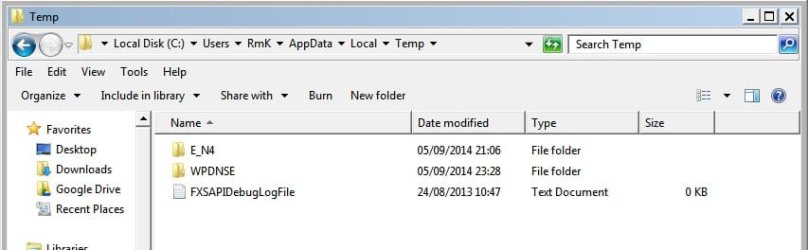
This is the path to the temporary file: C:Users\RMK|AppData\Local\Temp\tsiVi032.dll

Nothing found: Temp.jpg

Download TFC by Old Timer TFC - Temp File Cleaner by OldTimer - Geeks to Go Forum to a clean flash drive.


Plug the drive in the infected machine, right click (TFC.exe) on the drive and choose to run as Administrator.
Save any unsaved work. TFC will close ALL open programs including your browser!

I have no need to open browser in safe mode with no network. I thought you knew by now I can't get into normal windows or safe mode with networking... I realize that you shouldn't bother yourself with remembering so many problems everywhere, but this is like my main problem, no offense :)

Click the Start button to begin the cleaning process and let it run uninterrupted to completion.

Important! Manually reboot the machine to ensure a complete clean.

So I've used it, deleted 420mb or so. Rebooted and here is what I see :) 1409961758539.jpg
No difference so far :cry:
 

My Computer My Computer

Computer type
Laptop
Computer Manufacturer/Model Number
Asus K55VJ
OS
Windows 7 Ultimate x64
CPU
i7-3630QM 2.4GHz
Motherboard
Asus K55V
Memory
6GB
Graphics Card(s)
GeForce GT 635M
Hard Drives
Toshiba 500GB HDD
Antivirus
None.
Browser
Chrome
Last edited:

My Computer My Computer

Computer type
PC/Desktop
Computer Manufacturer/Model Number
Bruce ... somewhere in his 40's
OS
Windows 7 Ultimate 32bit SP1
CPU
Intel(R) Core(TM)2 Quad CPU @ 2.40GHz, 2400 MHz
Motherboard
INTEL/D975XBX2
Memory
4 GB
Graphics Card(s)
ATI Radeon HD 2600 Pro
Monitor(s) Displays
Samsung SyncMaster 914v
Screen Resolution
1280 x 1024
Hard Drives
2/500GB each ... ST3500630AS ATA Device.
One is not connected
PSU
Rocketfish 700 W
Case
G.Skill Gigabyte Chassis
Keyboard
Standard PS/2 Keyboard
Mouse
Microsoft PS/2 Mouse
Internet Speed
DSL
Antivirus
Avira Internet Security
Browser
IE 11
Other Info
ATI HDMI Audio
file folder WPDNSE
WPDNSE stands for Windows Portable Device Namespace extension

File Folder E_N4
BKDR_AGENT.AWGY | Low Risk | Trend Micro Threat Encyclopedia


Did you download or copy an MP3 file recently?

Hmmm, recently - no, about 4 months ago I downloaded and placed some songs on my mp3 which I never plugged again since then. I used Freemake YouTube to mp3 converter.

Folder WPDNSE was empty even before deletion by TFC. And the other folder contained PhyDMACC.dll. All those files were completely wiped out after TFC. So I don't even have a parent folder AppData now.

If what I still can't access my normal windows.
 
Last edited:

My Computer My Computer

Computer type
Laptop
Computer Manufacturer/Model Number
Asus K55VJ
OS
Windows 7 Ultimate x64
CPU
i7-3630QM 2.4GHz
Motherboard
Asus K55V
Memory
6GB
Graphics Card(s)
GeForce GT 635M
Hard Drives
Toshiba 500GB HDD
Antivirus
None.
Browser
Chrome
I think you'd be better off to do a "clean" install ... We're getting no where with this. :(
 

My Computer My Computer

Computer type
PC/Desktop
Computer Manufacturer/Model Number
Bruce ... somewhere in his 40's
OS
Windows 7 Ultimate 32bit SP1
CPU
Intel(R) Core(TM)2 Quad CPU @ 2.40GHz, 2400 MHz
Motherboard
INTEL/D975XBX2
Memory
4 GB
Graphics Card(s)
ATI Radeon HD 2600 Pro
Monitor(s) Displays
Samsung SyncMaster 914v
Screen Resolution
1280 x 1024
Hard Drives
2/500GB each ... ST3500630AS ATA Device.
One is not connected
PSU
Rocketfish 700 W
Case
G.Skill Gigabyte Chassis
Keyboard
Standard PS/2 Keyboard
Mouse
Microsoft PS/2 Mouse
Internet Speed
DSL
Antivirus
Avira Internet Security
Browser
IE 11
Other Info
ATI HDMI Audio
Back
Top