JavaScript is disabled. For a better experience, please enable JavaScript in your browser before proceeding.
You are using an out of date browser. It may not display this or other websites correctly.
You should upgrade or use an
alternative browser .
Solved Problem with my nvidia card!
Hey guys,
Recently i had a problem with my nvidia , Games were open with nvidia but suddenly games doesn't detect it.
My nvidia is Getforce GT 525M
Windows 7 home premium 64bit
I tried to add the games from nvidia control panel but nothing happened
Computer type PC/Desktop Computer Manufacturer/Model Number Dell OS Microsoft Windows 7 Home Premium 64-bit 7601 Multiprocessor Free Service Pack 1 CPU Intel(R) Core(TM) i5-2410M CPU @ 2.30GHz Motherboard Dell Inc. 0FXK2Y Memory 6.00 GB Graphics Card(s) (1) Intel(R) HD Graphics Family (2) NVIDIA GeForce GT 525M Sound Card (1) NVIDIA Virtual Audio Device (Wave Extensible) (WDM) (2 Screen Resolution 0 x 0 x 0 bits (0 colors) @ 0 Hz Hard Drives (1) SAMSUNG HM641JI ATA Device (2) Generic- Multi-Card USB Device
Breaking Bad
Guru
Gold Member
VIP
Computer type PC/Desktop Computer Manufacturer/Model Number Dude Build OS Windows 10 Pro X64 CPU Intel(R) Core(TM) i5-3570K CPU OC@ 4.5GHZ Turbo Motherboard MSI Z77A-G45 Gaming Memory 8.00 GB DDR3 1600Mhz Graphics Card(s) MSI Gaming X GTX 1070 Sound Card Realtek High Definition Monitor(s) Displays Dell S23O9W, HP L1710 Screen Resolution DELL-1920 x 1080 HP-1280 x1024 Hard Drives Crucial m4 256 SSD, WD 7200RPM 500GB WD 1TB PSU Seasonic X650 GOLD Case Zalman Z12 Cooling Antec Kuhler 920 Keyboard Logitech Mouse MSI DS100 Interceptor Internet Speed 50 down and 5 up Antivirus MSE Browser Chrome, IE 11 Other Info Logitech X-620 Speakers
New member
Thread Starter
Thanks For Reply
!
I Tried that way to open the game with Nvidia (run with graphics processor) but no thing change...
I also used driverscanner , it show me that Nvidia is up-to-date but Intel not!!!
My PC Device manager show the intel and Nvidia drivers in Display adapters
and when i run a game it seems to be veeery very slow ,,, and this game was Normal yesterday !!!!
I don't know what happen !! :sarc:
Computer type PC/Desktop Computer Manufacturer/Model Number Dell OS Microsoft Windows 7 Home Premium 64-bit 7601 Multiprocessor Free Service Pack 1 CPU Intel(R) Core(TM) i5-2410M CPU @ 2.30GHz Motherboard Dell Inc. 0FXK2Y Memory 6.00 GB Graphics Card(s) (1) Intel(R) HD Graphics Family (2) NVIDIA GeForce GT 525M Sound Card (1) NVIDIA Virtual Audio Device (Wave Extensible) (WDM) (2 Screen Resolution 0 x 0 x 0 bits (0 colors) @ 0 Hz Hard Drives (1) SAMSUNG HM641JI ATA Device (2) Generic- Multi-Card USB Device
New member
Thread Starter
Thanks For Reply
!
I Tried that way to open the game with Nvidia (run with graphics processor) but no thing change...
I also used driverscanner , it show me that Nvidia is up-to-date but Intel not!!!
My PC Device manager show the intel and Nvidia drivers in Display adapters
and when i run a game it seems to be veeery very slow ,,, and this game was Normal yesterday !!!!
I don't know what happen !! :sarc:
Computer type PC/Desktop Computer Manufacturer/Model Number Dell OS Microsoft Windows 7 Home Premium 64-bit 7601 Multiprocessor Free Service Pack 1 CPU Intel(R) Core(TM) i5-2410M CPU @ 2.30GHz Motherboard Dell Inc. 0FXK2Y Memory 6.00 GB Graphics Card(s) (1) Intel(R) HD Graphics Family (2) NVIDIA GeForce GT 525M Sound Card (1) NVIDIA Virtual Audio Device (Wave Extensible) (WDM) (2 Screen Resolution 0 x 0 x 0 bits (0 colors) @ 0 Hz Hard Drives (1) SAMSUNG HM641JI ATA Device (2) Generic- Multi-Card USB Device
Breaking Bad
Guru
Gold Member
VIP
Fill in your system specs using this, and I will help find the driver for your Intel graphics
:ar:
Upload your System Specs
I would also recommend not using programs like driverscanner, look here
:ar:
Update drivers
Computer type PC/Desktop Computer Manufacturer/Model Number Dude Build OS Windows 10 Pro X64 CPU Intel(R) Core(TM) i5-3570K CPU OC@ 4.5GHZ Turbo Motherboard MSI Z77A-G45 Gaming Memory 8.00 GB DDR3 1600Mhz Graphics Card(s) MSI Gaming X GTX 1070 Sound Card Realtek High Definition Monitor(s) Displays Dell S23O9W, HP L1710 Screen Resolution DELL-1920 x 1080 HP-1280 x1024 Hard Drives Crucial m4 256 SSD, WD 7200RPM 500GB WD 1TB PSU Seasonic X650 GOLD Case Zalman Z12 Cooling Antec Kuhler 920 Keyboard Logitech Mouse MSI DS100 Interceptor Internet Speed 50 down and 5 up Antivirus MSE Browser Chrome, IE 11 Other Info Logitech X-620 Speakers
New member
Thread Starter
Okay i Finished system specs.
Computer type PC/Desktop Computer Manufacturer/Model Number Dell OS Microsoft Windows 7 Home Premium 64-bit 7601 Multiprocessor Free Service Pack 1 CPU Intel(R) Core(TM) i5-2410M CPU @ 2.30GHz Motherboard Dell Inc. 0FXK2Y Memory 6.00 GB Graphics Card(s) (1) Intel(R) HD Graphics Family (2) NVIDIA GeForce GT 525M Sound Card (1) NVIDIA Virtual Audio Device (Wave Extensible) (WDM) (2 Screen Resolution 0 x 0 x 0 bits (0 colors) @ 0 Hz Hard Drives (1) SAMSUNG HM641JI ATA Device (2) Generic- Multi-Card USB Device
Breaking Bad
Guru
Gold Member
VIP
I would go to the dell site for the drivers. What is the model number of your Dell? That is for updating drivers in general. Always best to go to the manufacture site for drivers.
Computer type PC/Desktop Computer Manufacturer/Model Number Dude Build OS Windows 10 Pro X64 CPU Intel(R) Core(TM) i5-3570K CPU OC@ 4.5GHZ Turbo Motherboard MSI Z77A-G45 Gaming Memory 8.00 GB DDR3 1600Mhz Graphics Card(s) MSI Gaming X GTX 1070 Sound Card Realtek High Definition Monitor(s) Displays Dell S23O9W, HP L1710 Screen Resolution DELL-1920 x 1080 HP-1280 x1024 Hard Drives Crucial m4 256 SSD, WD 7200RPM 500GB WD 1TB PSU Seasonic X650 GOLD Case Zalman Z12 Cooling Antec Kuhler 920 Keyboard Logitech Mouse MSI DS100 Interceptor Internet Speed 50 down and 5 up Antivirus MSE Browser Chrome, IE 11 Other Info Logitech X-620 Speakers
New member
Thread Starter
Computer type PC/Desktop Computer Manufacturer/Model Number Dell OS Microsoft Windows 7 Home Premium 64-bit 7601 Multiprocessor Free Service Pack 1 CPU Intel(R) Core(TM) i5-2410M CPU @ 2.30GHz Motherboard Dell Inc. 0FXK2Y Memory 6.00 GB Graphics Card(s) (1) Intel(R) HD Graphics Family (2) NVIDIA GeForce GT 525M Sound Card (1) NVIDIA Virtual Audio Device (Wave Extensible) (WDM) (2 Screen Resolution 0 x 0 x 0 bits (0 colors) @ 0 Hz Hard Drives (1) SAMSUNG HM641JI ATA Device (2) Generic- Multi-Card USB Device
Breaking Bad
Guru
Gold Member
VIP
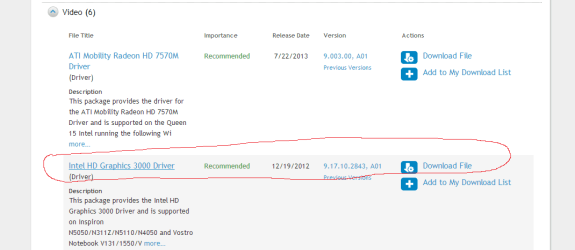
Okay, you need the driver from here
:ar:
Dell Drivers
Get the intel HD 3000 I circled in this pic
Computer type PC/Desktop Computer Manufacturer/Model Number Dude Build OS Windows 10 Pro X64 CPU Intel(R) Core(TM) i5-3570K CPU OC@ 4.5GHZ Turbo Motherboard MSI Z77A-G45 Gaming Memory 8.00 GB DDR3 1600Mhz Graphics Card(s) MSI Gaming X GTX 1070 Sound Card Realtek High Definition Monitor(s) Displays Dell S23O9W, HP L1710 Screen Resolution DELL-1920 x 1080 HP-1280 x1024 Hard Drives Crucial m4 256 SSD, WD 7200RPM 500GB WD 1TB PSU Seasonic X650 GOLD Case Zalman Z12 Cooling Antec Kuhler 920 Keyboard Logitech Mouse MSI DS100 Interceptor Internet Speed 50 down and 5 up Antivirus MSE Browser Chrome, IE 11 Other Info Logitech X-620 Speakers
New member
Thread Starter
Ok should i uninstall any thing first ? (driver or something like that)
Computer type PC/Desktop Computer Manufacturer/Model Number Dell OS Microsoft Windows 7 Home Premium 64-bit 7601 Multiprocessor Free Service Pack 1 CPU Intel(R) Core(TM) i5-2410M CPU @ 2.30GHz Motherboard Dell Inc. 0FXK2Y Memory 6.00 GB Graphics Card(s) (1) Intel(R) HD Graphics Family (2) NVIDIA GeForce GT 525M Sound Card (1) NVIDIA Virtual Audio Device (Wave Extensible) (WDM) (2 Screen Resolution 0 x 0 x 0 bits (0 colors) @ 0 Hz Hard Drives (1) SAMSUNG HM641JI ATA Device (2) Generic- Multi-Card USB Device
Breaking Bad
Guru
Gold Member
VIP
Download the driver, it should work. I meant to ask seeing this
and when i run a game it seems to be veeery very slow ,,, and this game was Normal yesterday !!!!
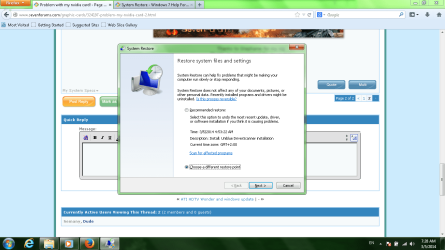
Have you installed and software or made changes since yesterday? If so a system restore can take it back to where it was working good
:ar:
System restore
What game are you running that is having problems?
Computer type PC/Desktop Computer Manufacturer/Model Number Dude Build OS Windows 10 Pro X64 CPU Intel(R) Core(TM) i5-3570K CPU OC@ 4.5GHZ Turbo Motherboard MSI Z77A-G45 Gaming Memory 8.00 GB DDR3 1600Mhz Graphics Card(s) MSI Gaming X GTX 1070 Sound Card Realtek High Definition Monitor(s) Displays Dell S23O9W, HP L1710 Screen Resolution DELL-1920 x 1080 HP-1280 x1024 Hard Drives Crucial m4 256 SSD, WD 7200RPM 500GB WD 1TB PSU Seasonic X650 GOLD Case Zalman Z12 Cooling Antec Kuhler 920 Keyboard Logitech Mouse MSI DS100 Interceptor Internet Speed 50 down and 5 up Antivirus MSE Browser Chrome, IE 11 Other Info Logitech X-620 Speakers
New member
Thread Starter
Yes i Downloaded Movie maker, and adobe after effects CS6 ....
Computer type PC/Desktop Computer Manufacturer/Model Number Dell OS Microsoft Windows 7 Home Premium 64-bit 7601 Multiprocessor Free Service Pack 1 CPU Intel(R) Core(TM) i5-2410M CPU @ 2.30GHz Motherboard Dell Inc. 0FXK2Y Memory 6.00 GB Graphics Card(s) (1) Intel(R) HD Graphics Family (2) NVIDIA GeForce GT 525M Sound Card (1) NVIDIA Virtual Audio Device (Wave Extensible) (WDM) (2 Screen Resolution 0 x 0 x 0 bits (0 colors) @ 0 Hz Hard Drives (1) SAMSUNG HM641JI ATA Device (2) Generic- Multi-Card USB Device
Breaking Bad
Guru
Gold Member
VIP
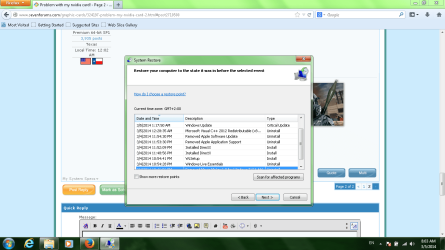
I would apply a system restore prior to those changes. If that fixes the game issues, then you can try to install the programs again, one at a time to monitor if it changes the gaming performance again.
Computer type PC/Desktop Computer Manufacturer/Model Number Dude Build OS Windows 10 Pro X64 CPU Intel(R) Core(TM) i5-3570K CPU OC@ 4.5GHZ Turbo Motherboard MSI Z77A-G45 Gaming Memory 8.00 GB DDR3 1600Mhz Graphics Card(s) MSI Gaming X GTX 1070 Sound Card Realtek High Definition Monitor(s) Displays Dell S23O9W, HP L1710 Screen Resolution DELL-1920 x 1080 HP-1280 x1024 Hard Drives Crucial m4 256 SSD, WD 7200RPM 500GB WD 1TB PSU Seasonic X650 GOLD Case Zalman Z12 Cooling Antec Kuhler 920 Keyboard Logitech Mouse MSI DS100 Interceptor Internet Speed 50 down and 5 up Antivirus MSE Browser Chrome, IE 11 Other Info Logitech X-620 Speakers
New member
Thread Starter
Which one is better to choose ??
Sorry i forget to told you that the windows updated and this is issue arise
Computer type PC/Desktop Computer Manufacturer/Model Number Dell OS Microsoft Windows 7 Home Premium 64-bit 7601 Multiprocessor Free Service Pack 1 CPU Intel(R) Core(TM) i5-2410M CPU @ 2.30GHz Motherboard Dell Inc. 0FXK2Y Memory 6.00 GB Graphics Card(s) (1) Intel(R) HD Graphics Family (2) NVIDIA GeForce GT 525M Sound Card (1) NVIDIA Virtual Audio Device (Wave Extensible) (WDM) (2 Screen Resolution 0 x 0 x 0 bits (0 colors) @ 0 Hz Hard Drives (1) SAMSUNG HM641JI ATA Device (2) Generic- Multi-Card USB Device
Breaking Bad
Guru
Gold Member
VIP
Try the one in that pic, the recommended one
Computer type PC/Desktop Computer Manufacturer/Model Number Dude Build OS Windows 10 Pro X64 CPU Intel(R) Core(TM) i5-3570K CPU OC@ 4.5GHZ Turbo Motherboard MSI Z77A-G45 Gaming Memory 8.00 GB DDR3 1600Mhz Graphics Card(s) MSI Gaming X GTX 1070 Sound Card Realtek High Definition Monitor(s) Displays Dell S23O9W, HP L1710 Screen Resolution DELL-1920 x 1080 HP-1280 x1024 Hard Drives Crucial m4 256 SSD, WD 7200RPM 500GB WD 1TB PSU Seasonic X650 GOLD Case Zalman Z12 Cooling Antec Kuhler 920 Keyboard Logitech Mouse MSI DS100 Interceptor Internet Speed 50 down and 5 up Antivirus MSE Browser Chrome, IE 11 Other Info Logitech X-620 Speakers
New member
Thread Starter
Nothing happen only driverscanner return back ! ...... I think it's better to choose the other option and choose before the windows updated ! what do you think ?
Computer type PC/Desktop Computer Manufacturer/Model Number Dell OS Microsoft Windows 7 Home Premium 64-bit 7601 Multiprocessor Free Service Pack 1 CPU Intel(R) Core(TM) i5-2410M CPU @ 2.30GHz Motherboard Dell Inc. 0FXK2Y Memory 6.00 GB Graphics Card(s) (1) Intel(R) HD Graphics Family (2) NVIDIA GeForce GT 525M Sound Card (1) NVIDIA Virtual Audio Device (Wave Extensible) (WDM) (2 Screen Resolution 0 x 0 x 0 bits (0 colors) @ 0 Hz Hard Drives (1) SAMSUNG HM641JI ATA Device (2) Generic- Multi-Card USB Device
Breaking Bad
Guru
Gold Member
VIP
Try the other one, and uninstall driverscanner
Computer type PC/Desktop Computer Manufacturer/Model Number Dude Build OS Windows 10 Pro X64 CPU Intel(R) Core(TM) i5-3570K CPU OC@ 4.5GHZ Turbo Motherboard MSI Z77A-G45 Gaming Memory 8.00 GB DDR3 1600Mhz Graphics Card(s) MSI Gaming X GTX 1070 Sound Card Realtek High Definition Monitor(s) Displays Dell S23O9W, HP L1710 Screen Resolution DELL-1920 x 1080 HP-1280 x1024 Hard Drives Crucial m4 256 SSD, WD 7200RPM 500GB WD 1TB PSU Seasonic X650 GOLD Case Zalman Z12 Cooling Antec Kuhler 920 Keyboard Logitech Mouse MSI DS100 Interceptor Internet Speed 50 down and 5 up Antivirus MSE Browser Chrome, IE 11 Other Info Logitech X-620 Speakers
New member
Thread Starter
The system restored to the time before i deleted Movie maker ,,
Computer type PC/Desktop Computer Manufacturer/Model Number Dell OS Microsoft Windows 7 Home Premium 64-bit 7601 Multiprocessor Free Service Pack 1 CPU Intel(R) Core(TM) i5-2410M CPU @ 2.30GHz Motherboard Dell Inc. 0FXK2Y Memory 6.00 GB Graphics Card(s) (1) Intel(R) HD Graphics Family (2) NVIDIA GeForce GT 525M Sound Card (1) NVIDIA Virtual Audio Device (Wave Extensible) (WDM) (2 Screen Resolution 0 x 0 x 0 bits (0 colors) @ 0 Hz Hard Drives (1) SAMSUNG HM641JI ATA Device (2) Generic- Multi-Card USB Device
New member
Thread Starter
Can i remove all windows update that done .... Cause i think they made the problem?
Computer type PC/Desktop Computer Manufacturer/Model Number Dell OS Microsoft Windows 7 Home Premium 64-bit 7601 Multiprocessor Free Service Pack 1 CPU Intel(R) Core(TM) i5-2410M CPU @ 2.30GHz Motherboard Dell Inc. 0FXK2Y Memory 6.00 GB Graphics Card(s) (1) Intel(R) HD Graphics Family (2) NVIDIA GeForce GT 525M Sound Card (1) NVIDIA Virtual Audio Device (Wave Extensible) (WDM) (2 Screen Resolution 0 x 0 x 0 bits (0 colors) @ 0 Hz Hard Drives (1) SAMSUNG HM641JI ATA Device (2) Generic- Multi-Card USB Device
Breaking Bad
Guru
Gold Member
VIP
You would have to go back to and older restore point. Windows updates create restore points.
Computer type PC/Desktop Computer Manufacturer/Model Number Dude Build OS Windows 10 Pro X64 CPU Intel(R) Core(TM) i5-3570K CPU OC@ 4.5GHZ Turbo Motherboard MSI Z77A-G45 Gaming Memory 8.00 GB DDR3 1600Mhz Graphics Card(s) MSI Gaming X GTX 1070 Sound Card Realtek High Definition Monitor(s) Displays Dell S23O9W, HP L1710 Screen Resolution DELL-1920 x 1080 HP-1280 x1024 Hard Drives Crucial m4 256 SSD, WD 7200RPM 500GB WD 1TB PSU Seasonic X650 GOLD Case Zalman Z12 Cooling Antec Kuhler 920 Keyboard Logitech Mouse MSI DS100 Interceptor Internet Speed 50 down and 5 up Antivirus MSE Browser Chrome, IE 11 Other Info Logitech X-620 Speakers



 !
!