Problem with nokia 6120 classic

aredy

New member
Local time
11:16 AM
Messages
10
I'm using nokia pc suite 7.1.40.6, but i can;t use one touch access on win 7.

Failed to connect to the network! The modem may be used by another application or the modem may not be configured properly.

But when I'm using other machine running win xp sp3. I can connect to the internet using one touch access.

Hope someone will guide me on this.
 

My Computer

OS
windows 7
Hello Aredy, welcome to the Seven Forums.

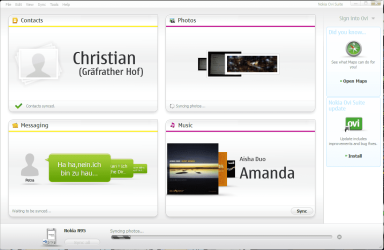
Nokia is moving away from PC Suite and concentrating more on Nokia Ovi Suite. You should download and install it. It is fully Windows 7 compatible, I have never had any problems to connect to internet using Ovi Suite.

Kari

P.S. Completely trivial, unimportant information: Ovi, the word used in Ovi Suite and in the name of Nokia's webstore is a Finnish word meaning a door. Nokia is a town in Finland where the company was founded 1865 as a pulp mill.
 

Attachments

  • Nokia_Ovi.png
    Nokia_Ovi.png
    58 KB · Views: 205

My Computer

Computer type
Laptop
Computer Manufacturer/Model Number
HP ENVY 17-1150eg
OS
Windows 10 Pro x64 EN-GB
CPU
1.6 GHz Intel Core i7-720QM Processor
Memory
6 GB
Graphics Card(s)
ATI Mobility Radeon HD 5850 Graphics
Sound Card
Beats sound system with integrated subwoofer
Monitor(s) Displays
17" laptop display, 22" LED and 32" Full HD TV through HDMI
Screen Resolution
1600*900 (1), 1920*1080 (2&3)
Hard Drives
Internal: 2 x 500 GB SATA Hard Disk Drive 7200 rpm
External: 2TB for backups, 3TB USB3 network drive for media
Cooling
As Envy runs a bit warm, I have it on a Cooler Master pad
Keyboard
Logitech diNovo Media Desktop Laser (bluetooth)
Mouse
Logitech Performance Mouse MX
Internet Speed
50/10 Mbps VDSL
Antivirus
Windows Defender 4.3.9431.0
Browser
Maxthon 3.5.2., IE11
hello kari,
thanks for replying and give me that info.
I'm download it right away :D
 

My Computer

OS
windows 7
i've installed Ovi suite 2.1 but still can make my 6120c as a modem.:(
 

My Computer

OS
windows 7
Try to uninstall everything Nokia-related, reboot and re-install Ovi Suite.

Turn Bluetooth off on your phone, remember not to connect your phone to computer before installation asks it. When installation asks you to connect your phone, use USB cable (not Bluetooth) and choose from your phone 'PC Suite' as connection mode.

Kari
 

Attachments

  • Nokia_Uninstall.png
    Nokia_Uninstall.png
    57.8 KB · Views: 140

My Computer

Computer type
Laptop
Computer Manufacturer/Model Number
HP ENVY 17-1150eg
OS
Windows 10 Pro x64 EN-GB
CPU
1.6 GHz Intel Core i7-720QM Processor
Memory
6 GB
Graphics Card(s)
ATI Mobility Radeon HD 5850 Graphics
Sound Card
Beats sound system with integrated subwoofer
Monitor(s) Displays
17" laptop display, 22" LED and 32" Full HD TV through HDMI
Screen Resolution
1600*900 (1), 1920*1080 (2&3)
Hard Drives
Internal: 2 x 500 GB SATA Hard Disk Drive 7200 rpm
External: 2TB for backups, 3TB USB3 network drive for media
Cooling
As Envy runs a bit warm, I have it on a Cooler Master pad
Keyboard
Logitech diNovo Media Desktop Laser (bluetooth)
Mouse
Logitech Performance Mouse MX
Internet Speed
50/10 Mbps VDSL
Antivirus
Windows Defender 4.3.9431.0
Browser
Maxthon 3.5.2., IE11
I've uninstall everything and even use Pc suite cleaner 7.1.

restart my notebook

install ovi suite 2.1

restart my notebook

and still can make my 6120c as a modem
 

My Computer

OS
windows 7
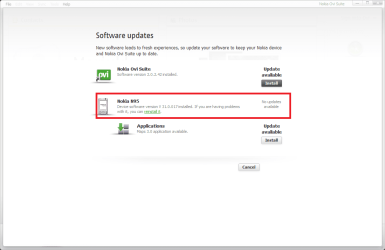
Have you updated your phone's firmware? Connect your phone using USB cable, click Tools > Software Updates. If the phone is up to date, it tells you No updates available. If it needs to be updated, click the update / install button and follow the orders.

Notice that phone firmware update resets the phone to factory defaults, so if you don't want to lose your text messages, calendar and contacts you have to first make a backup (Tools > Backup). Also remove any memory cards before updating the firmware.

Kari
 

Attachments

  • Nokia_Update.png
    Nokia_Update.png
    20.7 KB · Views: 72

My Computer

Computer type
Laptop
Computer Manufacturer/Model Number
HP ENVY 17-1150eg
OS
Windows 10 Pro x64 EN-GB
CPU
1.6 GHz Intel Core i7-720QM Processor
Memory
6 GB
Graphics Card(s)
ATI Mobility Radeon HD 5850 Graphics
Sound Card
Beats sound system with integrated subwoofer
Monitor(s) Displays
17" laptop display, 22" LED and 32" Full HD TV through HDMI
Screen Resolution
1600*900 (1), 1920*1080 (2&3)
Hard Drives
Internal: 2 x 500 GB SATA Hard Disk Drive 7200 rpm
External: 2TB for backups, 3TB USB3 network drive for media
Cooling
As Envy runs a bit warm, I have it on a Cooler Master pad
Keyboard
Logitech diNovo Media Desktop Laser (bluetooth)
Mouse
Logitech Performance Mouse MX
Internet Speed
50/10 Mbps VDSL
Antivirus
Windows Defender 4.3.9431.0
Browser
Maxthon 3.5.2., IE11
there is no update for me since my firmware already V 06.01
 

Attachments

  • ovi.jpg
    ovi.jpg
    24.4 KB · Views: 44

My Computer

OS
windows 7
Strange.

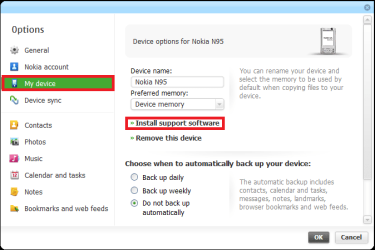
OK, next think to check is that your phone's PC Suite & Ovi Suite support is installed and up to date.

Connect the phone using USB cable. Go to Tools > Options, choose My Device and click Install support software:

Nokia_Install_Support.png

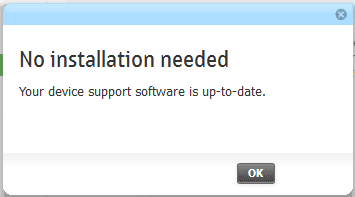
If the support software in your phone is up to date, you get this:

Nokia_Install_Support_2.png

If not, follow the instructions given on screen. While you check this, I'll look if I can figure still something out.

Kari
 

My Computer

Computer type
Laptop
Computer Manufacturer/Model Number
HP ENVY 17-1150eg
OS
Windows 10 Pro x64 EN-GB
CPU
1.6 GHz Intel Core i7-720QM Processor
Memory
6 GB
Graphics Card(s)
ATI Mobility Radeon HD 5850 Graphics
Sound Card
Beats sound system with integrated subwoofer
Monitor(s) Displays
17" laptop display, 22" LED and 32" Full HD TV through HDMI
Screen Resolution
1600*900 (1), 1920*1080 (2&3)
Hard Drives
Internal: 2 x 500 GB SATA Hard Disk Drive 7200 rpm
External: 2TB for backups, 3TB USB3 network drive for media
Cooling
As Envy runs a bit warm, I have it on a Cooler Master pad
Keyboard
Logitech diNovo Media Desktop Laser (bluetooth)
Mouse
Logitech Performance Mouse MX
Internet Speed
50/10 Mbps VDSL
Antivirus
Windows Defender 4.3.9431.0
Browser
Maxthon 3.5.2., IE11
my device support software is up to date
 

My Computer

OS
windows 7
OK. I reinstalled Ovi Suite and tested everything. I uninstalled and reinstalled it five times, the result was always the same so I believe this works also for you:

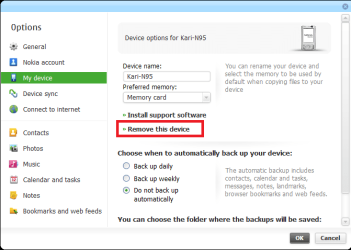
  1. Go to Tools > Options
  2. Choose My Device, click Remove this device:
    Nokia_Remove_Device.png
    .
  3. Reconnect your phone. Do it two times, first connect using USB, then connect using Bluetooth
  4. Go to Tools > Connect to Internet:
    Nokia_connect_1.png
    .
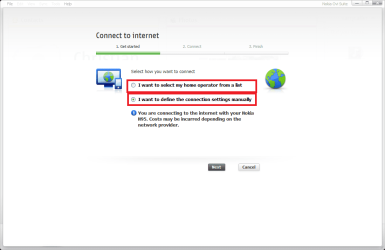
  5. Select one of two options:
    Nokia_connect_2.png
    .
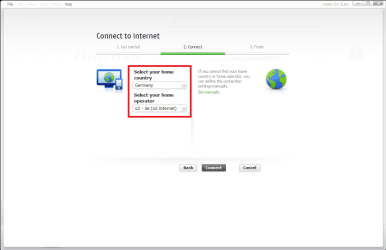
  6. If you selected the operator list, choose your country and operator from the drop down menus:
    Nokia_connect_3.png
    .
  7. If you selected to define access point manually, be sure you enter a valid and existing access point which is already defined in your phone and type the name exactly as it is written in your phone's list of access points. Leave the user name and password fields empty:
    Nokia_connect_4.png
    .
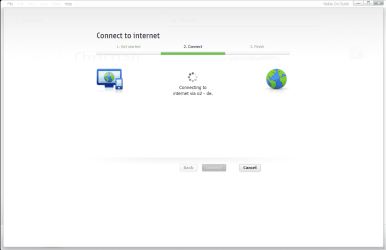
  8. Click Next, Ovi Suite tries to connect to Internet using the access point you defined:
    Nokia_connect_5.png
    .
  9. For some reason I noticed the connection always fails first time. If it fails, click Cancel and close Ovi Suite. Close it completely, not just minimize it to notification area
  10. Turn your phone off, wait a couple of seconds and turn it on again
  11. Repeat the above told procedure starting this time from point 4
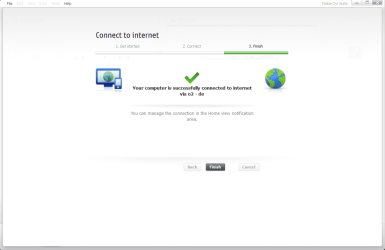
  12. You should now get the internet connection:
    Nokia_connect_6.png

I got it to work with two different Nokia phones, doing exactly as told above.

Good luck!

Kari
 

My Computer

Computer type
Laptop
Computer Manufacturer/Model Number
HP ENVY 17-1150eg
OS
Windows 10 Pro x64 EN-GB
CPU
1.6 GHz Intel Core i7-720QM Processor
Memory
6 GB
Graphics Card(s)
ATI Mobility Radeon HD 5850 Graphics
Sound Card
Beats sound system with integrated subwoofer
Monitor(s) Displays
17" laptop display, 22" LED and 32" Full HD TV through HDMI
Screen Resolution
1600*900 (1), 1920*1080 (2&3)
Hard Drives
Internal: 2 x 500 GB SATA Hard Disk Drive 7200 rpm
External: 2TB for backups, 3TB USB3 network drive for media
Cooling
As Envy runs a bit warm, I have it on a Cooler Master pad
Keyboard
Logitech diNovo Media Desktop Laser (bluetooth)
Mouse
Logitech Performance Mouse MX
Internet Speed
50/10 Mbps VDSL
Antivirus
Windows Defender 4.3.9431.0
Browser
Maxthon 3.5.2., IE11
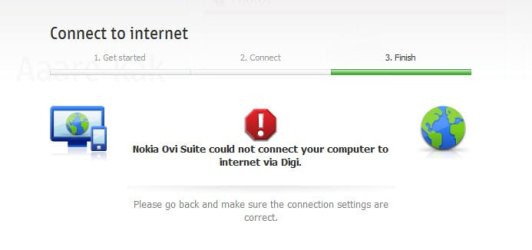
I've follow your instruction precisely and still can't get to the internet
 

Attachments

  • ovi2.jpg
    ovi2.jpg
    14.2 KB · Views: 2

My Computer

OS
windows 7
I really can not understand. Did you reboot your phone after connecting it with Ovi Suite?

Kari

P.S. You could check the Nokia Support Forums if you could find some help. I have nothing more for you to try.
 

My Computer

Computer type
Laptop
Computer Manufacturer/Model Number
HP ENVY 17-1150eg
OS
Windows 10 Pro x64 EN-GB
CPU
1.6 GHz Intel Core i7-720QM Processor
Memory
6 GB
Graphics Card(s)
ATI Mobility Radeon HD 5850 Graphics
Sound Card
Beats sound system with integrated subwoofer
Monitor(s) Displays
17" laptop display, 22" LED and 32" Full HD TV through HDMI
Screen Resolution
1600*900 (1), 1920*1080 (2&3)
Hard Drives
Internal: 2 x 500 GB SATA Hard Disk Drive 7200 rpm
External: 2TB for backups, 3TB USB3 network drive for media
Cooling
As Envy runs a bit warm, I have it on a Cooler Master pad
Keyboard
Logitech diNovo Media Desktop Laser (bluetooth)
Mouse
Logitech Performance Mouse MX
Internet Speed
50/10 Mbps VDSL
Antivirus
Windows Defender 4.3.9431.0
Browser
Maxthon 3.5.2., IE11
yeah i already did all the things that you've told me.

it's ok i already post something there but doesnt have any replies yet.

thanks for you help kari
 

My Computer

OS
windows 7
Nothing to thank, I haven't been able to help you. I hope you find a solution.

Kari
 

My Computer

Computer type
Laptop
Computer Manufacturer/Model Number
HP ENVY 17-1150eg
OS
Windows 10 Pro x64 EN-GB
CPU
1.6 GHz Intel Core i7-720QM Processor
Memory
6 GB
Graphics Card(s)
ATI Mobility Radeon HD 5850 Graphics
Sound Card
Beats sound system with integrated subwoofer
Monitor(s) Displays
17" laptop display, 22" LED and 32" Full HD TV through HDMI
Screen Resolution
1600*900 (1), 1920*1080 (2&3)
Hard Drives
Internal: 2 x 500 GB SATA Hard Disk Drive 7200 rpm
External: 2TB for backups, 3TB USB3 network drive for media
Cooling
As Envy runs a bit warm, I have it on a Cooler Master pad
Keyboard
Logitech diNovo Media Desktop Laser (bluetooth)
Mouse
Logitech Performance Mouse MX
Internet Speed
50/10 Mbps VDSL
Antivirus
Windows Defender 4.3.9431.0
Browser
Maxthon 3.5.2., IE11
now i think this is not a problem from my device.

i've test using other machines using win 7, it works well.

i try to use usb modem at my notebook it still return the same error.

is there any how i can fix this. it hard for me to do my work without accesing the internet.
 

My Computer

OS
windows 7
hy :)
-uninstall all nokia drivers and softwares (use revo uninstaller)
-uninstall your secure softwares
-download and install Kaspersky Internet Security 2010 Trial
-scan your pc with Kaspersky
-if find infection remove it
-uninstall Kaspersky Internet Security 2010 Trial
-download, install and clean your pc with ccleaner
-start-run-msconfig.exe and press enter
-in the window select services , and enable all
-restart pc
-enable pc suite mode in your phone
-install nokia pc suite
-if pc suite want restart, enable it
-continue instalation (use cable connection)
-restart pc
-done

p.s.: send me reply, thnx :) sorry for my incorrect composition. i am from slovakia, and a speak hungarian
 
Last edited:

My Computer

OS
Windows 7 Ultimate
thanks for your reply.
my last option was to format my machine.
and it already solve.

i believe this thing occur because i'm upgrading from vista.

but my machine had a fresh installation.
 

My Computer

OS
windows 7
Back
Top