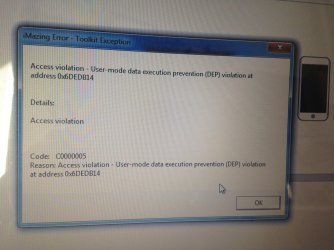
Problem with program related to DEP

djzero83

New member
Local time
4:35 AM
Messages
11
Hello to all. I hope it is the right section to post this question and I thank everyone in advance for the help. I have Windows 7 Ultimate 32 bit with Service Pack 1. I have a problem with a program: Imazing. The above program is used to manage all the contents of the iphone and specifically the problem regarding the transfer of the app. After backing up apps with Imazing, the program creates backups with the .imazingapp extension and can only be restored with the above program. When I try to reinstall any app, the program crashes giving me similar errors (only the string changes). I enclose the error images. I also contacted the assistance of the software giving me several directions like trying to reinstall the app by restarting PC and iPhone, disabling antivirus and antimalware, asking if I was the administrator of the account (and of course I am and I have full rights) and finally making me install the following microsoft hotfix
https://support.microsoft.com/en-us/...ws-7-or-window
. Nothing helped me to solve the problem of error. I also tried to insert the program in the exclusions of the "Data execution protection (DEP)" tab, giving me the error "This program must be executed with data execution protection enabled, it can not be disabled for this program". Do you have any ideas about it? Thank you so much to everyone for your help.
 

Attachments

  • IMG_5736.jpg
    IMG_5736.jpg
    1.4 MB · Views: 1
  • IMG_5738.jpg
    IMG_5738.jpg
    1.2 MB · Views: 1

My Computer

Computer type
Laptop
Computer Manufacturer/Model Number
Sony Vaio VGN-FZ38M
OS
Windows 7 Ultimate 32 bit
What version of imazing do you have installed on your computer? Version 2.4.7 is the latest and is compatable with Windows 7. DEP is usually a problem for versions of software meant for older operating systems.
 

My Computer

Computer type
PC/Desktop
OS
Windows 7 x64, Vista x64, 8.1 smartphone
CPU
Intel E8400 65W 64-bit
Motherboard
Gigabyte EP45-UD3LR
Memory
DDR2 2 x 2GB, 1GB x 2
Graphics Card(s)
XFX Radeon HD5750
Sound Card
AMD High Definition Audio; Realtek High Definition Audio
Monitor(s) Displays
iiyama prolite X2377HDS
Screen Resolution
1920 x 1080
Hard Drives
500GB 7200 rpm Seagate ST3500413AS 16MB, 500GB 5400 rpm Toshiba MQ02ABF050H 32MB, 200GB 7200 rpm Seagate ST3200820AS 8MB, 2TB 7200 rpm Western Digital WD20EZRX 64MB
PSU
Enermax Liberty Modular
Case
Antec P193 Midi Tower
Keyboard
Mionix ZIBAL 60
Mouse
Razer USB 2.0 Diamondback Mouse or Huion Graphics Tablet
Browser
Internet Explorer, Lunascape, Firefox, Opera, Avast Safezone
What version of imazing do you have installed on your computer? Version 2.4.7 is the latest and is compatable with Windows 7. DEP is usually a problem for versions of software meant for older operating systems.

I have version 2.4.7. I tried to disable DEP with prompt command but after restart pc blue screen comes. Also in safe mode. I can't reactive dep and restart pc normally. I tried to restore windows to a previous point but always blue screen. Any suggestion?
 

My Computer

Computer type
Laptop
Computer Manufacturer/Model Number
Sony Vaio VGN-FZ38M
OS
Windows 7 Ultimate 32 bit
Hello djzero83

Which prompt command did you use to deactivate DEP, and what Blue Screen error message did this generate ?

It sounds like a problem with PAE (physical address extension), which is perculiar to 32-bit editions of windows. DEP and PAE parameters interact. Switching on DEP automatically causes PAE to be enabled. However, after switching off DEP on Windows 32-bit, you also need to re-enable PAE.

If you received blue screen error code 0x7b, then PAE is almost certain the problem.

To turn off Data Execution Prevention:
bcdedit /set {current} nx alwaysoff
To Reenable Physical Address Extension:
bcdedit /set {current} pae foreceenable
Source:
Prevent BSOD when disabling DEP on 32 bit Windows 7
Prevent BSOD when disabling DEP on 32 bit Windows 7 | All Things I Know About Windows
See also:
Physical Address Extension
Physical Address Extension (Windows)
Boot parameters to Configure DEP and PAE
Boot Parameters to Configure DEP and PAE | Microsoft Docs
 

My Computer

Computer type
PC/Desktop
OS
Windows 7 x64, Vista x64, 8.1 smartphone
CPU
Intel E8400 65W 64-bit
Motherboard
Gigabyte EP45-UD3LR
Memory
DDR2 2 x 2GB, 1GB x 2
Graphics Card(s)
XFX Radeon HD5750
Sound Card
AMD High Definition Audio; Realtek High Definition Audio
Monitor(s) Displays
iiyama prolite X2377HDS
Screen Resolution
1920 x 1080
Hard Drives
500GB 7200 rpm Seagate ST3500413AS 16MB, 500GB 5400 rpm Toshiba MQ02ABF050H 32MB, 200GB 7200 rpm Seagate ST3200820AS 8MB, 2TB 7200 rpm Western Digital WD20EZRX 64MB
PSU
Enermax Liberty Modular
Case
Antec P193 Midi Tower
Keyboard
Mionix ZIBAL 60
Mouse
Razer USB 2.0 Diamondback Mouse or Huion Graphics Tablet
Browser
Internet Explorer, Lunascape, Firefox, Opera, Avast Safezone
Hello djzero83

Which prompt command did you use to deactivate DEP, and what Blue Screen error message did this generate ?

It sounds like a problem with PAE (physical address extension), which is perculiar to 32-bit editions of windows. DEP and PAE parameters interact. Switching on DEP automatically causes PAE to be enabled. However, after switching off DEP on Windows 32-bit, you also need to re-enable PAE.

If you received blue screen error code 0x7b, then PAE is almost certain the problem.

To turn off Data Execution Prevention:
To Reenable Physical Address Extension:
Source:
Prevent BSOD when disabling DEP on 32 bit Windows 7
Prevent BSOD when disabling DEP on 32 bit Windows 7 | All Things I Know About Windows
See also:
Physical Address Extension
Physical Address Extension (Windows)
Boot parameters to Configure DEP and PAE
Boot Parameters to Configure DEP and PAE | Microsoft Docs
I used the command alwaysoff. Now, the unique mode to open prompt command is when windows, next blue screen, try to resolve problem and ask me to open "start recovery tool at startup". Windows fails to resolve the problem and give me a possibility to open advance options. In this windows I have
Recovery at startup
Recovery system configuration
Recovery image system
Windows memory diagnostic
Prompt of commands

I tried to restore windows to a different points but nothing. I tried your method with enforce pae in this prompt of command but nothing (only to be sure, the directory that windows give me in this prompt of command is X and not C and can't modify it. before these options I choosed the unique administrator on pc (me).
The blue screen is referred to Page_fault_in_nonpaged_area and the number of error is 0x00000050 (0x80523110, 0x00000000, 0x810F6676, 0x00000000).
So, I tried to explain all. What do you suggest me? Thank you very very much and sorry for my bad english. Grazie
 

My Computer

Computer type
Laptop
Computer Manufacturer/Model Number
Sony Vaio VGN-FZ38M
OS
Windows 7 Ultimate 32 bit
... Now, the unique mode to open prompt command is when windows, next blue screen, try to resolve problem and ask me to open "start recovery tool at startup". Windows fails to resolve the problem and give me a possibility to open advance options. In this windows I have
Recovery at startup
Recovery system configuration
Recovery image system
Windows memory diagnostic
Prompt of commands

I tried to restore windows to a different points but nothing. I tried your method with enforce pae in this prompt of command but nothing (only to be sure, the directory that windows give me in this prompt of command is X and not C and can't modify it.
...

Sorry to hear that you are still experiencing problems.

Listen carefully. After Booting the computer, can you enter BIOS and find out if the BIOS can still "see" i) the installed RAM, and ii) the installed Disk Drive (system drive)?

If so, then you should run Windows memory diagnostic tool from the Advanced Options given.

When you have done that, you might want to read these instructions, and follow the advice:
How to Recover from an Infinitely Looping Startup Repair Loop
 

My Computer

Computer type
PC/Desktop
OS
Windows 7 x64, Vista x64, 8.1 smartphone
CPU
Intel E8400 65W 64-bit
Motherboard
Gigabyte EP45-UD3LR
Memory
DDR2 2 x 2GB, 1GB x 2
Graphics Card(s)
XFX Radeon HD5750
Sound Card
AMD High Definition Audio; Realtek High Definition Audio
Monitor(s) Displays
iiyama prolite X2377HDS
Screen Resolution
1920 x 1080
Hard Drives
500GB 7200 rpm Seagate ST3500413AS 16MB, 500GB 5400 rpm Toshiba MQ02ABF050H 32MB, 200GB 7200 rpm Seagate ST3200820AS 8MB, 2TB 7200 rpm Western Digital WD20EZRX 64MB
PSU
Enermax Liberty Modular
Case
Antec P193 Midi Tower
Keyboard
Mionix ZIBAL 60
Mouse
Razer USB 2.0 Diamondback Mouse or Huion Graphics Tablet
Browser
Internet Explorer, Lunascape, Firefox, Opera, Avast Safezone
Sorry to hear that you are still experiencing problems.

Listen carefully. After Booting the computer, can you enter BIOS and find out if the BIOS can still "see" i) the installed RAM, and ii) the installed Disk Drive (system drive)?

If so, then you should run Windows memory diagnostic tool from the Advanced Options given.

When you have done that, you might want to read these instructions, and follow the advice:
How to Recover from an Infinitely Looping Startup Repair Loop

So, there aren't problems in windows memory diagnostic tool. I tried your last guide but nothing. Always the os not boot. I have tried to use dvd of windows but when I choose startup restore, windows ask me that impossible to resolve problem. I don't have idea of the problem. I don't won't to reinstall os...it's very stressful...it's impossible that there isn't a mode to reenable dep and pae. Thanks for all your help.

EDIT: I resolved the problem. I find the right command to insert in the prompt of command. The command is:
C:\Windows\system32\bcdedit.exe /set {default} nx OptIn
Now windows restart normally. Tonight I turn off pc and hope tomorrow morning that it will start again.
 
Last edited:

My Computer

Computer type
Laptop
Computer Manufacturer/Model Number
Sony Vaio VGN-FZ38M
OS
Windows 7 Ultimate 32 bit
So, there aren't problems in windows memory diagnostic tool. ...

Good to hear this news from you. Now look in the computers' BIOS and check if the System Drive is still present.

... I tried your last guide but nothing. Always the os not boot. I have tried to use dvd of windows but when I choose startup restore, windows ask me that impossible to resolve problem. I don't have idea of the problem. I don't won't to reinstall os...it's very stressful...it's impossible that there isn't a mode to reenable dep and pae. Thanks for all your help.

You can skip ahead to step 4. In your own time, read and follow steps 4 - 16 of the guide. That way you avoid the clean install or needing to use a DVD. If you are stuck with any step, please let me know - I already know that this type of problem can be stressful to the user. It is possible that there is only one reason the computer fails to Boot.
 

My Computer

Computer type
PC/Desktop
OS
Windows 7 x64, Vista x64, 8.1 smartphone
CPU
Intel E8400 65W 64-bit
Motherboard
Gigabyte EP45-UD3LR
Memory
DDR2 2 x 2GB, 1GB x 2
Graphics Card(s)
XFX Radeon HD5750
Sound Card
AMD High Definition Audio; Realtek High Definition Audio
Monitor(s) Displays
iiyama prolite X2377HDS
Screen Resolution
1920 x 1080
Hard Drives
500GB 7200 rpm Seagate ST3500413AS 16MB, 500GB 5400 rpm Toshiba MQ02ABF050H 32MB, 200GB 7200 rpm Seagate ST3200820AS 8MB, 2TB 7200 rpm Western Digital WD20EZRX 64MB
PSU
Enermax Liberty Modular
Case
Antec P193 Midi Tower
Keyboard
Mionix ZIBAL 60
Mouse
Razer USB 2.0 Diamondback Mouse or Huion Graphics Tablet
Browser
Internet Explorer, Lunascape, Firefox, Opera, Avast Safezone
EDIT: I resolved the problem. I find the right command to insert in the prompt of command. The command is:
C:\Windows\system32\bcdedit.exe /set {default} nx OptIn
Now windows restart normally. Tonight I turn off pc and hope tomorrow morning that it will start again.

You solved it. Please mark this thread as solved.
 

My Computer

Computer type
PC/Desktop
OS
Windows 7 x64, Vista x64, 8.1 smartphone
CPU
Intel E8400 65W 64-bit
Motherboard
Gigabyte EP45-UD3LR
Memory
DDR2 2 x 2GB, 1GB x 2
Graphics Card(s)
XFX Radeon HD5750
Sound Card
AMD High Definition Audio; Realtek High Definition Audio
Monitor(s) Displays
iiyama prolite X2377HDS
Screen Resolution
1920 x 1080
Hard Drives
500GB 7200 rpm Seagate ST3500413AS 16MB, 500GB 5400 rpm Toshiba MQ02ABF050H 32MB, 200GB 7200 rpm Seagate ST3200820AS 8MB, 2TB 7200 rpm Western Digital WD20EZRX 64MB
PSU
Enermax Liberty Modular
Case
Antec P193 Midi Tower
Keyboard
Mionix ZIBAL 60
Mouse
Razer USB 2.0 Diamondback Mouse or Huion Graphics Tablet
Browser
Internet Explorer, Lunascape, Firefox, Opera, Avast Safezone
You solved it. Please mark this thread as solved.

I wait tomorrow morning and if there aren't problem, I close the thread. Thanks for now.
 

My Computer

Computer type
Laptop
Computer Manufacturer/Model Number
Sony Vaio VGN-FZ38M
OS
Windows 7 Ultimate 32 bit
All ok. PC start normally. Wonderful. So, remain only the problem with the program imazing. I don't undestand why the problem with DEP. It's very strange. If anyone have solution for this problem, the thread can be close. Thanks to all for the help.
 

My Computer

Computer type
Laptop
Computer Manufacturer/Model Number
Sony Vaio VGN-FZ38M
OS
Windows 7 Ultimate 32 bit
All the Blue screen errors are now gone, good.

Then the question remains on imazing. How long have you experienced this particular problem with the program? The latest product update was last November, and that is not so very long ago. What has changed on your computer since then?

Makes me wonder what the issue is with DEP? Search Event Viewer for the error signature (Event ID), that might help identify what module is causing the User mode access violation. With this information, you could post here, or send a copy to the software vendor. Once you have more information and a better understanding, you should contact the Vendor and obtain more support from them.
 

My Computer

Computer type
PC/Desktop
OS
Windows 7 x64, Vista x64, 8.1 smartphone
CPU
Intel E8400 65W 64-bit
Motherboard
Gigabyte EP45-UD3LR
Memory
DDR2 2 x 2GB, 1GB x 2
Graphics Card(s)
XFX Radeon HD5750
Sound Card
AMD High Definition Audio; Realtek High Definition Audio
Monitor(s) Displays
iiyama prolite X2377HDS
Screen Resolution
1920 x 1080
Hard Drives
500GB 7200 rpm Seagate ST3500413AS 16MB, 500GB 5400 rpm Toshiba MQ02ABF050H 32MB, 200GB 7200 rpm Seagate ST3200820AS 8MB, 2TB 7200 rpm Western Digital WD20EZRX 64MB
PSU
Enermax Liberty Modular
Case
Antec P193 Midi Tower
Keyboard
Mionix ZIBAL 60
Mouse
Razer USB 2.0 Diamondback Mouse or Huion Graphics Tablet
Browser
Internet Explorer, Lunascape, Firefox, Opera, Avast Safezone
All the Blue screen errors are now gone, good.

Then the question remains on imazing. How long have you experienced this particular problem with the program? The latest product update was last November, and that is not so very long ago. What has changed on your computer since then?

Makes me wonder what the issue is with DEP? Search Event Viewer for the error signature (Event ID), that might help identify what module is causing the User mode access violation. With this information, you could post here, or send a copy to the software vendor. Once you have more information and a better understanding, you should contact the Vendor and obtain more support from them.

Do you believe me if I tell you that I have not found anything in terms of errors in the event viewer? it seems impossible but it is so I checked in all the folders. The only things I found (I started the program a little while ago and made that error come out in order to search for it as the last event) are:

Mbamchameleon Failed to obtain file name information - C00000BE (Event ID 61703)
(which should be referred to MalwareBytes Anti-Malware but I disabled it);
The Application Compatibility Verification service is now in run mode. (Event ID 7036).

There is nothing more. It's possible? Thanks again for everything.
 

My Computer

Computer type
Laptop
Computer Manufacturer/Model Number
Sony Vaio VGN-FZ38M
OS
Windows 7 Ultimate 32 bit
EDIT: I resolved the problem. I find the right command to insert in the prompt of command. The command is:
C:\Windows\system32\bcdedit.exe /set {default} nx OptIn
Now windows restart normally. Tonight I turn off pc and hope tomorrow morning that it will start again.


This was apparently a year and 2 months ago, but still, I joined just to say THANK YOU - this is why I love people who follow up with their solution if they find one! You just saved me from hours of headache doing a total reinstall of Windows on this old Vista laptop (mere days after finishing another one) due to an infinite blue screen loop, apparently caused when I disabled DEP. I thought I'd searched everywhere...it's amazing that there's almost no information about this on the internet. (Seriously, google "bcdedit" "set default nx", with the quotes... 4 entire results!)


Dumb thing is, I was this close to figuring it out before almost giving up but thankfully finding this post. I had the recovery command prompt at startup and was trying c:\Windows\system32\bcdedit /set {current} nx OptIn, based on what I was finding on other sites - but of course, that only works if you're already logged into Windows normally; I needed that elusive {default} keyword.


Anyways, THANK YOU for sharing your solution - just wanted you to know I appreciate it!!
 

My Computer

Computer type
PC/Desktop
Computer Manufacturer/Model Number
two HP laptops(/tablet convertibles) (Win10), one Dell laptop (Vista), one HP desktop (XP)
OS
Two w/Win10 Education 64bit; one w/Vista Ultimate SP2 32bit; and an ancient desktop w/XP SP3 (32bit)
This was apparently a year and 2 months ago, but still, I joined just to say THANK YOU - this is why I love people who follow up with their solution if they find one! You just saved me from hours of headache doing a total reinstall of Windows on this old Vista laptop (mere days after finishing another one) due to an infinite blue screen loop, apparently caused when I disabled DEP. I thought I'd searched everywhere...it's amazing that there's almost no information about this on the internet. (Seriously, google "bcdedit" "set default nx", with the quotes... 4 entire results!)


Dumb thing is, I was this close to figuring it out before almost giving up but thankfully finding this post. I had the recovery command prompt at startup and was trying c:\Windows\system32\bcdedit /set {current} nx OptIn, based on what I was finding on other sites - but of course, that only works if you're already logged into Windows normally; I needed that elusive {default} keyword.


Anyways, THANK YOU for sharing your solution - just wanted you to know I appreciate it!!


I'm glad I helped you. I also searched a lot on the internet and after days and days of research and tests I found the right solution. and I hope it can help other people ;););)
 

My Computer

Computer type
Laptop
Computer Manufacturer/Model Number
Sony Vaio VGN-FZ38M
OS
Windows 7 Ultimate 32 bit
Back
Top