Hi Welcome to Seven Forums
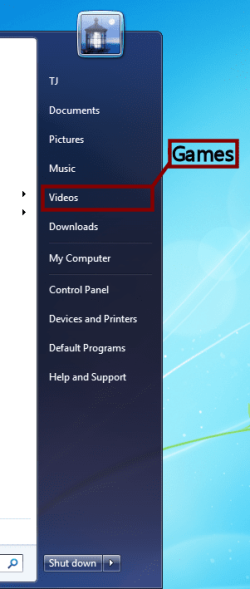
I would start by renaming the item not on the start menu itself,thats just a shortcut, you need to rename the file from start,ie:in your "c" drive,find the begining of the file and rename. I use to rename the file I put there myself,( by just holding shift on it while right clicking,then renaming ) , but it doesnt work on the windows shortcuts. Or better yet,go into start menu's options,and untic the boxes that desplay your "video" ,"downloads" and so on, now create a new file in you "my documents" / user documents" and name it games or that internet downloads. Then move all your game desktp icons to that folder and after that,right click on the folder,and say pin to start menu, this will create a shortcut named "games" in the start menu that you can directly acsess,or do the same with internet downloads, and the first time you are asked where to save a download,just browse for the "internet downloads" on your user documents,and save the file there,it will remember your selection,so all downloads will go there.

 Heres a Snapshot of the problem