Solved Problem with UAC

d4Nk

New member
Local time
12:39 AM
Messages
4
Hi!
I recently started having problems with UAC. Whenever I try to run, install or change anything, the UAC screen pops up, but when I click Yes the UAC pop-up goes away, but the screen stays dark and nothing happens. I can't disable UAC either, since it requiers the admins permission. I am logged in with an admin account since it's the only account on my PC. Please help me! Sorry if it has already been answered.
 

My Computer

Computer type
PC/Desktop
OS
Windows 7 Home Premium 64bit
Try a different (maybe older) videodrivers.

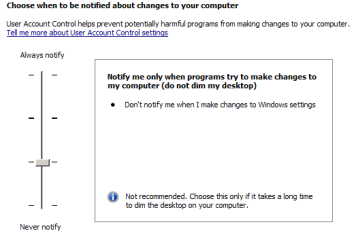
If that fails, try this UAC level:

Capture.PNG
 

My Computer

Computer type
Laptop
Computer Manufacturer/Model Number
Employer provided Dell Latitude
OS
W7 Pro SP1 64bit
CPU
i7
Memory
8GB
Graphics Card(s)
Intel HD Graphics
Hard Drives
crappy SSD
Antivirus
Employer mandated Symantec Endpoint Protection
Browser
Pale Moon 64bit, IE11 64bit & Chrome 64bit
I did not quite understand your situation. I think that I got it now.

Don't let the title of the tutorial below throw you off. You might be able to use those steps to edit the registry to turn off the UAC for a bit http://www.sevenforums.com/tutorials/85657-password-reset.html

308380d1393582234t-uac-security-question-4-never.png
 

My Computer

Computer type
Laptop
Computer Manufacturer/Model Number
Employer provided Dell Latitude
OS
W7 Pro SP1 64bit
CPU
i7
Memory
8GB
Graphics Card(s)
Intel HD Graphics
Hard Drives
crappy SSD
Antivirus
Employer mandated Symantec Endpoint Protection
Browser
Pale Moon 64bit, IE11 64bit & Chrome 64bit
Well I think that I'm in a very bad situation. I looked at the guide, but I don't have a Windows disk nor do I have a disk reader in my PC. I tried opening the Registry Editor by pressing the Start button, typing in Run and then typed in regedit, but it requires admins permission too.
 
Last edited:

My Computer

Computer type
PC/Desktop
OS
Windows 7 Home Premium 64bit
I have fixed the problem by going into Safe Mode and disabling UAC. Thank You UsernameIssues for your help!
 

My Computer

Computer type
PC/Desktop
OS
Windows 7 Home Premium 64bit
I have fixed the problem by going into Safe Mode and disabling UAC. Thank You UsernameIssues for your help!
Wish I had thought of that :-)

You can now change videodrivers.

Don't surf the Internet too much with the UAC turned off.
 

My Computer

Computer type
Laptop
Computer Manufacturer/Model Number
Employer provided Dell Latitude
OS
W7 Pro SP1 64bit
CPU
i7
Memory
8GB
Graphics Card(s)
Intel HD Graphics
Hard Drives
crappy SSD
Antivirus
Employer mandated Symantec Endpoint Protection
Browser
Pale Moon 64bit, IE11 64bit & Chrome 64bit
Back
Top