Solved Problem with USB Wireless dongle

kindeller

New member
Local time
9:59 PM
Messages
25
Location
Belfast, Northern Ireland
Updated issues:

  • USB Wireless dongle/adapter (Tenda W322U v2.0)
  • Struggles to connect on boot, and extends shutdown time
  • Performs poorly at lower varying speeds (30mb connection: 0.2-7mb/s) when connected
  • Struggles to connect, displaying no/missing wireless access points
  • When connecting to access points takes extended amounts of time often locking/freezing win7 wireless windows and properties only.
  • often requires diagnostic to restart the device before it will connect after a system restart.
  • Drivers are up to date
  • Tested on other machines on the same network, works promptly to connect.
  • Dongle works "fine" after connected initially often not displaying the issues found after a restart however suffers poor performance.(see page 3).
  • Attempting to communicate with the device, installing new drivers, uninstalling drivers/device, connecting to new networks, are some of the causes for freezing. Repeatable.
  • Initial freezes often occur on new networks on "attempting to authenticate" phase of the connection process.
  • Attempts to connect to a wireless network, even when the device is unplugged on login?


Original Post

I posted recently on the forum... unfortunately no one replied for some reason but in a last ditch attempt I've narrowed my issue down and am hoping for some guidance. Basically my computer is having issues with numerous devices that are plugged into them. I use a wireless dongle for my internet access, it regularly fails to connect, or takes an extended amount of time to respond often freezing/crashing explorer.exe (this happens with several makes and types of dongles.. other computers on the network connect without issues). If i am connected the device is week and therefore so is signal resulting in slow network/internet speeds.

I also have issues with keyboard and mouse (both USB) failing to respond on start up although all lights are on, they don't function. On most occasions the only way to get the computer to recognize the device is a restart. Finally i've had issues with a self powered (via socket) 2TB HDD, often failing to be recognized by windows.

Very very frustrated, Any help at all or suggestions appreciated!
 
Last edited:

My Computer

OS
Windows 7 Professional 64x (SP1)
CPU
i5 750 @ 2.67GHz (stock)
Motherboard
Gigabyte P55-us3l
Memory
2x2GB (not sure on model) 1333
Graphics Card(s)
Nvidia GTX 275
Monitor(s) Displays
2x Samsung Syncmaster T220
Hard Drives
2TB SAMSUNG F3EG HD203WI SATA2
1TB SAMSUNG HD103SJ SATA F3
Internet Speed
30MB Virgin
Hello Kindeller, Welcome to Sevenforums

I am sorry Myself and others failed to see/respond to your issue. Sometimes threads slip past us on occasion.

First, please Fill out your specs - this tool may help you with that. Click on the links to be directed to where you need to go.

Also, type "devices and printers" into the start search and click the first program at the top. Then type "device manager" into the start search and click the first program at the top. In both of those windows, please let me know if you see any exclaimation marks near any of the devices.
 

My Computer

Computer type
PC/Desktop
Computer Manufacturer/Model Number
Custom Asus Build
OS
Microsoft Windows 8.1 Pro 64-bit
CPU
Intel(R) Core(TM) i3-4130 CPU @ 3.40GHz
Motherboard
B85M-E
Memory
8.00 GB
Graphics Card(s)
None
Sound Card
Realtek High Definition Audio
Monitor(s) Displays
Asus 23.6" Monitor
Screen Resolution
1920 x 1080 x 32 bits (4294967296 colors) @ 60 Hz
Hard Drives
INTEL SSDSC2BW180A4
Samsung SSD 840 PRO Series
PSU
Seasonic S12II-380Bronze
Case
Lian Li
Cooling
Fan, Passive
Keyboard
Logitech K120
Mouse
Microsoft Touch Mouse
Internet Speed
4ms Ping, 19.0 Mbps Download, 19.0 Mbps Upload
Antivirus
Eset Endpoint
Browser
Internet Explorer, Chrome
Thanks for the quick replies, spec has been filled out for you! There are no issues as far as the computer is aware and as far as i can see. I downloaded restarted and removed all drivers for the USB's. As soon as the wireless dongle adapter was plugged in, the device froze the wireless taskbar icon on the bottom right again. With the same issue and resolution (once removed from the USB slot the wireless icon responded - showing access points, then realising the device was removed and closing it again)

Edit: Its worth noting I can almost definitely rule out software or OS issues because I've done a complete fresh OS install in an attempt to resolve any driver/registry and other issues that might conflict. But i'll leave that up to you (:
 
Last edited:

My Computer

OS
Windows 7 Professional 64x (SP1)
CPU
i5 750 @ 2.67GHz (stock)
Motherboard
Gigabyte P55-us3l
Memory
2x2GB (not sure on model) 1333
Graphics Card(s)
Nvidia GTX 275
Monitor(s) Displays
2x Samsung Syncmaster T220
Hard Drives
2TB SAMSUNG F3EG HD203WI SATA2
1TB SAMSUNG HD103SJ SATA F3
Internet Speed
30MB Virgin
You still haven't given out the info DustSailor wanted. (Devices and Printers, Device Manager - whether any ! or ? mark is there) :)

Since you said you had installed Windows afresh, I may ask this question. Did you try your USB devices immediately after the OS Installation + all necessary drivers for the devices + all Windows updates and before installing any software. What was the status? Plus you are now clinging on to just one device the Wireless adapter whereas your first post mentioned other USB devices too. Can you please elaborate what these devices are and whether all of them exhibit the same behaviour after your fresh install?
 

My Computer

OS
Windows 7 Home Premium 32 bit
"There are no issues as far as the computer is aware" - implied no the computer hasn't given any errors in any part of the device manager. Its apparently working properly, however when storage device isnt recognised it does shot an exclamation mark. Yes, and they worked fine for a while. I'm focused on the wireless device because its the one i originally have the problem with, it's also the most prevalent. I have tested the hardware (dongle/harddrive) on other computers on the network that appear to work fine. So in know the hardware is not at fault. My main USB storage device used to transfer around 30mb/s Now can only manage half of that if im lucky. and just the other day upon booting my computer the keyboard and mouse where powered by the computer but unresponsive, a restart fixed the issue.

As i mentioned i originally believed the issue lay with the USB dongle, slowly I've been troubleshooting the device and my computer and sought any help i can find. If theres anything else you want me to rule out before continuing, i'd be happy to try. but as far as im aware this is the USB port issue... but im more than likely wrong so Throw stuff at me to troubleshoot/try.

Thanks for the help so far! (:
 

My Computer

OS
Windows 7 Professional 64x (SP1)
CPU
i5 750 @ 2.67GHz (stock)
Motherboard
Gigabyte P55-us3l
Memory
2x2GB (not sure on model) 1333
Graphics Card(s)
Nvidia GTX 275
Monitor(s) Displays
2x Samsung Syncmaster T220
Hard Drives
2TB SAMSUNG F3EG HD203WI SATA2
1TB SAMSUNG HD103SJ SATA F3
Internet Speed
30MB Virgin
Hello again kindeller,

Just to make sure, exactly which USB devices aren't working? All of them some of the time, or specific ones all the time? You say your wireless adapter is having trouble, is there another USB device also having trouble, or is the trouble with a specific USB port?

Try plugging it in to another USB port to see if a specific port is the problem. Assuming your mouse and keyboard both use USB and work well, try those ports, and plug the devices in to the port that isn't working (or perhaps it is working and this is not the issue).

And you say you have all up to date driver software for all USB devices. I am still curious what devices those are. As well, try Revo uninstaller free (found here) to remove the drivers that are having issues (USB and Wireless adapter) if you can find them to remove them. If not, just use Windows uninstaller. Then download the drivers again (Use a LAN line for internet, or download the wireless driver before you uninstall it so that you don't lose the internet connection). Now here is the tricky part. You might try a little experiement with the wireless driver. Sometimes, if you use a slightly older version of the driver, it can work a little better than the most recent one. So try that and see how it goes.

What antivirus are you using? And are you using just the standard windows firewall? Do you have all windows updates installed?
 

My Computer

Computer type
PC/Desktop
Computer Manufacturer/Model Number
Custom Asus Build
OS
Microsoft Windows 8.1 Pro 64-bit
CPU
Intel(R) Core(TM) i3-4130 CPU @ 3.40GHz
Motherboard
B85M-E
Memory
8.00 GB
Graphics Card(s)
None
Sound Card
Realtek High Definition Audio
Monitor(s) Displays
Asus 23.6" Monitor
Screen Resolution
1920 x 1080 x 32 bits (4294967296 colors) @ 60 Hz
Hard Drives
INTEL SSDSC2BW180A4
Samsung SSD 840 PRO Series
PSU
Seasonic S12II-380Bronze
Case
Lian Li
Cooling
Fan, Passive
Keyboard
Logitech K120
Mouse
Microsoft Touch Mouse
Internet Speed
4ms Ping, 19.0 Mbps Download, 19.0 Mbps Upload
Antivirus
Eset Endpoint
Browser
Internet Explorer, Chrome
Power down your PC and unplug the power supply from the wall outlet. Now press your case power button and hold it down for a couple of seconds. The power LED on your case should lite up and then fad out. Now plug the power supply back into the AC wall plug and power up normally. Now see if things have improved. USB ports have an overload protection circuit to prevent damage from a short or current overload. Once its tripped it can be tricky to get it to reset. Completely draining all power usually does it. It sounds like your USB devices aren't getting enough current or the voltage is low. If this doesn't work I might try swapping in another power supply as a test, if you have one or can borrow one. Also check all your motherboard power cables including any of the 4, 6 or 8 pin aux cables.
 

My Computer

Computer type
PC/Desktop
Computer Manufacturer/Model Number
Home Built
OS
Windows 10 Education 64 bit
CPU
AMD Phenom II X4 980 Black Edition Deneb 3.7GHz
Motherboard
Asus M4N68T-M V2 µATX Motherboard
Memory
8GB 4GBx2 Kingston PC10600 DDR3 1333 Memory
Graphics Card(s)
Zotac NVIDIA Geforce GT640 2 Gig DDR3 PCIe
Sound Card
VIA VT1708s High Definition Audio 8-channel Onboard
Monitor(s) Displays
22" LG E2242 1080p and 2 19" I-INC AG191D
Screen Resolution
1280x1024 - 1920x1080 - 1280x1024
Hard Drives
Crucial M100 256 GB SSD and 500 GB WD Blue SATA
PSU
Thermaltake TR 620
Case
Power Up Black ATX Mid-Tower Case
Cooling
Stock heatsink and fan
Keyboard
Logitech Wireless K350 Wave
Mouse
Logitech Wireless M570 Trackman Wheel
Internet Speed
80 Mbps Down 30 Mbps Up
Antivirus
Windows Defender
Browser
Internet Explorer 11
Other Info
HP DVD1040e Lightscribe - External USB2
Thanks again for the replies and sticking with me, i had a friend of mine who works in It support for a company had a look at it. He says its might not necessarily the USB's because they may run on the same chip/memory block or something to that effect so thats why it knocks out the entire USB functionality while trying to fix the issue. He thinks its something to do with software issues still :/ There is only one that seams to have consistent issues (the wireless dongle). The keyboard, mouse and mass storage are irregular but he thinks they are just coincidences/effects of the dongle problems.

Assuming the issues with the dongle still.. I did try all of the above swapping ports,uninstalling via that clean up wizard, uninstalling via windows devices and printers/device manager and it froze the computer, and wouldn't respond. reinstalling over using both up to date downloaded drivers, and the one supplied on the CD, and letting windows install what one it wants. I've swapped the dongle between computers every one i put in has issues with my system, but works fine on other machines.

We have two identical dongles on two computers on the network (although different machines entirely set up wise). None the less one connects to the network instantly as soon as you sign on, the other (mine) wont connect to a network/cant find the network/locks the computer etc

I've checked drivers, settings, OS updates, Ipconfig info, all of which are similar where necessary... But i have to have missed something :/

I'm the only one on the network that has the issue (even after restarts), so we know the router is fine.

I'm willing to start from scratch and run through all the troubleshooting ideas you have, im fed up with the unreliability its giving me. I'm on a 30mb Connection which I used to get now it ranges from 0.43mb/s to 7mb/s, when it actually finds/stays connected.
 

My Computer

OS
Windows 7 Professional 64x (SP1)
CPU
i5 750 @ 2.67GHz (stock)
Motherboard
Gigabyte P55-us3l
Memory
2x2GB (not sure on model) 1333
Graphics Card(s)
Nvidia GTX 275
Monitor(s) Displays
2x Samsung Syncmaster T220
Hard Drives
2TB SAMSUNG F3EG HD203WI SATA2
1TB SAMSUNG HD103SJ SATA F3
Internet Speed
30MB Virgin
What antivirus are you using? And are you using just the standard windows firewall? Do you have all windows updates installed?
Once more, let me know the answer to these questions. As well, can you post a screenshot of your control Panel Programs?
 

My Computer

Computer type
PC/Desktop
Computer Manufacturer/Model Number
Custom Asus Build
OS
Microsoft Windows 8.1 Pro 64-bit
CPU
Intel(R) Core(TM) i3-4130 CPU @ 3.40GHz
Motherboard
B85M-E
Memory
8.00 GB
Graphics Card(s)
None
Sound Card
Realtek High Definition Audio
Monitor(s) Displays
Asus 23.6" Monitor
Screen Resolution
1920 x 1080 x 32 bits (4294967296 colors) @ 60 Hz
Hard Drives
INTEL SSDSC2BW180A4
Samsung SSD 840 PRO Series
PSU
Seasonic S12II-380Bronze
Case
Lian Li
Cooling
Fan, Passive
Keyboard
Logitech K120
Mouse
Microsoft Touch Mouse
Internet Speed
4ms Ping, 19.0 Mbps Download, 19.0 Mbps Upload
Antivirus
Eset Endpoint
Browser
Internet Explorer, Chrome
What antivirus are you using? And are you using just the standard windows firewall? Do you have all windows updates installed?
Once more, let me know the answer to these questions. As well, can you post a screenshot of your control Panel Programs?

Microsoft Security essentials, as recommended by the house mate who uses the same dongle, and yes Windows firewall.What exactly are you looking a screenshot for? I'm a little confused, just my control panel, my programs list or the control panel -> programs window on its own?

Yes all windows updates are installed (:
 
Last edited:

My Computer

OS
Windows 7 Professional 64x (SP1)
CPU
i5 750 @ 2.67GHz (stock)
Motherboard
Gigabyte P55-us3l
Memory
2x2GB (not sure on model) 1333
Graphics Card(s)
Nvidia GTX 275
Monitor(s) Displays
2x Samsung Syncmaster T220
Hard Drives
2TB SAMSUNG F3EG HD203WI SATA2
1TB SAMSUNG HD103SJ SATA F3
Internet Speed
30MB Virgin
Alright, update Microsoft Security and do a full scan. And The screenshot is of the "uninstall programs" list of all your programs so I can see if there are any suspect looking items. Likely that isn't the case, but it couldn't hurt.

Have you tried another wireless adapter to find out if the problems originate from your current adapter?
 

My Computer

Computer type
PC/Desktop
Computer Manufacturer/Model Number
Custom Asus Build
OS
Microsoft Windows 8.1 Pro 64-bit
CPU
Intel(R) Core(TM) i3-4130 CPU @ 3.40GHz
Motherboard
B85M-E
Memory
8.00 GB
Graphics Card(s)
None
Sound Card
Realtek High Definition Audio
Monitor(s) Displays
Asus 23.6" Monitor
Screen Resolution
1920 x 1080 x 32 bits (4294967296 colors) @ 60 Hz
Hard Drives
INTEL SSDSC2BW180A4
Samsung SSD 840 PRO Series
PSU
Seasonic S12II-380Bronze
Case
Lian Li
Cooling
Fan, Passive
Keyboard
Logitech K120
Mouse
Microsoft Touch Mouse
Internet Speed
4ms Ping, 19.0 Mbps Download, 19.0 Mbps Upload
Antivirus
Eset Endpoint
Browser
Internet Explorer, Chrome
From my testing i keep coming down to communication issues with the device and the computer for example, my computer takes an extended amount of time to also shutdown (something i only realised was an issue when i removed the dongle device as it shutdown) causing a dramatically reduced shutdown time. I tested this with other USB devices which didnt have any effect.

I've tried the same model and a different model with the same results. And im putting together a screenshot by screenshot img slide of what happens. I have however noticed one thing. I tried putting one of the dongles into my laptop which already had a built in wireless card. I disabled the card and put in the dongle, it installed the drivers and presto connected no problem. I replugged it into the PC and i noticed something different.

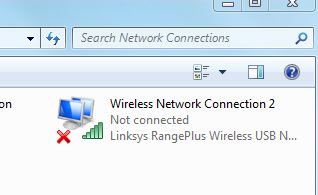
although the device in "network connections" shows as "not connected" it is infact greyed out as if... its disabled. Heres a screenshot of the two in the same state. This is driver installed... with no known networks to connect to or been connected to.

Working fine (laptop)
lnkCO.jpg


Broken (PC)
BZnBY.jpg


Its also worth mentioning.... 6? :/ Also the PC still allows/shows available networks although it looks like this?


Edit: Its difficult to update without access to the net but if i manage to connect i'll update for now i'll run a scan Let me grab some more screens for you (:
 

My Computer

OS
Windows 7 Professional 64x (SP1)
CPU
i5 750 @ 2.67GHz (stock)
Motherboard
Gigabyte P55-us3l
Memory
2x2GB (not sure on model) 1333
Graphics Card(s)
Nvidia GTX 275
Monitor(s) Displays
2x Samsung Syncmaster T220
Hard Drives
2TB SAMSUNG F3EG HD203WI SATA2
1TB SAMSUNG HD103SJ SATA F3
Internet Speed
30MB Virgin
Kindeller,

Do this right quick: http://www.sevenforums.com/tutorials/1538-sfc-scannow-command-system-file-checker.html

Download revo uninstaller free: Download Revo Uninstaller Freeware - Free and Full Download - Uninstall software, remove programs, solve uninstall problems
uninstall the driver if you can find it, and click "advanced", then click next. Make sure all the registry items (and none of the folders themselvs) are checked, and click delete. Click next, then if another screen pops up with extra items to delete, check them and delete them. Let me know if Revo cannot find the driver. After this, install the previous version of the adapter's software (not the latest version). See if this does anything.

right click the wireless connection and enable it. Look on the right menu of the pictures you posted and find something that says wireless connections or profiles. Basically, find how many wireless network profiles your computer lists.

Once more, what USB devices are currently not working? You mentioned the network adapter, but are there any others?

When did this issue start to happen, do you remember the events that went on then?

You may have to dig a bit deeper, and unfortunately I am not skilled enough to help you look through event collections, etc.
 

My Computer

Computer type
PC/Desktop
Computer Manufacturer/Model Number
Custom Asus Build
OS
Microsoft Windows 8.1 Pro 64-bit
CPU
Intel(R) Core(TM) i3-4130 CPU @ 3.40GHz
Motherboard
B85M-E
Memory
8.00 GB
Graphics Card(s)
None
Sound Card
Realtek High Definition Audio
Monitor(s) Displays
Asus 23.6" Monitor
Screen Resolution
1920 x 1080 x 32 bits (4294967296 colors) @ 60 Hz
Hard Drives
INTEL SSDSC2BW180A4
Samsung SSD 840 PRO Series
PSU
Seasonic S12II-380Bronze
Case
Lian Li
Cooling
Fan, Passive
Keyboard
Logitech K120
Mouse
Microsoft Touch Mouse
Internet Speed
4ms Ping, 19.0 Mbps Download, 19.0 Mbps Upload
Antivirus
Eset Endpoint
Browser
Internet Explorer, Chrome
About to attempt the stuff you've suggest, thanks so far!

I know the issue no longer lies with all USB devices, only with the wireless dongles and anything USB wirelss. I've tried two different models and all of the above drivers in various combinations i've lost track. As far as i know theres only two drivers i can possibly install thats the one provided by the manufacturer and the one windows installs automatically.

Ones a tenda w322u v2.0 wirelss dongle the others a Linksys WUSB100 v2.0

Another strange point... when i log on now without even having a USB wireless device inserted in any USB port, the computer shows a wireless symbol as if attempting to connect to one :/ The issues always been around for months but comes and goes, its not so much that it cant connect to the wirelss.. that its soo slow communicating that windows freezes wireless stuff, and strangely only the wireless stuff :/ Like if i do log on with the dongle inserted i can watch from the connections as it attempts to authenticate, then if i click on the icon it either doesnt show or respond of it says connecting and above the status bar is says "it is taking a long time to connect to the network" :( I know its not security issues because i can connect sometimes and if i change any of those settings it doesnt even attempt to connect.
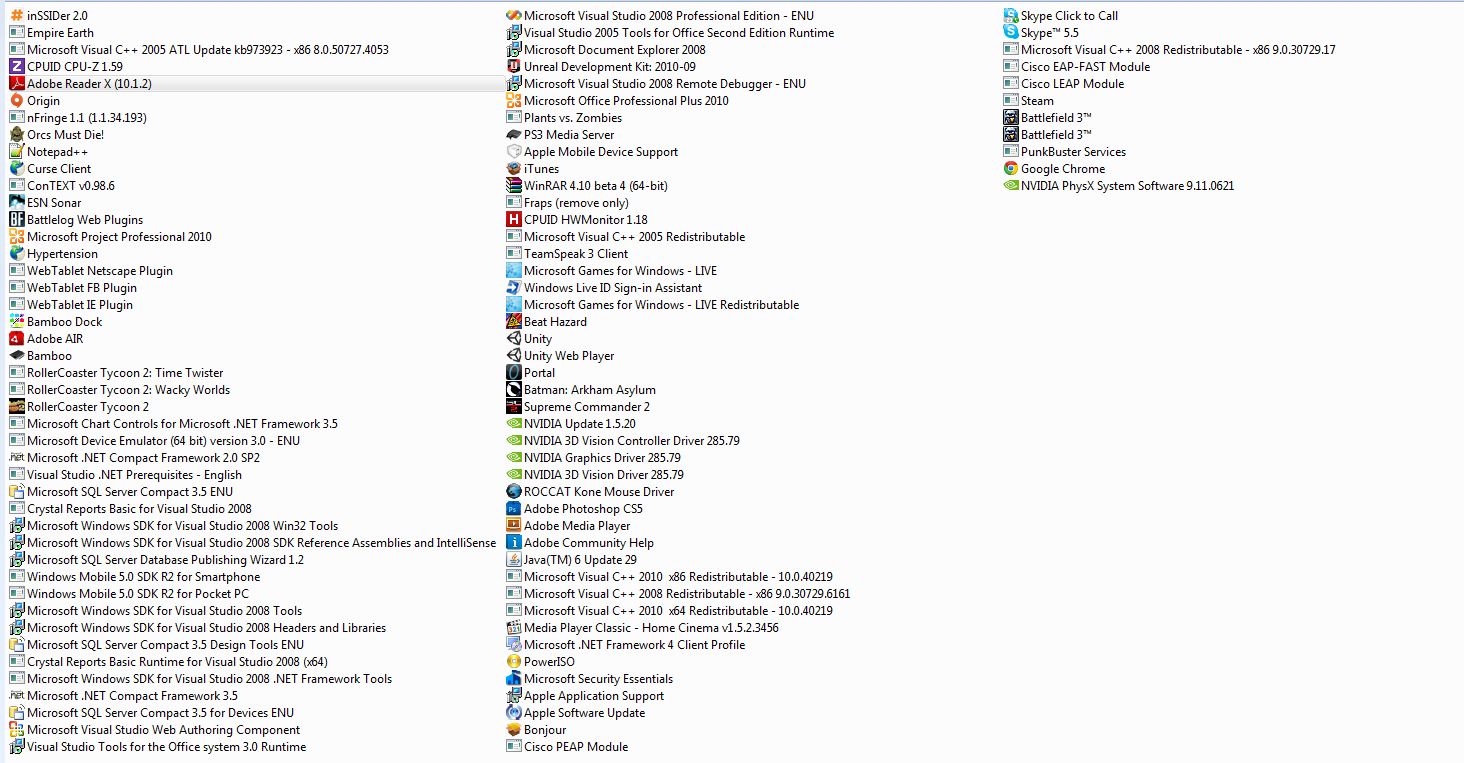
So fed up with this crap i know it cant be drivers it cant be dongles... theres something on my OS/Hardware thats causing a conflict with anything USB wireless :/ I'll try some of your suggestions anyway now and update with any results (:
 

My Computer

OS
Windows 7 Professional 64x (SP1)
CPU
i5 750 @ 2.67GHz (stock)
Motherboard
Gigabyte P55-us3l
Memory
2x2GB (not sure on model) 1333
Graphics Card(s)
Nvidia GTX 275
Monitor(s) Displays
2x Samsung Syncmaster T220
Hard Drives
2TB SAMSUNG F3EG HD203WI SATA2
1TB SAMSUNG HD103SJ SATA F3
Internet Speed
30MB Virgin
Would be helpful if you uploaded a screenshot of your computer's programs. Try this: http://www.sevenforums.com/tutorials/18203-internet-troubleshooting-guide.html and also this: http://www.sevenforums.com/tutorials/1538-sfc-scannow-command-system-file-checker.html

And shoot, here is a new one: http://www.sevenforums.com/tutorials/165554-usb-driver-general-fix-problems.html

Even if you know it isn't security related, a virus scan couldn't hurt.

Are these USB devices compatible with Win 7? Are the drivers Win 7 64 Bit? You only have a single driver installed for wireless at a time, right?
 

My Computer

Computer type
PC/Desktop
Computer Manufacturer/Model Number
Custom Asus Build
OS
Microsoft Windows 8.1 Pro 64-bit
CPU
Intel(R) Core(TM) i3-4130 CPU @ 3.40GHz
Motherboard
B85M-E
Memory
8.00 GB
Graphics Card(s)
None
Sound Card
Realtek High Definition Audio
Monitor(s) Displays
Asus 23.6" Monitor
Screen Resolution
1920 x 1080 x 32 bits (4294967296 colors) @ 60 Hz
Hard Drives
INTEL SSDSC2BW180A4
Samsung SSD 840 PRO Series
PSU
Seasonic S12II-380Bronze
Case
Lian Li
Cooling
Fan, Passive
Keyboard
Logitech K120
Mouse
Microsoft Touch Mouse
Internet Speed
4ms Ping, 19.0 Mbps Download, 19.0 Mbps Upload
Antivirus
Eset Endpoint
Browser
Internet Explorer, Chrome
Programs list
NvmlL.jpg


I've run the sfc /scannow with no integrity violations.
I've shown all hidden devices, and uninstalled them all. I tried uninstalling the current one... its frozen my wireless windows again. I'll run a virus scan now.

Yes both devices have been tested on 3 other systems all of which connect instantly to the network without any fuss or extra installations of drivers or any extra changes. I tested it on my laptop about an hour ago also on windows 7 64x and it installed the windows driver and worked without any issues. I plugged it back into my PC.... it dies a death :/
 

My Computer

OS
Windows 7 Professional 64x (SP1)
CPU
i5 750 @ 2.67GHz (stock)
Motherboard
Gigabyte P55-us3l
Memory
2x2GB (not sure on model) 1333
Graphics Card(s)
Nvidia GTX 275
Monitor(s) Displays
2x Samsung Syncmaster T220
Hard Drives
2TB SAMSUNG F3EG HD203WI SATA2
1TB SAMSUNG HD103SJ SATA F3
Internet Speed
30MB Virgin
I managed to get my dongle to connect to both the network and the internet. But unfortunately that was all well until i restarted the computer. Upon login, its taken.... almost 5 minutes and since then its not only missing my network but drops to find no networks. I know there are atleast 4 within distance to the dongle all on different channels and not causing any other issues for other computer systems. Mine however cant fecking find jack. When it does pop up to the list, instead of connecting it automatically like it should it disspears. I try manually selecting it and i get "Windows was unable to connect" as always after a restart. -.-

Opening network connections i see it regularly attempt to authenticate bur fails to get anywhere... around 5minutes later, its connected to my prefered network on its own accord in the process of me writting this... still no internet access. A minute or so later.. i have internet access... Do a speed test: Ping of 35ms. Download speed: 0.10mb/s (30mb line) half way through fails speed test, no pages load... connections dropped out. Great.

right click the wireless connection and enable it. Look on the right menu of the pictures you posted and find something that says wireless connections or profiles. Basically, find how many wireless network profiles your computer lists.

One, the one im trying to connect to :/
 

My Computer

OS
Windows 7 Professional 64x (SP1)
CPU
i5 750 @ 2.67GHz (stock)
Motherboard
Gigabyte P55-us3l
Memory
2x2GB (not sure on model) 1333
Graphics Card(s)
Nvidia GTX 275
Monitor(s) Displays
2x Samsung Syncmaster T220
Hard Drives
2TB SAMSUNG F3EG HD203WI SATA2
1TB SAMSUNG HD103SJ SATA F3
Internet Speed
30MB Virgin

My Computer

Computer type
PC/Desktop
Computer Manufacturer/Model Number
Custom Asus Build
OS
Microsoft Windows 8.1 Pro 64-bit
CPU
Intel(R) Core(TM) i3-4130 CPU @ 3.40GHz
Motherboard
B85M-E
Memory
8.00 GB
Graphics Card(s)
None
Sound Card
Realtek High Definition Audio
Monitor(s) Displays
Asus 23.6" Monitor
Screen Resolution
1920 x 1080 x 32 bits (4294967296 colors) @ 60 Hz
Hard Drives
INTEL SSDSC2BW180A4
Samsung SSD 840 PRO Series
PSU
Seasonic S12II-380Bronze
Case
Lian Li
Cooling
Fan, Passive
Keyboard
Logitech K120
Mouse
Microsoft Touch Mouse
Internet Speed
4ms Ping, 19.0 Mbps Download, 19.0 Mbps Upload
Antivirus
Eset Endpoint
Browser
Internet Explorer, Chrome
Think i might just wipe my Pc and fresh install windows again this time only installing the very basics required and slowly going through in-case something im installing is causing issues :/ Thanks for your help so far, If anyone has any other ideas... please do pip up and let me have a go i'd definitely not like to have to fresh install the OS :(
 

My Computer

OS
Windows 7 Professional 64x (SP1)
CPU
i5 750 @ 2.67GHz (stock)
Motherboard
Gigabyte P55-us3l
Memory
2x2GB (not sure on model) 1333
Graphics Card(s)
Nvidia GTX 275
Monitor(s) Displays
2x Samsung Syncmaster T220
Hard Drives
2TB SAMSUNG F3EG HD203WI SATA2
1TB SAMSUNG HD103SJ SATA F3
Internet Speed
30MB Virgin
Back
Top