Solved Problem with USB Wireless dongle

After you do your clean install, create a restore point for yourself and give it a good name. You may even want to create more as you go along and install programs. If you can avoid it, don't install the bundled WIFI utilities that come with the Wireless Dongles, just install the drivers. Its been my experience that they just muck things up when they disable Windows built in wireless network management feature and replace it with their own. I would also just stick to just the one dongle. The less drivers installed on top of other drivers the better. If you have to, try a second adapter, but I would put it off as long as possible.
 

My Computer

Computer type
PC/Desktop
Computer Manufacturer/Model Number
Home Built
OS
Windows 10 Education 64 bit
CPU
AMD Phenom II X4 980 Black Edition Deneb 3.7GHz
Motherboard
Asus M4N68T-M V2 µATX Motherboard
Memory
8GB 4GBx2 Kingston PC10600 DDR3 1333 Memory
Graphics Card(s)
Zotac NVIDIA Geforce GT640 2 Gig DDR3 PCIe
Sound Card
VIA VT1708s High Definition Audio 8-channel Onboard
Monitor(s) Displays
22" LG E2242 1080p and 2 19" I-INC AG191D
Screen Resolution
1280x1024 - 1920x1080 - 1280x1024
Hard Drives
Crucial M100 256 GB SSD and 500 GB WD Blue SATA
PSU
Thermaltake TR 620
Case
Power Up Black ATX Mid-Tower Case
Cooling
Stock heatsink and fan
Keyboard
Logitech Wireless K350 Wave
Mouse
Logitech Wireless M570 Trackman Wheel
Internet Speed
80 Mbps Down 30 Mbps Up
Antivirus
Windows Defender
Browser
Internet Explorer 11
Other Info
HP DVD1040e Lightscribe - External USB2
But what i dont understand is its not a specific driver issue... there's something software/hardware related on my computer that's causing a slow response time to any USB wireless devices on my computer... im pretty sure theres very little that does such a thing.. And i don't change or augment any settings with windows... hell I've still got the same original background and themes :/

Well the linksys adapter is being returned this weekend to its owner so I wont have that to test with, so for now i've got my Tenda one. As for installing programs that come with the device, there is a Tenda utility, but i never installed that because it didn't require so on the other computer with the same dongle so i was adamant that i didnt either :p For now im going to keep posting in forums and other places in the hope that someone's came across a similar issue or is able to help me troubleshoot it to a resolution :(

I think the main issue isn't that it doesnt work...because the driver must work to some degree for it to actually connect and produce atleast some sort of internet connection and functionality..(surely?)

The issue lies in the fact that its slow, freezes and locks up all wireless settings and windows when trying to communicate using any wireless USB device? :/ So what controls wireless connectivity other than the hardware itself the drivers and the router as they all seam to work fine with the same data/settings on other systems.
 

My Computer

OS
Windows 7 Professional 64x (SP1)
CPU
i5 750 @ 2.67GHz (stock)
Motherboard
Gigabyte P55-us3l
Memory
2x2GB (not sure on model) 1333
Graphics Card(s)
Nvidia GTX 275
Monitor(s) Displays
2x Samsung Syncmaster T220
Hard Drives
2TB SAMSUNG F3EG HD203WI SATA2
1TB SAMSUNG HD103SJ SATA F3
Internet Speed
30MB Virgin
I've had wireless adapters that worked fine on one PC and were nothing but a pain in the but on another PC. Different hardware and different operating systems though, so its hard to know if it was hardware conflicts or software conflicts. I had a problem on this PC were my PC took a long time to detect my network and establish a connection on boot up. It turned out to be a service that took a long time to start up and was delaying things at boot up. Once I disabled that service from starting, my network connected in a couple of seconds instead of the 30+ it was taking. The offending program was Roxio 2010 which I have since uninstalled. It did the same thing on wired and wireless, but once the connection was made everything worked fine. It was more of an annoyance than anything else.
 

My Computer

Computer type
PC/Desktop
Computer Manufacturer/Model Number
Home Built
OS
Windows 10 Education 64 bit
CPU
AMD Phenom II X4 980 Black Edition Deneb 3.7GHz
Motherboard
Asus M4N68T-M V2 µATX Motherboard
Memory
8GB 4GBx2 Kingston PC10600 DDR3 1333 Memory
Graphics Card(s)
Zotac NVIDIA Geforce GT640 2 Gig DDR3 PCIe
Sound Card
VIA VT1708s High Definition Audio 8-channel Onboard
Monitor(s) Displays
22" LG E2242 1080p and 2 19" I-INC AG191D
Screen Resolution
1280x1024 - 1920x1080 - 1280x1024
Hard Drives
Crucial M100 256 GB SSD and 500 GB WD Blue SATA
PSU
Thermaltake TR 620
Case
Power Up Black ATX Mid-Tower Case
Cooling
Stock heatsink and fan
Keyboard
Logitech Wireless K350 Wave
Mouse
Logitech Wireless M570 Trackman Wheel
Internet Speed
80 Mbps Down 30 Mbps Up
Antivirus
Windows Defender
Browser
Internet Explorer 11
Other Info
HP DVD1040e Lightscribe - External USB2
See... its not necessarily on boot.. just when the computer tries to interact with the device.. say for example: uninstalling the device, shutting it down on shutdown, connecting to a secured network. These all freeze only wireless components and windows and USB functionality as well, when inserting a new usb while the wireless is froze it wont recognise it until the dongle is removed or explorer.exe is restarted. :/

Its finding what part of the wireless to dongle interface is locking up... is there a way to in detail watch the communication of the dongle and the OS to see where it hangs or becomes unresponsive?
 

My Computer

OS
Windows 7 Professional 64x (SP1)
CPU
i5 750 @ 2.67GHz (stock)
Motherboard
Gigabyte P55-us3l
Memory
2x2GB (not sure on model) 1333
Graphics Card(s)
Nvidia GTX 275
Monitor(s) Displays
2x Samsung Syncmaster T220
Hard Drives
2TB SAMSUNG F3EG HD203WI SATA2
1TB SAMSUNG HD103SJ SATA F3
Internet Speed
30MB Virgin
Task Manager might give you some indication of whats going on? Error logs too, if they exist. I'm not sure what ones you should look for or where to find them though. I'm sure somebody here that is an IT pro can probably steer you in the right direction.
 

My Computer

Computer type
PC/Desktop
Computer Manufacturer/Model Number
Home Built
OS
Windows 10 Education 64 bit
CPU
AMD Phenom II X4 980 Black Edition Deneb 3.7GHz
Motherboard
Asus M4N68T-M V2 µATX Motherboard
Memory
8GB 4GBx2 Kingston PC10600 DDR3 1333 Memory
Graphics Card(s)
Zotac NVIDIA Geforce GT640 2 Gig DDR3 PCIe
Sound Card
VIA VT1708s High Definition Audio 8-channel Onboard
Monitor(s) Displays
22" LG E2242 1080p and 2 19" I-INC AG191D
Screen Resolution
1280x1024 - 1920x1080 - 1280x1024
Hard Drives
Crucial M100 256 GB SSD and 500 GB WD Blue SATA
PSU
Thermaltake TR 620
Case
Power Up Black ATX Mid-Tower Case
Cooling
Stock heatsink and fan
Keyboard
Logitech Wireless K350 Wave
Mouse
Logitech Wireless M570 Trackman Wheel
Internet Speed
80 Mbps Down 30 Mbps Up
Antivirus
Windows Defender
Browser
Internet Explorer 11
Other Info
HP DVD1040e Lightscribe - External USB2
Might have stumbled upon something worth making a note off... I just tried troubleshooting the dongle without restarting the computer.. with great and surprising success.

Disconnected from network and reconnected: As expected rather prompt, no issues.
Removed saved networks in manage networks: Reconnect promoted for security and connected, no issues.
Removed dongle completely from USB port and reinserted in same port: Connected to network without issue.

Unfortunately throughout this... my connection speed while connected is still subpar to what i can get on another computer :/ varying between 0.20mb/s to 7mb/s (30mb/s line) :(
 
Last edited:

My Computer

OS
Windows 7 Professional 64x (SP1)
CPU
i5 750 @ 2.67GHz (stock)
Motherboard
Gigabyte P55-us3l
Memory
2x2GB (not sure on model) 1333
Graphics Card(s)
Nvidia GTX 275
Monitor(s) Displays
2x Samsung Syncmaster T220
Hard Drives
2TB SAMSUNG F3EG HD203WI SATA2
1TB SAMSUNG HD103SJ SATA F3
Internet Speed
30MB Virgin
Reading back, did you ever try uninstalling the driver using Revo? Did you try both an older and newer version of the driver (seperately)? Did you check to make sure you have no other wireless network drivers installed?
 

My Computer

Computer type
PC/Desktop
Computer Manufacturer/Model Number
Custom Asus Build
OS
Microsoft Windows 8.1 Pro 64-bit
CPU
Intel(R) Core(TM) i3-4130 CPU @ 3.40GHz
Motherboard
B85M-E
Memory
8.00 GB
Graphics Card(s)
None
Sound Card
Realtek High Definition Audio
Monitor(s) Displays
Asus 23.6" Monitor
Screen Resolution
1920 x 1080 x 32 bits (4294967296 colors) @ 60 Hz
Hard Drives
INTEL SSDSC2BW180A4
Samsung SSD 840 PRO Series
PSU
Seasonic S12II-380Bronze
Case
Lian Li
Cooling
Fan, Passive
Keyboard
Logitech K120
Mouse
Microsoft Touch Mouse
Internet Speed
4ms Ping, 19.0 Mbps Download, 19.0 Mbps Upload
Antivirus
Eset Endpoint
Browser
Internet Explorer, Chrome
Never used revo, Older versions dont exist, the dongle itself is a new version and they're website only supplies one driver. (it did work for a while i think) As far as i know, how would i go about ensuring i have removed every trace of any other software/hardware on the OS?

I'm about to attempt to use another persons OS HD installed in my hardware, it should show if the issue lies with the OS or the hardware itself...allowing me to fresh install it or upgrade/fix the hardware (:

Thanks for the support! I'll try revo (:

Got revo... No idea what im looking for/doing? should i be looking to remove the drivers? the cards? :/
 
Last edited:

My Computer

OS
Windows 7 Professional 64x (SP1)
CPU
i5 750 @ 2.67GHz (stock)
Motherboard
Gigabyte P55-us3l
Memory
2x2GB (not sure on model) 1333
Graphics Card(s)
Nvidia GTX 275
Monitor(s) Displays
2x Samsung Syncmaster T220
Hard Drives
2TB SAMSUNG F3EG HD203WI SATA2
1TB SAMSUNG HD103SJ SATA F3
Internet Speed
30MB Virgin
how would i go about ensuring i have removed every trace of any other software/hardware on the OS?
Just uninstalling the software should be good enough.

I'm about to attempt to use another persons OS HD installed in my hardware, it should show if the issue lies with the OS or the hardware itself...
You would have to completely reinstall the other OS on that HDD if you do this.
 

My Computer

Computer type
PC/Desktop
Computer Manufacturer/Model Number
Custom Asus Build
OS
Microsoft Windows 8.1 Pro 64-bit
CPU
Intel(R) Core(TM) i3-4130 CPU @ 3.40GHz
Motherboard
B85M-E
Memory
8.00 GB
Graphics Card(s)
None
Sound Card
Realtek High Definition Audio
Monitor(s) Displays
Asus 23.6" Monitor
Screen Resolution
1920 x 1080 x 32 bits (4294967296 colors) @ 60 Hz
Hard Drives
INTEL SSDSC2BW180A4
Samsung SSD 840 PRO Series
PSU
Seasonic S12II-380Bronze
Case
Lian Li
Cooling
Fan, Passive
Keyboard
Logitech K120
Mouse
Microsoft Touch Mouse
Internet Speed
4ms Ping, 19.0 Mbps Download, 19.0 Mbps Upload
Antivirus
Eset Endpoint
Browser
Internet Explorer, Chrome
Well there is no software and it doesn't show up on my machine, but it knows its the #3 dongle used on the machine every time despite uninstalling and removal of all software related to all of them. Although I've just used revo and the scan afterwords found three folders if you will of information. hopefully they are the stuff im looking for.

Fair point! Well for now its back to troubleshooting :/ it appears i've done something thats causing it to never connect. Havent been able to establish a connection to the router for over 2 hours :( Think its borked :/
 

My Computer

OS
Windows 7 Professional 64x (SP1)
CPU
i5 750 @ 2.67GHz (stock)
Motherboard
Gigabyte P55-us3l
Memory
2x2GB (not sure on model) 1333
Graphics Card(s)
Nvidia GTX 275
Monitor(s) Displays
2x Samsung Syncmaster T220
Hard Drives
2TB SAMSUNG F3EG HD203WI SATA2
1TB SAMSUNG HD103SJ SATA F3
Internet Speed
30MB Virgin
Even trying to install the new drivers is causing an issue :/ seriously what the f**k?!
 

My Computer

OS
Windows 7 Professional 64x (SP1)
CPU
i5 750 @ 2.67GHz (stock)
Motherboard
Gigabyte P55-us3l
Memory
2x2GB (not sure on model) 1333
Graphics Card(s)
Nvidia GTX 275
Monitor(s) Displays
2x Samsung Syncmaster T220
Hard Drives
2TB SAMSUNG F3EG HD203WI SATA2
1TB SAMSUNG HD103SJ SATA F3
Internet Speed
30MB Virgin
Kindeller,

I don't know what you mean by it knowing it is the #3 dongle (very weird european/english word). Could you perhaps post a picture of this or explain it in more detail?

Are you absolutely positive you've uninstalled any other adapter software? What is the device called again? Its exact name?
 

My Computer

Computer type
PC/Desktop
Computer Manufacturer/Model Number
Custom Asus Build
OS
Microsoft Windows 8.1 Pro 64-bit
CPU
Intel(R) Core(TM) i3-4130 CPU @ 3.40GHz
Motherboard
B85M-E
Memory
8.00 GB
Graphics Card(s)
None
Sound Card
Realtek High Definition Audio
Monitor(s) Displays
Asus 23.6" Monitor
Screen Resolution
1920 x 1080 x 32 bits (4294967296 colors) @ 60 Hz
Hard Drives
INTEL SSDSC2BW180A4
Samsung SSD 840 PRO Series
PSU
Seasonic S12II-380Bronze
Case
Lian Li
Cooling
Fan, Passive
Keyboard
Logitech K120
Mouse
Microsoft Touch Mouse
Internet Speed
4ms Ping, 19.0 Mbps Download, 19.0 Mbps Upload
Antivirus
Eset Endpoint
Browser
Internet Explorer, Chrome
Tenda Wireless USB, model: W322U v2.0. Its been stuck for the past... 30mins installing the driver.. a prime example of whats resulting from whatever is wrong. I cant show you any screenshots because while the installer is still running, the storage device i use to transfer cant be picked up :/ Its locked my system up -.-
 

My Computer

OS
Windows 7 Professional 64x (SP1)
CPU
i5 750 @ 2.67GHz (stock)
Motherboard
Gigabyte P55-us3l
Memory
2x2GB (not sure on model) 1333
Graphics Card(s)
Nvidia GTX 275
Monitor(s) Displays
2x Samsung Syncmaster T220
Hard Drives
2TB SAMSUNG F3EG HD203WI SATA2
1TB SAMSUNG HD103SJ SATA F3
Internet Speed
30MB Virgin

My Computer

Computer type
PC/Desktop
Computer Manufacturer/Model Number
Custom Asus Build
OS
Microsoft Windows 8.1 Pro 64-bit
CPU
Intel(R) Core(TM) i3-4130 CPU @ 3.40GHz
Motherboard
B85M-E
Memory
8.00 GB
Graphics Card(s)
None
Sound Card
Realtek High Definition Audio
Monitor(s) Displays
Asus 23.6" Monitor
Screen Resolution
1920 x 1080 x 32 bits (4294967296 colors) @ 60 Hz
Hard Drives
INTEL SSDSC2BW180A4
Samsung SSD 840 PRO Series
PSU
Seasonic S12II-380Bronze
Case
Lian Li
Cooling
Fan, Passive
Keyboard
Logitech K120
Mouse
Microsoft Touch Mouse
Internet Speed
4ms Ping, 19.0 Mbps Download, 19.0 Mbps Upload
Antivirus
Eset Endpoint
Browser
Internet Explorer, Chrome
Well i know the dongle works fine, its being used currently on other systems in the house, it was like £7 online, i wasnt expecting much :p

Buts its all irrelevant anyway, there's something wrong with the way my computer handles all USB wireless dongles and it looks like i wont find out what... probably a deep routed driver/dongle issue that i cant find :/ tried revo but its not helped much... Think if i still have issues i might try buying a wireless card for the motherboard :/
 

My Computer

OS
Windows 7 Professional 64x (SP1)
CPU
i5 750 @ 2.67GHz (stock)
Motherboard
Gigabyte P55-us3l
Memory
2x2GB (not sure on model) 1333
Graphics Card(s)
Nvidia GTX 275
Monitor(s) Displays
2x Samsung Syncmaster T220
Hard Drives
2TB SAMSUNG F3EG HD203WI SATA2
1TB SAMSUNG HD103SJ SATA F3
Internet Speed
30MB Virgin
Although, rather than a reinstall - There are some programs that I am not sure their function that you have installed. I recommend removing (with revo) everything that you don't really use or need. By everything, I mean programs and not drivers, nor updates. The more you remove, the higher the chance you get of removing a potential problem.

After you remove all that you are willing to part with, while I do not recommend this normally due to its registry editing, you might (carefully) try Ccleaner to clean out the registry. See if this works - http://www.piriform.com/ccleaner

I know I repeat myself sometimes, but double check to make sure ALL important updates are installed and double check if you have any optional updates you think you may need to have installed.
 

My Computer

Computer type
PC/Desktop
Computer Manufacturer/Model Number
Custom Asus Build
OS
Microsoft Windows 8.1 Pro 64-bit
CPU
Intel(R) Core(TM) i3-4130 CPU @ 3.40GHz
Motherboard
B85M-E
Memory
8.00 GB
Graphics Card(s)
None
Sound Card
Realtek High Definition Audio
Monitor(s) Displays
Asus 23.6" Monitor
Screen Resolution
1920 x 1080 x 32 bits (4294967296 colors) @ 60 Hz
Hard Drives
INTEL SSDSC2BW180A4
Samsung SSD 840 PRO Series
PSU
Seasonic S12II-380Bronze
Case
Lian Li
Cooling
Fan, Passive
Keyboard
Logitech K120
Mouse
Microsoft Touch Mouse
Internet Speed
4ms Ping, 19.0 Mbps Download, 19.0 Mbps Upload
Antivirus
Eset Endpoint
Browser
Internet Explorer, Chrome
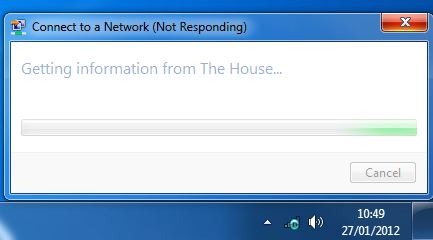
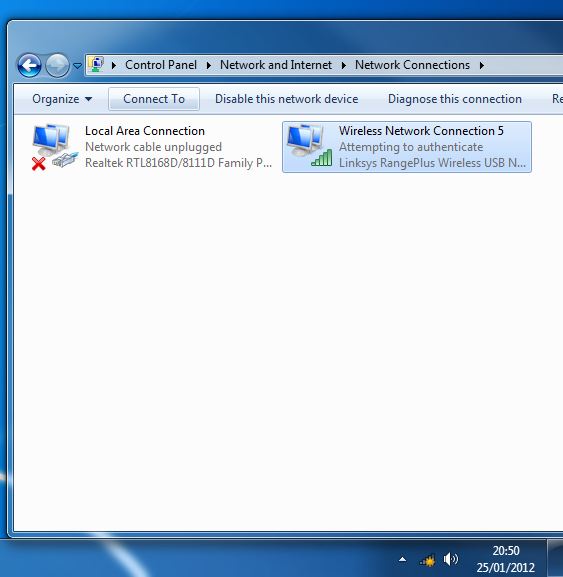
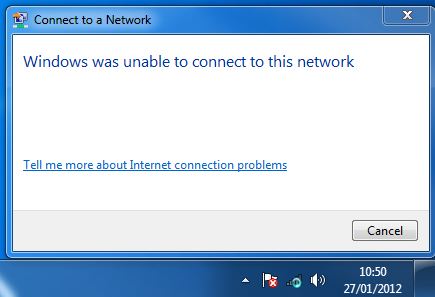
I did a driver roll back this morning, finally able to atleast establish a connection to my network, the rollback however didnt change much its still the up to date tenda one so some how there was two or one on top of another? speeds still 1/6's of its capabilities and im not sure if it'll work fine on restart. But atleast i can upload some photos of the issue for you (:

The not responding on connection:
ml6dm.jpg


Normally what its frozen on:
t1Tni.jpg


Results in:
WycMQ.jpg


Fixed by logging off and back on again? :/ What baffles me though is now its...connected and working... i can disable,log off, disconnect and reconnect without any connection issues. As soon as i restart,remove the device or shutdown it starts having problems again? :/
 

My Computer

OS
Windows 7 Professional 64x (SP1)
CPU
i5 750 @ 2.67GHz (stock)
Motherboard
Gigabyte P55-us3l
Memory
2x2GB (not sure on model) 1333
Graphics Card(s)
Nvidia GTX 275
Monitor(s) Displays
2x Samsung Syncmaster T220
Hard Drives
2TB SAMSUNG F3EG HD203WI SATA2
1TB SAMSUNG HD103SJ SATA F3
Internet Speed
30MB Virgin
I personally prefer to use a PCI or PCIe card over a WIFI dongle in a desktop PC. I always seem to get a better signal, likely because the antennas are better quality. The other thing that nags me about dongles is, if you plug it into a different USB port it becomes Wireless Connection No. 2 or 3 or 4 etc, depending on how many different ports you use. Drivers etc are installed each time too. :confused:
 

My Computer

Computer type
PC/Desktop
Computer Manufacturer/Model Number
Home Built
OS
Windows 10 Education 64 bit
CPU
AMD Phenom II X4 980 Black Edition Deneb 3.7GHz
Motherboard
Asus M4N68T-M V2 µATX Motherboard
Memory
8GB 4GBx2 Kingston PC10600 DDR3 1333 Memory
Graphics Card(s)
Zotac NVIDIA Geforce GT640 2 Gig DDR3 PCIe
Sound Card
VIA VT1708s High Definition Audio 8-channel Onboard
Monitor(s) Displays
22" LG E2242 1080p and 2 19" I-INC AG191D
Screen Resolution
1280x1024 - 1920x1080 - 1280x1024
Hard Drives
Crucial M100 256 GB SSD and 500 GB WD Blue SATA
PSU
Thermaltake TR 620
Case
Power Up Black ATX Mid-Tower Case
Cooling
Stock heatsink and fan
Keyboard
Logitech Wireless K350 Wave
Mouse
Logitech Wireless M570 Trackman Wheel
Internet Speed
80 Mbps Down 30 Mbps Up
Antivirus
Windows Defender
Browser
Internet Explorer 11
Other Info
HP DVD1040e Lightscribe - External USB2
I personally prefer to use a PCI or PCIe card over a WIFI dongle in a desktop PC. I always seem to get a better signal, likely because the antennas are better quality. The other thing that nags me about dongles is, if you plug it into a different USB port it becomes Wireless Connection No. 2 or 3 or 4 etc, depending on how many different ports you use. Drivers etc are installed each time too. :confused:

To be honest i've tried a multitude of USB ports with three dongles... its no wonder its thrown a fit at me xD
 

My Computer

OS
Windows 7 Professional 64x (SP1)
CPU
i5 750 @ 2.67GHz (stock)
Motherboard
Gigabyte P55-us3l
Memory
2x2GB (not sure on model) 1333
Graphics Card(s)
Nvidia GTX 275
Monitor(s) Displays
2x Samsung Syncmaster T220
Hard Drives
2TB SAMSUNG F3EG HD203WI SATA2
1TB SAMSUNG HD103SJ SATA F3
Internet Speed
30MB Virgin
Ok.. I've fresh installed windows, inserted the Wireless USB dongle...updated to the latest drivers. And the issue is still there. Any ideas as to where to head from here? :/
 

My Computer

OS
Windows 7 Professional 64x (SP1)
CPU
i5 750 @ 2.67GHz (stock)
Motherboard
Gigabyte P55-us3l
Memory
2x2GB (not sure on model) 1333
Graphics Card(s)
Nvidia GTX 275
Monitor(s) Displays
2x Samsung Syncmaster T220
Hard Drives
2TB SAMSUNG F3EG HD203WI SATA2
1TB SAMSUNG HD103SJ SATA F3
Internet Speed
30MB Virgin
Back
Top