I'm using Windows 7 Ultimate 64 bit on an Asus Notebook computer with Intel i7-2630 CPU.
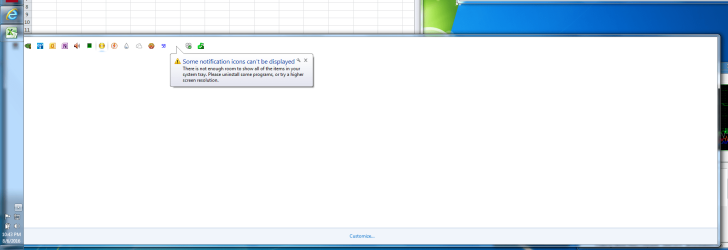
This problem appeared 4-5 days ago. When I click the Taskbar arrow marked "show hidden icons" to see my system tray, instead of a small box showing the icons, I get a huge screen wide box which is mostly empty, and the message "Some notification icons can't be displayed. There is not enough room to show all of the items in your system tray. Please uninstall some programs or try a higher screen resolution."
Here's a screenshot of this message: http://image.prntscr.com/image/ab9d0c86520e4010a921f8405c9760cb.png
As you can see, there are only 16 icons in the tray, which used to fit a small 4x4 grid before this problem appeared. Now the box is the width of the entire screen and mostly empty, and it still complains about not enough space.
My screen is at 1920x1080, which is the native resolution of the LCD screen.
Does anyone know why this problem suddenly appeared?
Thanks.
This problem appeared 4-5 days ago. When I click the Taskbar arrow marked "show hidden icons" to see my system tray, instead of a small box showing the icons, I get a huge screen wide box which is mostly empty, and the message "Some notification icons can't be displayed. There is not enough room to show all of the items in your system tray. Please uninstall some programs or try a higher screen resolution."
Here's a screenshot of this message: http://image.prntscr.com/image/ab9d0c86520e4010a921f8405c9760cb.png
As you can see, there are only 16 icons in the tray, which used to fit a small 4x4 grid before this problem appeared. Now the box is the width of the entire screen and mostly empty, and it still complains about not enough space.
My screen is at 1920x1080, which is the native resolution of the LCD screen.
Does anyone know why this problem suddenly appeared?
Thanks.
Attachments
My Computer
At a glance
Windows 7 64 bit Ultimatei7
- Computer type
- Laptop
- Computer Manufacturer/Model Number
- Asus
- OS
- Windows 7 64 bit Ultimate
- CPU
- i7