Problem with XP/Win7 file sharing

HallonNightmare

New member
Local time
1:04 AM
Messages
4
Location
Sweden
Hey guys/gals.

I'm having a weird issue when it comes to to accessing shared folders on my Win7 machine from my XP machine. First, nothing worked. But now, after few hours of researching the web about how to get this sh*t working, I'm stuck with one small irritating problem.

On my win7 box, everything works like a charm. I can access my xp box flawlessly.
On my XP box, I can find the win7 box. I can ping it, and I can see it in the network map. But when trying to get into the win7 box, and accessing the shared folders, I hit a dead end with the error:
'\\<computer> is not accessible. You might not have permission to use this network resource. Contact the administrator of this server to find out if you have access permissions.'

However when manually entering the address to the shared folder (\\win7\folder\), everything works fine and I'm able to browse through the content of the folder.

Any ideas folks? People wont always know the name of my shared folders e.g. on a LAN.
 

My Computer

OS
Windows 7
CPU
Intel
Motherboard
XFX
Memory
Corsair
Graphics Card(s)
XFX GeForce
Monitor(s) Displays
LG
Hard Drives
1 x 500GB
1 x 1000GB
PSU
680W
Keyboard
Saitek
Mouse
Logitech
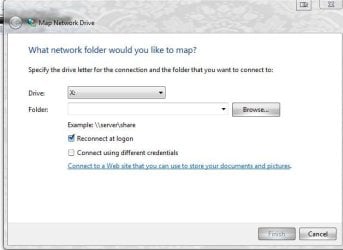
When mapping the drive(s), set them to automatically reconnect at Windows startup. There's a check box for that right where/when you enter the address. It's called "reconnect at logon."
 

Attachments

  • Capture.JPG
    Capture.JPG
    33.3 KB · Views: 61

My Computer

Computer Manufacturer/Model Number
self built
OS
7600.20510 x86
CPU
P4 550 3.4 GHz HT running at 3.5 GHz
Motherboard
MSI PM8M3-V (MS-7211 v1.x) Micro-ATX mainboard
Memory
OCZ 2 GB(2x1GB) DDR400mHz running @ 414 mHz
Graphics Card(s)
HIS Radeon HD 3850 IceQ 3 Turbo HDMI Dual DL-DVI AGP
Sound Card
MOTU Traveler firewire studio interface 192 kHz 24 bit
Monitor(s) Displays
22" widescreen Acer X223W LCD, 17" Compaq P75 CRT
Screen Resolution
1680x1050 and 1280x1024
Hard Drives
SATA I x2 WD, 400 GB and 120 GB, SATA 2 WD Caviar Black 1 TB
PSU
350W generic
Case
Cybertronpc, it glows blue
Cooling
stock cpu fan, Ice-Q 3 gpu and system, many case fans
Keyboard
Logitch Classical Keyboard 200
Mouse
Logitech Mediaplay cordless
Internet Speed
1792/448 kbits/sec
Other Info
SATA II PCI fake RAID adapter, 1 GB Readyboost, original ATI Remote Wonder (even works with WMC perfectly), Logitech Rumblepad 2 game controller x2
Not quite sure hos this relates. The thing is, that I want people (and myself) to see which folders are currently shared on my win7 machine. So they can access them without knowing the name of the folder in advance.
 

My Computer

OS
Windows 7
CPU
Intel
Motherboard
XFX
Memory
Corsair
Graphics Card(s)
XFX GeForce
Monitor(s) Displays
LG
Hard Drives
1 x 500GB
1 x 1000GB
PSU
680W
Keyboard
Saitek
Mouse
Logitech
Yeah. My last post will do that for you. The shares will automatically show up in Windows Explorer, right where C:, D: etc....are....if you map them like that from remote machines.
 

My Computer

Computer Manufacturer/Model Number
self built
OS
7600.20510 x86
CPU
P4 550 3.4 GHz HT running at 3.5 GHz
Motherboard
MSI PM8M3-V (MS-7211 v1.x) Micro-ATX mainboard
Memory
OCZ 2 GB(2x1GB) DDR400mHz running @ 414 mHz
Graphics Card(s)
HIS Radeon HD 3850 IceQ 3 Turbo HDMI Dual DL-DVI AGP
Sound Card
MOTU Traveler firewire studio interface 192 kHz 24 bit
Monitor(s) Displays
22" widescreen Acer X223W LCD, 17" Compaq P75 CRT
Screen Resolution
1680x1050 and 1280x1024
Hard Drives
SATA I x2 WD, 400 GB and 120 GB, SATA 2 WD Caviar Black 1 TB
PSU
350W generic
Case
Cybertronpc, it glows blue
Cooling
stock cpu fan, Ice-Q 3 gpu and system, many case fans
Keyboard
Logitch Classical Keyboard 200
Mouse
Logitech Mediaplay cordless
Internet Speed
1792/448 kbits/sec
Other Info
SATA II PCI fake RAID adapter, 1 GB Readyboost, original ATI Remote Wonder (even works with WMC perfectly), Logitech Rumblepad 2 game controller x2
Then... all of the computers that want to access my folders, would have to do this on their machines?
 

My Computer

OS
Windows 7
CPU
Intel
Motherboard
XFX
Memory
Corsair
Graphics Card(s)
XFX GeForce
Monitor(s) Displays
LG
Hard Drives
1 x 500GB
1 x 1000GB
PSU
680W
Keyboard
Saitek
Mouse
Logitech
Yeah. They have to map the share(s) to your Win7 machine while checking that box. Only a one time thing. Never need to be looked at again, if done right.
 

My Computer

Computer Manufacturer/Model Number
self built
OS
7600.20510 x86
CPU
P4 550 3.4 GHz HT running at 3.5 GHz
Motherboard
MSI PM8M3-V (MS-7211 v1.x) Micro-ATX mainboard
Memory
OCZ 2 GB(2x1GB) DDR400mHz running @ 414 mHz
Graphics Card(s)
HIS Radeon HD 3850 IceQ 3 Turbo HDMI Dual DL-DVI AGP
Sound Card
MOTU Traveler firewire studio interface 192 kHz 24 bit
Monitor(s) Displays
22" widescreen Acer X223W LCD, 17" Compaq P75 CRT
Screen Resolution
1680x1050 and 1280x1024
Hard Drives
SATA I x2 WD, 400 GB and 120 GB, SATA 2 WD Caviar Black 1 TB
PSU
350W generic
Case
Cybertronpc, it glows blue
Cooling
stock cpu fan, Ice-Q 3 gpu and system, many case fans
Keyboard
Logitch Classical Keyboard 200
Mouse
Logitech Mediaplay cordless
Internet Speed
1792/448 kbits/sec
Other Info
SATA II PCI fake RAID adapter, 1 GB Readyboost, original ATI Remote Wonder (even works with WMC perfectly), Logitech Rumblepad 2 game controller x2
The issue at hand, it that my win7 box is blocking access to people trying to list my shared folders, or so to speak. The only way to access my shared folders is to know the name of the folder being shared. I want it to be like it is on my win7 machine, when i try to access other computers. By just going into another computer via the network map or direct address e.g. \\<computer>, it would list all the resources that computer is sharing...

Edit: I go to LAN-parties about 3 times a year. At which this would be really annoying.
 

My Computer

OS
Windows 7
CPU
Intel
Motherboard
XFX
Memory
Corsair
Graphics Card(s)
XFX GeForce
Monitor(s) Displays
LG
Hard Drives
1 x 500GB
1 x 1000GB
PSU
680W
Keyboard
Saitek
Mouse
Logitech
Hello there,

I tried everything...like remove password and some other option and at last i map that drive but nothing happened.. i still cannot share...

i am using a lptp with win 7 and one pc with xp over a linksys router ..so i can access files frm xp but not frm win 7 ,,,
the only thing i can access is a folder users..

plzzzzz help:(
 

My Computer

OS
windows 7
Back
Top