Problems accessing the Internet with new laptop

tommyw252

New member
Local time
1:03 AM
Messages
8
Hi guys/girls,
Please can you help me out.
I have just bought a new Acer laptop with Windows 7, I am not great with laptops and troubleshooting.

I tried pugging in the wire connection and it does not connect.

When I troubleshoot I get the message does't have a valid IP addresss (zes i have restarted the modem) It is fine on this laptop I am susing now.
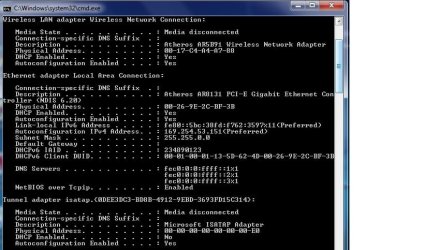
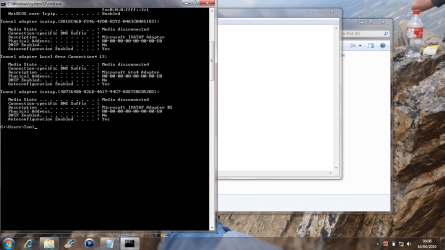
I ran the IPconfig/all and it does not show an IP address (please don't get too technical on me I just saw how to do this on a similar thread) I tried attaching it to this thread.

It is basically full of 0000's

Please can someone tell me the steps from when I plug the internet cable in how I connect, it's driving me up the wall.

Thanks, Tom
 

Attachments
  • Untitled.png
    Untitled.png
    165.2 KB · Views: 22

My Computer My Computer

Computer Manufacturer/Model Number
ACER EXTENSA 5635Z
OS
Windows 7
Memory
2GB
Hard Drives
250GB
Internet Speed
FAST?
Make sure you don't have mac address filtering turned on in your router.

The reason that your physical address is blank is probably due to a driver issue. You should reinstall your network drivers.

If that doesn't work, you could set a mac address yourself...

   Warning
Only do this if you know the real address of your card


You would do so via this method:

1. Control Pane > Device Manager > Right click your Network (Ethernet) Adapter > Properties > Advanced > Network Address > Put a Value such as "8817E890E20A" in the text box. > OK

Now run another ipconfig /all to confirm that the Physical Adress has changed.

Reboot.
 

My Computer My Computer

Computer Manufacturer/Model Number
Apple Macbook Pro (April 2009)
OS
W7 Ult. x64 | OS X
CPU
Intel Mobile Core 2 Duo 2.93Ghz [T9800 Penryn]
Motherboard
NVIDIA nForce 730i Rev. B1 [Mac-F2268EC8 (U2E1)]
Memory
4096MB Samsung DDR3 Dual Channel [PC3-8500F 1066Mhz]
Graphics Card(s)
NVIDIA GeForce 9600M GT 512MB [G96M Rev. C1]
Sound Card
SB X-Fi Surround 5.1 USB | Onboard Realtek (Disabled)
Monitor(s) Displays
Acer x223wbd 22" | Apple Anti-Glare 17" (Disabled)
Screen Resolution
{Current} 1440x900 {Acer} 1680x1050 {Apple} 1920x1200
Hard Drives
{Internal}
Seagate Momentus 320GB 2.5" 7200RPM [ST9320421AS]

{Externals}
LaCie 320GB USB 2.0 HDD [301284UR]
LaCie 750GB USB 2.0 FW400 eSATA HDD [301314U]
LaCie 1TB USB 2.0 HDD [301304UR]
PSU
Magsafe
Case
Aluminum/Unibody (MBP52)
Cooling
2 x 6000 RPM Fans
Keyboard
Logitech G-15v2 [PN 920-000379]
Mouse
Logitech G-9 [PN 910-000338]
Internet Speed
12Mbps/2.5Mbps w/ 24Mbps Speed Boost [Comcast]
Other Info
Logitech X-540 Speakers [PN 970223-0122]
Sennheiser PC-151 Headset
Hi, I did manage to find the advanced option eventually and put a value in, confirmed this and teh IPconfig run was the same. I rebooted and its the same unfortunately.

No idea how to do this: Make sure you don't have mac address filtering turned on in your router I am connecting straight from a Modem, no router involved and it's at home. When I try and connect it asks for a username/password for instance or IP Cd..
You may need to force the nic to have a mac address, because it looks like yours is blank... no idea how.

If there is anything else I can try it would be great.
The cable works find on this laptop and has for ages, but it just wont connect to my newer laptop with windows 7.
 

My Computer My Computer

Computer Manufacturer/Model Number
ACER EXTENSA 5635Z
OS
Windows 7
Memory
2GB
Hard Drives
250GB
Internet Speed
FAST?
If you're connecting to a modem that requires a username and password you may need to set that up in order to connect to the internet.

Setting up a DSL Connection:
Control Panel > Network and Sharing Center > Set up a new connection or network', > Connect to the Internet > Broadband (PPPoE) > Follow Instructions and Input your information.

The mac address is that set of zero's that i tried to get you to change through that dialog. It's likely that you have faulty drivers installed or that your device requires a mac address with specific characters. Either way, download the latest drivers for your computer.

Oh yeah, fill in your System Specs via the link in my signature.

If you don't know any of the values, download Speccy. Run it and it will tell you what hardware you have.
 

My Computer My Computer

Computer Manufacturer/Model Number
Apple Macbook Pro (April 2009)
OS
W7 Ult. x64 | OS X
CPU
Intel Mobile Core 2 Duo 2.93Ghz [T9800 Penryn]
Motherboard
NVIDIA nForce 730i Rev. B1 [Mac-F2268EC8 (U2E1)]
Memory
4096MB Samsung DDR3 Dual Channel [PC3-8500F 1066Mhz]
Graphics Card(s)
NVIDIA GeForce 9600M GT 512MB [G96M Rev. C1]
Sound Card
SB X-Fi Surround 5.1 USB | Onboard Realtek (Disabled)
Monitor(s) Displays
Acer x223wbd 22" | Apple Anti-Glare 17" (Disabled)
Screen Resolution
{Current} 1440x900 {Acer} 1680x1050 {Apple} 1920x1200
Hard Drives
{Internal}
Seagate Momentus 320GB 2.5" 7200RPM [ST9320421AS]

{Externals}
LaCie 320GB USB 2.0 HDD [301284UR]
LaCie 750GB USB 2.0 FW400 eSATA HDD [301314U]
LaCie 1TB USB 2.0 HDD [301304UR]
PSU
Magsafe
Case
Aluminum/Unibody (MBP52)
Cooling
2 x 6000 RPM Fans
Keyboard
Logitech G-15v2 [PN 920-000379]
Mouse
Logitech G-9 [PN 910-000338]
Internet Speed
12Mbps/2.5Mbps w/ 24Mbps Speed Boost [Comcast]
Other Info
Logitech X-540 Speakers [PN 970223-0122]
Sennheiser PC-151 Headset
Trouble connecting, please help!

Hi, I know this is long but please I would very much appreciate help on this one.

I have a new Acer Extensa laptop, with Windows 7.

I have tested the internet connection on it and it does work wireless and on my work connection, however I am connecting to my Home wire network where I am typing this from and the new laptop will not connect to this connection.

As i said I am running a wire straight from the modem into my new laptop with no connection.

I am running the troubleshooter and it tells me that I am on an "unidentified network" and also that it can't configure an IP address.
I have ran IPconfig/all and it returns all 000.00 etc ip addresses and Location. (I dont understand this much anyhow).
My internet is set up to automatically pick up connections, as i said it will at my work and in an internet cafe nearby on the wireless.
However I know it is not an issue with the provider as it works on this laptop and i know it is not password protected.

Does anyone have any ideas, I am not great with computers and I have tried so many things, spent loads of money trying to call support lines and no luck!

I appreciate your help.
 

My Computer My Computer

Computer Manufacturer/Model Number
ACER EXTENSA 5635Z
OS
Windows 7
Memory
2GB
Hard Drives
250GB
Internet Speed
FAST?
Hi, I know this is long but please I would very much appreciate help on this one.

I have a new Acer Extensa laptop, with Windows 7.

I have tested the internet connection on it and it does work wireless and on my work connection, however I am connecting to my Home wire network where I am typing this from and the new laptop will not connect to this connection.

As i said I am running a wire straight from the modem into my new laptop with no connection.

I am running the troubleshooter and it tells me that I am on an "unidentified network" and also that it can't configure an IP address.
I have ran IPconfig/all and it returns all 000.00 etc ip addresses and Location. (I dont understand this much anyhow).
My internet is set up to automatically pick up connections, as i said it will at my work and in an internet cafe nearby on the wireless.
However I know it is not an issue with the provider as it works on this laptop and i know it is not password protected.

Does anyone have any ideas, I am not great with computers and I have tried so many things, spent loads of money trying to call support lines and no luck!

I appreciate your help.

Might be as simple a a Lan driver. you should go to the mfr site and download the newest driver.

Let us know if you need help

Ken
 

My Computer My Computer

Computer Manufacturer/Model Number
HP Pavillion dv-7 1005 Tx
OS
Win 8 Release candidate 8400
CPU
[email protected]
Memory
4 gigs
Graphics Card(s)
Nvidia 9600M
Sound Card
HD built-in
Monitor(s) Displays
17" Wxga
Screen Resolution
1440x900
Cooling
none
Internet Speed
45Mb down 5Mb up
I don't know how to do this, really i have no idea about drivers and how to get them, I am not using the laptop with the problem also.

I am living in the czech republic, i dont know if that makes a difference also?
Although i guess not as i can connect at work.
 

My Computer My Computer

Computer Manufacturer/Model Number
ACER EXTENSA 5635Z
OS
Windows 7
Memory
2GB
Hard Drives
250GB
Internet Speed
FAST?
Could you please fill in your system specs? At least, we need to know your computer model, and network adapter.

See my sig.
 

My Computer My Computer

Computer Manufacturer/Model Number
Custom
OS
Windows 7 Professional x64
CPU
Intel i7 2600K OC'd @ 4620 MHz
Motherboard
Asus P8Z68-V Pro
Memory
16GB GSkill Sniper 2133 Mhz (4x4GB)
Graphics Card(s)
EVGA GeForce GTX 480 SuperClocked+
Sound Card
Realtek High Definition Audio
Monitor(s) Displays
2x Acer S273HLbmii 27"
Screen Resolution
2 x 1920x1080
Hard Drives
64GB Crucial M4 SSD

Storage: Hitachi 1TB 5400RPM, Samsung 1.5TB 5400RPM
PSU
Corsair HW Series 750w (modular)
Case
Cooler Master HAF 932 Advanced Blue Edition
Cooling
CM Hyper 212+ CPU cooler, 3x 230mm + 1x 140mm case fans
Keyboard
Logitech MK320 (wireless)
Mouse
Logitech MK320 (wireless)
Internet Speed
30 Mb/s : 2 Mb/s
Operating System: Microsoft Windows 7 Home Premium 64-Bit
- Processor: Intel Pentium Dual Core T4300 2.10GHz 1MB Cache (800FSB)
- Graphics: Intel GMA X4500HD
- Memory: 2GB DDR3 RAM
- Hard Drive: 250GB SATA (5400RPM)
- Optical Drive: DVD Super Multi Dual Layer Drive
- Bluetooth: Bluetooth 2.1 + Enhanced Data Rate
- Screen: 15.6" WXGA LED LCD Widescreen (1366x768)
- Wireless LAN: 802.11b, 802.11g & 802.11n
- Ethernet LAN: 10/100/1000
- Sound Controller: High Definition Audio
- Speakers: Stereo
- Card Reader: SD Card, Memory Stick, Memory Stick Pro, MultiMedia Card & xD-Picture Card
- Security: Kensington Lock Slot
- Connections: 3x USB 2.0, 1x VGA, 1x RJ-45, 1x Microphone & 1x Speakers/Headphones
- Battery: 6-Cell Lithium-Ion
- Dimensions: 360.0mm x 267.0mm x 43.0mm
- Weight: 2.88kg
- Warranty: 1 Yea
 

My Computer My Computer

Computer Manufacturer/Model Number
ACER EXTENSA 5635Z
OS
Windows 7
Memory
2GB
Hard Drives
250GB
Internet Speed
FAST?
Just insert the cd for the internet drivers and update.
 

My Computer My Computer

OS
Windows 7 Better then yours
Sound Card
Sound blaster live!
Monitor(s) Displays
samsung SyncMaster T200
Screen Resolution
Better than yours
Keyboard
Pro
Mouse
Pro
Internet Speed
The fastes =) beat that
What computer model do you have? It is probably written right on the lid somewhere.
 

My Computer My Computer

Computer Manufacturer/Model Number
Custom
OS
Windows 7 Professional x64
CPU
Intel i7 2600K OC'd @ 4620 MHz
Motherboard
Asus P8Z68-V Pro
Memory
16GB GSkill Sniper 2133 Mhz (4x4GB)
Graphics Card(s)
EVGA GeForce GTX 480 SuperClocked+
Sound Card
Realtek High Definition Audio
Monitor(s) Displays
2x Acer S273HLbmii 27"
Screen Resolution
2 x 1920x1080
Hard Drives
64GB Crucial M4 SSD

Storage: Hitachi 1TB 5400RPM, Samsung 1.5TB 5400RPM
PSU
Corsair HW Series 750w (modular)
Case
Cooler Master HAF 932 Advanced Blue Edition
Cooling
CM Hyper 212+ CPU cooler, 3x 230mm + 1x 140mm case fans
Keyboard
Logitech MK320 (wireless)
Mouse
Logitech MK320 (wireless)
Internet Speed
30 Mb/s : 2 Mb/s
Trouble will connecting on Wire and Wireless, Help!

Hi guys,

I have had this issue for a week now and I still can't get my new acer to work.
Here is the story:

I have a connection at home, I have a single wire or a wireless router, none of which I can get to work.

The one wire will work on one older laptop and a newer laptop i have will no connect to it, so I bought a wireless router, and this will not connect to either laptop.
I have contacted Acer who say its the internet provider, the provider say everything is set up correctly, plus it does work on one laptop so this indicates it's true!

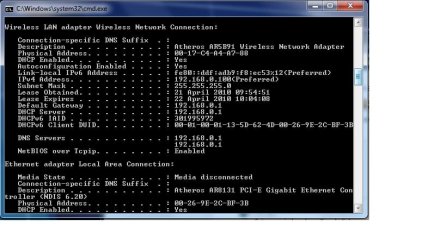
I have attached screenshots of a wire connection ipconfig/all and another on the wireless connection. The detection thing! on Windows 7 when on the wire LAN connection indicates Doesnt have a valid IP Configuration and the Wireless connection detects The DNS server isn't responding.

I really dont know what is wrong, It is a new laptop, it should have the latest driver right? I don't really know how to update them anyway.

Any ideas would be greatful, i am lost and I am living In the czech republic so I can't send it back without spending loads of money.

Who can I contact, Acer, Microsoft or the Internet provider? whos issue is it?
Please can you support me on this one, I don't understand the IP config stuff, i just noticed people do it and it helps people understand the issue.

One more thing, I notice when i click into the network it states no internet connection for both.

wiredLANipconfigall.jpg

wirelessipconfigall.jpg
 

My Computer My Computer

Computer Manufacturer/Model Number
ACER EXTENSA 5635Z
OS
Windows 7
Memory
2GB
Hard Drives
250GB
Internet Speed
FAST?
Hi guys,

I have had this issue for a week now and I still can't get my new acer to work.
Here is the story:

I have a connection at home, I have a single wire or a wireless router, none of which I can get to work.

The one wire will work on one older laptop and a newer laptop i have will no connect to it, so I bought a wireless router, and this will not connect to either laptop.
I have contacted Acer who say its the internet provider, the provider say everything is set up correctly, plus it does work on one laptop so this indicates it's true!

I have attached screenshots of a wire connection ipconfig/all and another on the wireless connection. The detection thing! on Windows 7 when on the wire LAN connection indicates Doesnt have a valid IP Configuration and the Wireless connection detects The DNS server isn't responding.

I really dont know what is wrong, It is a new laptop, it should have the latest driver right? I don't really know how to update them anyway.

Any ideas would be greatful, i am lost and I am living In the czech republic so I can't send it back without spending loads of money.

Who can I contact, Acer, Microsoft or the Internet provider? whos issue is it?
Please can you support me on this one, I don't understand the IP config stuff, i just noticed people do it and it helps people understand the issue.

One more thing, I notice when i click into the network it states no internet connection for both.

View attachment 68540

View attachment 68541

Have you rebooted the router and the PC at the same time?
 

My Computer My Computer

Computer Manufacturer/Model Number
HP Pavillion dv-7 1005 Tx
OS
Win 8 Release candidate 8400
CPU
[email protected]
Memory
4 gigs
Graphics Card(s)
Nvidia 9600M
Sound Card
HD built-in
Monitor(s) Displays
17" Wxga
Screen Resolution
1440x900
Cooling
none
Internet Speed
45Mb down 5Mb up
Yes I have, Please has anyone got anything?
 

My Computer My Computer

Computer Manufacturer/Model Number
ACER EXTENSA 5635Z
OS
Windows 7
Memory
2GB
Hard Drives
250GB
Internet Speed
FAST?
What type of connection do you have? If you have DSL, you may have to supply login details in order to connect. If you have cable, I'm not sure why your connection isn't working. What did you do to get the original laptop connected?
 

My Computer My Computer

Computer Manufacturer/Model Number
Apple Macbook Pro (April 2009)
OS
W7 Ult. x64 | OS X
CPU
Intel Mobile Core 2 Duo 2.93Ghz [T9800 Penryn]
Motherboard
NVIDIA nForce 730i Rev. B1 [Mac-F2268EC8 (U2E1)]
Memory
4096MB Samsung DDR3 Dual Channel [PC3-8500F 1066Mhz]
Graphics Card(s)
NVIDIA GeForce 9600M GT 512MB [G96M Rev. C1]
Sound Card
SB X-Fi Surround 5.1 USB | Onboard Realtek (Disabled)
Monitor(s) Displays
Acer x223wbd 22" | Apple Anti-Glare 17" (Disabled)
Screen Resolution
{Current} 1440x900 {Acer} 1680x1050 {Apple} 1920x1200
Hard Drives
{Internal}
Seagate Momentus 320GB 2.5" 7200RPM [ST9320421AS]

{Externals}
LaCie 320GB USB 2.0 HDD [301284UR]
LaCie 750GB USB 2.0 FW400 eSATA HDD [301314U]
LaCie 1TB USB 2.0 HDD [301304UR]
PSU
Magsafe
Case
Aluminum/Unibody (MBP52)
Cooling
2 x 6000 RPM Fans
Keyboard
Logitech G-15v2 [PN 920-000379]
Mouse
Logitech G-9 [PN 910-000338]
Internet Speed
12Mbps/2.5Mbps w/ 24Mbps Speed Boost [Comcast]
Other Info
Logitech X-540 Speakers [PN 970223-0122]
Sennheiser PC-151 Headset
The laptop on it now connects automatically, yet my latest, the acer is not picking up anything?
I really am stuck, I don't even know who to call to get advice?
Should I just return the laptop!? which is hard as I have to send it back to the UK. I am in Czech
 

My Computer My Computer

Computer Manufacturer/Model Number
ACER EXTENSA 5635Z
OS
Windows 7
Memory
2GB
Hard Drives
250GB
Internet Speed
FAST?
Back
Top