
Yesterday I performed a clean windows 7 install on my fathers HP pavillion desktop PC. It had originally vista.
During installing the screen became black, but when I unplugged the HDMI cabel which is for the LCD TV, the black screen dissapeared and the install could be completed. If I plug in the HDMI cabel again now, the screen becomes black in some seconds and then the screen shows the clean windows 7 bacground without any program icons or taskbar. How can this be fixed?
The second problem:
If one of the original screensavers included in the windows 7 is used, it works. But if I try to use the gphotoshow screensaver, which I have used many years on other PCs, a popup appears on a black screen where it stands "please insert a disc into K drive". If I then press ENTER, the gphotoshow screensaver works. As long as I dont press ENTER, the popup continues to appear on the black screen without the gphotoshow
The popup as it looks: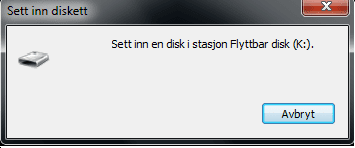
Norwegian language, but its just to show how it looks
Info:
32-bits
AMD Athlon(tm) 64 X2 dual core processor 6000+ 3.00Ghz
Installed memory: 4.00GB(3,50 GB can be used)
The windows.old, windows.old.001 and windows.old.002 have been removed via disc cleanup
During installing the screen became black, but when I unplugged the HDMI cabel which is for the LCD TV, the black screen dissapeared and the install could be completed. If I plug in the HDMI cabel again now, the screen becomes black in some seconds and then the screen shows the clean windows 7 bacground without any program icons or taskbar. How can this be fixed?
The second problem:
If one of the original screensavers included in the windows 7 is used, it works. But if I try to use the gphotoshow screensaver, which I have used many years on other PCs, a popup appears on a black screen where it stands "please insert a disc into K drive". If I then press ENTER, the gphotoshow screensaver works. As long as I dont press ENTER, the popup continues to appear on the black screen without the gphotoshow
The popup as it looks:
Norwegian language, but its just to show how it looks
Info:
32-bits
AMD Athlon(tm) 64 X2 dual core processor 6000+ 3.00Ghz
Installed memory: 4.00GB(3,50 GB can be used)
The windows.old, windows.old.001 and windows.old.002 have been removed via disc cleanup
My Computer
- Computer type
- PC/Desktop
- Computer Manufacturer/Model Number
- Unknown
- OS
- Windows 7 Home Premium 64bit, service pack 1
- CPU
- Intel(R) Core(TM) i5 760
- Memory
- 4,00 GB


