
Solved Problems after cloning C drive

magicant

New member
Member
Local time
12:50 AM
Messages
52
[FONT=&quot]I'm having problems after cloning my C drive (Windows 7 Ultimate 64Bit SP1).[/FONT]

[FONT=&quot]First I updated my BIOS because I'm looking to get a new video card and my motherboard needs an updated BIOS to support it. That went fine. After I installed the latest motherboard drivers (chipset, usb 3.0, etc).[/FONT]

[FONT=&quot]Then I decided to clone my main C drive and my second D drive. I used an external docking station (StarTech SATA Duplicator Hard Drive Doc) which is supposed to make a bit for bit copy. My original drives were Intel X25-E Extreme 64GB. The new drives are SAMSUNG 850 PRO 256GB.[/FONT]

[FONT=&quot]D drive first (I have some software installed on it). Seemed to work fine. Then I did my C drive, and this is what happened.[/FONT]

[FONT=&quot]When I first booted up with it, windows ran a quick repair, restarted, and it booted fine. Everything looked good. I restarted a few times, ran a few programs, no problem.[/FONT]

[FONT=&quot]Then I booted into safe mode because I was trying to delete a folder that was locked. Right before booting into safe mode it ran chkdsk and a bunch of stuff flew by. Fixing orphan file ..... It went fast so I couldn't see. After that it booted into safe mode fine and when I rebooted it was fine.[/FONT]

[FONT=&quot]Then I tried windows update and got Error 0xC80003FB. I ran the windows update repair tool and it fixed a bunch of errors except one. Still wouldn't work.[/FONT]

[FONT=&quot]So I ran a chkdsk on the C drive. Right click, properties, tools, check now and i checked both boxes, restarted and let it run. It ran through restarted and now windows update works.[/FONT]

[FONT=&quot]Next problem, when running Itunes or Photoshop (only ones so far) I got a message that dnssd.dll is either not designed to run on windows or it contains an error. After clicking ok the programs ran. I couldn't find a solution so I copied this dll from another windows 7 machine to mine, and the error went away.[/FONT]

[FONT=&quot]Now when opening itunes, it works fine but if I click on preferences it takes forever for the preferences to come up. If I click before, it freezes. I uninstalled and reinstalled itunes but still have that problem. Also, when I open Filezilla (an FTP client) I get error messages. It seems to work and I can connect to the FTP but I get errors if I go to HELP and ABOUT, or if I try to import settings, etc. I haven't tried reinstalling yet, but I fear it won't fix it.
[/FONT][FONT=&quot]
It also seems the windows recent and frequent programs is not working. When I used to right click on the taskbar icon for an open folder it would show a list of frequent folders I opened, and I could drag a folder onto it to add it to the pinned list. Now it only shows windows explorer, pin this program, and close. I can't add anything to it.
[/FONT]
[FONT=&quot]Any ideas? Is the drive bad? Did something get corrupted? I'm afraid what other problems I may have. Sorry for the long post.[/FONT]

[FONT=&quot]Thanks.[/FONT]

[FONT=&quot]System specs:
[/FONT]
[FONT=&quot]--OS: - Microsoft Windows 7 Ultimate (64 bit) SP1 with latest updates.[/FONT]
[FONT=&quot]--Monitor: - Dell UltraSharp U3011 30-inch Widescreen [/FONT]
[FONT=&quot]--Case: - COOLER MASTER HAF X RC-942-KKN1 ATX Full Tower [/FONT]
[FONT=&quot]--Motherboard: MSI Big Bang-XPower LGA 1366 Intel X58 [/FONT]
[FONT=&quot]--CPU: - Intel Core i7-980X Extreme Edition Gulftown 3.33GHz [/FONT]
[FONT=&quot]--CPU Cooler: - CoolIT Systems VAN-R120 Vantage A.L.C. Liquid Coole[/FONT]
[FONT=&quot]--Power Supply: - CORSAIR Professional Series AX1200 1200W [/FONT]
[FONT=&quot]--Sound Card: - Creative Sound Blaster X-Fi Titanium Fatal1ty [/FONT]
[FONT=&quot]--Video Card: - EVGA SuperClocked 015-P3-1582-AR GeForce GTX 580 (Fermi) [/FONT]
[FONT=&quot]--Memory: - G.SKILL Ripjaws Series 24GB (6 x 4GB) 240-Pin DDR3 SDRAM[/FONT]
[FONT=&quot]--Memory Cooler: - G.SKILL FTB-3500C5-D Fans[/FONT]
[FONT=&quot]--1st Hard Drive: - SAMSUNG 850 PRO 256GB SSD[/FONT]
[FONT=&quot]--2nd Hard Drive - SAMSUNG 850 PRO 256GB SSD[/FONT]
[FONT=&quot]--3rd Hard Drive: - Western Digital VelociRaptor WD1000DHTZ [/FONT]
[FONT=&quot]--4th Hard Drive: -Seagate Barracuda XT 2TB 7200 RPM 64MB Cache [/FONT]
[FONT=&quot]--1st Optical Drive: - LG WH10LS30K 10X Blu-ray Burner [/FONT]
[FONT=&quot]--2nd Optical Drive: - LG WH10LS30K 10X Blu-ray Burner [/FONT]
[FONT=&quot]--Keyboard/Mouse: - Logitech MX 5500 Revolution Bluetooth Cordless Desktop [/FONT]
[FONT=&quot]--Card Reader: Nippon Labs Delux 3.5" Internal Card Reader/Writer[/FONT]
[FONT=&quot]--Speakers: - Altec Lansing ADA995 5.1 surround speakers[/FONT]
 

My Computer

Computer type
PC/Desktop
OS
Windows 7 Ultimate 64bit SP1 w/latest updates
CPU
Intel Core i7-980X Extreme Edition Gulftown 3.33GHz
Motherboard
MSI Big Bang-XPower LGA 1366 Intel X58 with latest Bios v1.7
Memory
G.SKILL Ripjaws Series 24GB (6 x 4GB) 240-Pin DDR3 SDRAM
Graphics Card(s)
EVGA GeForce GTX 980 Ti SC+
Sound Card
Creative Sound Blaster X-Fi Titanium Fatal1ty
Monitor(s) Displays
Dell UltraSharp U3011 30-inch Widescreen
Screen Resolution
2560x1600
Hard Drives
--1st Hard Drive: - SAMSUNG 850 PRO 256GB SSD
--2nd Hard Drive - SAMSUNG 850 PRO 256GB SSD
--3rd Hard Drive: - Western Digital VelociRaptor WD1000DHTZ
--4th Hard Drive: -Seagate Barracuda XT 2TB 7200 RPM 64MB Cache
PSU
CORSAIR Professional Series AX1200 1200W
Case
COOLER MASTER HAF X RC-942-KKN1 ATX Full Tower
Cooling
CoolIT Systems VAN-R120 Vantage A.L.C. Liquid Cooler
Keyboard
Logitech MX 5500 Revolution Bluetooth Cordless Keyboard
Mouse
Logitech MX 5500 Revolution Bluetooth Cordless Mouse
Internet Speed
100 Mbps download / 40 Mbps upload
Antivirus
Norton Internet Secutiry 2015
Browser
Firefox
Other Info
--Card Reader: Nippon Labs Delux 3.5" Internal Card Reader/Writer
--Speakers: - Altec Lansing ADA995 5.1 surround speakers
--Webcam: Logitech HD Pro C920 1080p Widescreen
--Microphone: Telex M-560 Super-Directional USB Digital Microphone
Just very quickly I personally would re clone that drive/s and use Macrium free to do it as I find it is the best cloning software. I say this because I think as you said it yourself that the drive may have become corrupted or rather the transfer of data got corrupted during the cloning process.
Macrium Reflect Free
 

My Computer

Computer type
PC/Desktop
Computer Manufacturer/Model Number
Own build (new) Desk1 / Asus ROG Win 7 / Desk2 1st build
OS
Desk1 7 Home Prem / Desk2 10 Pro / Main lap Asus ROG 10 Pro 2 laptop Toshiba 7 Pro Asus P2520 7 & 10
CPU
Desk1 i5 3750K / Laptop i7 GTX 860M / Desk2 i5 2500
Motherboard
Desk1 Asus P877-V / Desk2 Gigabyte H67 UD3H / Laptop ?
Memory
Desk1 8GB (1866) / Desk2 16GB (1333) / Laptop 8Gb DDR3
Graphics Card(s)
Desk 1& 2NVidia GTX 650 & Laptops on board Intel
Sound Card
Desk 1 & 2 -XONAR DG Realtek High Def audio Laptop
Monitor(s) Displays
Desk 1 Benq HD 2450 / Desk2 Philips 24" / Laptop 17.5"
Screen Resolution
1920x1080 D1 & D2 & Laptop 1
Hard Drives
Desk1 Samsung 120GB 830 SSD
Asus ROG 256GB 850 Pro SSD
Desk2 Samsung 840 256 SSD
Toshiba 120GB EVO
PSU
Desk 1 Corsair HX 1050/ Laptop ? / Desk 2 Corsair HX 650
Case
Desk 1 Cooler HAF XM ? Toshiba laptop / Desk2 Coolermaster
Cooling
Fans on all Desk1 -2 Desk2 - all Coolermasters 5 Laptop ?
Keyboard
Desk 1 MS Sidewinder X6 Desk 2 MS Sidewinder X 4
Mouse
Desk 1&2 - Gigabyte MS 900 gamer - laptop - Logitec wireless
Internet Speed
ADSL2+
Other Info
One other Desktop (tester) and spare Toshba laptop both with SSD's
Running Kaspersky 2016 ISS on all machines config'd identically
Logitec audio stereo systems on each machine (x3)
Canon MG5250MFC
Router/modem TP-Link running WPA2SK
Do you know if this will also clone the hidden 100mb windows partition as well? The reason I used the docking station is that it is suppose to be a hardware bit for bit copy of the drive, with less chance of problems from cloning using software. So I'm not sure why it didn't work.
 

My Computer

Computer type
PC/Desktop
OS
Windows 7 Ultimate 64bit SP1 w/latest updates
CPU
Intel Core i7-980X Extreme Edition Gulftown 3.33GHz
Motherboard
MSI Big Bang-XPower LGA 1366 Intel X58 with latest Bios v1.7
Memory
G.SKILL Ripjaws Series 24GB (6 x 4GB) 240-Pin DDR3 SDRAM
Graphics Card(s)
EVGA GeForce GTX 980 Ti SC+
Sound Card
Creative Sound Blaster X-Fi Titanium Fatal1ty
Monitor(s) Displays
Dell UltraSharp U3011 30-inch Widescreen
Screen Resolution
2560x1600
Hard Drives
--1st Hard Drive: - SAMSUNG 850 PRO 256GB SSD
--2nd Hard Drive - SAMSUNG 850 PRO 256GB SSD
--3rd Hard Drive: - Western Digital VelociRaptor WD1000DHTZ
--4th Hard Drive: -Seagate Barracuda XT 2TB 7200 RPM 64MB Cache
PSU
CORSAIR Professional Series AX1200 1200W
Case
COOLER MASTER HAF X RC-942-KKN1 ATX Full Tower
Cooling
CoolIT Systems VAN-R120 Vantage A.L.C. Liquid Cooler
Keyboard
Logitech MX 5500 Revolution Bluetooth Cordless Keyboard
Mouse
Logitech MX 5500 Revolution Bluetooth Cordless Mouse
Internet Speed
100 Mbps download / 40 Mbps upload
Antivirus
Norton Internet Secutiry 2015
Browser
Firefox
Other Info
--Card Reader: Nippon Labs Delux 3.5" Internal Card Reader/Writer
--Speakers: - Altec Lansing ADA995 5.1 surround speakers
--Webcam: Logitech HD Pro C920 1080p Widescreen
--Microphone: Telex M-560 Super-Directional USB Digital Microphone
Do you know if this will also clone the hidden 100mb windows partition as well? The reason I used the docking station is that it is suppose to be a hardware bit for bit copy of the drive, with less chance of problems from cloning using software. So I'm not sure why it didn't work.

It will clone everything that you tell it Macrium to, including the System Reserved (100 mb), but you have to mark each partition that you want copied. I agree that Macrium is the program to use. Also could you post a Screen shot of your Disk Management so we can take a look at it. http://www.sevenforums.com/tutorials/274797-disk-management-post-screen-capture-image.html Be sure and widen the columns so we can read all of the print. == One more question just to clarify. Are you saying that the clone does not work now or the original does not work?
 

My Computer

Computer type
PC/Desktop
Computer Manufacturer/Model Number
Custom Build
OS
Windows 7 Home Premium 32-Bit - Build 7600 SP1
CPU
Intel Core i3-2120 3.30Ghz
Motherboard
Asus P8Z68-V LX Intel Z68 Socket H2 ATX
Memory
Kingston 4 GB DDR3 1333 mhz
Graphics Card(s)
AMD Radeon HD6670
Sound Card
Sound Blaster Audigy SE 24-Bit
Monitor(s) Displays
Asus VE228
Screen Resolution
1440 X 900
Hard Drives
OCZ Vertex 3 120 GB Sata 3 SSD ==
Kingston SH103/S3 120 G Hyper X 120 GB SSD ==
Western Digital 500 GB Caviar Green 7200 RPM ==
PSU
Corsair CX600M == 600 Watt
Case
NZXT Apollo - Silver with Clear Side Panel
Cooling
Three 120 mm Fans
Keyboard
Microsoft Natural 4000
Mouse
Microsoft Custom Optical 3000
Internet Speed
AT&T Fiber Optic Wireless Network
Antivirus
Microsoft Security Essentials
Browser
Chrome
Other Info
120 mm Blue LED Fan -- Three Blue LED Lazer Light Sticks
Right now I am trying the clone again with the docking station, just to give it one more try.
I have not put the original back in the computer yet, but the original was working fine. I'm only changing drives to get more space, and thought it would be nice to get a performance boost. Nothing was wrong with the original.

The cloned drive would boot, but I started having problems (as I explained in the original post). So something went wrong. If this second clone attempt doesn't work then I guess I will look into Macrium. I assume I can keep my other drives plugged in while using Macrium? I can connect one drive through the esata docking station of my other computer, and I guess plug one in internally to the motherboard. And then clone.

I'll let you know how this second docking station clone attempt works.

Thanks.
 

My Computer

Computer type
PC/Desktop
OS
Windows 7 Ultimate 64bit SP1 w/latest updates
CPU
Intel Core i7-980X Extreme Edition Gulftown 3.33GHz
Motherboard
MSI Big Bang-XPower LGA 1366 Intel X58 with latest Bios v1.7
Memory
G.SKILL Ripjaws Series 24GB (6 x 4GB) 240-Pin DDR3 SDRAM
Graphics Card(s)
EVGA GeForce GTX 980 Ti SC+
Sound Card
Creative Sound Blaster X-Fi Titanium Fatal1ty
Monitor(s) Displays
Dell UltraSharp U3011 30-inch Widescreen
Screen Resolution
2560x1600
Hard Drives
--1st Hard Drive: - SAMSUNG 850 PRO 256GB SSD
--2nd Hard Drive - SAMSUNG 850 PRO 256GB SSD
--3rd Hard Drive: - Western Digital VelociRaptor WD1000DHTZ
--4th Hard Drive: -Seagate Barracuda XT 2TB 7200 RPM 64MB Cache
PSU
CORSAIR Professional Series AX1200 1200W
Case
COOLER MASTER HAF X RC-942-KKN1 ATX Full Tower
Cooling
CoolIT Systems VAN-R120 Vantage A.L.C. Liquid Cooler
Keyboard
Logitech MX 5500 Revolution Bluetooth Cordless Keyboard
Mouse
Logitech MX 5500 Revolution Bluetooth Cordless Mouse
Internet Speed
100 Mbps download / 40 Mbps upload
Antivirus
Norton Internet Secutiry 2015
Browser
Firefox
Other Info
--Card Reader: Nippon Labs Delux 3.5" Internal Card Reader/Writer
--Speakers: - Altec Lansing ADA995 5.1 surround speakers
--Webcam: Logitech HD Pro C920 1080p Widescreen
--Microphone: Telex M-560 Super-Directional USB Digital Microphone
Well it's doing the same thing after retrying the clone with the docking station.

When I first booted it ran a windows repair again. Then when starting into windows it loaded the drivers for the samsung drive, successfully. Restarted and booted normally.

I didn't get that dll error when opening itunes but opening preferences still takes forever. Filezilla still shows errors. The jump list/favorites are not working. And windows update is giving the error again.

I've read other people using this docking station and having no problems. Unless there is something wrong with the dock or maybe something wrong with the drive. Here is a screenshot of disk management.

http://www.sevenforums.com/attachment.php?attachmentid=376045&stc=1&d=1447625587

I guess I'm going to have to try a software option and see if that makes a difference.
 

Attachments

  • Disk Management.jpg
    Disk Management.jpg
    134.3 KB · Views: 10

My Computer

Computer type
PC/Desktop
OS
Windows 7 Ultimate 64bit SP1 w/latest updates
CPU
Intel Core i7-980X Extreme Edition Gulftown 3.33GHz
Motherboard
MSI Big Bang-XPower LGA 1366 Intel X58 with latest Bios v1.7
Memory
G.SKILL Ripjaws Series 24GB (6 x 4GB) 240-Pin DDR3 SDRAM
Graphics Card(s)
EVGA GeForce GTX 980 Ti SC+
Sound Card
Creative Sound Blaster X-Fi Titanium Fatal1ty
Monitor(s) Displays
Dell UltraSharp U3011 30-inch Widescreen
Screen Resolution
2560x1600
Hard Drives
--1st Hard Drive: - SAMSUNG 850 PRO 256GB SSD
--2nd Hard Drive - SAMSUNG 850 PRO 256GB SSD
--3rd Hard Drive: - Western Digital VelociRaptor WD1000DHTZ
--4th Hard Drive: -Seagate Barracuda XT 2TB 7200 RPM 64MB Cache
PSU
CORSAIR Professional Series AX1200 1200W
Case
COOLER MASTER HAF X RC-942-KKN1 ATX Full Tower
Cooling
CoolIT Systems VAN-R120 Vantage A.L.C. Liquid Cooler
Keyboard
Logitech MX 5500 Revolution Bluetooth Cordless Keyboard
Mouse
Logitech MX 5500 Revolution Bluetooth Cordless Mouse
Internet Speed
100 Mbps download / 40 Mbps upload
Antivirus
Norton Internet Secutiry 2015
Browser
Firefox
Other Info
--Card Reader: Nippon Labs Delux 3.5" Internal Card Reader/Writer
--Speakers: - Altec Lansing ADA995 5.1 surround speakers
--Webcam: Logitech HD Pro C920 1080p Widescreen
--Microphone: Telex M-560 Super-Directional USB Digital Microphone
So I put my old C drive back just to check things and it still works fine. No problems with itunes preferences, no errors with Filezilla, no errors running windows update.

So I don't know if my computer/windows just has a problem with the new/different drive, if there is a problem with the docking station, or if the SSD is defective. I'm almost inclined to buy another SSD and give it a try.

Unless anyone has any other suggestions. I think I'm done for tonight. Will have to wait until next weekend to try again. If no other suggestions then maybe I'll try installing Macrium on my backup computer and trying to clone from there. Or if I'm ambitious maybe I'll order another samsung drive and try the docking station with that first.
 

My Computer

Computer type
PC/Desktop
OS
Windows 7 Ultimate 64bit SP1 w/latest updates
CPU
Intel Core i7-980X Extreme Edition Gulftown 3.33GHz
Motherboard
MSI Big Bang-XPower LGA 1366 Intel X58 with latest Bios v1.7
Memory
G.SKILL Ripjaws Series 24GB (6 x 4GB) 240-Pin DDR3 SDRAM
Graphics Card(s)
EVGA GeForce GTX 980 Ti SC+
Sound Card
Creative Sound Blaster X-Fi Titanium Fatal1ty
Monitor(s) Displays
Dell UltraSharp U3011 30-inch Widescreen
Screen Resolution
2560x1600
Hard Drives
--1st Hard Drive: - SAMSUNG 850 PRO 256GB SSD
--2nd Hard Drive - SAMSUNG 850 PRO 256GB SSD
--3rd Hard Drive: - Western Digital VelociRaptor WD1000DHTZ
--4th Hard Drive: -Seagate Barracuda XT 2TB 7200 RPM 64MB Cache
PSU
CORSAIR Professional Series AX1200 1200W
Case
COOLER MASTER HAF X RC-942-KKN1 ATX Full Tower
Cooling
CoolIT Systems VAN-R120 Vantage A.L.C. Liquid Cooler
Keyboard
Logitech MX 5500 Revolution Bluetooth Cordless Keyboard
Mouse
Logitech MX 5500 Revolution Bluetooth Cordless Mouse
Internet Speed
100 Mbps download / 40 Mbps upload
Antivirus
Norton Internet Secutiry 2015
Browser
Firefox
Other Info
--Card Reader: Nippon Labs Delux 3.5" Internal Card Reader/Writer
--Speakers: - Altec Lansing ADA995 5.1 surround speakers
--Webcam: Logitech HD Pro C920 1080p Widescreen
--Microphone: Telex M-560 Super-Directional USB Digital Microphone
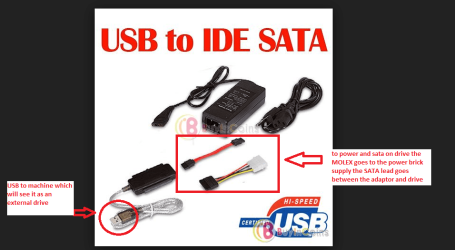
If you think the docking station method might be the problem then try using a USB to SATA adaptor - I use one all the time so I don't have to disassemble anything. They are cheap enough and a very handy tool for doing any work on a drive outside of a working machine.
 

Attachments

  • USB TO SATA ADAPTOR.PNG
    USB TO SATA ADAPTOR.PNG
    75.5 KB · Views: 0

My Computer

Computer type
PC/Desktop
Computer Manufacturer/Model Number
Own build (new) Desk1 / Asus ROG Win 7 / Desk2 1st build
OS
Desk1 7 Home Prem / Desk2 10 Pro / Main lap Asus ROG 10 Pro 2 laptop Toshiba 7 Pro Asus P2520 7 & 10
CPU
Desk1 i5 3750K / Laptop i7 GTX 860M / Desk2 i5 2500
Motherboard
Desk1 Asus P877-V / Desk2 Gigabyte H67 UD3H / Laptop ?
Memory
Desk1 8GB (1866) / Desk2 16GB (1333) / Laptop 8Gb DDR3
Graphics Card(s)
Desk 1& 2NVidia GTX 650 & Laptops on board Intel
Sound Card
Desk 1 & 2 -XONAR DG Realtek High Def audio Laptop
Monitor(s) Displays
Desk 1 Benq HD 2450 / Desk2 Philips 24" / Laptop 17.5"
Screen Resolution
1920x1080 D1 & D2 & Laptop 1
Hard Drives
Desk1 Samsung 120GB 830 SSD
Asus ROG 256GB 850 Pro SSD
Desk2 Samsung 840 256 SSD
Toshiba 120GB EVO
PSU
Desk 1 Corsair HX 1050/ Laptop ? / Desk 2 Corsair HX 650
Case
Desk 1 Cooler HAF XM ? Toshiba laptop / Desk2 Coolermaster
Cooling
Fans on all Desk1 -2 Desk2 - all Coolermasters 5 Laptop ?
Keyboard
Desk 1 MS Sidewinder X6 Desk 2 MS Sidewinder X 4
Mouse
Desk 1&2 - Gigabyte MS 900 gamer - laptop - Logitec wireless
Internet Speed
ADSL2+
Other Info
One other Desktop (tester) and spare Toshba laptop both with SSD's
Running Kaspersky 2016 ISS on all machines config'd identically
Logitec audio stereo systems on each machine (x3)
Canon MG5250MFC
Router/modem TP-Link running WPA2SK
I have one of those but the docking station is an external 2 bay drive that does hardware duplication without being connected to the computer. It has it's own duplicator. I can also connect it to the computer through esata to connect the drive to the computer.

But if I wind up using software then i can use the docking station as the external connection.

I've also heard good things about acronis. Do you think macrium is better than acronis?

Thanks.
 

My Computer

Computer type
PC/Desktop
OS
Windows 7 Ultimate 64bit SP1 w/latest updates
CPU
Intel Core i7-980X Extreme Edition Gulftown 3.33GHz
Motherboard
MSI Big Bang-XPower LGA 1366 Intel X58 with latest Bios v1.7
Memory
G.SKILL Ripjaws Series 24GB (6 x 4GB) 240-Pin DDR3 SDRAM
Graphics Card(s)
EVGA GeForce GTX 980 Ti SC+
Sound Card
Creative Sound Blaster X-Fi Titanium Fatal1ty
Monitor(s) Displays
Dell UltraSharp U3011 30-inch Widescreen
Screen Resolution
2560x1600
Hard Drives
--1st Hard Drive: - SAMSUNG 850 PRO 256GB SSD
--2nd Hard Drive - SAMSUNG 850 PRO 256GB SSD
--3rd Hard Drive: - Western Digital VelociRaptor WD1000DHTZ
--4th Hard Drive: -Seagate Barracuda XT 2TB 7200 RPM 64MB Cache
PSU
CORSAIR Professional Series AX1200 1200W
Case
COOLER MASTER HAF X RC-942-KKN1 ATX Full Tower
Cooling
CoolIT Systems VAN-R120 Vantage A.L.C. Liquid Cooler
Keyboard
Logitech MX 5500 Revolution Bluetooth Cordless Keyboard
Mouse
Logitech MX 5500 Revolution Bluetooth Cordless Mouse
Internet Speed
100 Mbps download / 40 Mbps upload
Antivirus
Norton Internet Secutiry 2015
Browser
Firefox
Other Info
--Card Reader: Nippon Labs Delux 3.5" Internal Card Reader/Writer
--Speakers: - Altec Lansing ADA995 5.1 surround speakers
--Webcam: Logitech HD Pro C920 1080p Widescreen
--Microphone: Telex M-560 Super-Directional USB Digital Microphone
Your Disk Management looks OK with the exception that the System Reserved should not have a letter. You should remove the Z:
 

My Computer

Computer type
PC/Desktop
Computer Manufacturer/Model Number
Custom Build
OS
Windows 7 Home Premium 32-Bit - Build 7600 SP1
CPU
Intel Core i3-2120 3.30Ghz
Motherboard
Asus P8Z68-V LX Intel Z68 Socket H2 ATX
Memory
Kingston 4 GB DDR3 1333 mhz
Graphics Card(s)
AMD Radeon HD6670
Sound Card
Sound Blaster Audigy SE 24-Bit
Monitor(s) Displays
Asus VE228
Screen Resolution
1440 X 900
Hard Drives
OCZ Vertex 3 120 GB Sata 3 SSD ==
Kingston SH103/S3 120 G Hyper X 120 GB SSD ==
Western Digital 500 GB Caviar Green 7200 RPM ==
PSU
Corsair CX600M == 600 Watt
Case
NZXT Apollo - Silver with Clear Side Panel
Cooling
Three 120 mm Fans
Keyboard
Microsoft Natural 4000
Mouse
Microsoft Custom Optical 3000
Internet Speed
AT&T Fiber Optic Wireless Network
Antivirus
Microsoft Security Essentials
Browser
Chrome
Other Info
120 mm Blue LED Fan -- Three Blue LED Lazer Light Sticks
I manually added the letter when I first built the computer. I was trying to boot into safe mode through msconfig but i was not able to select everything and doing research read that if you assign a drive letter to that partition it will work. So I assigned a letter and it work fine. I used a registry hack to make that drive hidden in my computer so it doesn't show up. I haven't had any issues with it having a drive letter so i don't think that is the problem.

I don't know why I got strange random problems like that unless the drive is defective and has some bad sectors or the docking station didn't copy correctly (although it seemed to copy the D drive fine, I've had no problems with that yet).

I may buy another drive and try that with the docking station, and if i get the same problem will than try a software solution. Unless anyone has any other ideas. And does anyone have any experience between acronis and macriu?

Thanks for the responses
 

My Computer

Computer type
PC/Desktop
OS
Windows 7 Ultimate 64bit SP1 w/latest updates
CPU
Intel Core i7-980X Extreme Edition Gulftown 3.33GHz
Motherboard
MSI Big Bang-XPower LGA 1366 Intel X58 with latest Bios v1.7
Memory
G.SKILL Ripjaws Series 24GB (6 x 4GB) 240-Pin DDR3 SDRAM
Graphics Card(s)
EVGA GeForce GTX 980 Ti SC+
Sound Card
Creative Sound Blaster X-Fi Titanium Fatal1ty
Monitor(s) Displays
Dell UltraSharp U3011 30-inch Widescreen
Screen Resolution
2560x1600
Hard Drives
--1st Hard Drive: - SAMSUNG 850 PRO 256GB SSD
--2nd Hard Drive - SAMSUNG 850 PRO 256GB SSD
--3rd Hard Drive: - Western Digital VelociRaptor WD1000DHTZ
--4th Hard Drive: -Seagate Barracuda XT 2TB 7200 RPM 64MB Cache
PSU
CORSAIR Professional Series AX1200 1200W
Case
COOLER MASTER HAF X RC-942-KKN1 ATX Full Tower
Cooling
CoolIT Systems VAN-R120 Vantage A.L.C. Liquid Cooler
Keyboard
Logitech MX 5500 Revolution Bluetooth Cordless Keyboard
Mouse
Logitech MX 5500 Revolution Bluetooth Cordless Mouse
Internet Speed
100 Mbps download / 40 Mbps upload
Antivirus
Norton Internet Secutiry 2015
Browser
Firefox
Other Info
--Card Reader: Nippon Labs Delux 3.5" Internal Card Reader/Writer
--Speakers: - Altec Lansing ADA995 5.1 surround speakers
--Webcam: Logitech HD Pro C920 1080p Widescreen
--Microphone: Telex M-560 Super-Directional USB Digital Microphone
System Reserved does not need a letter for it to boot or for it to be cloned or for it to be imaged. Don't assign drive letter to SysRes; leave it as it originally was.
 

My Computer

Computer type
PC/Desktop
Computer Manufacturer/Model Number
Antec desktop; Acer Aspire laptops
OS
Windows 7 Professional 64-bit
CPU
Desktop i5; Acers i5 & i7
Memory
desktop 16GB; 1 Acer 8GB & 1 Acer 16GB
Hard Drives
1TB split into 2 equal partitions [OS and data] usable by RJS
Internet Speed
AT&T DSL
Browser
FF, GChrome, msIE
Other Info
Windows 7 Firewall, Emsisoft AM/AV, MSE [scan-only], SpywareBlaster, Ruiware/BillP combine
Does giving it a drive letter matter? It's been like that for 5 years with no issues and I don't think that has anything to do with my cloning problem. I'm trying to figure out what could be causing these strange issues with the clone.
 

My Computer

Computer type
PC/Desktop
OS
Windows 7 Ultimate 64bit SP1 w/latest updates
CPU
Intel Core i7-980X Extreme Edition Gulftown 3.33GHz
Motherboard
MSI Big Bang-XPower LGA 1366 Intel X58 with latest Bios v1.7
Memory
G.SKILL Ripjaws Series 24GB (6 x 4GB) 240-Pin DDR3 SDRAM
Graphics Card(s)
EVGA GeForce GTX 980 Ti SC+
Sound Card
Creative Sound Blaster X-Fi Titanium Fatal1ty
Monitor(s) Displays
Dell UltraSharp U3011 30-inch Widescreen
Screen Resolution
2560x1600
Hard Drives
--1st Hard Drive: - SAMSUNG 850 PRO 256GB SSD
--2nd Hard Drive - SAMSUNG 850 PRO 256GB SSD
--3rd Hard Drive: - Western Digital VelociRaptor WD1000DHTZ
--4th Hard Drive: -Seagate Barracuda XT 2TB 7200 RPM 64MB Cache
PSU
CORSAIR Professional Series AX1200 1200W
Case
COOLER MASTER HAF X RC-942-KKN1 ATX Full Tower
Cooling
CoolIT Systems VAN-R120 Vantage A.L.C. Liquid Cooler
Keyboard
Logitech MX 5500 Revolution Bluetooth Cordless Keyboard
Mouse
Logitech MX 5500 Revolution Bluetooth Cordless Mouse
Internet Speed
100 Mbps download / 40 Mbps upload
Antivirus
Norton Internet Secutiry 2015
Browser
Firefox
Other Info
--Card Reader: Nippon Labs Delux 3.5" Internal Card Reader/Writer
--Speakers: - Altec Lansing ADA995 5.1 surround speakers
--Webcam: Logitech HD Pro C920 1080p Widescreen
--Microphone: Telex M-560 Super-Directional USB Digital Microphone
Does giving it a drive letter matter? It's been like that for 5 years with no issues and I don't think that has anything to do with my cloning problem. I'm trying to figure out what could be causing these strange issues with the clone.
After I reRead the thread, I realized in your computer, it made no difference over there, so ignore my post.
Over here, SysRes not remaining what is supposed to be, and coupled with my diddling with EasyBCD caused boot problems.
 

My Computer

Computer type
PC/Desktop
Computer Manufacturer/Model Number
Antec desktop; Acer Aspire laptops
OS
Windows 7 Professional 64-bit
CPU
Desktop i5; Acers i5 & i7
Memory
desktop 16GB; 1 Acer 8GB & 1 Acer 16GB
Hard Drives
1TB split into 2 equal partitions [OS and data] usable by RJS
Internet Speed
AT&T DSL
Browser
FF, GChrome, msIE
Other Info
Windows 7 Firewall, Emsisoft AM/AV, MSE [scan-only], SpywareBlaster, Ruiware/BillP combine
Does giving it a drive letter matter? It's been like that for 5 years with no issues and I don't think that has anything to do with my cloning problem. I'm trying to figure out what could be causing these strange issues with the clone.

It may not make a difference, but it might also. I am only stating the correct way it should be. When Windows installs, the System Reserved does not have a letter.
 

My Computer

Computer type
PC/Desktop
Computer Manufacturer/Model Number
Custom Build
OS
Windows 7 Home Premium 32-Bit - Build 7600 SP1
CPU
Intel Core i3-2120 3.30Ghz
Motherboard
Asus P8Z68-V LX Intel Z68 Socket H2 ATX
Memory
Kingston 4 GB DDR3 1333 mhz
Graphics Card(s)
AMD Radeon HD6670
Sound Card
Sound Blaster Audigy SE 24-Bit
Monitor(s) Displays
Asus VE228
Screen Resolution
1440 X 900
Hard Drives
OCZ Vertex 3 120 GB Sata 3 SSD ==
Kingston SH103/S3 120 G Hyper X 120 GB SSD ==
Western Digital 500 GB Caviar Green 7200 RPM ==
PSU
Corsair CX600M == 600 Watt
Case
NZXT Apollo - Silver with Clear Side Panel
Cooling
Three 120 mm Fans
Keyboard
Microsoft Natural 4000
Mouse
Microsoft Custom Optical 3000
Internet Speed
AT&T Fiber Optic Wireless Network
Antivirus
Microsoft Security Essentials
Browser
Chrome
Other Info
120 mm Blue LED Fan -- Three Blue LED Lazer Light Sticks
I've been looking into macrium reflect although I haven't installed it yet.

A few questions. Does it matter if I clone within windows or from the rescue cd? I haven't find any video tutorials on cloning using the rescue cd. And how does it actually clone while windows is running? Does it clone absolutely everything? I'm not sure how it can while within windows.

I saw a few video tutorials and it seemed to do this, although when complete I noticed a slight difference in the GB size shown on the original partition and the clone. Why are they not exact?

I assume that if cloning from SSD to SSD there is no worry of aligning or anything like that? I can just clone directly.

Thank you.
 

My Computer

Computer type
PC/Desktop
OS
Windows 7 Ultimate 64bit SP1 w/latest updates
CPU
Intel Core i7-980X Extreme Edition Gulftown 3.33GHz
Motherboard
MSI Big Bang-XPower LGA 1366 Intel X58 with latest Bios v1.7
Memory
G.SKILL Ripjaws Series 24GB (6 x 4GB) 240-Pin DDR3 SDRAM
Graphics Card(s)
EVGA GeForce GTX 980 Ti SC+
Sound Card
Creative Sound Blaster X-Fi Titanium Fatal1ty
Monitor(s) Displays
Dell UltraSharp U3011 30-inch Widescreen
Screen Resolution
2560x1600
Hard Drives
--1st Hard Drive: - SAMSUNG 850 PRO 256GB SSD
--2nd Hard Drive - SAMSUNG 850 PRO 256GB SSD
--3rd Hard Drive: - Western Digital VelociRaptor WD1000DHTZ
--4th Hard Drive: -Seagate Barracuda XT 2TB 7200 RPM 64MB Cache
PSU
CORSAIR Professional Series AX1200 1200W
Case
COOLER MASTER HAF X RC-942-KKN1 ATX Full Tower
Cooling
CoolIT Systems VAN-R120 Vantage A.L.C. Liquid Cooler
Keyboard
Logitech MX 5500 Revolution Bluetooth Cordless Keyboard
Mouse
Logitech MX 5500 Revolution Bluetooth Cordless Mouse
Internet Speed
100 Mbps download / 40 Mbps upload
Antivirus
Norton Internet Secutiry 2015
Browser
Firefox
Other Info
--Card Reader: Nippon Labs Delux 3.5" Internal Card Reader/Writer
--Speakers: - Altec Lansing ADA995 5.1 surround speakers
--Webcam: Logitech HD Pro C920 1080p Widescreen
--Microphone: Telex M-560 Super-Directional USB Digital Microphone
You can clone from Windows. The only time you need the Rescue CD is when your PC is messed up and won't boot. You can then boot from the Rescue CD and restore your files that way. == Yes, it clones all of the files. For some reason the GB might not be exactly the same amount. I am not sure why, but I have never had Macrium fail. I have always used the image instead of clone because it is about half the size. With image you do not have access to each file individually like when cloning. An image just restores the whole thing. If you need access to individual files then cloning is the way to go. == Using a SSD or a HDD is done the same way. Nothing to worry about there. == Here is a youtube on cloning with Macrium https://www.youtube.com/watch?v=U0PyZIqecII == Let us know how it goes.
 

My Computer

Computer type
PC/Desktop
Computer Manufacturer/Model Number
Custom Build
OS
Windows 7 Home Premium 32-Bit - Build 7600 SP1
CPU
Intel Core i3-2120 3.30Ghz
Motherboard
Asus P8Z68-V LX Intel Z68 Socket H2 ATX
Memory
Kingston 4 GB DDR3 1333 mhz
Graphics Card(s)
AMD Radeon HD6670
Sound Card
Sound Blaster Audigy SE 24-Bit
Monitor(s) Displays
Asus VE228
Screen Resolution
1440 X 900
Hard Drives
OCZ Vertex 3 120 GB Sata 3 SSD ==
Kingston SH103/S3 120 G Hyper X 120 GB SSD ==
Western Digital 500 GB Caviar Green 7200 RPM ==
PSU
Corsair CX600M == 600 Watt
Case
NZXT Apollo - Silver with Clear Side Panel
Cooling
Three 120 mm Fans
Keyboard
Microsoft Natural 4000
Mouse
Microsoft Custom Optical 3000
Internet Speed
AT&T Fiber Optic Wireless Network
Antivirus
Microsoft Security Essentials
Browser
Chrome
Other Info
120 mm Blue LED Fan -- Three Blue LED Lazer Light Sticks
I dont want to do an image because I want to replace my current system SSD drive with a larger, so I need to clone it and then boot from the new drive. I will try it this weekend since my hardware duplicator seems to have not cloned properly.

One other question, can I install macrium on a different drive and still clone C (system) drive or does it have to be installed on the windows drive.

And how does it clone all of windows while windows is in use? aren't the files locked?

Thank you very much.
 

My Computer

Computer type
PC/Desktop
OS
Windows 7 Ultimate 64bit SP1 w/latest updates
CPU
Intel Core i7-980X Extreme Edition Gulftown 3.33GHz
Motherboard
MSI Big Bang-XPower LGA 1366 Intel X58 with latest Bios v1.7
Memory
G.SKILL Ripjaws Series 24GB (6 x 4GB) 240-Pin DDR3 SDRAM
Graphics Card(s)
EVGA GeForce GTX 980 Ti SC+
Sound Card
Creative Sound Blaster X-Fi Titanium Fatal1ty
Monitor(s) Displays
Dell UltraSharp U3011 30-inch Widescreen
Screen Resolution
2560x1600
Hard Drives
--1st Hard Drive: - SAMSUNG 850 PRO 256GB SSD
--2nd Hard Drive - SAMSUNG 850 PRO 256GB SSD
--3rd Hard Drive: - Western Digital VelociRaptor WD1000DHTZ
--4th Hard Drive: -Seagate Barracuda XT 2TB 7200 RPM 64MB Cache
PSU
CORSAIR Professional Series AX1200 1200W
Case
COOLER MASTER HAF X RC-942-KKN1 ATX Full Tower
Cooling
CoolIT Systems VAN-R120 Vantage A.L.C. Liquid Cooler
Keyboard
Logitech MX 5500 Revolution Bluetooth Cordless Keyboard
Mouse
Logitech MX 5500 Revolution Bluetooth Cordless Mouse
Internet Speed
100 Mbps download / 40 Mbps upload
Antivirus
Norton Internet Secutiry 2015
Browser
Firefox
Other Info
--Card Reader: Nippon Labs Delux 3.5" Internal Card Reader/Writer
--Speakers: - Altec Lansing ADA995 5.1 surround speakers
--Webcam: Logitech HD Pro C920 1080p Widescreen
--Microphone: Telex M-560 Super-Directional USB Digital Microphone
No mate you can clone while the Windows is running - have done it many times and I don't think there would be a problem with the Macrium on a totally separate drive as you pick the disk to be cloned and then the destination one, but not having done it that way I cannot say for definite it will clone going with that process.

Having said that just install the Macrium on C: drive it really doesn't make any difference and you get Macrium on the cloned drive as well as the rest of your programs. Is it locked while you are doing the clone - no but I always leave the machine to clone on it's own - it takes only a few minutes anyway and even if it took an hour I reckon you could find something else to do;)
 

My Computer

Computer type
PC/Desktop
Computer Manufacturer/Model Number
Own build (new) Desk1 / Asus ROG Win 7 / Desk2 1st build
OS
Desk1 7 Home Prem / Desk2 10 Pro / Main lap Asus ROG 10 Pro 2 laptop Toshiba 7 Pro Asus P2520 7 & 10
CPU
Desk1 i5 3750K / Laptop i7 GTX 860M / Desk2 i5 2500
Motherboard
Desk1 Asus P877-V / Desk2 Gigabyte H67 UD3H / Laptop ?
Memory
Desk1 8GB (1866) / Desk2 16GB (1333) / Laptop 8Gb DDR3
Graphics Card(s)
Desk 1& 2NVidia GTX 650 & Laptops on board Intel
Sound Card
Desk 1 & 2 -XONAR DG Realtek High Def audio Laptop
Monitor(s) Displays
Desk 1 Benq HD 2450 / Desk2 Philips 24" / Laptop 17.5"
Screen Resolution
1920x1080 D1 & D2 & Laptop 1
Hard Drives
Desk1 Samsung 120GB 830 SSD
Asus ROG 256GB 850 Pro SSD
Desk2 Samsung 840 256 SSD
Toshiba 120GB EVO
PSU
Desk 1 Corsair HX 1050/ Laptop ? / Desk 2 Corsair HX 650
Case
Desk 1 Cooler HAF XM ? Toshiba laptop / Desk2 Coolermaster
Cooling
Fans on all Desk1 -2 Desk2 - all Coolermasters 5 Laptop ?
Keyboard
Desk 1 MS Sidewinder X6 Desk 2 MS Sidewinder X 4
Mouse
Desk 1&2 - Gigabyte MS 900 gamer - laptop - Logitec wireless
Internet Speed
ADSL2+
Other Info
One other Desktop (tester) and spare Toshba laptop both with SSD's
Running Kaspersky 2016 ISS on all machines config'd identically
Logitec audio stereo systems on each machine (x3)
Canon MG5250MFC
Router/modem TP-Link running WPA2SK
Using Intelligent Copy instead of sector-by-sector copy leads to accurate clone or imaging -- and the byte-count will differ some between the original and the clone. I've made clones and full-partition images from within Windows, and have used DVD boot to restore. No problems encountered.
 

My Computer

Computer type
PC/Desktop
Computer Manufacturer/Model Number
Antec desktop; Acer Aspire laptops
OS
Windows 7 Professional 64-bit
CPU
Desktop i5; Acers i5 & i7
Memory
desktop 16GB; 1 Acer 8GB & 1 Acer 16GB
Hard Drives
1TB split into 2 equal partitions [OS and data] usable by RJS
Internet Speed
AT&T DSL
Browser
FF, GChrome, msIE
Other Info
Windows 7 Firewall, Emsisoft AM/AV, MSE [scan-only], SpywareBlaster, Ruiware/BillP combine
Back
Top