problems booting?

JBrown

New member
Local time
6:39 PM
Messages
8
Location
Austin
Hello guys.

I just finished a new computer for the office. The internals are an MSI x48c platinum, 6gb corsair DDR3, intel Q7200, 1.5TB Barracuda and a Geforce 9400GT.

The day after I installed the 7100 RC, the computer would lock up on startup and I would have to restart, but i had to put it through windows repair before it would restart and come back up. When its up, I can restart all I want. But when I shut down, it hangs up on startup again. I tried to keep it in hibernation, but it doesnt come out of hibernation, and sleep doesnt work at all. I have tried system restores to the very beginning, and it just comes back. I am thinking that it is some hardware doing it if its not a faulty install, but I have updated all the drivers, and even the bios. The log has VSS errors, kernal-power 41, avg (have since uninstalled it), and search errors.

any suggestions?
 

My Computer

OS
Windows 7 Build 7100x32
CPU
Intel Quadcore Q8200 2.53mhz
Motherboard
MSI X48C Platinum
Memory
6gb Corsair DDR3
Graphics Card(s)
Geforce 9400GT 1024mb
Sound Card
integrated Realtek
Monitor(s) Displays
Viewsonic G810
Screen Resolution
1600x1200
Hard Drives
Seagate 1.5TB Barracuda
PSU
Xion 800 watt
Keyboard
Sony
Mouse
Microsoft
Internet Speed
10mb Cable
Hello guys.

I just finished a new computer for the office. The internals are an MSI x48c platinum, 6gb corsair DDR3, intel Q7200, 1.5TB Barracuda and a Geforce 9400GT.

The day after I installed the 7100 RC, the computer would lock up on startup and I would have to restart, but i had to put it through windows repair before it would restart and come back up. When its up, I can restart all I want. But when I shut down, it hangs up on startup again. I tried to keep it in hibernation, but it doesnt come out of hibernation, and sleep doesnt work at all. I have tried system restores to the very beginning, and it just comes back. I am thinking that it is some hardware doing it if its not a faulty install, but I have updated all the drivers, and even the bios. The log has VSS errors, kernal-power 41, avg (have since uninstalled it), and search errors.

any suggestions?

JB

Where are you getting the VSS errors from? event viewer? could you see what event viewer says in the windows logs>application tab says about errors? any listed? any blue screens? what power plan are you using? are you auto hiding the taskbar? Have you tried a system file check (sfc /scannow)?

If all the above dont help you could try a a repair install. A tutorial on repair installs can be found here http://www.sevenforums.com/tutorials/3413-repair-install.html

Good luck and let me know if you need help

Ken
 

My Computer

Computer Manufacturer/Model Number
HP Pavillion dv-7 1005 Tx
OS
Win 8 Release candidate 8400
CPU
[email protected]
Memory
4 gigs
Graphics Card(s)
Nvidia 9600M
Sound Card
HD built-in
Monitor(s) Displays
17" Wxga
Screen Resolution
1440x900
Cooling
none
Internet Speed
45Mb down 5Mb up
Thank you for the quick reply! Not a single BSOD, taskbar is not in auto-hide I have tried install repair several times. I dont remember the exact event ID codes, but I will get them and post tomorrow. They are in event viewer. I have changed the power plans all over. and no i have not tried a system file check. That is something for me to try tomorrow. thanks again.
 

My Computer

OS
Windows 7 Build 7100x32
CPU
Intel Quadcore Q8200 2.53mhz
Motherboard
MSI X48C Platinum
Memory
6gb Corsair DDR3
Graphics Card(s)
Geforce 9400GT 1024mb
Sound Card
integrated Realtek
Monitor(s) Displays
Viewsonic G810
Screen Resolution
1600x1200
Hard Drives
Seagate 1.5TB Barracuda
PSU
Xion 800 watt
Keyboard
Sony
Mouse
Microsoft
Internet Speed
10mb Cable
Good luck JB
 

My Computer

Computer Manufacturer/Model Number
HP Pavillion dv-7 1005 Tx
OS
Win 8 Release candidate 8400
CPU
[email protected]
Memory
4 gigs
Graphics Card(s)
Nvidia 9600M
Sound Card
HD built-in
Monitor(s) Displays
17" Wxga
Screen Resolution
1440x900
Cooling
none
Internet Speed
45Mb down 5Mb up
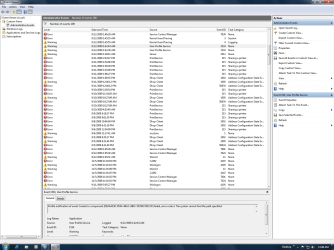
k guys I did another repair install this morning. I checked the event viewer after words and have attached a png.
 

Attachments

  • event viewer.png
    event viewer.png
    65.1 KB · Views: 54

My Computer

OS
Windows 7 Build 7100x32
CPU
Intel Quadcore Q8200 2.53mhz
Motherboard
MSI X48C Platinum
Memory
6gb Corsair DDR3
Graphics Card(s)
Geforce 9400GT 1024mb
Sound Card
integrated Realtek
Monitor(s) Displays
Viewsonic G810
Screen Resolution
1600x1200
Hard Drives
Seagate 1.5TB Barracuda
PSU
Xion 800 watt
Keyboard
Sony
Mouse
Microsoft
Internet Speed
10mb Cable
JB

Obviously the print service and DHCP are happening most frequently. Im wondering if they are causing the problem booting. Maybe the print service keeps or dhcp keeps trying to succeed until it times out and that could be when your computer fails

Ken
 

My Computer

Computer Manufacturer/Model Number
HP Pavillion dv-7 1005 Tx
OS
Win 8 Release candidate 8400
CPU
[email protected]
Memory
4 gigs
Graphics Card(s)
Nvidia 9600M
Sound Card
HD built-in
Monitor(s) Displays
17" Wxga
Screen Resolution
1440x900
Cooling
none
Internet Speed
45Mb down 5Mb up
Hi JBrown, welcome to the forums.

You could try creating a new user account, booting into it and seeing if the same happens. If not then there is an issue with your user account & you may need to migrate to the newly created one using http://www.sevenforums.com/tutorials/11470-windows-easy-transfer-transfer-computers.html

This should effectively transfer all user files & settings from 1 account to another.
   Note
You will need to run the transfer in 1 account then the transfer back in the other account


Hope this helps :)


OS
 

My Computer

Computer Manufacturer/Model Number
Compaq Desktop
OS
Windows 7 Ultimate x64
CPU
AMD Sempron Dual Core
Memory
3GB
Graphics Card(s)
NVIDIA GeForce 6150SE nForce 430
Screen Resolution
1024x768
Hard Drives
150GB Sata
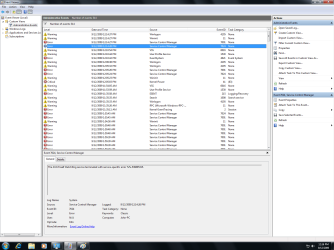
thanks very much guys. I created a new account but when I shut down and tried to restart it just hung up on "starting windows", as always. The computer just quits thinking and chills there. Here is a new png.

One problem I am noticing is that the service control manager errors are both from AVG, which I have tried uninstalling over and over and over. It says the uninstall was successful, but these files are not disappearing. and yes, I have used control panel and the avg uninstall from their website.

I have built many computers (I work in a tv/computer repair shop (I do tv's)), and have never had a problem. But this build is driving me crazy. I am close to just reverting back to XP on this machine. Which would be a real shame.
 

Attachments

  • viewer.png
    viewer.png
    64.4 KB · Views: 18

My Computer

OS
Windows 7 Build 7100x32
CPU
Intel Quadcore Q8200 2.53mhz
Motherboard
MSI X48C Platinum
Memory
6gb Corsair DDR3
Graphics Card(s)
Geforce 9400GT 1024mb
Sound Card
integrated Realtek
Monitor(s) Displays
Viewsonic G810
Screen Resolution
1600x1200
Hard Drives
Seagate 1.5TB Barracuda
PSU
Xion 800 watt
Keyboard
Sony
Mouse
Microsoft
Internet Speed
10mb Cable
looking at the event viewer, I am noticing that there is not a single error that has appeared everytime I have tried to boot. It appears that each one of these has been absent at different times during the failure. I cannot pin point this. I did another bios update and manually updated every driver. I have also done a memtest in knoppix.
 

My Computer

OS
Windows 7 Build 7100x32
CPU
Intel Quadcore Q8200 2.53mhz
Motherboard
MSI X48C Platinum
Memory
6gb Corsair DDR3
Graphics Card(s)
Geforce 9400GT 1024mb
Sound Card
integrated Realtek
Monitor(s) Displays
Viewsonic G810
Screen Resolution
1600x1200
Hard Drives
Seagate 1.5TB Barracuda
PSU
Xion 800 watt
Keyboard
Sony
Mouse
Microsoft
Internet Speed
10mb Cable
And no blue screens right?
K
 

My Computer

Computer Manufacturer/Model Number
HP Pavillion dv-7 1005 Tx
OS
Win 8 Release candidate 8400
CPU
[email protected]
Memory
4 gigs
Graphics Card(s)
Nvidia 9600M
Sound Card
HD built-in
Monitor(s) Displays
17" Wxga
Screen Resolution
1440x900
Cooling
none
Internet Speed
45Mb down 5Mb up
You may need to run regedit and remove any sign of AVG.

The more common locations are within HKEY_CURRENT_USER\Software and HKEY_LOCAL_MACHINE\SOFTWARE


You could do a search for 'AVG' and see what results you get but....
   Warning
Some results may not be for AVG, you will need to check that the keys you are deleting are directly related to AVG


Hope this helps :)
 

My Computer

Computer Manufacturer/Model Number
Compaq Desktop
OS
Windows 7 Ultimate x64
CPU
AMD Sempron Dual Core
Memory
3GB
Graphics Card(s)
NVIDIA GeForce 6150SE nForce 430
Screen Resolution
1024x768
Hard Drives
150GB Sata
I deleted the AVG items in the registry, and that error has gone away (thanks). I was on a different user account that I created, and the DHCP and HP errors werent on it, so all that was left was VSS and winlogon. However on first shut down, it hung on the starting windows screen. Restart is fine, but hibernate doesnt work. neither does sleep. Then I had one successful shut down/start up and immediately I looked at the log, and the same errors were there for that particular sequence, so its apparantly not finding the root problem, just the subsequent side effects of them.

I hate this, I really like the stability and speed on my Home PC w/ Win7. I am not normally a windows fan, I find Leopard much more functional (and stable) on even basic hardware. However Aero glass is very functional as well. I run a dual boot on my Lenovo S10 w/ Leopard and Win7.
 

My Computer

OS
Windows 7 Build 7100x32
CPU
Intel Quadcore Q8200 2.53mhz
Motherboard
MSI X48C Platinum
Memory
6gb Corsair DDR3
Graphics Card(s)
Geforce 9400GT 1024mb
Sound Card
integrated Realtek
Monitor(s) Displays
Viewsonic G810
Screen Resolution
1600x1200
Hard Drives
Seagate 1.5TB Barracuda
PSU
Xion 800 watt
Keyboard
Sony
Mouse
Microsoft
Internet Speed
10mb Cable
Okay so I just wiped the Win7 and installed XP. Then I made another partition and installed Win7. I restarted from win7 to install XP and then restarted after that install back into XP and it worked fine. So I shutdown and tried going into Win7 and just locked up on the starting windows screen. Then I restarted and tried booting XP, which locked up before even getting to the boot screen. I disabled updates during the install of both, to make sure it wasnt the updates causing it. I checked the logs on each, and there are no problems. So apparantly my hardware is not agreeing with something.
 

My Computer

OS
Windows 7 Build 7100x32
CPU
Intel Quadcore Q8200 2.53mhz
Motherboard
MSI X48C Platinum
Memory
6gb Corsair DDR3
Graphics Card(s)
Geforce 9400GT 1024mb
Sound Card
integrated Realtek
Monitor(s) Displays
Viewsonic G810
Screen Resolution
1600x1200
Hard Drives
Seagate 1.5TB Barracuda
PSU
Xion 800 watt
Keyboard
Sony
Mouse
Microsoft
Internet Speed
10mb Cable
black screen with cursor

I see there are a few discussions with the same problem. My machine boots up to the login screen, i enter password and then the boot sequence goes to a black screen with the mouse cursor in the middle and hangs up. The HDD led flashs and nothing else. I then have to reset the computer by holding down the power button, the machine starts up again and indicates that the last shut down was not normal and asks to start in "Safe Mode". I have tried this and the machine boots normally. The black screen problem happens maybe 4 out of 5 start ups.

Has anybody with a similar problem found a solution, its really fustrating.
 

My Computer

Computer Manufacturer/Model Number
Sony Vaio VGN-SR36GN
OS
windows 7
Memory
3GB
Hard Drives
320GB
Back
Top