
Problems formatting D-drive after newly installing Windows 7

ekuarf

New member
Local time
9:01 PM
Messages
1
Hallo,

my problem is the following. I had Windows XP on my Samsung P560 laptop. This week I installed Windows 7 Professional (32 bit) on it. The first time I did it, the new installation did not wipe the computer clean; which is what I wanted. I then found out how to change the boot order to boot from the installation CD. Now it wiped the C-drive clean, but put the old stuff on the D-drive. At least, that is what I am guessing is going on: The files that were on the C-drive are now on the D-drive. When I start up Windows all folders etc. are empty.

To really clean the laptop, I now want to format the D-drive. However, the "format" option in Disk Management is inactive (stays gray). I can only guess what is going on. Is Windows 7 installed twice on my computer? When I start up the computer, on the black BIOS screen, it says Windows 7 twice as well. What can I do about it? If not, why can I not format the D-drive? I attached the a Disk Management screen shot. I hope that helps.

If you know what is going on and even know how to fix it, please use "normal" people language. This is the only computer I have and I need it for work daily, so I really want to prevent misunderstandings.

Thank you! Frauke
 

Attachments
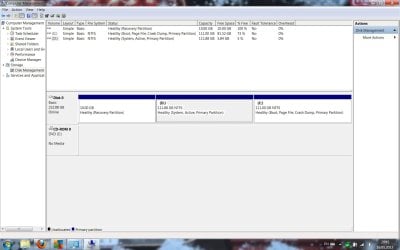
  • FormatD.jpg
    FormatD.jpg
    117.7 KB · Views: 9

My Computer My Computer

At a glance

Windows 7 Professional 32 bit
Computer Manufacturer/Model Number
Samsung NP-P560_AS01DE
OS
Windows 7 Professional 32 bit
Hello ekuarf Welcome to the Seven Forums!

With one look the D partition was the original XP C primary. Did you previously have a second storage/backup D partition before installing 7? You installed 7 to a totally separate second primary and didn't replace the OEM XP preinstall when using the custom option during the 7 install resulting in seeing an almost XP/7 dual boot.

You have two options to go with in order to clean all this up depending on how you want to go about it. Each however might involve seeing a second new 7 install however.

1) Nuke both C and D and reserve D for a separate storage/backup partition putting 7 on the first primary. 2)Clean both C and D off entirely to see a brand new larger single C primary with a fresh 7 install go onto that.

Simply nuking the present D and moving C back to the front of the drive is a time consumer and doesn't guaranty integrity due to the large volume of drive space once C is moved and expanded to simply see the enlarged C primary fill the drive. And for the second option you will want to decide if you want to continue keeping the XP Factory recovery partition on the drive or lose that and add another 10gb into the mix.
 

My Computers My Computers

  • At a glance

    W7 Ultimate x64/W10 Pro x64/W11 Pro Triple Bo...AMD Phenom II X4 975 Deneb 3.6ghz - 965 2nd r...Kingston Hyper X DDR3 1600 1.5v 16gb - Hyper ...MSI HD Radeon 5750 1gb - MSI HD Radeon 6450 o...
    Computer type
    PC/Desktop
    Computer Manufacturer/Model Number
    Custom builds = 2
    OS
    W7 Ultimate x64/W10 Pro x64/W11 Pro Triple Boot - Main PC W7 Remote PC Micro ATX W7 Pro x64/W11 Pro
    CPU
    AMD Phenom II X4 975 Deneb 3.6ghz - 965 2nd remote pc
    Motherboard
    Gigabyte GA-790XTA-UD4-Gigabyte GA-880GM-D2H remote pc
    Memory
    Kingston Hyper X DDR3 1600 1.5v 16gb - Hyper X Fury 8gb 2nd
    Graphics Card(s)
    MSI HD Radeon 5750 1gb - MSI HD Radeon 6450 on mini tower
    Sound Card
    Creative Labs X-Fi Xtreme Audio P - Realtek onooard 2nd case
    Monitor(s) Displays
    ASUS VW199T-P 19" HP 2082a Main-HP 2082a 20" remote pc
    Screen Resolution
    Asus 1440x900 - HP 1600x900
    Hard Drives
    WD Black 1TB HD per OS W7, W10, and pending W11 presently on 500gb OS Drive - Pending Triple 1TB HDs for Spanned Storage/backup volume
    Single 2TB external USB enclosure, single 1TB System 7 Host/Boot drive, Pending 8TB external HD for system image b
    PSU
    Corsair 750TX - primary / Corsair CX600 - second
    Case
    Antec 900-2 - SSD compatible / NZXT Vulcan mini tower
    Cooling
    Zalman CNPS9900A
    Keyboard
    AZIO L70 Backlit Letters Gaming - ONN Cordless/USB
    Mouse
    MSI DS200 Programmable, Logitech Cordless
    Internet Speed
    30mbps upgrade - primary hard wired - mini tower usb WiFi
    Antivirus
    GFI VIPRE Internet Security 2014 on W7 2016 beta on W10,
    Browser
    Cyberfox, WaterFox 64bit FF variants, FireFox x64, Pale Moon
    Other Info
    Accomdata fan cooled usb 2.0 PIDE/Sata II, III external enclosure.
    Sambient usb/eSata PATA/Sata II, III external enclosure.
  • At a glance

    W7 Pro x64/W11 ProAMD Deneb 3.6ghz - 965Kingston Hyper X Fury 8gbMSI HD Radeon 6450 DVI Output
    Computer type
    PC/Desktop
    System Manufacturer/Model Number
    CUSTOM ASSEMBLY
    OS
    W7 Pro x64/W11 Pro
    CPU
    AMD Deneb 3.6ghz - 965
    Motherboard
    Gigabyte GA-880GM-D2H remote pc
    Memory
    Kingston Hyper X Fury 8gb
    Graphics Card(s)
    MSI HD Radeon 6450 DVI Output
    Sound Card
    Realtek onooard Creative or Other separate PENDING
    Monitor(s) Displays
    VIZIO 32" LCD TV Separate LCD Pending
    Screen Resolution
    1600x1080
    Hard Drives
    WD 500GB OS Host/Boot WD Green 1TB Storage/Backup
    PSU
    Corsair 600W - THERMALTAKE 600W spare case
    Case
    NZXT Vulcan mini tower
    Cooling
    Twin 120mm Top Fans - 240mm Side Cover
    Keyboard
    ONN Cordless/USB Logitech Cordless
    Mouse
    ONN USB/Cordless - Logitech Cordless
    Internet Speed
    DSL 5G
    Browser
    MS Edge, FireFox, WaterFox x64, FireFox Nightly
    Other Info
    OS Testing-Remote Access to Main TeamViewer
Back
Top