Problems playing 1080p MKV contents

sawwei

New member
Local time
5:16 PM
Messages
42
Location
Sydney
Hi,

I have been using Shark codec packs for almost a year now and I am very happy with it, until the latest release.
I always keep it updated, but the after updating to your latest one I found that I have problems playing 1080p files. It will stutters and most of the time stop playing. I have this problem before with the previous version, but it has been fixed several times with the newer versions. But sad to say, the latest version bring back this problem again...:cry:
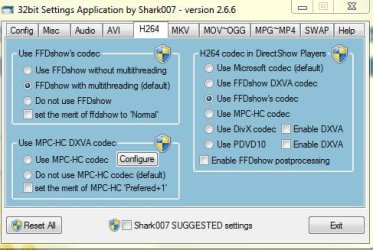
I am using Win 7 (64-Bit) and I always use Shark's suggested settings and choose Dshow DXVA on the H264 TAB, also set MPC-HC for WVC1 on the SWAP TAB, to display the subtitle.
 

My Computer My Computer

At a glance

MS Windows 7 Home Premium 64-bitIntel Core i7 720QM @ 1.60GHz Clarksfield 45n...8.0GB Dual-Channel DDR3 @ 664MHz (9-9-9-24)NVIDIA GeForce GTX 260M
Computer Manufacturer/Model Number
Alienware M15x
OS
MS Windows 7 Home Premium 64-bit
CPU
Intel Core i7 720QM @ 1.60GHz Clarksfield 45nm Techno
Motherboard
Alienware, A07
Memory
8.0GB Dual-Channel DDR3 @ 664MHz (9-9-9-24)
Graphics Card(s)
NVIDIA GeForce GTX 260M
Sound Card
IDT High Definition Audio CODEC
Monitor(s) Displays
Generic PnP Monitor on NVIDIA GeForce GTX 260M
Screen Resolution
1920x1080 pixels
Hard Drives
ST9500420AS
Manufacturer Seagate
Form Factor 2.5"
Cache Size 16MB
Interface SATA
Capacity 488GB
Real size 500,107,862,016 bytes
Mouse
Microsoft Explorer Mouse
Internet Speed
1 Mbps
First, you did completely un-instal the older version before you updated to the new one correct?

What happens if you set x264 to use FFDshow as seen in my snip?
Does it play smoothly then?

If so, perhaps try a different DXVA codec. Such as FFDshow DXVA.

I understand wanting hardware acceleration. This is simply to test if the particular DXVA codec is conflicting somehow.

Also, WVC1 in the swap tab is a video codec. As far as i am aware it has nothing to do with Subtitles.
I would suggest using FFDshow for this one as well for the time being until you can isolate the issue.
 

Attachments

  • Capture.JPG
    Capture.JPG
    42.5 KB · Views: 17

My Computer My Computer

At a glance

Windows 7 Home Premium 64bitIntel Core i7 2700k8GB Mushkin Redline Ridgebacks @1866EVGA GTX570 SC
Computer Manufacturer/Model Number
Custom (Self Build)
OS
Windows 7 Home Premium 64bit
CPU
Intel Core i7 2700k
Motherboard
eVGA P67 SLI
Memory
8GB Mushkin Redline Ridgebacks @1866
Graphics Card(s)
EVGA GTX570 SC
Sound Card
XiFi Titanium HD
Monitor(s) Displays
LG W2453V
Screen Resolution
1920x1080
Hard Drives
Intel 320 80GB -- Intel X25-V 40GB --WD Black 1TB x2 -- WD Blue 640GB
PSU
Seasonic x750
Case
Corsair 600T SE White
Cooling
eVGA Superclocked CPU Cooler
Keyboard
Saitek Cyborg
Antivirus
Kaspersky
Browser
IE
Other Info
LG BD/DVD
Thank you for your reply, Wishmaster.
I've tried your settings, but I don't see any difference.
It still stutters.
What should I do ?
My settings were suggested by Mr.Shark himself, because I was having problem displaying subs with WMP.
One more thing, my CPU usage is very heavy everytime I play the 1080p files.
I heard that with AVCore Codec we can reduce the CPU usage to 1%, is that true ?
 

My Computer My Computer

At a glance

MS Windows 7 Home Premium 64-bitIntel Core i7 720QM @ 1.60GHz Clarksfield 45n...8.0GB Dual-Channel DDR3 @ 664MHz (9-9-9-24)NVIDIA GeForce GTX 260M
Computer Manufacturer/Model Number
Alienware M15x
OS
MS Windows 7 Home Premium 64-bit
CPU
Intel Core i7 720QM @ 1.60GHz Clarksfield 45nm Techno
Motherboard
Alienware, A07
Memory
8.0GB Dual-Channel DDR3 @ 664MHz (9-9-9-24)
Graphics Card(s)
NVIDIA GeForce GTX 260M
Sound Card
IDT High Definition Audio CODEC
Monitor(s) Displays
Generic PnP Monitor on NVIDIA GeForce GTX 260M
Screen Resolution
1920x1080 pixels
Hard Drives
ST9500420AS
Manufacturer Seagate
Form Factor 2.5"
Cache Size 16MB
Interface SATA
Capacity 488GB
Real size 500,107,862,016 bytes
Mouse
Microsoft Explorer Mouse
Internet Speed
1 Mbps
sawwei, seems to me like you may have turned UAC off.
If so, uninstall my software, re-enable UAC to default, reboot, re-install my software.

ps: i will ignore your private message(s) here and on my forum.
Issues like this should be solved in an open forum so that the resolutuion is available to assist others.
 

My Computer My Computer

At a glance

Windows 7 Ultimate 64biti7 2600k16GB (4x4) corsair vengeanceIntel HD3000 iGPU / AMD HD6870 1024MB
Computer Manufacturer/Model Number
Selfbuilt
OS
Windows 7 Ultimate 64bit
CPU
i7 2600k
Motherboard
asus P8Z68-V LE
Memory
16GB (4x4) corsair vengeance
Graphics Card(s)
Intel HD3000 iGPU / AMD HD6870 1024MB
Sound Card
bitstreamed to an Onkyo 609
Monitor(s) Displays
Asus VE278 27" LED / Bravia EX7 60" LED
Screen Resolution
native 1080p x2
Hard Drives
4x 2TB int. + 2x 2TB external and a SSD for the boot drive.
PSU
650w Antec
Case
NZXT tempest evo
Cooling
air/stock
Keyboard
Dell
Mouse
logitech m505
Internet Speed
dual: cable/blackberry tether for travel use
Other Info
BD re-writer //
asus notebook G73Jw
sawwei, seems to me like you may have turned UAC off.
If so, uninstall my software, re-enable UAC to default, reboot, re-install my software.

ps: i will ignore your private message(s) here and on my forum.
Issues like this should be solved in an open forum so that the resolutuion is available to assist others.

I have done it but still no luck.
I also have another questions in regards of the heavy CPU loads everytime I play 1080p contents.
Any idea how to fix this ?
 

My Computer My Computer

At a glance

MS Windows 7 Home Premium 64-bitIntel Core i7 720QM @ 1.60GHz Clarksfield 45n...8.0GB Dual-Channel DDR3 @ 664MHz (9-9-9-24)NVIDIA GeForce GTX 260M
Computer Manufacturer/Model Number
Alienware M15x
OS
MS Windows 7 Home Premium 64-bit
CPU
Intel Core i7 720QM @ 1.60GHz Clarksfield 45nm Techno
Motherboard
Alienware, A07
Memory
8.0GB Dual-Channel DDR3 @ 664MHz (9-9-9-24)
Graphics Card(s)
NVIDIA GeForce GTX 260M
Sound Card
IDT High Definition Audio CODEC
Monitor(s) Displays
Generic PnP Monitor on NVIDIA GeForce GTX 260M
Screen Resolution
1920x1080 pixels
Hard Drives
ST9500420AS
Manufacturer Seagate
Form Factor 2.5"
Cache Size 16MB
Interface SATA
Capacity 488GB
Real size 500,107,862,016 bytes
Mouse
Microsoft Explorer Mouse
Internet Speed
1 Mbps
sawwei, seems to me like you may have turned UAC off.
If so, uninstall my software, re-enable UAC to default, reboot, re-install my software.

ps: i will ignore your private message(s) here and on my forum.
Issues like this should be solved in an open forum so that the resolutuion is available to assist others.

I have done it but still no luck.

I am sorry if my assumption is incorrect, but, simply re-instating UAC is NOT enough. UAC needs to be enable during the installation of my software (as instructed above) and anytime you use the Settings Applications to make changes.
 

My Computer My Computer

At a glance

Windows 7 Ultimate 64biti7 2600k16GB (4x4) corsair vengeanceIntel HD3000 iGPU / AMD HD6870 1024MB
Computer Manufacturer/Model Number
Selfbuilt
OS
Windows 7 Ultimate 64bit
CPU
i7 2600k
Motherboard
asus P8Z68-V LE
Memory
16GB (4x4) corsair vengeance
Graphics Card(s)
Intel HD3000 iGPU / AMD HD6870 1024MB
Sound Card
bitstreamed to an Onkyo 609
Monitor(s) Displays
Asus VE278 27" LED / Bravia EX7 60" LED
Screen Resolution
native 1080p x2
Hard Drives
4x 2TB int. + 2x 2TB external and a SSD for the boot drive.
PSU
650w Antec
Case
NZXT tempest evo
Cooling
air/stock
Keyboard
Dell
Mouse
logitech m505
Internet Speed
dual: cable/blackberry tether for travel use
Other Info
BD re-writer //
asus notebook G73Jw
sawwei, seems to me like you may have turned UAC off.
If so, uninstall my software, re-enable UAC to default, reboot, re-install my software.

ps: i will ignore your private message(s) here and on my forum.
Issues like this should be solved in an open forum so that the resolutuion is available to assist others.

I have done it but still no luck.

I am sorry if my assumption is incorrect, but, simply re-instating UAC is NOT enough. UAC needs to be enable during the installation of my software (as instructed above) and anytime you use the Settings Applications to make changes.

Seems odd but I can vouch for what he's saying. Shark's stuff is widely accepted as the best that money can buy but usually isn't. That hackitechure that is Shark's is unparalleled but as such requires some idiosyncratic requirements. You'd think that he'd want UAC OFF but it looks like it needs the time or the prompt to know where it is installing all this stuff....
 

My Computer My Computer

At a glance

El Capitan / Windows 10i7-4980HQ16GBIris 5200
Computer type
Laptop
Computer Manufacturer/Model Number
Apple
OS
El Capitan / Windows 10
CPU
i7-4980HQ
Memory
16GB
Graphics Card(s)
Iris 5200
Back
Top