problems recording with Windows Media Center

dmehling

New member
Member
Local time
8:52 PM
Messages
47
I have been trying to diagnose a strange problem with either my TV tuner card or tuner software. On two channels, whenever I record, there will be a frequent freezing and skipping of the program. The program will be stuck on one frame, and 3 seconds later it will resume, but those 3 seconds of the program are lost. I have really narrowed it down to only these two channels. No other channels will do this. It will do this regardless of time of day, although it seems like at night it occurs a little more often. However, further experimentation has demonstrated that this problem so far has only occurred in Windows Media Center (Windows 7 version). I then tried to record programs with the Happauge WinTV software (I have a Happauge tuner card). But when I played it back it did not have that problem. I would really love to figure out what is causing the problem in Windows Media Center, because the WinTV program is quite pitiful in comparison. By the way this is regular over the air TV.
 

My Computer

Computer Manufacturer/Model Number
Alienware
OS
Windows 7
CPU
i7
Memory
12 GB
This is very likely a signal issue, the root cause of it would need to be investigated/determined by your cable provider - could just be a bad STB or it may just need the software reset which usually takes place after it's unplugged for a while.
 
Thanks for your reply, but I don't think that's the issue. I specifically said that I am watching regular over the air television with an antenna. I do not have cable. I really don't see how this could be a signal issue if the problem is resolved by utilizing a different program. I do not have this problem with the WinTV program, but only with Windows Media Center.
 

My Computer

Computer Manufacturer/Model Number
Alienware
OS
Windows 7
CPU
i7
Memory
12 GB
Why do you think it would be a signal issue with the channel rather than being software-based? If the problem is with the channel, then why would it only manifest itself in Windows Media Center rather than WinTV?
 

My Computer

Computer Manufacturer/Model Number
Alienware
OS
Windows 7
CPU
i7
Memory
12 GB
The actual URL above 'should' take you to correct page and section on the hauppauge site but does not appear to...what I was trying to convey with the link was the the WinTV app can list the signal strenght for each channel and help you better setup your antenna.

from www dot hauppauge.com/site/support/support_wintv7.html click on 'features' then 'Monitor the signal you are receiving to allow you to improve antenna placement or correct signal problems on the fly!'
 
I feel like you are not exactly understanding the issue I have. This is not an issue of signal strength. I have a very good signal. The only problem I have is in Windows Media Center and at least one other TV tuner program (Sage TV, trial version). If I am watching a program live, everything is great. But as soon as I start recording, these 3 second glitches will begin occurring periodically. When I use WinTV, I do not have this same issue. This leads me to believe that this is a software problem and not a single issue. I know to do about signal issue would really like to find out why I'm having trouble with Windows Media Center or Sage TV.
 

My Computer

Computer Manufacturer/Model Number
Alienware
OS
Windows 7
CPU
i7
Memory
12 GB
I am not agreeing with what appears to be your assumption that just because you can play the show in any player that you have a strong signal. How have you assessed signal strength otherwise? The TV Tuner is very busy processing the poorer signal on those channels which is why the issue occurs on record. It is NOT as busy processing signals on the other channels. The 'signal' is 'processed' and a strong signal requires less processing. The 'processing' is done by your TV Tuner.

If all channels were acting this way, I would not suspect poor signal processing as the issue.

But, if you disagree...
 
I could not check the signal strength as you indicated since I was running an earlier version of WinTV. I am in the process of trying to install version 7 although I am having trouble with that as well, but should get it straightened out soon. In the meantime I checked the signal strength indicator in Windows Media Center. The strength for channels 13.1 and 13.2 (the problem channels) is the same as the other major channels. They are all at full strength. You may still be right about the signal strength, but the fact that the problem does not manifest itself in WinTV causes me to be skeptical. If the signal strength was an issue, why would it only cause problems with one software program?
 

My Computer

Computer Manufacturer/Model Number
Alienware
OS
Windows 7
CPU
i7
Memory
12 GB
I would suspect differing manners of hardware acceleration, use of system resources, etc. I also would review what format those channels are broadcasting in. Clearly there is a tipping point that causes this to occur - once it is isolated, it may be addressable.

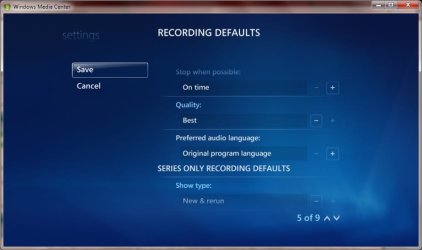
In WMC, can you change your recording quality to a lower setting for a test and attempt to record using the lower setting and see if that has an effect?

WMC>Settings>TV>Recorder>Recording Defaults>Quality
 
Are you suggesting that lowering the quality may improve performance because of the capability of my computer or because of another factor? I have a PC with an i7 processor and 12 GB of RAM, along with a graphics card with 1 GB of memory, so it seems like I could easily record at the highest quality level without any problems. By the way, I could not find where to adjust the quality settings in Windows Media Center. I did a Google search and it sounds like they removed that option from the Windows 7 version.

When you say format, are you referring to whether it is in HD or standard definition? I record fully HD programs all the time, but standard definition programs also have the same glitch on these two channels.
 

My Computer

Computer Manufacturer/Model Number
Alienware
OS
Windows 7
CPU
i7
Memory
12 GB
I am trying to help rule things out as part of troubleshooting...

To change recording quality:

WMC>Tasks>Settings>TV>Recorder>Recording Defaults>Quality

The options are Best, Better, Good, and Fair.

DT stations can broadcast in HD and also can broadcast in varying levels of HD, 480p, 720p, 1080p or in 480i. Most are 480i still. Many use advanced techniques to sharpen images and alter the aspect ratio to look like widescreen but are still actually 480i (like many of the so called codec packs do). Most antenna systems were not designed for signals above 480i. This has to do with the types of materials used, cables, fittings, shielding, lengths of cables, types and designs of the actual antenna's...

Here is a map and app from the FCC on signal strength - just enter your USA zip code.

http://www.dtv.gov/fixreception.html

It will list the spectrums used and you can research yourself the capabilities of each.

As far as where the setting is for recording quality, this is well documented and I have just reviewed it's location in the menus again.
 
Last edited:
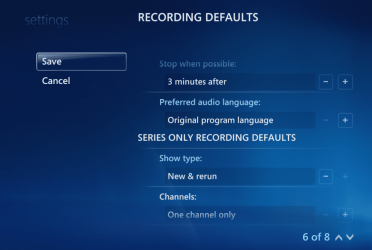
Yes I hear what you're saying, but as I said in my last message, the option to change recording quality settings was apparently removed in the Windows 7 version of Windows Media Center. I have done exactly what you suggested, but there is no place that says quality. Maybe it is located somewhere else but I cannot find it.
 

My Computer

Computer Manufacturer/Model Number
Alienware
OS
Windows 7
CPU
i7
Memory
12 GB
Thanks for your suggestions, but that still doesn't help. I went to the website you provided the link for, and checked the signal strength for each channel. Nearly all of them were very strong, including the channels where I keep experiencing this glitch. The weaker channels are ones I don't even watch.

I have looked under recording defaults a dozen times and I don't see anything about quality. You say that this is well documented. Where can I find such documentation? Maybe you could give me a screenshot of what you're talking about. If you do google search for Windows media Center recording quality, you will find that there are many other people who also cannot find the quality setting. So I'm not making this up.
 

My Computer

Computer Manufacturer/Model Number
Alienware
OS
Windows 7
CPU
i7
Memory
12 GB
Here it is.
 

Attachments

  • windows media center image.PNG
    windows media center image.PNG
    117.2 KB · Views: 64

My Computer

Computer Manufacturer/Model Number
Alienware
OS
Windows 7
CPU
i7
Memory
12 GB
This link from thegreenbutton is from 2005:

TV Recording Quality Settings, Where R They? - The Green Button

Has been the same since. but later in the thread we see:

The quality settings are related to the hardware MPEG2 encoder on the TV tuner card. As you are using a DVB-T card which doesn't have a hardware encoder (as the stream is broadcast in MPEG2), you don't get a quality setting. If you used an analogue card you would get the settings.
Cheers
Andy
 
So what does that mean for my problem? Does this mean that the quality is not an issue?
 

My Computer

Computer Manufacturer/Model Number
Alienware
OS
Windows 7
CPU
i7
Memory
12 GB
Thanks for your suggestions, but that still doesn't help. I went to the website you provided the link for, and checked the signal strength for each channel. Nearly all of them were very strong, including the channels where I keep experiencing this glitch. The weaker channels are ones I don't even watch.

at the FCC map, what is the BAND of the channels received. Are they all the same?
 
Back
Top