Problems viewing pcs on network

ITGIRL

Back to Reality
Guru
Local time
6:19 PM
Messages
128
Location
Oklahoma
I am having problems viewing any computers on my workgroup. I'm in a work environment working off of a workgroup. No pc's are able to even ping my computer. When I go to network and sharing, the network discovery is set to on. I'm not sure what I'm doing wrong. Any information would be helpful. My network has about 80 pcs on it ranging from windows 2000 to Vista. I am the only one who has windows 7.

Thanks so much!
ITGIRL
 

My Computer

Computer Manufacturer/Model Number
Dell Vostro 220 mini
OS
Windows 7 Pro. 32 bit
CPU
2.93 GHz E7500 Intel Core 2 Duo
Motherboard
Dell
Memory
2 GB
Graphics Card(s)
Intel G45/G43
Sound Card
Realtek High Def.
Monitor(s) Displays
17" acer (I know...its bad)
Screen Resolution
1024x768
Hard Drives
WD 250 GB
Keyboard
Dell L100
Mouse
Dell optical (standard)
Internet Speed
100 Mbps 11.91 dl 12.46 ul
Other Info
Have questions, just ask.

My Computer

Computer Manufacturer/Model Number
Dell XPS 15 L502x
OS
Windows 7 Ultimate x64 SP1
CPU
Core i7-2670QM
Memory
8GB DDR3 PC3-10600
Graphics Card(s)
Intel HD Graphics 3000 + GeForce GT 540M
Screen Resolution
1920x1080
Hard Drives
1TB 5400RPM Seagate
Haha I am the IT department. My boss gave my the newest version to figure out all the details on how to get it up and running since we are going to put all the pcs on windows 7 in April. I took a look at both of those links and had another employee check to see if they could see me in their network places, but he couldn't.
 

My Computer

Computer Manufacturer/Model Number
Dell Vostro 220 mini
OS
Windows 7 Pro. 32 bit
CPU
2.93 GHz E7500 Intel Core 2 Duo
Motherboard
Dell
Memory
2 GB
Graphics Card(s)
Intel G45/G43
Sound Card
Realtek High Def.
Monitor(s) Displays
17" acer (I know...its bad)
Screen Resolution
1024x768
Hard Drives
WD 250 GB
Keyboard
Dell L100
Mouse
Dell optical (standard)
Internet Speed
100 Mbps 11.91 dl 12.46 ul
Other Info
Have questions, just ask.
None of the steps in those links helped?
 

My Computer

Computer Manufacturer/Model Number
Dell XPS 15 L502x
OS
Windows 7 Ultimate x64 SP1
CPU
Core i7-2670QM
Memory
8GB DDR3 PC3-10600
Graphics Card(s)
Intel HD Graphics 3000 + GeForce GT 540M
Screen Resolution
1920x1080
Hard Drives
1TB 5400RPM Seagate
I was able to share the folder without a problem. However nobody on the same network can see me or get to me. Nor am I able to see them or get into their computers. Its probably something that I am overlooking. I'll go back and reread them. My brain is fried at this point. I really appreciate the help.
 

My Computer

Computer Manufacturer/Model Number
Dell Vostro 220 mini
OS
Windows 7 Pro. 32 bit
CPU
2.93 GHz E7500 Intel Core 2 Duo
Motherboard
Dell
Memory
2 GB
Graphics Card(s)
Intel G45/G43
Sound Card
Realtek High Def.
Monitor(s) Displays
17" acer (I know...its bad)
Screen Resolution
1024x768
Hard Drives
WD 250 GB
Keyboard
Dell L100
Mouse
Dell optical (standard)
Internet Speed
100 Mbps 11.91 dl 12.46 ul
Other Info
Have questions, just ask.
No pc's are able to even ping my computer.

Hey.

That almost has to be a router config problem. Only other way this would happen is if you installed a 3rd party firewall with a setting to disallow pings.
 

My Computer

Computer Manufacturer/Model Number
self built
OS
7600.20510 x86
CPU
P4 550 3.4 GHz HT running at 3.5 GHz
Motherboard
MSI PM8M3-V (MS-7211 v1.x) Micro-ATX mainboard
Memory
OCZ 2 GB(2x1GB) DDR400mHz running @ 414 mHz
Graphics Card(s)
HIS Radeon HD 3850 IceQ 3 Turbo HDMI Dual DL-DVI AGP
Sound Card
MOTU Traveler firewire studio interface 192 kHz 24 bit
Monitor(s) Displays
22" widescreen Acer X223W LCD, 17" Compaq P75 CRT
Screen Resolution
1680x1050 and 1280x1024
Hard Drives
SATA I x2 WD, 400 GB and 120 GB, SATA 2 WD Caviar Black 1 TB
PSU
350W generic
Case
Cybertronpc, it glows blue
Cooling
stock cpu fan, Ice-Q 3 gpu and system, many case fans
Keyboard
Logitch Classical Keyboard 200
Mouse
Logitech Mediaplay cordless
Internet Speed
1792/448 kbits/sec
Other Info
SATA II PCI fake RAID adapter, 1 GB Readyboost, original ATI Remote Wonder (even works with WMC perfectly), Logitech Rumblepad 2 game controller x2
No pc's are able to even ping my computer.

Hey.

That almost has to be a router config problem. Only other way this would happen is if you installed a 3rd party firewall with a setting to disallow pings.

Or if network discovery is turned off, perhaps?
 

My Computer

Computer Manufacturer/Model Number
Dell XPS 15 L502x
OS
Windows 7 Ultimate x64 SP1
CPU
Core i7-2670QM
Memory
8GB DDR3 PC3-10600
Graphics Card(s)
Intel HD Graphics 3000 + GeForce GT 540M
Screen Resolution
1920x1080
Hard Drives
1TB 5400RPM Seagate

My Computer

Computer Manufacturer/Model Number
self built
OS
7600.20510 x86
CPU
P4 550 3.4 GHz HT running at 3.5 GHz
Motherboard
MSI PM8M3-V (MS-7211 v1.x) Micro-ATX mainboard
Memory
OCZ 2 GB(2x1GB) DDR400mHz running @ 414 mHz
Graphics Card(s)
HIS Radeon HD 3850 IceQ 3 Turbo HDMI Dual DL-DVI AGP
Sound Card
MOTU Traveler firewire studio interface 192 kHz 24 bit
Monitor(s) Displays
22" widescreen Acer X223W LCD, 17" Compaq P75 CRT
Screen Resolution
1680x1050 and 1280x1024
Hard Drives
SATA I x2 WD, 400 GB and 120 GB, SATA 2 WD Caviar Black 1 TB
PSU
350W generic
Case
Cybertronpc, it glows blue
Cooling
stock cpu fan, Ice-Q 3 gpu and system, many case fans
Keyboard
Logitch Classical Keyboard 200
Mouse
Logitech Mediaplay cordless
Internet Speed
1792/448 kbits/sec
Other Info
SATA II PCI fake RAID adapter, 1 GB Readyboost, original ATI Remote Wonder (even works with WMC perfectly), Logitech Rumblepad 2 game controller x2
See I was reading somewhere that it could be a configuration in the router but because I had vista before that and it worked just fine, it had to be something on my personal pc. I have turned off my password protection to see if maybe that was it. Could it be a setting in the firewall? The only firewall that I have is the pc firewall that comes preinstalled.
 

My Computer

Computer Manufacturer/Model Number
Dell Vostro 220 mini
OS
Windows 7 Pro. 32 bit
CPU
2.93 GHz E7500 Intel Core 2 Duo
Motherboard
Dell
Memory
2 GB
Graphics Card(s)
Intel G45/G43
Sound Card
Realtek High Def.
Monitor(s) Displays
17" acer (I know...its bad)
Screen Resolution
1024x768
Hard Drives
WD 250 GB
Keyboard
Dell L100
Mouse
Dell optical (standard)
Internet Speed
100 Mbps 11.91 dl 12.46 ul
Other Info
Have questions, just ask.
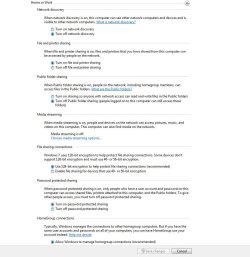
What you want to do is the following and then take things from there (You can enable network discovery if you want to). Also, make sure a password is set for the user account. What happens when others ping you by ip address, instead of machine name? (Look for mdsnresponder.exe in task manager - if you have that, let us know)
 

Attachments

  • Capture.JPG
    Capture.JPG
    91.8 KB · Views: 16

My Computer

Computer Manufacturer/Model Number
self built
OS
7600.20510 x86
CPU
P4 550 3.4 GHz HT running at 3.5 GHz
Motherboard
MSI PM8M3-V (MS-7211 v1.x) Micro-ATX mainboard
Memory
OCZ 2 GB(2x1GB) DDR400mHz running @ 414 mHz
Graphics Card(s)
HIS Radeon HD 3850 IceQ 3 Turbo HDMI Dual DL-DVI AGP
Sound Card
MOTU Traveler firewire studio interface 192 kHz 24 bit
Monitor(s) Displays
22" widescreen Acer X223W LCD, 17" Compaq P75 CRT
Screen Resolution
1680x1050 and 1280x1024
Hard Drives
SATA I x2 WD, 400 GB and 120 GB, SATA 2 WD Caviar Black 1 TB
PSU
350W generic
Case
Cybertronpc, it glows blue
Cooling
stock cpu fan, Ice-Q 3 gpu and system, many case fans
Keyboard
Logitch Classical Keyboard 200
Mouse
Logitech Mediaplay cordless
Internet Speed
1792/448 kbits/sec
Other Info
SATA II PCI fake RAID adapter, 1 GB Readyboost, original ATI Remote Wonder (even works with WMC perfectly), Logitech Rumblepad 2 game controller x2
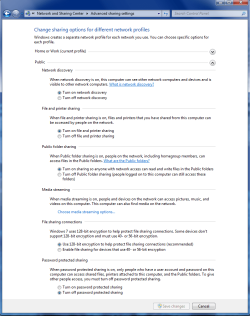
I have found that the public sharing option works best when sharing between different Op systems. You might try using the public sharing option> " Turn on sharing so anyone with network access can read and write files in the public folders".

Have everything in "public" sharing enabled with password protected sharing "off" usually enables file sharing for all users. It's not the most secure way of doing it but it seems to work pretty well. I also found out that you need to use a different user name on each machine for sharing to work properly.
 

Attachments

  • public sharing enabled all.PNG
    public sharing enabled all.PNG
    39.7 KB · Views: 7

My Computer

Computer type
PC/Desktop
Computer Manufacturer/Model Number
Home built
OS
Windows 7 Ult, Windows 8.1 Pro,
CPU
Q9650-4.275GHz, E8600 4.5GHz, E6750-3.8GHz
Motherboard
Evga 780i FTW
Memory
G.Skill PC2 9600 1200Mhz 5 5 5 15 2T
Graphics Card(s)
GTX480
Sound Card
Asus Xonar D2
Monitor(s) Displays
HannsG
Screen Resolution
1680X1050
Hard Drives
GSkill Phoenix Pro 120GB SSD
PSU
ThermalTake Toughpower 1000Watt modular
Case
ThermalTake XaserV
Cooling
Xigmatek S1283
Keyboard
Logitech G15
Mouse
Logitech G9
Internet Speed
T1
Ok I have put my settings to what is shown in the picture. I tried to ping my machine via ip and got a request time out with no mdsnresponder.exe in my processes. I am still unable to see anything on the network. Also I don't know if this is a big issue or not, but when I am in my network center it states that I am on Network 2. Thanks!
 

My Computer

Computer Manufacturer/Model Number
Dell Vostro 220 mini
OS
Windows 7 Pro. 32 bit
CPU
2.93 GHz E7500 Intel Core 2 Duo
Motherboard
Dell
Memory
2 GB
Graphics Card(s)
Intel G45/G43
Sound Card
Realtek High Def.
Monitor(s) Displays
17" acer (I know...its bad)
Screen Resolution
1024x768
Hard Drives
WD 250 GB
Keyboard
Dell L100
Mouse
Dell optical (standard)
Internet Speed
100 Mbps 11.91 dl 12.46 ul
Other Info
Have questions, just ask.
How is this computer connected to the network - by ethernet or by wifi?
 

My Computer

Computer Manufacturer/Model Number
Dell XPS 15 L502x
OS
Windows 7 Ultimate x64 SP1
CPU
Core i7-2670QM
Memory
8GB DDR3 PC3-10600
Graphics Card(s)
Intel HD Graphics 3000 + GeForce GT 540M
Screen Resolution
1920x1080
Hard Drives
1TB 5400RPM Seagate
Ethernet.
 

My Computer

Computer Manufacturer/Model Number
Dell Vostro 220 mini
OS
Windows 7 Pro. 32 bit
CPU
2.93 GHz E7500 Intel Core 2 Duo
Motherboard
Dell
Memory
2 GB
Graphics Card(s)
Intel G45/G43
Sound Card
Realtek High Def.
Monitor(s) Displays
17" acer (I know...its bad)
Screen Resolution
1024x768
Hard Drives
WD 250 GB
Keyboard
Dell L100
Mouse
Dell optical (standard)
Internet Speed
100 Mbps 11.91 dl 12.46 ul
Other Info
Have questions, just ask.
Have you compared the network settings (ie: ipconfig /all) on the 7 computer to any of the other computers?
 

My Computer

Computer Manufacturer/Model Number
Dell XPS 15 L502x
OS
Windows 7 Ultimate x64 SP1
CPU
Core i7-2670QM
Memory
8GB DDR3 PC3-10600
Graphics Card(s)
Intel HD Graphics 3000 + GeForce GT 540M
Screen Resolution
1920x1080
Hard Drives
1TB 5400RPM Seagate
ITGIRL: Welcome to SevenForums!

Is this the only Win7 PC and the only 1 you cannot ping? Thats because ICMP is off by default in Win7 Firewall... but you should still be able to see it from another PC.
 

My Computer

Computer Manufacturer/Model Number
Homebrew PC - "Alpha_Dawg"
OS
Windows 7 Ultimate 64 bit Steve Ballmer Signature Edition
CPU
Intel Core 2 Quad - Q9550 - 2.83GHz stock - OC'd to 3.6GHz
Motherboard
Gigabyte EP45-UD3P
Memory
4GB DDR2 800MHz (PC6400) OCZ Reaper
Graphics Card(s)
Nvidia GE Force 8800 GTS
Sound Card
Asus Xonar DX
Monitor(s) Displays
Samsung SyncMaster 2333HD
Screen Resolution
1920 x 1080
Hard Drives
WD Caviar Black 750GB - 7200RPM - 32MB cache
WD Caviar Green 1.5TB - 5400RPM - 64MB cache
WD Caviar Green 2.0TB - 5400RPM - 64MB cache
PSU
PC Power & Cooling Silencer 750
Case
Gigabyte 3D Aurora
Cooling
Case is Air - 5ea. 120mm fans (mix of Arctic and Xigmatec)
Keyboard
MS Natural Wireless KB
Mouse
MS Wireless Mouse
Internet Speed
50 mbps down/5 mbps up
Other Info
AVerMedia - AVerTVHD G2 Dual Tuner Card
Kegobeer---> I have compared it to a working Vista machine configuration. I have found no differences.

Darryl---> I am not able to see any computers and they are not able to see me.
 

My Computer

Computer Manufacturer/Model Number
Dell Vostro 220 mini
OS
Windows 7 Pro. 32 bit
CPU
2.93 GHz E7500 Intel Core 2 Duo
Motherboard
Dell
Memory
2 GB
Graphics Card(s)
Intel G45/G43
Sound Card
Realtek High Def.
Monitor(s) Displays
17" acer (I know...its bad)
Screen Resolution
1024x768
Hard Drives
WD 250 GB
Keyboard
Dell L100
Mouse
Dell optical (standard)
Internet Speed
100 Mbps 11.91 dl 12.46 ul
Other Info
Have questions, just ask.
I was wondering, since I have windows 7 pro and in a workgroup instead of a domain, would that cause me not to be able to see other pcs? When I go to view full network map, I can see about 10 pcs and a few switches on the network. There is nothing in common with any of the pcs that I can see. Some are running xp and some are vista. Also some are at other locations. Thanks everyone!
 

My Computer

Computer Manufacturer/Model Number
Dell Vostro 220 mini
OS
Windows 7 Pro. 32 bit
CPU
2.93 GHz E7500 Intel Core 2 Duo
Motherboard
Dell
Memory
2 GB
Graphics Card(s)
Intel G45/G43
Sound Card
Realtek High Def.
Monitor(s) Displays
17" acer (I know...its bad)
Screen Resolution
1024x768
Hard Drives
WD 250 GB
Keyboard
Dell L100
Mouse
Dell optical (standard)
Internet Speed
100 Mbps 11.91 dl 12.46 ul
Other Info
Have questions, just ask.
I was wondering, since I have windows 7 pro and in a workgroup instead of a domain, would that cause me not to be able to see other pcs? When I go to view full network map, I can see about 10 pcs and a few switches on the network. There is nothing in common with any of the pcs that I can see. Some are running xp and some are vista. Also some are at other locations. Thanks everyone!

Girl:

Does that mean the other PCs ARE on a domain? Or are they in the same Workgroup as your Win7 PC?

If you just want to test connectivity with ping you have to disble ICMP blocking in Win7 firewall, here's how: http://www.howtogeek.com/howto/wind...-request-through-your-windows-vista-firewall/
 

My Computer

Computer Manufacturer/Model Number
Homebrew PC - "Alpha_Dawg"
OS
Windows 7 Ultimate 64 bit Steve Ballmer Signature Edition
CPU
Intel Core 2 Quad - Q9550 - 2.83GHz stock - OC'd to 3.6GHz
Motherboard
Gigabyte EP45-UD3P
Memory
4GB DDR2 800MHz (PC6400) OCZ Reaper
Graphics Card(s)
Nvidia GE Force 8800 GTS
Sound Card
Asus Xonar DX
Monitor(s) Displays
Samsung SyncMaster 2333HD
Screen Resolution
1920 x 1080
Hard Drives
WD Caviar Black 750GB - 7200RPM - 32MB cache
WD Caviar Green 1.5TB - 5400RPM - 64MB cache
WD Caviar Green 2.0TB - 5400RPM - 64MB cache
PSU
PC Power & Cooling Silencer 750
Case
Gigabyte 3D Aurora
Cooling
Case is Air - 5ea. 120mm fans (mix of Arctic and Xigmatec)
Keyboard
MS Natural Wireless KB
Mouse
MS Wireless Mouse
Internet Speed
50 mbps down/5 mbps up
Other Info
AVerMedia - AVerTVHD G2 Dual Tuner Card
No everyone is on the same workgroup.
 

My Computer

Computer Manufacturer/Model Number
Dell Vostro 220 mini
OS
Windows 7 Pro. 32 bit
CPU
2.93 GHz E7500 Intel Core 2 Duo
Motherboard
Dell
Memory
2 GB
Graphics Card(s)
Intel G45/G43
Sound Card
Realtek High Def.
Monitor(s) Displays
17" acer (I know...its bad)
Screen Resolution
1024x768
Hard Drives
WD 250 GB
Keyboard
Dell L100
Mouse
Dell optical (standard)
Internet Speed
100 Mbps 11.91 dl 12.46 ul
Other Info
Have questions, just ask.
Back
Top