Problems viewing pcs on network

No everyone is on the same workgroup.

If you'd like, type system information in the start menu search box. On the screen that opens, ctrl+s.

Zip or rar the saved file and attach to a post. We may be able to figure something out with that.

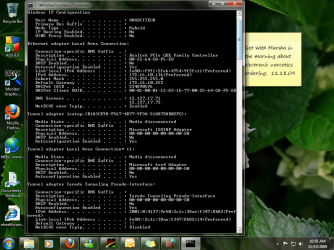
Also, from command prompt, copy and paste this then hit enter:

ipconfig /all

then also attach a screenshot of that along with the attachment from above.
 

My Computer

Computer Manufacturer/Model Number
self built
OS
7600.20510 x86
CPU
P4 550 3.4 GHz HT running at 3.5 GHz
Motherboard
MSI PM8M3-V (MS-7211 v1.x) Micro-ATX mainboard
Memory
OCZ 2 GB(2x1GB) DDR400mHz running @ 414 mHz
Graphics Card(s)
HIS Radeon HD 3850 IceQ 3 Turbo HDMI Dual DL-DVI AGP
Sound Card
MOTU Traveler firewire studio interface 192 kHz 24 bit
Monitor(s) Displays
22" widescreen Acer X223W LCD, 17" Compaq P75 CRT
Screen Resolution
1680x1050 and 1280x1024
Hard Drives
SATA I x2 WD, 400 GB and 120 GB, SATA 2 WD Caviar Black 1 TB
PSU
350W generic
Case
Cybertronpc, it glows blue
Cooling
stock cpu fan, Ice-Q 3 gpu and system, many case fans
Keyboard
Logitch Classical Keyboard 200
Mouse
Logitech Mediaplay cordless
Internet Speed
1792/448 kbits/sec
Other Info
SATA II PCI fake RAID adapter, 1 GB Readyboost, original ATI Remote Wonder (even works with WMC perfectly), Logitech Rumblepad 2 game controller x2
I was wondering, since I have windows 7 pro and in a workgroup instead of a domain, would that cause me not to be able to see other pcs? When I go to view full network map, I can see about 10 pcs and a few switches on the network. There is nothing in common with any of the pcs that I can see. Some are running xp and some are vista. Also some are at other locations. Thanks everyone!

Sorry to just jump in here, but in the above quote you say you can see 10 PCs when you view full map. When you open my computer and on the bottom left click on the network icon what do you see.
 

My Computer

Computer Manufacturer/Model Number
PartsIsParts
OS
Windows 7 Ultimate 64bit
CPU
Intel Pentium D 3Ghz
Motherboard
ASRock G31M-S
Memory
4 Gigs PC 6400
Graphics Card(s)
Nvidia GeForce 8500 GT
Sound Card
Realtek High Definition Audio Integrated
Monitor(s) Displays
AOC 19inch X2
Screen Resolution
1024 X 768 (I'm Old)
Hard Drives
Segate ST3160815AS Serial ATAII
Western Digital WD1600AAJA-75PSA0 Serial ATAII
PSU
500 watt..don't know mfg.
Case
Giant Black 4u rackmount I've had for years
Cooling
Stock CPU extra 120s in case
Keyboard
Generic Made in China
Mouse
Logitech USB Optical Scroll
Internet Speed
What ever comcast decides to give me usually 21Mbps up/5mbps
I was able to share the folder without a problem. However nobody on the same network can see me or get to me. Nor am I able to see them or get into their computers. Its probably something that I am overlooking. I'll go back and reread them. My brain is fried at this point. I really appreciate the help.

Hi and welcome
S

Just to be clear you are on a workgroup, but what was set up as the newtorking component in win 7. Win & homegroup uses IPv6, work group and older uses IPv4. If your CO workgroup is IPv4 and win 7 homegroup thats the problem.

Good Luck and welcome aboard

Ken J++
 

My Computer

Computer Manufacturer/Model Number
HP Pavillion dv-7 1005 Tx
OS
Win 8 Release candidate 8400
CPU
[email protected]
Memory
4 gigs
Graphics Card(s)
Nvidia 9600M
Sound Card
HD built-in
Monitor(s) Displays
17" Wxga
Screen Resolution
1440x900
Cooling
none
Internet Speed
45Mb down 5Mb up
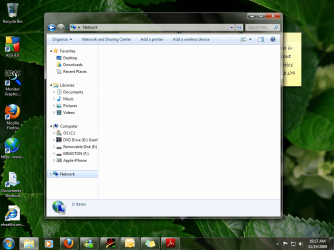
Pat-- I clicked on the network and there are 0 items shown.

Ken--(love your cat pic) I am not part of a homegroup. I am under a workgroup. I have the IPv6 unchecked and use IPv4 with my static IP address.
moz-screenshot.png
 

Attachments

  • network.png
    network.png
    177.8 KB · Views: 10

My Computer

Computer Manufacturer/Model Number
Dell Vostro 220 mini
OS
Windows 7 Pro. 32 bit
CPU
2.93 GHz E7500 Intel Core 2 Duo
Motherboard
Dell
Memory
2 GB
Graphics Card(s)
Intel G45/G43
Sound Card
Realtek High Def.
Monitor(s) Displays
17" acer (I know...its bad)
Screen Resolution
1024x768
Hard Drives
WD 250 GB
Keyboard
Dell L100
Mouse
Dell optical (standard)
Internet Speed
100 Mbps 11.91 dl 12.46 ul
Other Info
Have questions, just ask.
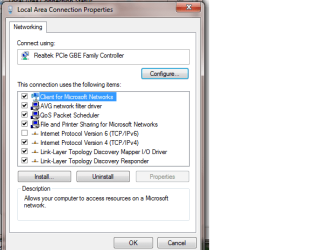
If you can please do what torrentg asked in his post above. Not sure why you are not seeing even your machine in your network. You've confirmed that network discovery is on, perhaps just check to make sure in the properties of your network card, that Client for Microsoft Networks is checked and File and Printer Sharing for Micorosoft Networks is checked. Also please confirm that your machine name is conflicting with anyother machine name on the network, netbios names can be funny...not likely but it's worth a look otherwise we've all got to be missing something
 

My Computer

Computer Manufacturer/Model Number
PartsIsParts
OS
Windows 7 Ultimate 64bit
CPU
Intel Pentium D 3Ghz
Motherboard
ASRock G31M-S
Memory
4 Gigs PC 6400
Graphics Card(s)
Nvidia GeForce 8500 GT
Sound Card
Realtek High Definition Audio Integrated
Monitor(s) Displays
AOC 19inch X2
Screen Resolution
1024 X 768 (I'm Old)
Hard Drives
Segate ST3160815AS Serial ATAII
Western Digital WD1600AAJA-75PSA0 Serial ATAII
PSU
500 watt..don't know mfg.
Case
Giant Black 4u rackmount I've had for years
Cooling
Stock CPU extra 120s in case
Keyboard
Generic Made in China
Mouse
Logitech USB Optical Scroll
Internet Speed
What ever comcast decides to give me usually 21Mbps up/5mbps
Pat-- I'm sorry I didn't see torrentg's post. I figure I am just overlooking something. I'm thinking about formatting and starting fresh. What do you think?

Thanks guys!

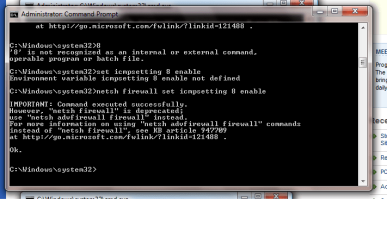
Also no one can ping me even after that command was executed correctly.
 

Attachments

  • client for micro.png
    client for micro.png
    15.1 KB · Views: 7
  • ipconfigall.png
    ipconfigall.png
    156.4 KB · Views: 17
  • ping command.png
    ping command.png
    20.1 KB · Views: 13
  • ping rto.doc
    ping rto.doc
    732.5 KB · Views: 10
Last edited:

My Computer

Computer Manufacturer/Model Number
Dell Vostro 220 mini
OS
Windows 7 Pro. 32 bit
CPU
2.93 GHz E7500 Intel Core 2 Duo
Motherboard
Dell
Memory
2 GB
Graphics Card(s)
Intel G45/G43
Sound Card
Realtek High Def.
Monitor(s) Displays
17" acer (I know...its bad)
Screen Resolution
1024x768
Hard Drives
WD 250 GB
Keyboard
Dell L100
Mouse
Dell optical (standard)
Internet Speed
100 Mbps 11.91 dl 12.46 ul
Other Info
Have questions, just ask.
Sounds kinda drastic to me. If you have the time and anymore patience left please wait for more input. Give everyone a moment or two to comment on your most recent post.
Randy
 

My Computer

Computer Manufacturer/Model Number
PartsIsParts
OS
Windows 7 Ultimate 64bit
CPU
Intel Pentium D 3Ghz
Motherboard
ASRock G31M-S
Memory
4 Gigs PC 6400
Graphics Card(s)
Nvidia GeForce 8500 GT
Sound Card
Realtek High Definition Audio Integrated
Monitor(s) Displays
AOC 19inch X2
Screen Resolution
1024 X 768 (I'm Old)
Hard Drives
Segate ST3160815AS Serial ATAII
Western Digital WD1600AAJA-75PSA0 Serial ATAII
PSU
500 watt..don't know mfg.
Case
Giant Black 4u rackmount I've had for years
Cooling
Stock CPU extra 120s in case
Keyboard
Generic Made in China
Mouse
Logitech USB Optical Scroll
Internet Speed
What ever comcast decides to give me usually 21Mbps up/5mbps
Oh yeah I'll wait. I would like to know what I'm doing wrong so if it happens again I know what to do.
 

My Computer

Computer Manufacturer/Model Number
Dell Vostro 220 mini
OS
Windows 7 Pro. 32 bit
CPU
2.93 GHz E7500 Intel Core 2 Duo
Motherboard
Dell
Memory
2 GB
Graphics Card(s)
Intel G45/G43
Sound Card
Realtek High Def.
Monitor(s) Displays
17" acer (I know...its bad)
Screen Resolution
1024x768
Hard Drives
WD 250 GB
Keyboard
Dell L100
Mouse
Dell optical (standard)
Internet Speed
100 Mbps 11.91 dl 12.46 ul
Other Info
Have questions, just ask.
I noticed that your network is using a Class B private reserved subnet (which is perfectly fine) however, in my experience those types of addressing schemes sometimes are often generated by a more sophisticated devices like a Cisco Pix, which may very well explain your problems with pinging on your network since some firewall appliances don't like ICMP packets bouncing around on their network. That of course is no help to you but it may help us....a previous post asked if your computer was the only computer with ping problems? Can you ping from and to, two other machines on your network? Still should be able to see your own machine on your network
 

My Computer

Computer Manufacturer/Model Number
PartsIsParts
OS
Windows 7 Ultimate 64bit
CPU
Intel Pentium D 3Ghz
Motherboard
ASRock G31M-S
Memory
4 Gigs PC 6400
Graphics Card(s)
Nvidia GeForce 8500 GT
Sound Card
Realtek High Definition Audio Integrated
Monitor(s) Displays
AOC 19inch X2
Screen Resolution
1024 X 768 (I'm Old)
Hard Drives
Segate ST3160815AS Serial ATAII
Western Digital WD1600AAJA-75PSA0 Serial ATAII
PSU
500 watt..don't know mfg.
Case
Giant Black 4u rackmount I've had for years
Cooling
Stock CPU extra 120s in case
Keyboard
Generic Made in China
Mouse
Logitech USB Optical Scroll
Internet Speed
What ever comcast decides to give me usually 21Mbps up/5mbps
I noticed that your network is using a Class B private reserved subnet (which is perfectly fine) however, in my experience those types of addressing schemes sometimes are often generated by a more sophisticated devices like a Cisco Pix, which may very well explain your problems with pinging on your network since some firewall appliances don't like ICMP packets bouncing around on their network. That of course is no help to you but it may help us....a previous post asked if your computer was the only computer with ping problems? Can you ping from and to, two other machines on your network? Still should be able to see your own machine on your network


Yes I can ping all other devices on my network. Also I have been able to use 2 other pc's and am able to ping with no problem. I just can't ping my computer from another.
 

My Computer

Computer Manufacturer/Model Number
Dell Vostro 220 mini
OS
Windows 7 Pro. 32 bit
CPU
2.93 GHz E7500 Intel Core 2 Duo
Motherboard
Dell
Memory
2 GB
Graphics Card(s)
Intel G45/G43
Sound Card
Realtek High Def.
Monitor(s) Displays
17" acer (I know...its bad)
Screen Resolution
1024x768
Hard Drives
WD 250 GB
Keyboard
Dell L100
Mouse
Dell optical (standard)
Internet Speed
100 Mbps 11.91 dl 12.46 ul
Other Info
Have questions, just ask.
Can you ping yourself?
 

My Computer

Computer Manufacturer/Model Number
Dell XPS 15 L502x
OS
Windows 7 Ultimate x64 SP1
CPU
Core i7-2670QM
Memory
8GB DDR3 PC3-10600
Graphics Card(s)
Intel HD Graphics 3000 + GeForce GT 540M
Screen Resolution
1920x1080
Hard Drives
1TB 5400RPM Seagate

My Computer

Computer Manufacturer/Model Number
Dell Vostro 220 mini
OS
Windows 7 Pro. 32 bit
CPU
2.93 GHz E7500 Intel Core 2 Duo
Motherboard
Dell
Memory
2 GB
Graphics Card(s)
Intel G45/G43
Sound Card
Realtek High Def.
Monitor(s) Displays
17" acer (I know...its bad)
Screen Resolution
1024x768
Hard Drives
WD 250 GB
Keyboard
Dell L100
Mouse
Dell optical (standard)
Internet Speed
100 Mbps 11.91 dl 12.46 ul
Other Info
Have questions, just ask.
Have you tried removing your anti-virus application? Disabling doesn't always do the trick, so if you would - please uninstall AVG, restart, and see if things improve.
 

My Computer

Computer Manufacturer/Model Number
Dell XPS 15 L502x
OS
Windows 7 Ultimate x64 SP1
CPU
Core i7-2670QM
Memory
8GB DDR3 PC3-10600
Graphics Card(s)
Intel HD Graphics 3000 + GeForce GT 540M
Screen Resolution
1920x1080
Hard Drives
1TB 5400RPM Seagate
Something else to check - did you supply drivers for the NIC, or did Windows 7 install them automatically? If Windows installed them, check the manufacturer for updated 7 drivers. Next, check the NIC settings in the device manager and see if anything looks out of place.
 

My Computer

Computer Manufacturer/Model Number
Dell XPS 15 L502x
OS
Windows 7 Ultimate x64 SP1
CPU
Core i7-2670QM
Memory
8GB DDR3 PC3-10600
Graphics Card(s)
Intel HD Graphics 3000 + GeForce GT 540M
Screen Resolution
1920x1080
Hard Drives
1TB 5400RPM Seagate
Yay! I am now able to see my networked computers! I uninstalled my version of AVG and everything works great. Now all I have to do is get a new security program :-> Thanks to everyone that helped.
 

My Computer

Computer Manufacturer/Model Number
Dell Vostro 220 mini
OS
Windows 7 Pro. 32 bit
CPU
2.93 GHz E7500 Intel Core 2 Duo
Motherboard
Dell
Memory
2 GB
Graphics Card(s)
Intel G45/G43
Sound Card
Realtek High Def.
Monitor(s) Displays
17" acer (I know...its bad)
Screen Resolution
1024x768
Hard Drives
WD 250 GB
Keyboard
Dell L100
Mouse
Dell optical (standard)
Internet Speed
100 Mbps 11.91 dl 12.46 ul
Other Info
Have questions, just ask.
Something else to check - did you supply drivers for the NIC, or did Windows 7 install them automatically? If Windows installed them, check the manufacturer for updated 7 drivers. Next, check the NIC settings in the device manager and see if anything looks out of place.


Yesterday I uninstalled the drives and restarted to let Windows 7 find the correct drivers for them.
 

My Computer

Computer Manufacturer/Model Number
Dell Vostro 220 mini
OS
Windows 7 Pro. 32 bit
CPU
2.93 GHz E7500 Intel Core 2 Duo
Motherboard
Dell
Memory
2 GB
Graphics Card(s)
Intel G45/G43
Sound Card
Realtek High Def.
Monitor(s) Displays
17" acer (I know...its bad)
Screen Resolution
1024x768
Hard Drives
WD 250 GB
Keyboard
Dell L100
Mouse
Dell optical (standard)
Internet Speed
100 Mbps 11.91 dl 12.46 ul
Other Info
Have questions, just ask.
Kegobeer:
Great catch on the AVG definite rep you up.
 

My Computer

Computer Manufacturer/Model Number
PartsIsParts
OS
Windows 7 Ultimate 64bit
CPU
Intel Pentium D 3Ghz
Motherboard
ASRock G31M-S
Memory
4 Gigs PC 6400
Graphics Card(s)
Nvidia GeForce 8500 GT
Sound Card
Realtek High Definition Audio Integrated
Monitor(s) Displays
AOC 19inch X2
Screen Resolution
1024 X 768 (I'm Old)
Hard Drives
Segate ST3160815AS Serial ATAII
Western Digital WD1600AAJA-75PSA0 Serial ATAII
PSU
500 watt..don't know mfg.
Case
Giant Black 4u rackmount I've had for years
Cooling
Stock CPU extra 120s in case
Keyboard
Generic Made in China
Mouse
Logitech USB Optical Scroll
Internet Speed
What ever comcast decides to give me usually 21Mbps up/5mbps
Yay! I am now able to see my networked computers! I uninstalled my version of AVG and everything works great. Now all I have to do is get a new security program :-> Thanks to everyone that helped.

Awesome. Ya, I knew it had to be the router or 3rd party something in effect here. Great call on that Beer. +rep
 

My Computer

Computer Manufacturer/Model Number
self built
OS
7600.20510 x86
CPU
P4 550 3.4 GHz HT running at 3.5 GHz
Motherboard
MSI PM8M3-V (MS-7211 v1.x) Micro-ATX mainboard
Memory
OCZ 2 GB(2x1GB) DDR400mHz running @ 414 mHz
Graphics Card(s)
HIS Radeon HD 3850 IceQ 3 Turbo HDMI Dual DL-DVI AGP
Sound Card
MOTU Traveler firewire studio interface 192 kHz 24 bit
Monitor(s) Displays
22" widescreen Acer X223W LCD, 17" Compaq P75 CRT
Screen Resolution
1680x1050 and 1280x1024
Hard Drives
SATA I x2 WD, 400 GB and 120 GB, SATA 2 WD Caviar Black 1 TB
PSU
350W generic
Case
Cybertronpc, it glows blue
Cooling
stock cpu fan, Ice-Q 3 gpu and system, many case fans
Keyboard
Logitch Classical Keyboard 200
Mouse
Logitech Mediaplay cordless
Internet Speed
1792/448 kbits/sec
Other Info
SATA II PCI fake RAID adapter, 1 GB Readyboost, original ATI Remote Wonder (even works with WMC perfectly), Logitech Rumblepad 2 game controller x2
After I saw the screen shots she posted, I figured uninstalling AVG was worth a shot. Glad it helped!
 

My Computer

Computer Manufacturer/Model Number
Dell XPS 15 L502x
OS
Windows 7 Ultimate x64 SP1
CPU
Core i7-2670QM
Memory
8GB DDR3 PC3-10600
Graphics Card(s)
Intel HD Graphics 3000 + GeForce GT 540M
Screen Resolution
1920x1080
Hard Drives
1TB 5400RPM Seagate
After I saw the screen shots she posted, I figured uninstalling AVG was worth a shot. Glad it helped!

I can't say in this case if it was AVG or an actual user setting made in it after install- but AVG is wreaking havoc on people's pcs giving all sorts of bsod and other stuff as well, like poor system performance.
 

My Computer

Computer Manufacturer/Model Number
self built
OS
7600.20510 x86
CPU
P4 550 3.4 GHz HT running at 3.5 GHz
Motherboard
MSI PM8M3-V (MS-7211 v1.x) Micro-ATX mainboard
Memory
OCZ 2 GB(2x1GB) DDR400mHz running @ 414 mHz
Graphics Card(s)
HIS Radeon HD 3850 IceQ 3 Turbo HDMI Dual DL-DVI AGP
Sound Card
MOTU Traveler firewire studio interface 192 kHz 24 bit
Monitor(s) Displays
22" widescreen Acer X223W LCD, 17" Compaq P75 CRT
Screen Resolution
1680x1050 and 1280x1024
Hard Drives
SATA I x2 WD, 400 GB and 120 GB, SATA 2 WD Caviar Black 1 TB
PSU
350W generic
Case
Cybertronpc, it glows blue
Cooling
stock cpu fan, Ice-Q 3 gpu and system, many case fans
Keyboard
Logitch Classical Keyboard 200
Mouse
Logitech Mediaplay cordless
Internet Speed
1792/448 kbits/sec
Other Info
SATA II PCI fake RAID adapter, 1 GB Readyboost, original ATI Remote Wonder (even works with WMC perfectly), Logitech Rumblepad 2 game controller x2
Back
Top