Problems with Aero

tylerorr95

New member
Local time
1:53 AM
Messages
31
Location
Hagerstown, MD, USA
If somebody could help me it would be greatfully appreciated.

I installed a program and suddenly it took me back to widows 7 basic. I've tryed everything to we enable aero(Toolbar Transparency) but it will not allow me. I ran a dianostic and it came up with this "Mirror drivers don't support Aero effects".

Please Help! :cry:
 

My Computer

Computer Manufacturer/Model Number
emachines EL 1200-06w
OS
Microsoft Windows 7 Ultimate
CPU
AMD Athlon 2650e, 1600 MHz (8 x 200)
Motherboard
eMachines WMCP61M
Memory
3 GB (2.75 Usable)
Graphics Card(s)
NVIDIA GeForce 6150SE nForce 430
Sound Card
Reltek ALC888/1200 @ nVIDIA nforce 6100-430
Monitor(s) Displays
Generic PnP Monitor [NoDB]; E19T6W
Screen Resolution
1440 x 900 (recommended)
Hard Drives
160GB SATA II (7200rpm, 8MB cache)
Keyboard
Standard multifunction keyboard
Mouse
2-button wheel mouse (PS/2)
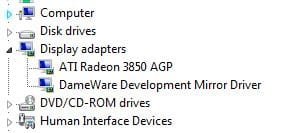
Go to device manager. Expand display adapter section. Right click on anything other than your video card and uninstall it/them.

Mirror drivers are for other computers to control yours and see your desktop. Commonly installed with Dameware. If you didn't authorize this, your computer has been rooted (aka "hacked".) Run a root kit detection scanner and Malwarebytes on full scan too.

Reboot after uninstalling the mirror driver.

If you actually did install the mirror driver on purpose, it will be reinstalled and work well without errors again when Dameware or similar put to use.

Good luck.
 

Attachments

  • Capture.JPG
    Capture.JPG
    14.9 KB · Views: 19,152

My Computer

Computer Manufacturer/Model Number
self built
OS
7600.20510 x86
CPU
P4 550 3.4 GHz HT running at 3.5 GHz
Motherboard
MSI PM8M3-V (MS-7211 v1.x) Micro-ATX mainboard
Memory
OCZ 2 GB(2x1GB) DDR400mHz running @ 414 mHz
Graphics Card(s)
HIS Radeon HD 3850 IceQ 3 Turbo HDMI Dual DL-DVI AGP
Sound Card
MOTU Traveler firewire studio interface 192 kHz 24 bit
Monitor(s) Displays
22" widescreen Acer X223W LCD, 17" Compaq P75 CRT
Screen Resolution
1680x1050 and 1280x1024
Hard Drives
SATA I x2 WD, 400 GB and 120 GB, SATA 2 WD Caviar Black 1 TB
PSU
350W generic
Case
Cybertronpc, it glows blue
Cooling
stock cpu fan, Ice-Q 3 gpu and system, many case fans
Keyboard
Logitch Classical Keyboard 200
Mouse
Logitech Mediaplay cordless
Internet Speed
1792/448 kbits/sec
Other Info
SATA II PCI fake RAID adapter, 1 GB Readyboost, original ATI Remote Wonder (even works with WMC perfectly), Logitech Rumblepad 2 game controller x2
Mirror Driver All Uninstalled

I ran into this problem where my Aero interface is disabled but the troubleshooter comes up telling you to disable to Mirror Driver or turn off programs that might be using it. Well I turned all the programs off, I did not have any Mirror drivers installed, and it gives me the same error. This happened to me and a client of mine with a brand new laptop. I am not sure what is going on since their handy little troubleshooter gives you no more information than to disable Mirror driver programs.

I am wondering if this happened because of a windows update lately as I have two other laptops with Windows 7 installed and neither has this error yet. I have reinstalled my video card drivers with no luck, and completely removed Live Mesh no luck. Other than that I have nothing running that I know of.
 

My Computer

Computer Manufacturer/Model Number
NA
OS
Windows 7
CPU
Intel Q6600
Motherboard
Asus
Memory
4GB
Graphics Card(s)
ATI Radeon HD3800
Back
Top