Solved Problems with appearance and personalization

NotDarkYet

New member
Local time
10:53 PM
Messages
7
Hi there,

I've tried to fill in my computer's specifications as fully as possible but some information I just couldn't find. Given this; however, I would still say my computing skills are intermediate.

I bought a new laptop recently which came with Windows 7 pre-installed. Before this I had been using Windows XP for four years. All things considered I find Windows 7 appropriate for what I use my computer for; user-friendly and aesthetically pleasing.

The only slight problems I've had are with setting the desktop background to slideshow and changing the picture to my user account. After I started the computer I began altering the design features to my own preference. The first thing which was annoying me was the 'Favorites' and 'Libraries' folders, so I searched Google and removed them via the registry.

After everything else was assembled and transferred I attempted to set the desktop background to shuffle. Yet, when I click on 'Browse...' and locate the My Pictures folder (where the pictures I downloaded were saved) and double click to open it none of the pictures appear. I don't suppose anyone else has stumbled across this problem?

I believe that my second question is related to whatever the problem is with the desktop background. When I go into 'Change Your Picture' and click on 'Browse for more pictures...', nothing happens. Just nothing.

I know I shouldn't have messed with the registry on a brand new computer but my obsessiveness got the best of me. If anyone could help me sort these out I'd be really grateful.
 

My Computer

Computer Manufacturer/Model Number
Acer Aspire 5742Z
OS
Windows 7 Home Premium 64bit
CPU
Processor Intel(R) Pentium(R) CPU P6200 @ 2.13GHz
Memory
6GB Ram
Screen Resolution
1366 x 768 x 59
Hard Drives
320GB HDD

1TB External HD
Welcome to Windows Seven Forums.

Unfortunately, the worst thing you could have done was mess with the Libraries folders.

Windows 7 uses a system of junction points and symbolic links so that legacy software gets pointed to the right folder. For example, My Documents files for the Windows XP operating system will be pointed to the Users folder in Windows 7.

These junction points are virtual folders so you can't see them, but if you break the link between them and the folder they point to, you've got problems.

I don't suppose you backed up the registry before you went in and removed the keys for your Libraries and Favourites? If you did, just restore the backup.

If you didn't, boot into Safe Mode and do a system restore to a point before you altered the system registry.

If that doesn't work you're probably looking at restoring Windows 7.
 

My Computer

Computer Manufacturer/Model Number
HP Pavilion Elite 495UK
OS
Windows 7 Ultimate SP1 64-Bit
CPU
Intel Core i7 870 @ 2.93GHz
Motherboard
MSI 2A9C (CPU1)
Memory
8Gb Dual-Channel DDR3 @ 664MHz
Graphics Card(s)
nVidia GeForce GTX 460 1024MB dedicated RAM
Sound Card
Realtek HD Audio
Monitor(s) Displays
HP2310i
Screen Resolution
1920 x 1080
Hard Drives
1x1954GB Hitachi HDS22020ALA 330 (RAID), 1x1954GB Hitachi External for backup and storage
PSU
460W
Case
HP Elite
Cooling
Air cooled
Keyboard
Logitech K750 solar-powered keyboard
Mouse
Logitech Wireless M180 mouse
Internet Speed
2Mb
Other Info
Pure Avanti Flow Internet Radio with iPod Dock, 64Gb iPod, HP USB Speakers, Sony MDR-V500 Headphones, Sony Vaio F-Series Laptop
What you should have done instead of trying to make Windows 7 work like Windows XP was familiarize yourself with the new features. Libraries is/are one of the best new additions to the operating system....and you simply ripped them out without even giving them a consideration.
 

My Computer

Computer Manufacturer/Model Number
Custom
OS
Windows 7 Ultimate RTM (Technet)
CPU
3.00 gigahertz Intel Core2 Duo E8400
Motherboard
ASUSTeK Computer INC. P5K/EPU Rev 1.xx
Memory
4GB
Graphics Card(s)
ATI Radeon X1950 Pro
Sound Card
Built in HD Audio
Monitor(s) Displays
22" Gateway LCD
Screen Resolution
1920 x 1200
Hard Drives
ST3160023A [Hard drive] (160.04 GB) -- drive 0, rev 8.01, ST3500630AS [Hard drive] (500.11 GB) -- drive 2, rev 3.AAK
ST3500630AS [Hard drive] (500.11 GB) -- drive 1, rev 3.AAK
Keyboard
Logitech G11
Mouse
Microsoft Wireless Laser Mouse 5000
Internet Speed
13.44 Mbps
Thumbs up MacGyvr.
To the OP. Give Windows 7 and yourself a little time to get to know each other. You will like it. I would also suggest before doing such things get with the good folks here and ask for information.
 

My Computer

Computer type
PC/Desktop
Computer Manufacturer/Model Number
Home made Desktop
OS
Windows 10 Pro. 64/ version 1709 Windows 7 Pro/64
CPU
Intel i7-6800K @ 4.3
Motherboard
ASUS X-99 Deluxe II
Memory
Corsair Platinum 16 gig @2400
Graphics Card(s)
EVGA GTX 1070 OC
Monitor(s) Displays
Asus 27" LED LCD/VE278Q
Screen Resolution
1920-1080 or 1280-720 HDMI
Hard Drives
INTEL SSD 730-240 Gb Sata 3.0/
PSU
EVGA Platium 1200W
Case
Phanteks Luxe Tempered Glass 8 fans/ one radiator
Cooling
XSPC/ Water Cooled CPU
Keyboard
Das 4 Professional
Mouse
Logitech M705/MX Anywhere 2-S
Internet Speed
100 mbits
Antivirus
Microsoft Security Essentials/ Malwarebytes Premium 3.0/ SAS
Browser
I.E. 11 default/Firefox/ ISP Time Warner Cable/Spectrum
Other Info
LG BluRay Burner/
Sound system-KLipsch-THX/
Icy Dock ssd Hot Swap bays.

My Computer

Computer type
PC/Desktop
Computer Manufacturer/Model Number
Home Built Desktop By DataTech
OS
Windows 7 Ultimate X64 SP1
CPU
Intel i5-2550K, Differing ~4.4-4.8GHz No built in GPU
Motherboard
ASUS P8Z68-V PRO/GEN3
Memory
16GB G.Skill Sniper 1866MHz @ 2133MHz 2x8GB
Graphics Card(s)
ASUS GTX650TIB-DC2OC-2GD5, (650TI Boost)
Sound Card
Onboard Realtek 5-1
Monitor(s) Displays
Samsung P2570HD
Screen Resolution
1920x1080
Hard Drives
Samsung 840 Pro 256GB SSD for OS, 500GB Seagate Constellation (Enterprise drive) for Data
PSU
Corsair HX650W
Case
Inwin Dragon Rider
Cooling
Hyper 212 EVO w/two Noctua fans, push-pull, @1300 RPM
Keyboard
E-Z Eyes, bright yellow keys with large characters
Mouse
steelseries SENSEI Laser Pro Gaming
Internet Speed
48-51Mbs Mbs down, 11 Mbs up Xfinity Cable
Antivirus
Norton Internet Security 2013
Browser
IE 10, Opera, Pale Moon if needed
Other Info
4 case fans, LG BluRay-RE, ASUS DVD-RW, Mr. Fusion power supply, 1.21 gigawatts.
Good suggestions Britton30. Rep+ to you!
 

My Computer

Computer Manufacturer/Model Number
HP Pavillion dv5t (generation 1)
OS
Vista 64 bit and 32 bit (SP2)
CPU
Intel(R) Core(TM)2 Duo Processor T9400 (2.53 GHz
Memory
4GB DDR2 System Memory (2 Dimm)
Graphics Card(s)
512 MB NVIDIA GeForce 9600M GT
Monitor(s) Displays
15.4" diagonal WSXGA+ High-Definition HP BrightView Widescre
Screen Resolution
1680 x 1050
Hard Drives
320GB 5400RPM SATA Hard Drive with HP ProtectSmart Hard Drive Protection
Keyboard
Built-in HP
Mouse
Built in - Synaptics TouchPad V6.5 on PS/2 Port
Internet Speed
Max
Other Info
~ Intel Next-Gen Wireless-N Mini-card w/Bluetooth ~ Blu-Ray ROM DVD+/-R/RW ~ Integ. HDTV Hybrid Tuner ~ 12 Cell Battery ~ MS Office (Home Premium) 2007 ~
Try How to restore all of the default Libraries in Windows 7 first


I don't think a restore will help since the registry was altered.
Try this system file checker and see what happens.

For system specs see Here.
:)

Windows 7 has a comprehensive help file as well. Start button and Help and Support. Put Libraries in the search pane.

I wasn't meaning a full restore to out-of-the-box settings, just a restore to a system restore point before the registry was edited.

Doing that should get the OP back to square one because he will then have his computer using the registry settings as they were before he altered them.
 

My Computer

Computer Manufacturer/Model Number
HP Pavilion Elite 495UK
OS
Windows 7 Ultimate SP1 64-Bit
CPU
Intel Core i7 870 @ 2.93GHz
Motherboard
MSI 2A9C (CPU1)
Memory
8Gb Dual-Channel DDR3 @ 664MHz
Graphics Card(s)
nVidia GeForce GTX 460 1024MB dedicated RAM
Sound Card
Realtek HD Audio
Monitor(s) Displays
HP2310i
Screen Resolution
1920 x 1080
Hard Drives
1x1954GB Hitachi HDS22020ALA 330 (RAID), 1x1954GB Hitachi External for backup and storage
PSU
460W
Case
HP Elite
Cooling
Air cooled
Keyboard
Logitech K750 solar-powered keyboard
Mouse
Logitech Wireless M180 mouse
Internet Speed
2Mb
Other Info
Pure Avanti Flow Internet Radio with iPod Dock, 64Gb iPod, HP USB Speakers, Sony MDR-V500 Headphones, Sony Vaio F-Series Laptop
Thanks Andrew, I was mistaken, a system restore should restore the registry.

Pay no attention to the man behind the curtain.:o
 

My Computer

Computer type
PC/Desktop
Computer Manufacturer/Model Number
Home Built Desktop By DataTech
OS
Windows 7 Ultimate X64 SP1
CPU
Intel i5-2550K, Differing ~4.4-4.8GHz No built in GPU
Motherboard
ASUS P8Z68-V PRO/GEN3
Memory
16GB G.Skill Sniper 1866MHz @ 2133MHz 2x8GB
Graphics Card(s)
ASUS GTX650TIB-DC2OC-2GD5, (650TI Boost)
Sound Card
Onboard Realtek 5-1
Monitor(s) Displays
Samsung P2570HD
Screen Resolution
1920x1080
Hard Drives
Samsung 840 Pro 256GB SSD for OS, 500GB Seagate Constellation (Enterprise drive) for Data
PSU
Corsair HX650W
Case
Inwin Dragon Rider
Cooling
Hyper 212 EVO w/two Noctua fans, push-pull, @1300 RPM
Keyboard
E-Z Eyes, bright yellow keys with large characters
Mouse
steelseries SENSEI Laser Pro Gaming
Internet Speed
48-51Mbs Mbs down, 11 Mbs up Xfinity Cable
Antivirus
Norton Internet Security 2013
Browser
IE 10, Opera, Pale Moon if needed
Other Info
4 case fans, LG BluRay-RE, ASUS DVD-RW, Mr. Fusion power supply, 1.21 gigawatts.
Thanks for the replies everybody; of the many forums I've posted on this seems like one of the most helpful around.

MacGyvr and Layback Bear: you both speak the truth. I've been on Windows 7 now for about ten days and, as I tried to say in my original post, really enjoy the user compatibility. It is a great improvement on Windows XP. Since my original modifications I re-edited the registry and I'd agree - Libraries is a fantastic feature. However, my initial impatience got the best of me and that's what brings me to the forums.

I'll do a system restore tomorrow before I leave for work then and hope for the best. It may not be surprising to you but I didn't back up the registry.

If it's not to much trouble seavixen32 could you post a basic guide on performing a system restore? I've never had to do one before so am unfamiliar with any prompts which may arise.

One last thing which is bothering me though is my external HD will not eject through the usual 'safely remove hardware' option. The only choice is to unplug after the laptop has been shut down. Not at all a hinderance but a slight annoyance. Could this be related to my messing around with the registry?

Thanks once again to all who replied. It's much appreciated.
 

My Computer

Computer Manufacturer/Model Number
Acer Aspire 5742Z
OS
Windows 7 Home Premium 64bit
CPU
Processor Intel(R) Pentium(R) CPU P6200 @ 2.13GHz
Memory
6GB Ram
Screen Resolution
1366 x 768 x 59
Hard Drives
320GB HDD

1TB External HD

My Computer

Computer type
PC/Desktop
Computer Manufacturer/Model Number
Built them myself, Science Experiments !
OS
Win7 Enterprise, Win7 x86 (Ult 7600), Win7 x64 Ult 7600, TechNet RTM on AMD x64 (2.8Ghz)
CPU
AMD fx8350 4ghz, AMD-32 2400mhz, AMD-64 3200mhz, AMDx64 2.8G
Motherboard
SIS 755, ECS-K8M890M-M (Ult 7600), GigaByte & others
Memory
2gb, 4gb on the Ult 7600, 4gb on Technet RTM, 32gb on FX8350
Graphics Card(s)
Draw my own Graphics, several nVidia cards
Sound Card
on motherboard
Monitor(s) Displays
19" flat scr, 28" I-Inc widescr,22" Emprex Widescr, 23" Acer
Screen Resolution
1280 x 1024, 1440 x 900, 1920 x 1080
Hard Drives
6 pata Ide HD's & 2 Sata HD's
added 80gb external on Ult 7600 computer,
numerous extra 1tb, 2TB, 3Tb SATA HD's
A collection of ext HD Docks w/ HDs
PSU
430w, 550w, 600w, 700, 800, etc
Case
All Generic Full Towers
Cooling
Open Air & a few fans, some w/ colored LEDs
Keyboard
Compaq & Dell recycled from GoodWill
Mouse
Made in China Optical Wired Mouse
Internet Speed
Fast Cable InterNet
Antivirus
AVG Free on 24 different Desktops, NO Problems!
Browser
IE 8 is preferred, but use FireFox sometimes
Other Info
Linksys Routers, switches, & Hubs
Too Many USB Flash Drives to count, Biggest is 64GB !
Eight computers in my home network.
Sixteen computers at my business network.
Linked via TeamViewer !
Lots of old used spare computer parts everywhere!
Doc's beat me to it. :)

Your point about the hard drive may, but not necessarily, be related to your registry database.

See how it acts after you've restored your system and if it's still not playing ball, let us know and we can start investigating why.
 

My Computer

Computer Manufacturer/Model Number
HP Pavilion Elite 495UK
OS
Windows 7 Ultimate SP1 64-Bit
CPU
Intel Core i7 870 @ 2.93GHz
Motherboard
MSI 2A9C (CPU1)
Memory
8Gb Dual-Channel DDR3 @ 664MHz
Graphics Card(s)
nVidia GeForce GTX 460 1024MB dedicated RAM
Sound Card
Realtek HD Audio
Monitor(s) Displays
HP2310i
Screen Resolution
1920 x 1080
Hard Drives
1x1954GB Hitachi HDS22020ALA 330 (RAID), 1x1954GB Hitachi External for backup and storage
PSU
460W
Case
HP Elite
Cooling
Air cooled
Keyboard
Logitech K750 solar-powered keyboard
Mouse
Logitech Wireless M180 mouse
Internet Speed
2Mb
Other Info
Pure Avanti Flow Internet Radio with iPod Dock, 64Gb iPod, HP USB Speakers, Sony MDR-V500 Headphones, Sony Vaio F-Series Laptop
Have you tried to activate the "Safely eject" link from both sides/columns of the Windows Explorer? I have found it doesn't work if I try to activate it from the left column (the Navigation Pane), but it does work if I activate it from the right column.
 

My Computer

Computer Manufacturer/Model Number
HP Pavillion dv5t (generation 1)
OS
Vista 64 bit and 32 bit (SP2)
CPU
Intel(R) Core(TM)2 Duo Processor T9400 (2.53 GHz
Memory
4GB DDR2 System Memory (2 Dimm)
Graphics Card(s)
512 MB NVIDIA GeForce 9600M GT
Monitor(s) Displays
15.4" diagonal WSXGA+ High-Definition HP BrightView Widescre
Screen Resolution
1680 x 1050
Hard Drives
320GB 5400RPM SATA Hard Drive with HP ProtectSmart Hard Drive Protection
Keyboard
Built-in HP
Mouse
Built in - Synaptics TouchPad V6.5 on PS/2 Port
Internet Speed
Max
Other Info
~ Intel Next-Gen Wireless-N Mini-card w/Bluetooth ~ Blu-Ray ROM DVD+/-R/RW ~ Integ. HDTV Hybrid Tuner ~ 12 Cell Battery ~ MS Office (Home Premium) 2007 ~
Process Explorer

I have Process Explorer on my W7 install.
It has a "Find" feature.

You type in the drive letter of your external HDD.
It will show you a list of threads and handles related to your search.
You can then kill those one-by-one.
Once they have been dealt with, do another "Find" for your HDD drive letter.
If Process Explorer doesn't list any results, you should be able to use the normal "Safely Remove" option to disconnect your HDD.

Process Explorer is available free from MS and other sites.
No install is needed.
Process Explorer

Probably not much help for your current problem, but you might want to consider it for the future. :)
 

My Computer

Computer type
PC/Desktop
Computer Manufacturer/Model Number
n/a
OS
W7 Ultimate SP1, LM19.2 MATE, W10 Home 1703, W10 Pro 1703 VM, #All 64 bit
CPU
AMD Phenom II x6 1100T, 3.3 GHz
Motherboard
ASUS M4A88T-M/USB3 (AM3)
Memory
12GB DDR3 1333 G-Skill (4GB x 2), G-Skill (2GB x 2)
Graphics Card(s)
NVIDIA GeForce GTX 660
Sound Card
Realtek?
Monitor(s) Displays
Samsung S23B350
Screen Resolution
1920x1080
Hard Drives
WD Green 2TB (SATA), WD Green 3TB (SATA), WD Blue 4TB (SATA), WD Blue 6TB (SATA)
PSU
Cooler Master
Case
Antec GX300 Tower
Cooling
3x Antec TRICOOL 120mm Fans
Mouse
Wired Optical
Internet Speed
DSL
Antivirus
Avast
Browser
Pale Moon (64 bit)
Other Info
2018-12-27 Upgraded HDDs
2015-12-10 Upgraded case, graphics card, storage
2015-08-15 Upgraded motherboard & RAM
2015-07-15 Upgraded LM17.1 to LM17.2
Thanks you lehnerus2000, I will certainly consider that after the system restore.

Sorry I've been away for two days but just haven't had the time to get to the computer.

Just one more question before I do this restore tonight if anyone could help;

Is there anywhere to save my bookmarks that won't delete them from the computer after the restore.

Really wouldn't fancy writing them all out...

Thanks for the information DocBrown.

And what do you mean from the left side of the panel on Explorer Imperfect1? The only way I know how to eject an external HD is by clicking on the icon in the bottom right hand corner of the screen and then on 'Eject...', are there other ways?

Thanks again for everyone's help.
 

My Computer

Computer Manufacturer/Model Number
Acer Aspire 5742Z
OS
Windows 7 Home Premium 64bit
CPU
Processor Intel(R) Pentium(R) CPU P6200 @ 2.13GHz
Memory
6GB Ram
Screen Resolution
1366 x 768 x 59
Hard Drives
320GB HDD

1TB External HD
Navigate to C:\users/username/favorites and copy the favorites folder contents to a new folder on your desktop. After the restore copy the back to the original location.
NOTE: Favorites also contains Favorites Bar which has any shortcuts you have added to the IE Favorites bar, these should be copied back separately.
 

My Computer

Computer type
PC/Desktop
Computer Manufacturer/Model Number
Home Built Desktop By DataTech
OS
Windows 7 Ultimate X64 SP1
CPU
Intel i5-2550K, Differing ~4.4-4.8GHz No built in GPU
Motherboard
ASUS P8Z68-V PRO/GEN3
Memory
16GB G.Skill Sniper 1866MHz @ 2133MHz 2x8GB
Graphics Card(s)
ASUS GTX650TIB-DC2OC-2GD5, (650TI Boost)
Sound Card
Onboard Realtek 5-1
Monitor(s) Displays
Samsung P2570HD
Screen Resolution
1920x1080
Hard Drives
Samsung 840 Pro 256GB SSD for OS, 500GB Seagate Constellation (Enterprise drive) for Data
PSU
Corsair HX650W
Case
Inwin Dragon Rider
Cooling
Hyper 212 EVO w/two Noctua fans, push-pull, @1300 RPM
Keyboard
E-Z Eyes, bright yellow keys with large characters
Mouse
steelseries SENSEI Laser Pro Gaming
Internet Speed
48-51Mbs Mbs down, 11 Mbs up Xfinity Cable
Antivirus
Norton Internet Security 2013
Browser
IE 10, Opera, Pale Moon if needed
Other Info
4 case fans, LG BluRay-RE, ASUS DVD-RW, Mr. Fusion power supply, 1.21 gigawatts.
Bookmarks?

Which bookmarks do you mean?

There is a Favorites folder in your User profile:
C:\Users\<Your User Name>\Favorites

Firefox bookmarks are stored in you User profile also:
C:\Users\<Your User Name>\AppData\Roaming\Mozilla\Firefox\Profiles
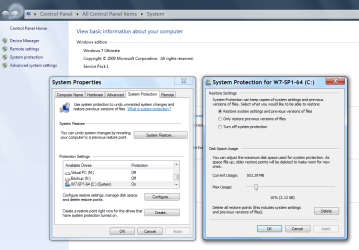
System Restore.png

A normal System Restore shouldn't change your documents and favourites.
If you are cautious/paranoid, you could copy your documents and favourites to an external drive.
You can export Firefox bookmarks using the Import and Backup option in the Library (in Firefox).

If you re-image your HDD (for example using Window Backup and Restore or Macrium Reflect), you WILL lose any documents that have been added since you made the image.
 
Last edited:

My Computer

Computer type
PC/Desktop
Computer Manufacturer/Model Number
n/a
OS
W7 Ultimate SP1, LM19.2 MATE, W10 Home 1703, W10 Pro 1703 VM, #All 64 bit
CPU
AMD Phenom II x6 1100T, 3.3 GHz
Motherboard
ASUS M4A88T-M/USB3 (AM3)
Memory
12GB DDR3 1333 G-Skill (4GB x 2), G-Skill (2GB x 2)
Graphics Card(s)
NVIDIA GeForce GTX 660
Sound Card
Realtek?
Monitor(s) Displays
Samsung S23B350
Screen Resolution
1920x1080
Hard Drives
WD Green 2TB (SATA), WD Green 3TB (SATA), WD Blue 4TB (SATA), WD Blue 6TB (SATA)
PSU
Cooler Master
Case
Antec GX300 Tower
Cooling
3x Antec TRICOOL 120mm Fans
Mouse
Wired Optical
Internet Speed
DSL
Antivirus
Avast
Browser
Pale Moon (64 bit)
Other Info
2018-12-27 Upgraded HDDs
2015-12-10 Upgraded case, graphics card, storage
2015-08-15 Upgraded motherboard & RAM
2015-07-15 Upgraded LM17.1 to LM17.2
And what do you mean from the left side of the panel on Explorer Imperfect1? The only way I know how to eject an external HD is by clicking on the icon in the bottom right hand corner of the screen and then on 'Eject...', are there other ways?

Go into Windows Explorer and in the Navigation Pane (left side column)
single-click on Computer. Go over to the right-side column and right-click on the drive you want to eject. Select "Safely Eject" and a pop-up balloon at the lower-right corner of the screen should tell you that you can now safely eject the item (i.e. your HD).

If on the other hand, you were to try to right-click on that same drive in the left side column (the Navigation Pane) you would probably get an error message telling you that it is not safe to eject that item.
 

My Computer

Computer Manufacturer/Model Number
HP Pavillion dv5t (generation 1)
OS
Vista 64 bit and 32 bit (SP2)
CPU
Intel(R) Core(TM)2 Duo Processor T9400 (2.53 GHz
Memory
4GB DDR2 System Memory (2 Dimm)
Graphics Card(s)
512 MB NVIDIA GeForce 9600M GT
Monitor(s) Displays
15.4" diagonal WSXGA+ High-Definition HP BrightView Widescre
Screen Resolution
1680 x 1050
Hard Drives
320GB 5400RPM SATA Hard Drive with HP ProtectSmart Hard Drive Protection
Keyboard
Built-in HP
Mouse
Built in - Synaptics TouchPad V6.5 on PS/2 Port
Internet Speed
Max
Other Info
~ Intel Next-Gen Wireless-N Mini-card w/Bluetooth ~ Blu-Ray ROM DVD+/-R/RW ~ Integ. HDTV Hybrid Tuner ~ 12 Cell Battery ~ MS Office (Home Premium) 2007 ~
Hello everyone, apologies for the delay between my replies but I'm moving house at the moment and haven't had much chance to sit down with my computer.

Anyway, I tried a system restore two nights ago but the oldest point was one day after I messed with the registry. I attempted this anyway but all I recieved was an error message and, after much clicking, my computer ended the night the way it had started that morning.

seavixen32 you suggested, if a system restore failed, to try restoring Windows 7; do you still think this is the best route to follow?

Or should I take on Britton30's advice and attempt to restore all the default libraries in Windows 7?

I have come to get used to these defunct features concerning my Windows 7; yet they are minor annoyances that, at the same time, I wouldn't mind getting rid of.


Thanks,

Ian
 

My Computer

Computer Manufacturer/Model Number
Acer Aspire 5742Z
OS
Windows 7 Home Premium 64bit
CPU
Processor Intel(R) Pentium(R) CPU P6200 @ 2.13GHz
Memory
6GB Ram
Screen Resolution
1366 x 768 x 59
Hard Drives
320GB HDD

1TB External HD
Hi Ian, I would, personally, try anything possible before a repair or clean install
 

My Computer

Computer type
PC/Desktop
Computer Manufacturer/Model Number
Home Built Desktop By DataTech
OS
Windows 7 Ultimate X64 SP1
CPU
Intel i5-2550K, Differing ~4.4-4.8GHz No built in GPU
Motherboard
ASUS P8Z68-V PRO/GEN3
Memory
16GB G.Skill Sniper 1866MHz @ 2133MHz 2x8GB
Graphics Card(s)
ASUS GTX650TIB-DC2OC-2GD5, (650TI Boost)
Sound Card
Onboard Realtek 5-1
Monitor(s) Displays
Samsung P2570HD
Screen Resolution
1920x1080
Hard Drives
Samsung 840 Pro 256GB SSD for OS, 500GB Seagate Constellation (Enterprise drive) for Data
PSU
Corsair HX650W
Case
Inwin Dragon Rider
Cooling
Hyper 212 EVO w/two Noctua fans, push-pull, @1300 RPM
Keyboard
E-Z Eyes, bright yellow keys with large characters
Mouse
steelseries SENSEI Laser Pro Gaming
Internet Speed
48-51Mbs Mbs down, 11 Mbs up Xfinity Cable
Antivirus
Norton Internet Security 2013
Browser
IE 10, Opera, Pale Moon if needed
Other Info
4 case fans, LG BluRay-RE, ASUS DVD-RW, Mr. Fusion power supply, 1.21 gigawatts.
seavixen32 you suggested, if a system restore failed, to try restoring Windows 7; do you still think this is the best route to follow?

Or should I take on Britton30's advice and attempt to restore all the default libraries in Windows 7?

Just another opinion. Once the registry has been changed it's almost impossible to know if other changes might have occurred. Restoring the libraries may work ... or not. Or you'll find out at the most inopportune time that something else is broke. For that reason I'd recommend a system restore after you copy your important documents, photos, bookmarks, favorites, etc and save them to your external HD. Since this is a relatively new machine, I'd access the hidden recovery partition and restore the machine to its original factory settings (like it was the day you got it home.) After you have everything set up again I'd immediately make a system image using either the built in Win 7 imaging tool or any of the free products like Macrium or Paragon. Once you have a system image, feel free to experiment. If and when the computer gets hosed (and it will happen if you like to tinker :)) you can use the system image to be up and running in about 30 minutes.
 

My Computer

Computer type
Laptop
Computer Manufacturer/Model Number
Sony Vaio VPCEB47GM Laptop
OS
Win 7 Pro 64-bit
CPU
Intel i5 2.4 Ghz
Memory
8GB DDR3
Graphics Card(s)
Intel HD 3000
Sound Card
IDT High Definition
Monitor(s) Displays
15.6 WGXA Anti-Glare LED
Screen Resolution
1280x800
Hard Drives
640Gb 7200rpm
Antivirus
MSE
Browser
Opera (primary) with IE9 backup
Back
Top