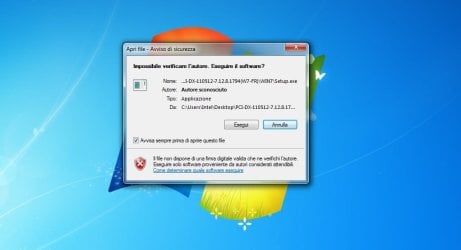
Hi, i have some problems with driver of my audio card Xonar dx. Seeing that i was not in the taskbar Asus Audio center, i uninstalled the audio driver to reinstall. But when I started the installation I output a warning dialog that says the certificate is not trusted and the drivers are from an unknown author, (first time never happened in previuos time), so i clicked "run" to start the installation but once the sound card is disabled (in fact, I did not hear the usual "click" by card during installation). The installation is successful but the card does not take the drivers, among other things, after rebooting the desktop screen returns alert certificate unknown, in particular, are two and relate the file: c:\...syswoow64\hsmgr.exe and other file in the same cart syswoow64. I also tried to clean up with Driver Sweeper in safe mode but nothing, i tried to install the driver with cd-rom and the warning does not come out but the card is still disabled. 
Now yesterday, to solve some problems with Explorer 11 (timeline empty and unable to download) I've run scans with Zoek and FRST, and this deleted some registry entries, you may have deleted some necessary item for the drivers?
In this case i add the report of scans maybe you can see if something important key or file has been removed. Many thanks!
NB To date, however, the sound card works perfectly, i have not noticed me because I uninstalled the drivers, but before this could happen, and therefore may not depend on the scans with FRST and zoek
Now yesterday, to solve some problems with Explorer 11 (timeline empty and unable to download) I've run scans with Zoek and FRST, and this deleted some registry entries, you may have deleted some necessary item for the drivers?
In this case i add the report of scans maybe you can see if something important key or file has been removed. Many thanks!
NB To date, however, the sound card works perfectly, i have not noticed me because I uninstalled the drivers, but before this could happen, and therefore may not depend on the scans with FRST and zoek
Attachments
My Computer
At a glance
Windows 7 Home Premium 64bit SP1Intel i5-2500kCorsair Vengeance 2x4 gb 1600mhz clas.8ASUS GTX 660
- Computer type
- PC/Desktop
- Computer Manufacturer/Model Number
- Custom build
- OS
- Windows 7 Home Premium 64bit SP1
- CPU
- Intel i5-2500k
- Motherboard
- Asus Sabertooth P67 rev.B3
- Memory
- Corsair Vengeance 2x4 gb 1600mhz clas.8
- Graphics Card(s)
- ASUS GTX 660
- Sound Card
- Asus Xonar dx
- Monitor(s) Displays
- Dell U2311H 23'
- Screen Resolution
- 1920x1080
- Hard Drives
- SSD Corsair F120 SO /
Western Digital red 2TB NAS storage
- PSU
- Corsair 650W
- Case
- CoolerMaster HAF 922 red
- Keyboard
- Logitech K350
- Mouse
- Logitech VX nano cordless mouse
- Internet Speed
- ADSL 8MB
- Antivirus
- Norton Antivirus 2014
- Browser
- Explorer 11 / Firefox 29