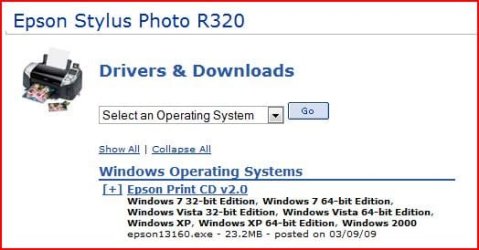
Problems with Epson Print CD

andjayik

New member
Member
VIP
Local time
8:56 PM
Messages
142
I have a epson Stylus R320 which prints fine but when i installed Epson print cd to print on a cd the program keeps telling me that the printer driver is not installed? This worked fine with xp and vista but has not worked with 7??
 

My Computer

OS
Windows 7 Ultimate
CPU
AMD Athlon II X4 630 (95W) Quad Core Socket AM3
Motherboard
GIGABYTE MA785GMT-UD2H
Memory
Patriot Viper Series DDR3 PC3-10666 1333MHz 4GB CL 7-7-7-20
Graphics Card(s)
Geforce GTX550 TI
Sound Card
built in realtech hd
ive done all that! Its just with print cd does'nt seem to work. Keeps asking for a printer driver yet it is installed already cause i can print everything else already. I have to hhok up the printer to me laptop with vista in order for the print cd to work.
 

My Computer

OS
Windows 7 Ultimate
CPU
AMD Athlon II X4 630 (95W) Quad Core Socket AM3
Motherboard
GIGABYTE MA785GMT-UD2H
Memory
Patriot Viper Series DDR3 PC3-10666 1333MHz 4GB CL 7-7-7-20
Graphics Card(s)
Geforce GTX550 TI
Sound Card
built in realtech hd
this is what i get?

moz-screenshot.png
Capture.PNG
 

My Computer

OS
Windows 7 Ultimate
CPU
AMD Athlon II X4 630 (95W) Quad Core Socket AM3
Motherboard
GIGABYTE MA785GMT-UD2H
Memory
Patriot Viper Series DDR3 PC3-10666 1333MHz 4GB CL 7-7-7-20
Graphics Card(s)
Geforce GTX550 TI
Sound Card
built in realtech hd
the solution to your problem :

# Select Print from the File menu.

If you see the message The Epson Printer Driver dealing with CD printing is not installed, click OK.

# Click Tray, select Tray 2, then click OK.

Note: If Tray 2 is not selected, the CD design will print in the wrong position.

# Click Manual Print.

# Make sure Epson Stylus Photo R(your model) is selected.

# Under Paper, select the following settings:

* Source: Manual

* Size: A4

# Click Properties.

# Select CD/DVD or CD/DVD Premium Surface for the Media Type setting.

# Click OK, then click OK again to print.

The epson printer driver dealing with cd printing is not installed - FixYa

had the same problem with DVD-printing on a Epson R300 with PrintCD 2.0 : just ignored "printerdriver is not installed"-message, did the above manual settings and the DVD-printing went OK.
 

My Computer

OS
Windows 7 Ultimate 32bit
Epson Print CD Issues

I found a work around today that worked for my Windows 7 64bit. The Epson Print CD software is already installed. I downloaded the latest drive from the Epson site. I opened the folder with the driver software in it. I right clicked on the executable and selected "troubleshoot compatibility". By default it always says "Windows XP Service Pack 2" and I then started the drive install with that selected. Once the drive was installed I recycled the printer including disconnecting and reconnecting the USB cable. I then ran the "troubleshoot compatibility" on the Epson Print CD executable and ran it as Windows XP Service Pack 2". When the software started and I did the first print, it recognized the driver at that time and now I can print normally.

I know we should not have to go through this to get this working, but mine is working fine now.

:party:
 

My Computer

OS
Windows 7 64bit
New CD Print

I downloaded the latest drivers for Windows 7 64 Bit from Epson for my RX 595 Photo Stylus and guess what it dropped onto my desktop?

CD Print version 2.0 :p

Worked flawlessly in Windows 7. :cool:
 

My Computer

Computer Manufacturer/Model Number
I custom built with parts from CompUSA, NewEgg, etc
OS
Windows 7 Professional 64 Bit
CPU
I7 950
Motherboard
EVGA X58 SLI
Memory
12 GB Corsair 1600
Graphics Card(s)
XFX HD 5770
Sound Card
Presonus Firepod (FP10) X 3 for MultiTrack Recording
Monitor(s) Displays
Acer AL2216W and Dell 2005FPW
Screen Resolution
1680 x 1050
Hard Drives
One WD !TB Caviar Blac (System drive)
Two WD 2TB Caviar Blacks
One Seagate 1.5TB
One WD 1.5
PSU
XON 1000 Watt
Case
Cooler Master
Cooling
Cooler Master
Keyboard
Microsoft Ergonomic
Mouse
3M Ergonomic and Razor Lachesis
Internet Speed
Road Runner DL 4.74 Mb/s, UL .37 Mb/s, Ping 40 ms
Plug in with Windows 7, let the automatic drivers install.

Share the printer. Use a one word share name for simplicity.

Load XP Mode.

In XP Mode's Command Prompt (CMD in Start Menu) type: "net use lpt1 \\computername\printername".

Install the Epson XP Printer Driver from Epson's website.

Select LTP1 for the printer.

Install Print CD from Epson's website.
 

My Computer

Computer Manufacturer/Model Number
Custom Build
OS
Windows 7 Professional 64 Bit
CPU
i7 950
Motherboard
Gigabyte X58A-UD3R
Memory
6GB DDR3
Graphics Card(s)
ATI HD 5870
Monitor(s) Displays
2x HP LP2065 (20" / 1600x1200)
Hard Drives
120GB OCZ Vertex 2 3.5" SSD
PSU
800W ULTRA
Case
Antec
Install EPSON EasyPrint to get EPSON Print CD to work

Pulled my hair out trying to get EPSON Print CD to work (on Epson Stylus Photo R320), from new PC running Windows 7. It worked perfectly from Windows XP. Heard back from Epson. You MUST install their EPSON EasyPrint program, then it works. But they don't say that on the web site, hence lots of folks struggling.
 

My Computer

Computer Manufacturer/Model Number
Dell XPS 8300
OS
Windows 7 Pro, 64 bit
CPU
Intel core 7-2600 processor 8MB cache, 3.4GHz
Memory
8GB DDR3 SDRAM at 1333MHz
Graphics Card(s)
AMD Radeon HD 6770
Monitor(s) Displays
2 of ASUS 21" LED
Hard Drives
1TD serial ATA hard drive 7200rpm plus externals
I have a epson Stylus R320 which prints fine but when i installed Epson print cd to print on a cd the program keeps telling me that the printer driver is not installed? This worked fine with xp and vista but has not worked with 7??

I'm having the exact problem...does anyone have a proper...easy...fix? I'm pulling my hair out, too.
 

My Computer

OS
64
I have an epson stylus r300. I've just installed it and got the printCD software going. What I did, was go to the epson website and download the latest driver for windows XP 64bit (as I have a windows 7 64bit installation) and manually installed that driver. After that the printCD worked without any problems or issues. If you would like more explanation about what I did I would be happy to fill you in. Good luck.
 

My Computer

Computer Manufacturer/Model Number
Dell
OS
Windows 7 Home Premium 64bit
Memory
6 GB
Monitor(s) Displays
Fujitsu siemens
I had the same problem with my Epson Stylus Photo Rx595.
I tried to download the combopack of driver and utility offered by EPSON, but that did not work.
After sevearl failed trials, I decided to download and install the driver and the CD print separately.
And, wow! everything is in order. It works perfectly.
Hope this helps!
 

My Computer

OS
Windows 7 ultimate x 32
Thanks

the solution to your problem :

# Select Print from the File menu.

If you see the message The Epson Printer Driver dealing with CD printing is not installed, click OK.

# Click Tray, select Tray 2, then click OK.

Note: If Tray 2 is not selected, the CD design will print in the wrong position.

# Click Manual Print.

# Make sure Epson Stylus Photo R(your model) is selected.

# Under Paper, select the following settings:

* Source: Manual

* Size: A4

# Click Properties.

# Select CD/DVD or CD/DVD Premium Surface for the Media Type setting.

# Click OK, then click OK again to print.

The epson printer driver dealing with cd printing is not installed - FixYa

had the same problem with DVD-printing on a Epson R300 with PrintCD 2.0 : just ignored "printerdriver is not installed"-message, did the above manual settings and the DVD-printing went OK.

I am now able to use Epson PrintCD on my Win7 system.:D
 

My Computer

Computer type
PC/Desktop
Computer Manufacturer/Model Number
custom build
OS
Windows 7 Home Premium 32bit
CPU
2.67 gigahertz Intel Core i7 920
Motherboard
ASUSTeK Computer INC. P6T
Memory
9248 kb
Graphics Card(s)
NVIDIA GeForce GT 640
Hard Drives
c: (NTFS on drive 0) 500.11 GB 320.24 GB free
d: (NTFS on drive 1) 1570.90 GB 1147.72 GB free
e: (NTFS on drive 2) 1000.19 GB 175.81 GB free
g: (NTFS on drive 4) 4000.77 GB 2703.59 GB free
q: (NTFS on drive 1) 429.50 GB 271.72 GB free
Antivirus
Vipre (Lifetime)
Browser
Google Chrome
eddieleprince's solution worked for me

NorthNorthWest's workaround did the job but it's not as smooth and simple as the original Print CD that I used on XP. Fortunately eddieleprince's suggestion to use the XP 64bit driver for my R320 was perfect. Thanks guys for all your suggestions.
 

My Computer

Computer type
PC/Desktop
Computer Manufacturer/Model Number
Asus and a couple of custom builds
OS
Windows 7 Pro 64bit
CPU
Intel and AMD
Memory
8 to 16g
Epson R300: Pulled most of my hair out trying to sort this 'missing cd print driver' problem after a rebuild using Windows 7 32 bit: The answer for me was to uninstall all Epson listings in 'Control Panel / Uninstall a program'. Then download and install: epson 13466.exe which you can find here: https://www.epson.com/cgi-bin/Store...26323&infoType=Downloads&platform=OSF_W_XP-32

Yes this is an old version for XP but it loads 'Print CD' etc and works like a charm!
 

My Computer

Computer type
PC/Desktop
Computer Manufacturer/Model Number
custom build
OS
Windows 7 32 bit
CPU
I7
Motherboard
Asus z97
Memory
Lots
Graphics Card(s)
None
Hard Drives
Lots
Antivirus
Comodo
Print CDs with Epson Stylus Photo R300 in Windows 7

I was having the same problem, unable to print CDs in Windows 7 using my Epson Stylus Photo R300 using Epson Print CD. I kept getting the error message "Driver dealing with CD printing not installed".

I had been able to print CDs just fine running Windows XP. And in Windows 7, I could use the printer for paper printing from other programs just fine. Just no luck in Win7 using Epson Print CD printing on a disk.

No printer at all would show up in the Print window's dropdown, and none of the solutions I saw here worked.

So, here's what I did:

First I loaded EasyPrint.

Then I went to the Epson site and loaded the Stylus Photo R380 driver (another printer I have). Lo and behold, when I went into PrintCD, the R380 showed up in the Print Window dropdown menu.

Further investigation showed that that driver folder was on the C drive in the Epson folder, along with the EasyPrint folder. None of the R300 drivers I had tried loading were in that folder.

You don't have to download the R380 driver - the way it loaded just gave me the clue for where the R300 driver had to reside to function properly.

So, I went to CNET and downloaded driver #11489 for the R300.
EPSON Stylus Photo R300 Series - Free download and software reviews - CNET Download.com

It loaded to the Epson folder on the C drive!

When I went into PrintCD, I saw both the R300 and R380 in the dropdown menu. I deleted the R380 driver, and DVDs are printing as usual on the R300.
 

My Computer

Computer type
PC/Desktop
Computer Manufacturer/Model Number
Dell
OS
Windows 7 64bit
CPU
Intel Xeon CPU E5-2670 v3 @ 2.30GHz
Memory
16 GB
Graphics Card(s)
Nvidia Quadro K2000
Hard Drives
Samsung SSD 850
Samsung SSD 850
WDC WD10EZEX-75M
WDC WD10EZEX-75M
Browser
Firefox
Back
Top