
I have a 2 screen arcade game running 7. I had it running for years until I upgraded my video card. I was running a 1050ti and 2 1080p screens.
I recently upgraded to a 3060ti, but I'm having driver/screen problems. My Nvidia driver wouldn't install so I used a program to ignore the "not digitally signed driver" from Nvidia. Now I have a 1080p screen working, but no 2nd screen. If I unplug the 2nd screen and plug it into another port on the card, the 2nd screen will light up. (It's not a bad port or cord, I have to move the plug for the computer to see the 2nd screen). BUT, the 2nd screen will only be 1024x768, AND windows will not remember at reboot.
I had a working setup with the old video card, so I know my cords are good, and both screens are 1080p. For some reason I can't use the onboard HDMI on my MB either.
My setup is:
Asrock X470 mb
Ryzen 5 2600
8gb ram
3060ti
Windows 7
Anyone have any ideas?
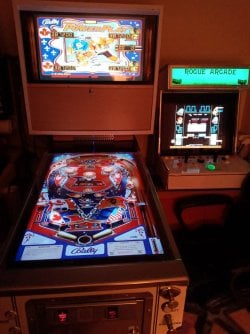
Here's why 2 screens are important.
- - - Updated - - -
I think my issue is the driver isn't digitally signed. I tried installing the certificate on each .dll, but it didn't work.
- - - Updated - - -
I think my issue is the driver isn't digitally signed. I tried installing the certificate on each .dll, but it didn't work.
I recently upgraded to a 3060ti, but I'm having driver/screen problems. My Nvidia driver wouldn't install so I used a program to ignore the "not digitally signed driver" from Nvidia. Now I have a 1080p screen working, but no 2nd screen. If I unplug the 2nd screen and plug it into another port on the card, the 2nd screen will light up. (It's not a bad port or cord, I have to move the plug for the computer to see the 2nd screen). BUT, the 2nd screen will only be 1024x768, AND windows will not remember at reboot.
I had a working setup with the old video card, so I know my cords are good, and both screens are 1080p. For some reason I can't use the onboard HDMI on my MB either.
My setup is:
Asrock X470 mb
Ryzen 5 2600
8gb ram
3060ti
Windows 7
Anyone have any ideas?
Here's why 2 screens are important.
- - - Updated - - -
I think my issue is the driver isn't digitally signed. I tried installing the certificate on each .dll, but it didn't work.
- - - Updated - - -
I think my issue is the driver isn't digitally signed. I tried installing the certificate on each .dll, but it didn't work.
Attachments
My Computer
At a glance
Ultimate x64I-5 2400K Overclocked to 3.9GHZ16GBNvidea 1050 ti
- Computer type
- PC/Desktop
- Computer Manufacturer/Model Number
- Custom build
- OS
- Ultimate x64
- CPU
- I-5 2400K Overclocked to 3.9GHZ
- Motherboard
- GIGABYTE Z-68
- Memory
- 16GB
- Graphics Card(s)
- Nvidea 1050 ti
- Hard Drives
- 2-3 TB SATA
1 KINGSTON SSD 120GB (Boot)
250 GB SATA
500GB SATA
- Antivirus
- Avast
- Browser
- Chrome, Firefox


