Problems with NVIDIA Geforce GT 540M 2GB

causevd

New member
Local time
9:42 AM
Messages
3
Hello guys,

I am pretty new in here and I have some problems with my Laptop which is DELL XPS 15 L502X.

Specs of the laptop are the following

Intel Core i7-2630QM @2.00Ghz
6GB RAM
NVIDIA Geforce GT 540M 2GB
Motherboard Dell Inc. 0NJT03
698 GB Western Digital WDC WD7500BPKT-75PK4T0 ATA Device (SATA)

So here my problem.

Whenever I try to play a game for like random time, for example 5-10 minutes or sometimes on 40-50 minutes my laptop gets freezing sound and this happens on every game and the game is completely frozen and sometimes I can end the process with CTRL + ALT + DELETE and kill the process from the task manager but sometimes I need manually to shutdown from the power button. Sometimes it gives me an error message like my NVIDIA driver stopped working and some kernel version.

Also my battery died long time ago and I've been searching for some solutions on the internet and some of them said that this series of laptops has this problems when the battery dies then when you gaming you'll get constantly game freezing etc .. but before I purchase the battery I want to make sure that the problem is not about the battery.

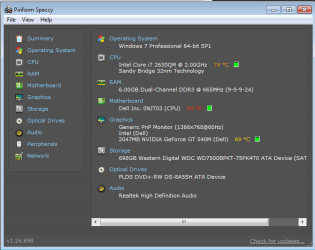
Also I have cleaned my laptop from dust and changed the thermal compound 2 months ago. I will post a snapshot of the temperatures below.

Here are some of the info that I have in "Problem Reporting" which you can see in "problems.txt"
And the first picture below is the temperatures of my laptop when I don't game.
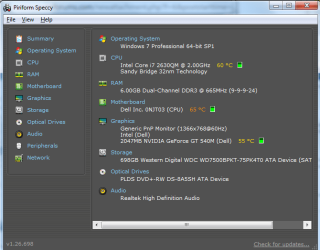
And the second picture below is the temperatures of my laptop when I game.
 

Attachments
  • problems.txt
    problems.txt
    15.1 KB · Views: 5
  • temperatures.png
    temperatures.png
    69.6 KB · Views: 15
  • temperatures2.png
    temperatures2.png
    38 KB · Views: 15

My Computer

Computer type
Laptop
Computer Manufacturer/Model Number
Dell XPS 15 L502x
OS
Windows 7 Professional 64bit
CPU
Intel Core i7-2630QM @2.00GHz
Motherboard
Motherboard Dell Inc. 0NJT03
Memory
6GB
Graphics Card(s)
NVIDIA Geforce GT 540M 2GB
Screen Resolution
1366 x 768
Hard Drives
698 GB Western Digital WDC WD7500BPKT-75PK4T0 ATA Device (SATA)
Cooling
Cooler Master Notepal x3
Mouse
Razer DeathAdder
Browser
Google Chrome
your problem is most definitely heat related. 60-75c under no load for the cpu is rather hot. it will soon shoot up to the 90s and be in the relms of thermal cut off.

you could contact dell and they may take it away and see if the cpus thermal paste needs replacing.

or you could buy a laptop cooling tray which may help the problem.

basically this is where the limitations of high performance smallish laptops lie.. cramming hot componentd Into a fairly thin chassis is never good.

on to the battery issue, did you leave it plugged in all the time it was in use and occasionally over night? as this is the quickest way to kill any battery in any device.

you need to cycle the battery to keep it at its peak. fully charge the battery amd then let it run flat till windows tells you to charge it again. if youre gaming for long periods of time remove the battery and just run it of mains.
 

My Computer

Computer type
PC/Desktop
Computer Manufacturer/Model Number
Built by badgers!!!
OS
Windows 7 Ultimate x64, & Mac OS X 10.9.2
CPU
Intel Core i5 2500k
Motherboard
Asus P8z68 LE
Memory
Corsair Vengence 8gb 1866mhz
Graphics Card(s)
Nvidia GTX 770 OC
Monitor(s) Displays
2x ASUS LED 22" IPS
Screen Resolution
3840x1080
Hard Drives
240GB Crucial M500 SSD
120gb Corsair Force 3 SSD
1TB Western Digital
PSU
Corsair HX650w Modular
Case
Corsair Air 540
Cooling
Corsair H60 Push/Pull
Keyboard
Corsair K70/ Logitech G27 wheel
Mouse
Saitek R.A.T 9
Internet Speed
Too slow!
Other Info
AMD fusion E350N Home server-Windows Home Server 2011 (also made by badgers!)
2011 Macbook 2.4ghz Core2Duo, 4gb ddr3, 120gb Ocz Vertex SSD
84 degrees on the motherboard and 74 degrees on the CPU while gaming is incredibly hot.
 

My Computer

Computer type
PC/Desktop
Computer Manufacturer/Model Number
Custom Build
OS
W7 Pro x64 SP1 | W10 Pro IP x64 | W8.1 Pro x64 VM | Linux Mint VM
CPU
i7-4790k @ 4GHz (4.4GHz Boost)
Motherboard
ASUS Sabertooth Z87 (BIOS Rev 2004)
Memory
16GB DDR3 Kingston HyperX Fury @ 1600MHz CL 9-9-9-27
Graphics Card(s)
EVGA GTX 980 Classified
Sound Card
Realtek Onboard
Monitor(s) Displays
Samsung S27D390
Screen Resolution
1920 x 1080
Hard Drives
240GB Intel 520 Series SSD |
Samsung 850 EVO 120GB SSD |
2TB WD Caviar Black |
2TB WD Caviar Green
PSU
Corsair HX850-80 Gold Modular
Case
Cooler Master Silencio 650
Cooling
Corsair H80i w/2 x Corsair SP120 | 2 x 120mm Noctua NF-S12B
Keyboard
Microsoft Sidewinder X4
Mouse
Gigabyte M6900 optical
Internet Speed
152mb
Antivirus
F-Secure
Browser
Firefox 38.0
Other Info
Backup Rig: Win 7 Pro 64-bit | AMD A10-5800k | ASUS F2A85-V Pro | 8GB Samsung DDR3 @1600MHz | 120GB Toshiba SDD | 2TB Seagate HDD | Cooler Master Silencio 550
your problem is most definitely heat related. 60-75c under no load for the cpu is rather hot. it will soon shoot up to the 90s and be in the relms of thermal cut off.

you could contact dell and they may take it away and see if the cpus thermal paste needs replacing.

or you could buy a laptop cooling tray which may help the problem.

basically this is where the limitations of high performance smallish laptops lie.. cramming hot componentd Into a fairly thin chassis is never good.

on to the battery issue, did you leave it plugged in all the time it was in use and occasionally over night? as this is the quickest way to kill any battery in any device.

you need to cycle the battery to keep it at its peak. fully charge the battery amd then let it run flat till windows tells you to charge it again. if youre gaming for long periods of time remove the battery and just run it of mains.

Well as I mention I have already cooling tray which is Cooler Master Notepal X3 and it keeps cool really good but from the back side and on the top of the laptop I mean where is the keyboard and my hand pointed is somehow warm. And I've bought a thermal compound I don't know what's the brand because it doesn't write on the tube. But it looks like I need to call some computer service so they can replace the thermal compound and thermal pads with some quality ones. And about the battery sometimes I plug out and use just on the battery but those were rare moments because I am a gamer mostly and my AC including with the battery was all the time ON. So, you advice me next time when I gaming or something to remove the battery and play just on the adapter right?

84 degrees on the motherboard and 74 degrees on the CPU while gaming is incredibly hot.

I don't have warranty anymore and Dell can't help me out. And yeah it's pretty hot and can you look at the problems.txt ?
 

My Computer

Computer type
Laptop
Computer Manufacturer/Model Number
Dell XPS 15 L502x
OS
Windows 7 Professional 64bit
CPU
Intel Core i7-2630QM @2.00GHz
Motherboard
Motherboard Dell Inc. 0NJT03
Memory
6GB
Graphics Card(s)
NVIDIA Geforce GT 540M 2GB
Screen Resolution
1366 x 768
Hard Drives
698 GB Western Digital WDC WD7500BPKT-75PK4T0 ATA Device (SATA)
Cooling
Cooler Master Notepal x3
Mouse
Razer DeathAdder
Browser
Google Chrome
When I'm at home I'll take a look, I can't open it on my phone.
 

My Computer

Computer type
PC/Desktop
Computer Manufacturer/Model Number
Custom Build
OS
W7 Pro x64 SP1 | W10 Pro IP x64 | W8.1 Pro x64 VM | Linux Mint VM
CPU
i7-4790k @ 4GHz (4.4GHz Boost)
Motherboard
ASUS Sabertooth Z87 (BIOS Rev 2004)
Memory
16GB DDR3 Kingston HyperX Fury @ 1600MHz CL 9-9-9-27
Graphics Card(s)
EVGA GTX 980 Classified
Sound Card
Realtek Onboard
Monitor(s) Displays
Samsung S27D390
Screen Resolution
1920 x 1080
Hard Drives
240GB Intel 520 Series SSD |
Samsung 850 EVO 120GB SSD |
2TB WD Caviar Black |
2TB WD Caviar Green
PSU
Corsair HX850-80 Gold Modular
Case
Cooler Master Silencio 650
Cooling
Corsair H80i w/2 x Corsair SP120 | 2 x 120mm Noctua NF-S12B
Keyboard
Microsoft Sidewinder X4
Mouse
Gigabyte M6900 optical
Internet Speed
152mb
Antivirus
F-Secure
Browser
Firefox 38.0
Other Info
Backup Rig: Win 7 Pro 64-bit | AMD A10-5800k | ASUS F2A85-V Pro | 8GB Samsung DDR3 @1600MHz | 120GB Toshiba SDD | 2TB Seagate HDD | Cooler Master Silencio 550
the txt file just has hundreds of "video hardware error" entries.

none of which point out the exact cause of the issue.. other than it being your gpu. but the temps are still a concern and most likely the cause.
 

My Computer

Computer type
PC/Desktop
Computer Manufacturer/Model Number
Built by badgers!!!
OS
Windows 7 Ultimate x64, & Mac OS X 10.9.2
CPU
Intel Core i5 2500k
Motherboard
Asus P8z68 LE
Memory
Corsair Vengence 8gb 1866mhz
Graphics Card(s)
Nvidia GTX 770 OC
Monitor(s) Displays
2x ASUS LED 22" IPS
Screen Resolution
3840x1080
Hard Drives
240GB Crucial M500 SSD
120gb Corsair Force 3 SSD
1TB Western Digital
PSU
Corsair HX650w Modular
Case
Corsair Air 540
Cooling
Corsair H60 Push/Pull
Keyboard
Corsair K70/ Logitech G27 wheel
Mouse
Saitek R.A.T 9
Internet Speed
Too slow!
Other Info
AMD fusion E350N Home server-Windows Home Server 2011 (also made by badgers!)
2011 Macbook 2.4ghz Core2Duo, 4gb ddr3, 120gb Ocz Vertex SSD
When I'm at home I'll take a look, I can't open it on my phone.

Alright. Thanks in advance !

the txt file just has hundreds of "video hardware error" entries.

none of which point out the exact cause of the issue.. other than it being your gpu. but the temps are still a concern and most likely the cause.

Yep, I was talking actually with some tech support and soon they will replace my thermal compound.
 

My Computer

Computer type
Laptop
Computer Manufacturer/Model Number
Dell XPS 15 L502x
OS
Windows 7 Professional 64bit
CPU
Intel Core i7-2630QM @2.00GHz
Motherboard
Motherboard Dell Inc. 0NJT03
Memory
6GB
Graphics Card(s)
NVIDIA Geforce GT 540M 2GB
Screen Resolution
1366 x 768
Hard Drives
698 GB Western Digital WDC WD7500BPKT-75PK4T0 ATA Device (SATA)
Cooling
Cooler Master Notepal x3
Mouse
Razer DeathAdder
Browser
Google Chrome
resolved?

Hi!

did the thermal compound do the trick?

Under no gpu load, gpu-z reports ~50c with nvidia gt540m latest driver 347.09

had so many problems, just trying to do basic graphics stuff (rocksmith on external via hdmi, xbmc)

underclocking is a temp solution, but inevitably nvsvc crashes, restarts + rests default clocks...

even with "balanced" settings, no joy.

also (to l502x users especially, but any optimus users) do you have problems with webgl because the "unmasked renderer" detects intel, not nvidia (check bottom of How to run WebGL on discrete Nvidia GPU for notebooks with Nvidia Optimus)

status: "gaming machine" struggles with simplest graphical tasks....
 

My Computer

Computer type
Laptop
Computer Manufacturer/Model Number
Dell
OS
Windows 7 Ultimate 64bit
CPU
2.2
Memory
8Gb
Graphics Card(s)
NVIDIA
Screen Resolution
1280/762
Mouse
built in pad || iphone || MS wireless
Internet Speed
100MB
Antivirus
Avast
Browser
Chrome, Chrome portable
Back
Top