problems with the resolution

xunxo56

New member
Local time
10:13 PM
Messages
4
hey dudes, i have a problem and i think if you can help me with this.
The problem is that when i play games, with a low resolution than the native resolution, the screen in the game is exactly the size of the resolution, not the size of the screen, actually, the full scren doesn't work. the game screen don't use all the physical screen.
my laptop is an dell inspiron 1318, and my video card is an Intel 965.
yesterday i update all the drivers, included the chipset drivers, but the problem continue.
any solution?.

(i'm sorry for the english, but i don't know too much :p)
 

My Computer

OS
Windows Seven
which games?
 

My Computers

System One System Two

  • Computer type
    PC/Desktop
    Computer Manufacturer/Model Number
    The Beast Model A (homebrew)
    OS
    Windows 11 21H2 Current build
    CPU
    AMD Ryzen 9 3950X
    Motherboard
    MSI MEG X570 GODLIKE
    Memory
    4 * 32 GB - Corsair Vengeance 3600 MHz
    Graphics Card(s)
    EVGA GeForce RTX 3080 Ti XC3 ULTRA GAMING (12G-P5-3955-KR)
    Sound Card
    Realtek® ALC1220 Codec
    Monitor(s) Displays
    2x Eve Spectrum ES07D03 4K Gaming Monitor (Matte) | Eve Spec
    Screen Resolution
    3x 3840 x 2160
    Hard Drives
    3x Samsung 980 Pro NVMe PCIe 4 M.2 2 TB SSD (MZ-V8P2T0B/AM) } 3x Sabrent Rocket NVMe 4.0 1 TB SSD
    PSU
    PC Power & Cooling’s Silencer Series 1050 Watt, 80 Plus Plat
    Case
    Fractal Design Define 7 XL Dark ATX Full Tower Case
    Cooling
    SteelSeries Apex Pro Wired Gaming Keyboard
    Keyboard
    SteelSeries Apex Pro
    Mouse
    Logitech MX Master 3S | MX Master 3 for business
    Internet Speed
    AT&T LightSpeed Gigabit Duplex Ftth
    Antivirus
    Windows Defender + MB 3
    Browser
    Nightly (default) + Firefox (stable),Chrome, Edge
  • Computer type
    PC/Desktop
    System Manufacturer/Model Number
    Dell Latitude E5470
    OS
    ChromeOS Flex Dev Channel (current)
    CPU
    Intel(R) Core(TM) i5-6300U CPU @ 2.40GHz, 2501 Mhz, 2 Core(s), 4 Logical Processor(s)
    Motherboard
    Dell
    Memory
    16 GB
    Graphics Card(s)
    Intel(R) HD Graphics 520
    Sound Card
    Intel(R) HD Graphics 520 + RealTek Audio
    Monitor(s) Displays
    Dell laptop display 15"
    Screen Resolution
    1920 * 1080
    Hard Drives
    Toshiba 128GB M.2 22300 drive
    INTEL Cherryville 520 Series SSDSC2CW180A 180 GB SATA III SSD
    PSU
    Dell
    Case
    Dell
    Cooling
    Dell
    Keyboard
    Dell
    Mouse
    Logitech MX Master 3S (shared w. Sys 1) | Dell TouchPad
    Internet Speed
    AT&T LightSpeed Gigabit Duplex Ftth
many games, pes 2009, assassin's creed, burnout, stalker, etc :/
 

My Computer

OS
Windows Seven
What is your native resolution?
Oh yes, try this:
Ctrl+Alt+F11
 

My Computer

OS
OS
Did you try to press Ctrl+Alt+F11 while you are in game?
 
Last edited by a moderator:

My Computer

OS
OS
Hi Guys!

I have the same problem but I could not solve it yet. Any res lower than native ends up with a black frame around the screen that annihilates my gaming :( I have my monitor plugged in through a DVI converter. Maybe my problem is with scaling, but in nVidia's control panel there is no flat panel scaling option furthermore I can't find any driver for my monitor too (because it is a generic PnP, no driver needed). I can't figure out how should I change the monitor's scaling settings. Until now there was no problem with it, these symptoms appeared yesterday so I have no idea what should I do to resolve it.

I would highly appreciate if someone clever helped me! Thanks in advance! :geek:
 

My Computer

OS
windows 7 build 7600
CPU
c2d e7300
Motherboard
GA-EP45T-UD3LR
Memory
Kingston DDR3-1333@7-7-7-21
Graphics Card(s)
9500GT
Monitor(s) Displays
Fujitsu-Siemens L19W-2SA
thanks sassa for the solution!!, when i press these keys the screen change into 3 modes, 1 the resolution doesn't use the full screen, 2 the same of the first option and 3 the screen, with any resolution, is in fullscreen.
anyway, thanks for your responses. :D
 

My Computer

OS
Windows Seven
thanks sassa for the solution!!, when i press these keys the screen change into 3 modes, 1 the resolution doesn't use the full screen, 2 the same of the first option and 3 the screen, with any resolution, is in fullscreen.
anyway, thanks for your responses. :D
+rep will be nice too... :huh:
 

My Computer

OS
OS
Ctrl + Alt + F11 does nothing for me. Why can't I see the change flat panel scaling tab in nvidia CP ?
 

My Computer

OS
windows 7 build 7600
CPU
c2d e7300
Motherboard
GA-EP45T-UD3LR
Memory
Kingston DDR3-1333@7-7-7-21
Graphics Card(s)
9500GT
Monitor(s) Displays
Fujitsu-Siemens L19W-2SA
i got same problem as the one above me.

running 1920x1080. games in 800x600 (cs 1.6)
and i use 2 monitors. (only 1 for gaming on)
 

My Computer

Computer Manufacturer/Model Number
Self Build
OS
Windows 7 Ultimate 64bit
CPU
Intel Q9550
Motherboard
Asus Maximus ii
Memory
4Gb Kingstone DDR2 5-5-5-5-16 1066mhz
Graphics Card(s)
Nvidia 8800gt (clocked)
Sound Card
Creative xtreme audio
Monitor(s) Displays
Benq 22" HD (1920x1080)
Screen Resolution
1920x1080
Hard Drives
1tb. Western Digital disk's
PSU
1000W Enermax
Case
Recom PowerStation
Cooling
Zalman fans and cpu cooler
Keyboard
Logitech G15
Mouse
OCZ Behemoth 3200DPI
Internet Speed
3mb cable
Ok i got this fixed now.

what i did:

Right click on the desktop. click on Nvidia controll panel.
in there go to display -> adjust desktop size and position
Then use nividia scaling ;) worked for me!
 

My Computer

Computer Manufacturer/Model Number
Self Build
OS
Windows 7 Ultimate 64bit
CPU
Intel Q9550
Motherboard
Asus Maximus ii
Memory
4Gb Kingstone DDR2 5-5-5-5-16 1066mhz
Graphics Card(s)
Nvidia 8800gt (clocked)
Sound Card
Creative xtreme audio
Monitor(s) Displays
Benq 22" HD (1920x1080)
Screen Resolution
1920x1080
Hard Drives
1tb. Western Digital disk's
PSU
1000W Enermax
Case
Recom PowerStation
Cooling
Zalman fans and cpu cooler
Keyboard
Logitech G15
Mouse
OCZ Behemoth 3200DPI
Internet Speed
3mb cable
Tip for doing : Right click on desktop
nivida control panel
then do at resolution
nvidia scaling
black sides gone
 

My Computer

Computer Manufacturer/Model Number
Selfmade
OS
Windows 7 Ultimate 64 Bit
CPU
Intel core 2 duo e8400 @ 3.6GHz
Motherboard
Evga 750i SLI
Memory
OCZ 4gb RAM @ 1066 MHz
Graphics Card(s)
9600GT SLI
Monitor(s) Displays
Samsung Syncmaster T200
Hard Drives
Samsung Spinpoint 500GB
PSU
Coolermaster M620
Case
Antec 900
Cooling
Scythe mugen 2
OK but i can not access that tab in cp. Is there any method that allows me to see flat panel scaling tab?
 

My Computer

OS
windows 7 build 7600
CPU
c2d e7300
Motherboard
GA-EP45T-UD3LR
Memory
Kingston DDR3-1333@7-7-7-21
Graphics Card(s)
9500GT
Monitor(s) Displays
Fujitsu-Siemens L19W-2SA
OK but i can not access that tab in cp. Is there any method that allows me to see flat panel scaling tab?


Look in your nvidia control panel.:D
 

My Computer

Computer Manufacturer/Model Number
Custom
OS
Windows 7 7600 RTM x64 Build
CPU
QX9650 clocked to 4.00 Ghz
Motherboard
EVGA 780i
Memory
OCZ Reaper 2x2 gig DDR2 1066
Graphics Card(s)
BFG gtx 285
Monitor(s) Displays
Samsung 226bw
Screen Resolution
1680 x 1050
Hard Drives
2x250 ghz western digital in raid 0
PSU
CORSAIR-650TX 650W PSU
Cooling
TRUE 120
Keyboard
Saitek eclipse
Mouse
G5
OK but i can not access that tab in cp. Is there any method that allows me to see flat panel scaling tab?

Cannot access ? try installing the newest nvidia driver
 

My Computer

Computer Manufacturer/Model Number
Self Build
OS
Windows 7 Ultimate 64bit
CPU
Intel Q9550
Motherboard
Asus Maximus ii
Memory
4Gb Kingstone DDR2 5-5-5-5-16 1066mhz
Graphics Card(s)
Nvidia 8800gt (clocked)
Sound Card
Creative xtreme audio
Monitor(s) Displays
Benq 22" HD (1920x1080)
Screen Resolution
1920x1080
Hard Drives
1tb. Western Digital disk's
PSU
1000W Enermax
Case
Recom PowerStation
Cooling
Zalman fans and cpu cooler
Keyboard
Logitech G15
Mouse
OCZ Behemoth 3200DPI
Internet Speed
3mb cable

My Computer

OS
windows 7 build 7600
CPU
c2d e7300
Motherboard
GA-EP45T-UD3LR
Memory
Kingston DDR3-1333@7-7-7-21
Graphics Card(s)
9500GT
Monitor(s) Displays
Fujitsu-Siemens L19W-2SA
well, if you do you shud have a nvidia controll panel button when you righ click on dektop. if not try installing ntune aswell.
 

My Computer

Computer Manufacturer/Model Number
Self Build
OS
Windows 7 Ultimate 64bit
CPU
Intel Q9550
Motherboard
Asus Maximus ii
Memory
4Gb Kingstone DDR2 5-5-5-5-16 1066mhz
Graphics Card(s)
Nvidia 8800gt (clocked)
Sound Card
Creative xtreme audio
Monitor(s) Displays
Benq 22" HD (1920x1080)
Screen Resolution
1920x1080
Hard Drives
1tb. Western Digital disk's
PSU
1000W Enermax
Case
Recom PowerStation
Cooling
Zalman fans and cpu cooler
Keyboard
Logitech G15
Mouse
OCZ Behemoth 3200DPI
Internet Speed
3mb cable
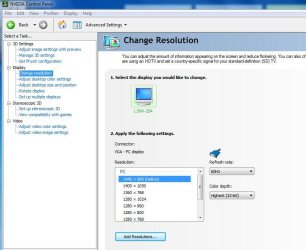
Yes I can access nvidia's control panel but in my case there is no flat panel scaling tab.
 

Attachments

  • Capture.JPG
    Capture.JPG
    63.2 KB · Views: 42

My Computer

OS
windows 7 build 7600
CPU
c2d e7300
Motherboard
GA-EP45T-UD3LR
Memory
Kingston DDR3-1333@7-7-7-21
Graphics Card(s)
9500GT
Monitor(s) Displays
Fujitsu-Siemens L19W-2SA

My Computer

Computer Manufacturer/Model Number
tw33k
OS
Windows 7 Ultimate (x64) SP1
CPU
Intel 3770k 4.6GHz
Motherboard
ASUS Maximus V Formula
Memory
8GB (2x 4GB) Crucial Ballistix
Graphics Card(s)
Sapphire 7950 (1060/1600)
Sound Card
On Board Realtek HD Audio
Monitor(s) Displays
27" Acer B273HU (via HDMI)
Screen Resolution
2048 x 1152
Hard Drives
Crucial M4 128GB
2TB WD Black
1TB Samsung F3 SATA
1TB WD Elite External
2TB WD USB 3.0
PSU
Corsair AX750 Gold
Case
Corsair Obsidian 800DW
Cooling
Corsair H100 (2x AP-121/2x UK-3000 push/pull)
Keyboard
Microsoft Wireless 5000
Mouse
Microsoft Wireless 5000
Internet Speed
5mb/s
Other Info
Logitech z-2300 2.1 speakers
Lamptron FC-5 v2
Back
Top