problems with the resolution

Yes I can access nvidia's control panel but in my case there is no flat panel scaling tab.

because you are look in wrong place.

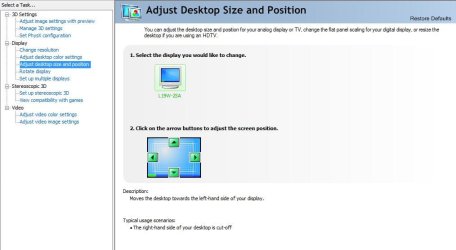
Display, then under display click the Adjust desktop size and position!

207qo8p.jpg
 

My Computer

Computer Manufacturer/Model Number
Self Build
OS
Windows 7 Ultimate 64bit
CPU
Intel Q9550
Motherboard
Asus Maximus ii
Memory
4Gb Kingstone DDR2 5-5-5-5-16 1066mhz
Graphics Card(s)
Nvidia 8800gt (clocked)
Sound Card
Creative xtreme audio
Monitor(s) Displays
Benq 22" HD (1920x1080)
Screen Resolution
1920x1080
Hard Drives
1tb. Western Digital disk's
PSU
1000W Enermax
Case
Recom PowerStation
Cooling
Zalman fans and cpu cooler
Keyboard
Logitech G15
Mouse
OCZ Behemoth 3200DPI
Internet Speed
3mb cable
I am not stupid, do you see that option?
 

Attachments

  • Capture2.JPG
    Capture2.JPG
    51.6 KB · Views: 84

My Computer

OS
windows 7 build 7600
CPU
c2d e7300
Motherboard
GA-EP45T-UD3LR
Memory
Kingston DDR3-1333@7-7-7-21
Graphics Card(s)
9500GT
Monitor(s) Displays
Fujitsu-Siemens L19W-2SA
hm. try download the newest driver, or if you have it use an older one.
also try download ntunes.
 

My Computer

Computer Manufacturer/Model Number
Self Build
OS
Windows 7 Ultimate 64bit
CPU
Intel Q9550
Motherboard
Asus Maximus ii
Memory
4Gb Kingstone DDR2 5-5-5-5-16 1066mhz
Graphics Card(s)
Nvidia 8800gt (clocked)
Sound Card
Creative xtreme audio
Monitor(s) Displays
Benq 22" HD (1920x1080)
Screen Resolution
1920x1080
Hard Drives
1tb. Western Digital disk's
PSU
1000W Enermax
Case
Recom PowerStation
Cooling
Zalman fans and cpu cooler
Keyboard
Logitech G15
Mouse
OCZ Behemoth 3200DPI
Internet Speed
3mb cable
I have already tried one older driver that certainly has flat panel scaling tab but in my case it was not visible. Maybe the problem is that my monitor is connected via a DVI-converter. Some sources said that flat panel scaling is only visible if the monitor is connected into the DVI connector and for this reason i have tried unplugging and plugging into my 9500GT's other DVI connector but with no result.

I am still looking foward to someone I could give all my rep for solving this issue for me ^^
 

My Computer

OS
windows 7 build 7600
CPU
c2d e7300
Motherboard
GA-EP45T-UD3LR
Memory
Kingston DDR3-1333@7-7-7-21
Graphics Card(s)
9500GT
Monitor(s) Displays
Fujitsu-Siemens L19W-2SA
Installing nTune did not solve the problem unfortunately. Flat panel scaling tab is still not visible for some reason.
 

My Computer

OS
windows 7 build 7600
CPU
c2d e7300
Motherboard
GA-EP45T-UD3LR
Memory
Kingston DDR3-1333@7-7-7-21
Graphics Card(s)
9500GT
Monitor(s) Displays
Fujitsu-Siemens L19W-2SA
If we somehow could manage to see the flat panel scaling tab maybe our problem would be solved. Anyway I tried to install a driver for my monitor, but windows says it needs no driver because it is a plug and play device.

dakifil what monitor do you have? Do you see the flat panel scaling tab in nvidia's cp?
 

My Computer

OS
windows 7 build 7600
CPU
c2d e7300
Motherboard
GA-EP45T-UD3LR
Memory
Kingston DDR3-1333@7-7-7-21
Graphics Card(s)
9500GT
Monitor(s) Displays
Fujitsu-Siemens L19W-2SA
I have anlog BenQ T201WA and I don't seeflat panel scaling tab. I reported this problem ti nvidia and thay said that they will work on it.
 

My Computer

OS
Windows 7 7600
Same problem as OP and a few repliers. Black bars, no scaling option. @Concker can you tell us what drivers your using that allow nVidia scaling?
 

My Computer

Computer Manufacturer/Model Number
Custom
OS
Windows 7
CPU
2.22GHz Intel Core Duo
Motherboard
Custom
Memory
2GB
Graphics Card(s)
nVidia GeForce 8600GT
Monitor(s) Displays
Sceptre 22"
Screen Resolution
1680x1050
I've found a temporary fix for this problem. You must use old vista drivers. I've installed 178.xx version of Vista drivers and everything is fixed, there's no more black bars...
 

My Computer

OS
Windows 7 7600
What is your native resolution?
Oh yes, try this:
Ctrl+Alt+F11

Gle nađoh i Srbina ovde :D .. Pozdrav brate :party:!! Neg da te pitam ja nesto ovako lepo srpski nadam se da se niko nece buniti... Kakve su ovo cudne rezolucije na windowsu... Imam 22'' monitor i na windows XP rezulucije su klasika od 800*600 pa i sve wide screen koje postoje na dalje do max rezolucije 1680*1050 dok na windowsu 7 npr imam moju klasicnu rezoluciju 1680*1050 ali nema sanse da stavim npr 1400*900 .... mislim to mi je bitno zbog igara, prva rezolucija ispod 1680*1050 je 1360*1024 koju nikad u zivotu nisam video onda 1280*800 ... dok na win xp sam mogao da stavljam rezolucije i manje od 800*600 a na 7 ne mogu ...trip...

------------------------------------------------------------------------
SORRY PPL MY ENGLISH IS NOT SO GOOD SO I ASK A QUESTION TO MY FRIEND ON OUR NATIVE LANGUAGE. IF IT IS SOME SERIOUS PROBLEM ILL PUT A NEW THREAD ON IT...
 

My Computer

OS
Windows 7 RTM
CPU
AMD Athlon X2 4000+
Motherboard
elitegroup nforce6m-a v2.0
Memory
2gb ddr2 800mhz
Graphics Card(s)
Sapphire Ati Radeon 4850
Monitor(s) Displays
Viewsonic VA2216w
Internet Speed
WDSL
Same problem as OP and a few repliers. Black bars, no scaling option. @Concker can you tell us what drivers your using that allow nVidia scaling?

im using the 8.15.11.9038 one.

my monitor is benq 22" hd monitor, connected whit dvi.
 

My Computer

Computer Manufacturer/Model Number
Self Build
OS
Windows 7 Ultimate 64bit
CPU
Intel Q9550
Motherboard
Asus Maximus ii
Memory
4Gb Kingstone DDR2 5-5-5-5-16 1066mhz
Graphics Card(s)
Nvidia 8800gt (clocked)
Sound Card
Creative xtreme audio
Monitor(s) Displays
Benq 22" HD (1920x1080)
Screen Resolution
1920x1080
Hard Drives
1tb. Western Digital disk's
PSU
1000W Enermax
Case
Recom PowerStation
Cooling
Zalman fans and cpu cooler
Keyboard
Logitech G15
Mouse
OCZ Behemoth 3200DPI
Internet Speed
3mb cable
34842386.png


You figure it out then. You and a select few others have that option, we don't.

Anyone else have any ideas?
 

My Computer

Computer Manufacturer/Model Number
Custom
OS
Windows 7
CPU
2.22GHz Intel Core Duo
Motherboard
Custom
Memory
2GB
Graphics Card(s)
nVidia GeForce 8600GT
Monitor(s) Displays
Sceptre 22"
Screen Resolution
1680x1050
So I guess we can just sit around in windowed mode then? This is really dumb.
 

My Computer

Computer Manufacturer/Model Number
Custom
OS
Windows 7
CPU
2.22GHz Intel Core Duo
Motherboard
Custom
Memory
2GB
Graphics Card(s)
nVidia GeForce 8600GT
Monitor(s) Displays
Sceptre 22"
Screen Resolution
1680x1050
I have figured out that, this problem is related to the monitor because i tried to plug in another monitor and in that case flat panel scaling was available. Someone should figure out that what should one do with his monitor to solve this problem.
 

My Computer

OS
windows 7 build 7600
CPU
c2d e7300
Motherboard
GA-EP45T-UD3LR
Memory
Kingston DDR3-1333@7-7-7-21
Graphics Card(s)
9500GT
Monitor(s) Displays
Fujitsu-Siemens L19W-2SA
Donate it to Goodwill ??? :p
 

My Computer

Computer type
PC/Desktop
Computer Manufacturer/Model Number
LENOVO K450 @3.0GHZ
OS
64-bit Windows 8.1 Pro
CPU
Core(TM) i5 CPU 4330 Haswell @ 3.20GHz
Motherboard
LENOVO
Memory
12.00 GB
Graphics Card(s)
Intel(R) HD Graphics
Sound Card
Intel HD integtrated
Monitor(s) Displays
HP 25' ISP Monitor
Screen Resolution
1900/1020
Hard Drives
(1) ST1000DM003-1CH162 (2) Generic STORAGE DEVICE USB Device (3) Generic STORAGE DEVICE USB Device
Internet Speed
100mb down/10mb up
Adding a custom resolution that I would like to use solved the problem. It's worth giving it a try. ^^
 

My Computer

OS
windows 7 build 7600
CPU
c2d e7300
Motherboard
GA-EP45T-UD3LR
Memory
Kingston DDR3-1333@7-7-7-21
Graphics Card(s)
9500GT
Monitor(s) Displays
Fujitsu-Siemens L19W-2SA
Back
Top