Problems with Windows Live Photo Gallery

pulsar68

New member
Member
Local time
2:00 AM
Messages
37
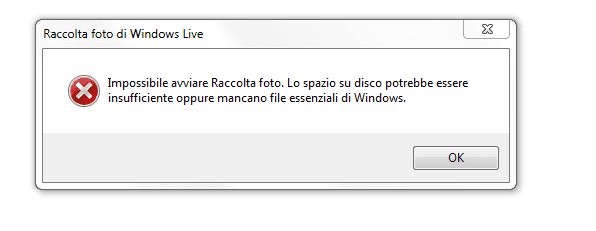
Hi all. I downloaded and installed Windows Live Photo Gallery but when I run the program this error appear and cannot open it. What can I do? Hope someome help me. Thanks
 

Attachments

  • Cattura.PNG
    Cattura.PNG
    5.7 KB · Views: 45

My Computer

Computer Manufacturer/Model Number
Self made
OS
Windows 7 Ultimate 64-bit
CPU
Intel i7 3770k
Motherboard
ASRock Z68 Pro Gen.3
Memory
Corsair Vengeance 16GB 1600 Mhz
Graphics Card(s)
Asus GTX580 Direct Cu II
Sound Card
Asus Xonar D2
Monitor(s) Displays
Dell u2711 IPS 27"
Screen Resolution
2560X1440
Hard Drives
OCZ Vertex 4 256 Gb SSD
Case
Cooler Master Cosmos 1000
Keyboard
Logitech Illuminated Keyboard
Mouse
Logitech Laser Mouse M505
Internet Speed
Wifi operator
An english translation of the error would really help! ;)
 

My Computer

Computer type
PC/Desktop
Computer Manufacturer/Model Number
LENOVO K450 @3.0GHZ
OS
64-bit Windows 8.1 Pro
CPU
Core(TM) i5 CPU 4330 Haswell @ 3.20GHz
Motherboard
LENOVO
Memory
12.00 GB
Graphics Card(s)
Intel(R) HD Graphics
Sound Card
Intel HD integtrated
Monitor(s) Displays
HP 25' ISP Monitor
Screen Resolution
1900/1020
Hard Drives
(1) ST1000DM003-1CH162 (2) Generic STORAGE DEVICE USB Device (3) Generic STORAGE DEVICE USB Device
Internet Speed
100mb down/10mb up
English translation

Unable to start the Photo Gallery. The disk space may be insufficient or missing critical files in Windows.:p
 

My Computer

Computer Manufacturer/Model Number
Self made
OS
Windows 7 Ultimate 64-bit
CPU
Intel i7 3770k
Motherboard
ASRock Z68 Pro Gen.3
Memory
Corsair Vengeance 16GB 1600 Mhz
Graphics Card(s)
Asus GTX580 Direct Cu II
Sound Card
Asus Xonar D2
Monitor(s) Displays
Dell u2711 IPS 27"
Screen Resolution
2560X1440
Hard Drives
OCZ Vertex 4 256 Gb SSD
Case
Cooler Master Cosmos 1000
Keyboard
Logitech Illuminated Keyboard
Mouse
Logitech Laser Mouse M505
Internet Speed
Wifi operator
Buongiorno, Pulsar, e benvenuti nel SevenForums.

This error dialog simply tells you Windows can not start Photo Gallery because

  1. the disk space may be insufficient

    or
  2. some critical files are missing.

1: Check that you have enough free space on your hard drive, download Live Photo Gallery once more and install it. If the error reoccurs, the issue was not insufficient space

2: This means some important Windows system files are missing. Open command prompt as an administrator and run the command sfc /scannow. It checks the system files on your computer and repairs / reinstalls them when needed.

Kari
 

My Computer

Computer type
Laptop
Computer Manufacturer/Model Number
HP ENVY 17-1150eg
OS
Windows 10 Pro x64 EN-GB
CPU
1.6 GHz Intel Core i7-720QM Processor
Memory
6 GB
Graphics Card(s)
ATI Mobility Radeon HD 5850 Graphics
Sound Card
Beats sound system with integrated subwoofer
Monitor(s) Displays
17" laptop display, 22" LED and 32" Full HD TV through HDMI
Screen Resolution
1600*900 (1), 1920*1080 (2&3)
Hard Drives
Internal: 2 x 500 GB SATA Hard Disk Drive 7200 rpm
External: 2TB for backups, 3TB USB3 network drive for media
Cooling
As Envy runs a bit warm, I have it on a Cooler Master pad
Keyboard
Logitech diNovo Media Desktop Laser (bluetooth)
Mouse
Logitech Performance Mouse MX
Internet Speed
50/10 Mbps VDSL
Antivirus
Windows Defender 4.3.9431.0
Browser
Maxthon 3.5.2., IE11
Still problems

Hi. First thanks for your help. I've up to 170 Gb free and I run prompt but nothing missing found... Is there any other possibility to fix this problem? thanks
 

My Computer

Computer Manufacturer/Model Number
Self made
OS
Windows 7 Ultimate 64-bit
CPU
Intel i7 3770k
Motherboard
ASRock Z68 Pro Gen.3
Memory
Corsair Vengeance 16GB 1600 Mhz
Graphics Card(s)
Asus GTX580 Direct Cu II
Sound Card
Asus Xonar D2
Monitor(s) Displays
Dell u2711 IPS 27"
Screen Resolution
2560X1440
Hard Drives
OCZ Vertex 4 256 Gb SSD
Case
Cooler Master Cosmos 1000
Keyboard
Logitech Illuminated Keyboard
Mouse
Logitech Laser Mouse M505
Internet Speed
Wifi operator
You did sfc /scannow? Did you try to redownload and reinstall the Live Photo Gallery after that?
 

My Computer

Computer type
Laptop
Computer Manufacturer/Model Number
HP ENVY 17-1150eg
OS
Windows 10 Pro x64 EN-GB
CPU
1.6 GHz Intel Core i7-720QM Processor
Memory
6 GB
Graphics Card(s)
ATI Mobility Radeon HD 5850 Graphics
Sound Card
Beats sound system with integrated subwoofer
Monitor(s) Displays
17" laptop display, 22" LED and 32" Full HD TV through HDMI
Screen Resolution
1600*900 (1), 1920*1080 (2&3)
Hard Drives
Internal: 2 x 500 GB SATA Hard Disk Drive 7200 rpm
External: 2TB for backups, 3TB USB3 network drive for media
Cooling
As Envy runs a bit warm, I have it on a Cooler Master pad
Keyboard
Logitech diNovo Media Desktop Laser (bluetooth)
Mouse
Logitech Performance Mouse MX
Internet Speed
50/10 Mbps VDSL
Antivirus
Windows Defender 4.3.9431.0
Browser
Maxthon 3.5.2., IE11
Yes, of course, but everyting like before
 

My Computer

Computer Manufacturer/Model Number
Self made
OS
Windows 7 Ultimate 64-bit
CPU
Intel i7 3770k
Motherboard
ASRock Z68 Pro Gen.3
Memory
Corsair Vengeance 16GB 1600 Mhz
Graphics Card(s)
Asus GTX580 Direct Cu II
Sound Card
Asus Xonar D2
Monitor(s) Displays
Dell u2711 IPS 27"
Screen Resolution
2560X1440
Hard Drives
OCZ Vertex 4 256 Gb SSD
Case
Cooler Master Cosmos 1000
Keyboard
Logitech Illuminated Keyboard
Mouse
Logitech Laser Mouse M505
Internet Speed
Wifi operator
OK. Do you have other Live products installed like Mail, Messenger, Movie Maker etc.? Are they working?

Maybe restoring system to an earlier point before you first attempted to install Photo Gallery would help?

Kari
 

My Computer

Computer type
Laptop
Computer Manufacturer/Model Number
HP ENVY 17-1150eg
OS
Windows 10 Pro x64 EN-GB
CPU
1.6 GHz Intel Core i7-720QM Processor
Memory
6 GB
Graphics Card(s)
ATI Mobility Radeon HD 5850 Graphics
Sound Card
Beats sound system with integrated subwoofer
Monitor(s) Displays
17" laptop display, 22" LED and 32" Full HD TV through HDMI
Screen Resolution
1600*900 (1), 1920*1080 (2&3)
Hard Drives
Internal: 2 x 500 GB SATA Hard Disk Drive 7200 rpm
External: 2TB for backups, 3TB USB3 network drive for media
Cooling
As Envy runs a bit warm, I have it on a Cooler Master pad
Keyboard
Logitech diNovo Media Desktop Laser (bluetooth)
Mouse
Logitech Performance Mouse MX
Internet Speed
50/10 Mbps VDSL
Antivirus
Windows Defender 4.3.9431.0
Browser
Maxthon 3.5.2., IE11
Just a thought in passing. you have enough total disk space free. how much is free in the partition where it is installed?
 

My Computer

Computer Manufacturer/Model Number
HP Pavillion dv-7 1005 Tx
OS
Win 8 Release candidate 8400
CPU
[email protected]
Memory
4 gigs
Graphics Card(s)
Nvidia 9600M
Sound Card
HD built-in
Monitor(s) Displays
17" Wxga
Screen Resolution
1440x900
Cooling
none
Internet Speed
45Mb down 5Mb up
179 gb, about
 

My Computer

Computer Manufacturer/Model Number
Self made
OS
Windows 7 Ultimate 64-bit
CPU
Intel i7 3770k
Motherboard
ASRock Z68 Pro Gen.3
Memory
Corsair Vengeance 16GB 1600 Mhz
Graphics Card(s)
Asus GTX580 Direct Cu II
Sound Card
Asus Xonar D2
Monitor(s) Displays
Dell u2711 IPS 27"
Screen Resolution
2560X1440
Hard Drives
OCZ Vertex 4 256 Gb SSD
Case
Cooler Master Cosmos 1000
Keyboard
Logitech Illuminated Keyboard
Mouse
Logitech Laser Mouse M505
Internet Speed
Wifi operator
I think I'll got to use Picasa. I'm sorry 'cause I liked very much Photo Gallery, for example that one in Vista... Anyway Thanks a lot for your support
 

My Computer

Computer Manufacturer/Model Number
Self made
OS
Windows 7 Ultimate 64-bit
CPU
Intel i7 3770k
Motherboard
ASRock Z68 Pro Gen.3
Memory
Corsair Vengeance 16GB 1600 Mhz
Graphics Card(s)
Asus GTX580 Direct Cu II
Sound Card
Asus Xonar D2
Monitor(s) Displays
Dell u2711 IPS 27"
Screen Resolution
2560X1440
Hard Drives
OCZ Vertex 4 256 Gb SSD
Case
Cooler Master Cosmos 1000
Keyboard
Logitech Illuminated Keyboard
Mouse
Logitech Laser Mouse M505
Internet Speed
Wifi operator
Back
Top