
Solved Process Tamer And/or Mz Cpu Accelerator?

MadMudMob

New member
Member
VIP
Local time
6:27 AM
Messages
143
Could some kind techy minded person please tell me if these two programs will work well with each other or if I should use just one (in which case which one) please ....
Process Tamer
and/or
Mz CPU Accelerator 4.10

Am using Windows 7 Home Premium with 3gb of memory (which I was advised is the most my ageing computer can cope with ... was two but had a third one added last year) and am rather concerned that Task Manager tells me the CPU is running between 70% and 99% when I watch a YouTube video with nothing else running except my AVG and Thunderbird email program. Am also getting 5 to 10 second freezes on Firefox if I have more than 4 tabs open - not every time but about once per day.

Or, is there is something better I should do or use?

I defrag every month and clean with Glary Utilities and WiseCare 365 weekly , restart the pc daily and do fortnightly scans for nasties with SuperAntiSpyware and Malwarebytes.

All and any advice greatly appreciated.

Not a clue what any of this actually means or why it thinks I am in America not the UK but thought it might help to copy it here ........
OS Name Microsoft Windows 7 Home Premium
Version 6.1.7601 Service Pack 1 Build 7601
Other OS Description Not Available
OS Manufacturer Microsoft Corporation
System Name ******
System Manufacturer Gigabyte Technology Co., Ltd.
System Model GA-MA69G-S3H
System Type X86-based PC
Processor AMD Athlon(tm) 64 X2 Dual Core Processor 4200+, 2200 Mhz, 2 Core(s), 2 Logical Processor(s)
BIOS Version/Date Award Software International, Inc. F3, 27/07/2007
SMBIOS Version 2.4
Windows Directory C:\Windows
System Directory C:\Windows\system32
Boot Device \Device\HarddiskVolume1
Locale United States
Hardware Abstraction Layer Version = "6.1.7601.17514"
User Name ********
Time Zone GMT Standard Time
Installed Physical Memory (RAM) 3.00 GB
Total Physical Memory 2.87 GB
Available Physical Memory 1.02 GB
Total Virtual Memory 5.75 GB
Available Virtual Memory 3.37 GB
Page File Space 2.87 GB
Page File C:\pagefile.sys
Processor : AMD Athlon(tm) 64 X2 Dual Core Processor 4200+
Memory : 2942MB(32)
Mother Board : GA-MA69G-S3H
Windows Version : Microsoft Windows 7 Home Premium Service Pack 1
Installation Date : 2014-07-19
Monitor : Generic PnP Monitor
Video Adapter : ATI Radeon X1200 Series (Microsoft Corporation - WDDM)
Mouse : USB Input Device
Keyboard : Standard PS/2 Keyboard
Disk Drive : WDC WD5000AVDS-63U7B1 ATA Device(465GB,IDE)
DVD/CD-ROM Drive : HL-DT-ST DVDRAM GSA-H66N ATA Device
 
Last edited:

My Computer

Computer type
PC/Desktop
Computer Manufacturer/Model Number
Dell
OS
Windows 7 Pro 64bit
CPU
Intel (R) Core(TM) i3-3320 CPU @ 3.30ghz
Motherboard
Dell Inc OT 10XY version A01
Memory
4GB
Graphics Card(s)
Intel(R) HT Graphics
Sound Card
ATI HDMI Audio
Monitor(s) Displays
Acer AL1714
Screen Resolution
1280 - 1024
Hard Drives
KC 45
SATA 3.0, 6.0Gb/s (Current 3.0Gb/s)
ATA8-ACS T 13/1699-D revision 4
RMP(R/s) 7200
PSU
Not known
Case
Not known
Cooling
Not known
Keyboard
Standard Keyboard
Mouse
Konig
Internet Speed
Ping:12ms Down:37.44 Mb/s Up:9.51 Mb/s
Antivirus
Avast Internet Security
Browser
Firefox (and occasionally Internet Explorer)
Other Info
Regularly use ...
~ Super AntiSpyware
~ Malwarebytes Anti-Malware
~ Wise Care365
~ CCleaner
~ Dropbox (for backups)
and defrag once a month
I have no experience with either program and generally am skeptical of their usefulness.

I do know that dynamically changing CPU priority is very difficult to get right and very easy to get wrong. I believe that Windows NT 4 did raise the priority of a process that had a foreground window but that this was dropped in Windows 2000. Apparently the action was too drastic and caused problems, although I don't what they were. But it does give an idea of how difficult it is to get this right. Windows does increase the time slice for such a program. I won't go into more detail.

Your computer should be able to do better than it is doing. I suspect there is something wrong and maybe someone can help with this.

I don't believe the answer is in running more software. Such programs promise much but rarely deliver.
 

My Computer

Computer type
PC/Desktop
Computer Manufacturer/Model Number
HP
OS
Windows 7 Pro 64 bit
CPU
Xeon W3520
Memory
8 GB
Graphics Card(s)
Nvidia Geforce 210
I agree with LMiller7 about the usefulness (or lack thereof) with programs like these and advise against using them. Just too many ways they can go wrong.

The CPU usage does seem high for the workload though. Have you tried scanning for rootkit's? With the same problem as yours thats what it turned out to be on my Sisters machine. Malwarebytes has a rootkit scanner that does a pretty good job as well as ESET's online scanner which I highly recommend.

Have you opened Task manager to see what processes are running while you're experiencing this? Might help to give a clue.

As an afterthought, have you been using the registry cleaner in your Wisecare?

ESET Online Scanner

https://www.malwarebytes.org/antirootkit/
 
Last edited:

My Computer

Computer type
Laptop
Computer Manufacturer/Model Number
MSI GE72VR Apache Pro-416
OS
Windows 10x64 Build 1709
CPU
Intel i7 7700HQ Kaby Lake
Motherboard
Micro-Star Intl. MS-179B (U3C1)
Memory
16 GB DDR4 @2400
Graphics Card(s)
Nvidia Geforce GTX 1060
Screen Resolution
1920x1080 120Hz
Hard Drives
256 GB Nvme M.2 SSD

1TB HDD@7200
Cooling
Cooler Blast 4
Keyboard
Steel Series
Antivirus
Bit Defender Free
Browser
Edge
Thankyou both for replying.

I scanned with the Malwarebytes and it found nothing but did say "Partition cannot be booted" throughout.

Yes, I have used the registry cleaner in Wisecare (feeling as though I've done a baaaaad thing).

Am about to use the ESET Online Scanner you so kindly linked to for me.

As for the Task Manager - I have looked but have very little understanding of what it says.

I did note that ....
~ Thunderbird is 84,532k
~ Sychost.exe (one of 11) is 68,532k
~ Firefox is 222,792K (with just this page open)
~ Skype is 68,068k
~SuperAntiSpyware is 56,124

but most of all there are 10 running for AVG with the highest being 39,095k and the total for AVG coming to 993,258k .... is that a lot? Should I use a different anti-virus and or/firewall?

There is one I don't recognise called TrustedInstaller using 11,432 that I have no clue about nor can I find it in my list of installed programs or be entering its name in the Star search box (?)

I really appreciate your help ..... thankyou
 
Last edited:

My Computer

Computer type
PC/Desktop
Computer Manufacturer/Model Number
Dell
OS
Windows 7 Pro 64bit
CPU
Intel (R) Core(TM) i3-3320 CPU @ 3.30ghz
Motherboard
Dell Inc OT 10XY version A01
Memory
4GB
Graphics Card(s)
Intel(R) HT Graphics
Sound Card
ATI HDMI Audio
Monitor(s) Displays
Acer AL1714
Screen Resolution
1280 - 1024
Hard Drives
KC 45
SATA 3.0, 6.0Gb/s (Current 3.0Gb/s)
ATA8-ACS T 13/1699-D revision 4
RMP(R/s) 7200
PSU
Not known
Case
Not known
Cooling
Not known
Keyboard
Standard Keyboard
Mouse
Konig
Internet Speed
Ping:12ms Down:37.44 Mb/s Up:9.51 Mb/s
Antivirus
Avast Internet Security
Browser
Firefox (and occasionally Internet Explorer)
Other Info
Regularly use ...
~ Super AntiSpyware
~ Malwarebytes Anti-Malware
~ Wise Care365
~ CCleaner
~ Dropbox (for backups)
and defrag once a month
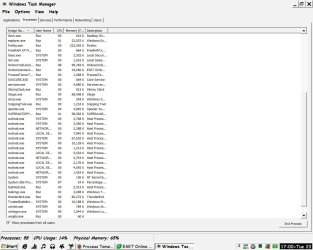
but most of all there are 10 running for AVG with the highest being 39,095k and the total for AVG coming to 993,258k .... is that a lot? Should I use a different anti-virus and or/firewall?

That doesn't make sense. If there are 10 AVG processes (not unusual) with the largest being 39,095k the total can't be anywhere near 993,258k.

Post a screenshot of Task Manager, Performance tab when the problem occurs. It is the total memory usage that is important. The memory usage of a process or group of processes is of no consequence unless it causes a shortage. At present I see no evidence that the problem is memory related.
 

My Computer

Computer type
PC/Desktop
Computer Manufacturer/Model Number
HP
OS
Windows 7 Pro 64 bit
CPU
Xeon W3520
Memory
8 GB
Graphics Card(s)
Nvidia Geforce 210
Ah, maybe my adding up is adrift - this should help (?) ...
 

Attachments

  • Capture.JPG
    Capture.JPG
    164.9 KB · Views: 5

My Computer

Computer type
PC/Desktop
Computer Manufacturer/Model Number
Dell
OS
Windows 7 Pro 64bit
CPU
Intel (R) Core(TM) i3-3320 CPU @ 3.30ghz
Motherboard
Dell Inc OT 10XY version A01
Memory
4GB
Graphics Card(s)
Intel(R) HT Graphics
Sound Card
ATI HDMI Audio
Monitor(s) Displays
Acer AL1714
Screen Resolution
1280 - 1024
Hard Drives
KC 45
SATA 3.0, 6.0Gb/s (Current 3.0Gb/s)
ATA8-ACS T 13/1699-D revision 4
RMP(R/s) 7200
PSU
Not known
Case
Not known
Cooling
Not known
Keyboard
Standard Keyboard
Mouse
Konig
Internet Speed
Ping:12ms Down:37.44 Mb/s Up:9.51 Mb/s
Antivirus
Avast Internet Security
Browser
Firefox (and occasionally Internet Explorer)
Other Info
Regularly use ...
~ Super AntiSpyware
~ Malwarebytes Anti-Malware
~ Wise Care365
~ CCleaner
~ Dropbox (for backups)
and defrag once a month
RE: Process Tamer/ MZ CPU Accelerator.

I've used MZ CPU Accelerator and other products by the same author. They seemed to work well on a low spec XP machine but I tested on Windows 7 some time ago and would not recommend either.

Reasons:

You don't want or need to always boost the foreground process and as for ProcessTamer seeing a process that is overloading your cpu, then reducing the priority of that process temporarily, until its cpu usage returns to a reasonable level - Well that will slow down lots of things like malware scans, downloading and installing windows updates and so on.

If you are going to use such types of software you need something that you can configure to exclude processes that you specify and that you can also enable/ disable with just a click or two of your mouse.
 

My Computer

Computer type
Laptop
Computer Manufacturer/Model Number
ASUS
OS
Microsoft Windows 7 Home Premium 64-bit 7601 Multiprocessor Free Service Pack 1
CPU
AMD C-60 APU with Radeon(tm) HD Graphics
Motherboard
ASUSTeK COMPUTER INC. X501U
Memory
4.00 GB
Graphics Card(s)
AMD Radeon HD 6290 Graphics
Sound Card
(1) AMD High Definition Audio Device (2) Realtek High Defi
Screen Resolution
1366 x 768 x 32 bits (4294967296 colors) @ 60 Hz
Hard Drives
Hitachi HTS545050A7E380 SATA Disk Device
Antivirus
Comodo CIS & FW, SecureAplus App Whitelisting, Threatfire
Browser
Cyberfox 64bit, Opera 64bit, Airfox
Other Info
Spy-The-Spy, HitmanPro.Alert, Norton Connect Safe, MJRegWatcher, BitDefender TrafficLight, Voodoo Shield, Zemana AntiMalware
It is difficult to tell without seeing a screenshot of Task Manager Performance tab but it does seem unlikely that there is a memory related problem.
 

My Computer

Computer type
PC/Desktop
Computer Manufacturer/Model Number
HP
OS
Windows 7 Pro 64 bit
CPU
Xeon W3520
Memory
8 GB
Graphics Card(s)
Nvidia Geforce 210
The Malwarebytes anti-rootkit is not the same as their Malware scanner. You have to download it separately, link provided in my last post.

Let us know what your eset scan comes up with.

I agree with LMiller7 that this is unlikely memory related. Is your CPU ALWAYS running as hard as you mentioned in your original post or is it sporadic? Also, did you save anything you deleted when you used the registry cleaner?
 
Last edited:

My Computer

Computer type
Laptop
Computer Manufacturer/Model Number
MSI GE72VR Apache Pro-416
OS
Windows 10x64 Build 1709
CPU
Intel i7 7700HQ Kaby Lake
Motherboard
Micro-Star Intl. MS-179B (U3C1)
Memory
16 GB DDR4 @2400
Graphics Card(s)
Nvidia Geforce GTX 1060
Screen Resolution
1920x1080 120Hz
Hard Drives
256 GB Nvme M.2 SSD

1TB HDD@7200
Cooling
Cooler Blast 4
Keyboard
Steel Series
Antivirus
Bit Defender Free
Browser
Edge
Apologies I should have said it was the Malwarebytes anti-rootkit you linked to that I used.

The ESET scan found and removed Variant of Win32/toolbar.SearchSuite.v.

After that both AdwCleaner and Malwarebytes JRT (Junk Remover Tool) found nothing.

The memory is usually the same as I posted the pic of but gets far worse if I am watching a YouTube video.

I used the registry cleaner in Wisecare some months ago (and, no sorry, I didn't think to save anything ... naive trust on my behalf) but this problem has only appeared over the last week or so. I can not think of anything I have changed, deleted or installed in that time.
 

My Computer

Computer type
PC/Desktop
Computer Manufacturer/Model Number
Dell
OS
Windows 7 Pro 64bit
CPU
Intel (R) Core(TM) i3-3320 CPU @ 3.30ghz
Motherboard
Dell Inc OT 10XY version A01
Memory
4GB
Graphics Card(s)
Intel(R) HT Graphics
Sound Card
ATI HDMI Audio
Monitor(s) Displays
Acer AL1714
Screen Resolution
1280 - 1024
Hard Drives
KC 45
SATA 3.0, 6.0Gb/s (Current 3.0Gb/s)
ATA8-ACS T 13/1699-D revision 4
RMP(R/s) 7200
PSU
Not known
Case
Not known
Cooling
Not known
Keyboard
Standard Keyboard
Mouse
Konig
Internet Speed
Ping:12ms Down:37.44 Mb/s Up:9.51 Mb/s
Antivirus
Avast Internet Security
Browser
Firefox (and occasionally Internet Explorer)
Other Info
Regularly use ...
~ Super AntiSpyware
~ Malwarebytes Anti-Malware
~ Wise Care365
~ CCleaner
~ Dropbox (for backups)
and defrag once a month
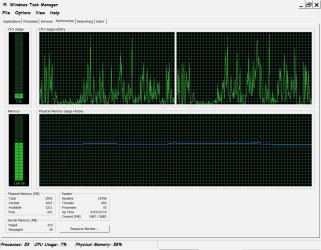
LMiller7 is this what you wanted? I seem to have posted the wrong one initially - sorry.
It is with only Firefox open, Thunderbird minimized and AVG in the System Tray ...
 

Attachments

  • Capture3.JPG
    Capture3.JPG
    288.7 KB · Views: 3
Last edited:

My Computer

Computer type
PC/Desktop
Computer Manufacturer/Model Number
Dell
OS
Windows 7 Pro 64bit
CPU
Intel (R) Core(TM) i3-3320 CPU @ 3.30ghz
Motherboard
Dell Inc OT 10XY version A01
Memory
4GB
Graphics Card(s)
Intel(R) HT Graphics
Sound Card
ATI HDMI Audio
Monitor(s) Displays
Acer AL1714
Screen Resolution
1280 - 1024
Hard Drives
KC 45
SATA 3.0, 6.0Gb/s (Current 3.0Gb/s)
ATA8-ACS T 13/1699-D revision 4
RMP(R/s) 7200
PSU
Not known
Case
Not known
Cooling
Not known
Keyboard
Standard Keyboard
Mouse
Konig
Internet Speed
Ping:12ms Down:37.44 Mb/s Up:9.51 Mb/s
Antivirus
Avast Internet Security
Browser
Firefox (and occasionally Internet Explorer)
Other Info
Regularly use ...
~ Super AntiSpyware
~ Malwarebytes Anti-Malware
~ Wise Care365
~ CCleaner
~ Dropbox (for backups)
and defrag once a month
The numbers look about what you would expect on a system with 3 GB RAM. There is no reason to suggest your problems are memory related.
 

My Computer

Computer type
PC/Desktop
Computer Manufacturer/Model Number
HP
OS
Windows 7 Pro 64 bit
CPU
Xeon W3520
Memory
8 GB
Graphics Card(s)
Nvidia Geforce 210
Thankyou - am not sure if that is good or bad :)
 

My Computer

Computer type
PC/Desktop
Computer Manufacturer/Model Number
Dell
OS
Windows 7 Pro 64bit
CPU
Intel (R) Core(TM) i3-3320 CPU @ 3.30ghz
Motherboard
Dell Inc OT 10XY version A01
Memory
4GB
Graphics Card(s)
Intel(R) HT Graphics
Sound Card
ATI HDMI Audio
Monitor(s) Displays
Acer AL1714
Screen Resolution
1280 - 1024
Hard Drives
KC 45
SATA 3.0, 6.0Gb/s (Current 3.0Gb/s)
ATA8-ACS T 13/1699-D revision 4
RMP(R/s) 7200
PSU
Not known
Case
Not known
Cooling
Not known
Keyboard
Standard Keyboard
Mouse
Konig
Internet Speed
Ping:12ms Down:37.44 Mb/s Up:9.51 Mb/s
Antivirus
Avast Internet Security
Browser
Firefox (and occasionally Internet Explorer)
Other Info
Regularly use ...
~ Super AntiSpyware
~ Malwarebytes Anti-Malware
~ Wise Care365
~ CCleaner
~ Dropbox (for backups)
and defrag once a month
Memory looks about right to me too, but in every screenshot you've given us your CPU usage is between 7 and 14 %. How often and for how long does it go to the high percentages you mentioned in your original post?
 

My Computer

Computer type
Laptop
Computer Manufacturer/Model Number
MSI GE72VR Apache Pro-416
OS
Windows 10x64 Build 1709
CPU
Intel i7 7700HQ Kaby Lake
Motherboard
Micro-Star Intl. MS-179B (U3C1)
Memory
16 GB DDR4 @2400
Graphics Card(s)
Nvidia Geforce GTX 1060
Screen Resolution
1920x1080 120Hz
Hard Drives
256 GB Nvme M.2 SSD

1TB HDD@7200
Cooling
Cooler Blast 4
Keyboard
Steel Series
Antivirus
Bit Defender Free
Browser
Edge
As I start to watch a video it can peak at 100% but then generally fluctuates between 50% and 70% for the duration of the video. Mostly staying toward the top percentage with an occasional spike to 95% to 100% again briefly
 

My Computer

Computer type
PC/Desktop
Computer Manufacturer/Model Number
Dell
OS
Windows 7 Pro 64bit
CPU
Intel (R) Core(TM) i3-3320 CPU @ 3.30ghz
Motherboard
Dell Inc OT 10XY version A01
Memory
4GB
Graphics Card(s)
Intel(R) HT Graphics
Sound Card
ATI HDMI Audio
Monitor(s) Displays
Acer AL1714
Screen Resolution
1280 - 1024
Hard Drives
KC 45
SATA 3.0, 6.0Gb/s (Current 3.0Gb/s)
ATA8-ACS T 13/1699-D revision 4
RMP(R/s) 7200
PSU
Not known
Case
Not known
Cooling
Not known
Keyboard
Standard Keyboard
Mouse
Konig
Internet Speed
Ping:12ms Down:37.44 Mb/s Up:9.51 Mb/s
Antivirus
Avast Internet Security
Browser
Firefox (and occasionally Internet Explorer)
Other Info
Regularly use ...
~ Super AntiSpyware
~ Malwarebytes Anti-Malware
~ Wise Care365
~ CCleaner
~ Dropbox (for backups)
and defrag once a month
Well........... I'd say that for your CPU that kinda falls into the "normal" range. It will spike at first.... then level off. You could try closing thunderbird if you're really worried about it. I'm doing about the same as you allude to now...... listening to a youtube video with my mail open..... my CPU usage is spiked in the upper 90% and then leveled off to about 25/30ish%

Let me look around a bit ..... maybe I can find something else. High CPU usage is generally associated with malware/virus infection but it seems we've ruled that pretty much out.
 

My Computer

Computer type
Laptop
Computer Manufacturer/Model Number
MSI GE72VR Apache Pro-416
OS
Windows 10x64 Build 1709
CPU
Intel i7 7700HQ Kaby Lake
Motherboard
Micro-Star Intl. MS-179B (U3C1)
Memory
16 GB DDR4 @2400
Graphics Card(s)
Nvidia Geforce GTX 1060
Screen Resolution
1920x1080 120Hz
Hard Drives
256 GB Nvme M.2 SSD

1TB HDD@7200
Cooling
Cooler Blast 4
Keyboard
Steel Series
Antivirus
Bit Defender Free
Browser
Edge
That is reassuring - thankyou for all your help and advice
 

My Computer

Computer type
PC/Desktop
Computer Manufacturer/Model Number
Dell
OS
Windows 7 Pro 64bit
CPU
Intel (R) Core(TM) i3-3320 CPU @ 3.30ghz
Motherboard
Dell Inc OT 10XY version A01
Memory
4GB
Graphics Card(s)
Intel(R) HT Graphics
Sound Card
ATI HDMI Audio
Monitor(s) Displays
Acer AL1714
Screen Resolution
1280 - 1024
Hard Drives
KC 45
SATA 3.0, 6.0Gb/s (Current 3.0Gb/s)
ATA8-ACS T 13/1699-D revision 4
RMP(R/s) 7200
PSU
Not known
Case
Not known
Cooling
Not known
Keyboard
Standard Keyboard
Mouse
Konig
Internet Speed
Ping:12ms Down:37.44 Mb/s Up:9.51 Mb/s
Antivirus
Avast Internet Security
Browser
Firefox (and occasionally Internet Explorer)
Other Info
Regularly use ...
~ Super AntiSpyware
~ Malwarebytes Anti-Malware
~ Wise Care365
~ CCleaner
~ Dropbox (for backups)
and defrag once a month
Unless you have a compelling reason to keep it on you could close skype also which should help some. But honestly.... the screenshots provided look fairly normal to me for your CPU. You could always check and see if you have an update for your chipset drivers but........

And you're very welcome btw.
 

My Computer

Computer type
Laptop
Computer Manufacturer/Model Number
MSI GE72VR Apache Pro-416
OS
Windows 10x64 Build 1709
CPU
Intel i7 7700HQ Kaby Lake
Motherboard
Micro-Star Intl. MS-179B (U3C1)
Memory
16 GB DDR4 @2400
Graphics Card(s)
Nvidia Geforce GTX 1060
Screen Resolution
1920x1080 120Hz
Hard Drives
256 GB Nvme M.2 SSD

1TB HDD@7200
Cooling
Cooler Blast 4
Keyboard
Steel Series
Antivirus
Bit Defender Free
Browser
Edge
Oh dear - I have no idea what a chipset driver is.

Skype I keep on as my dear stepsons who live in France tend to ring me here in the UK at the oddest of times day or night.

I am feeling much better about it all now, happy to forget about the two programs in my title and mark this thread as solved.

thanks-8.gif
 

My Computer

Computer type
PC/Desktop
Computer Manufacturer/Model Number
Dell
OS
Windows 7 Pro 64bit
CPU
Intel (R) Core(TM) i3-3320 CPU @ 3.30ghz
Motherboard
Dell Inc OT 10XY version A01
Memory
4GB
Graphics Card(s)
Intel(R) HT Graphics
Sound Card
ATI HDMI Audio
Monitor(s) Displays
Acer AL1714
Screen Resolution
1280 - 1024
Hard Drives
KC 45
SATA 3.0, 6.0Gb/s (Current 3.0Gb/s)
ATA8-ACS T 13/1699-D revision 4
RMP(R/s) 7200
PSU
Not known
Case
Not known
Cooling
Not known
Keyboard
Standard Keyboard
Mouse
Konig
Internet Speed
Ping:12ms Down:37.44 Mb/s Up:9.51 Mb/s
Antivirus
Avast Internet Security
Browser
Firefox (and occasionally Internet Explorer)
Other Info
Regularly use ...
~ Super AntiSpyware
~ Malwarebytes Anti-Malware
~ Wise Care365
~ CCleaner
~ Dropbox (for backups)
and defrag once a month
I have just had a thoroughly peaceful half hour ... I went to Device Manager in Control Panel, opened each into it's sublevels and right clicked everything then selected Update Driver Software, Search Automatically (computer and internet) and all are up to date.
 

My Computer

Computer type
PC/Desktop
Computer Manufacturer/Model Number
Dell
OS
Windows 7 Pro 64bit
CPU
Intel (R) Core(TM) i3-3320 CPU @ 3.30ghz
Motherboard
Dell Inc OT 10XY version A01
Memory
4GB
Graphics Card(s)
Intel(R) HT Graphics
Sound Card
ATI HDMI Audio
Monitor(s) Displays
Acer AL1714
Screen Resolution
1280 - 1024
Hard Drives
KC 45
SATA 3.0, 6.0Gb/s (Current 3.0Gb/s)
ATA8-ACS T 13/1699-D revision 4
RMP(R/s) 7200
PSU
Not known
Case
Not known
Cooling
Not known
Keyboard
Standard Keyboard
Mouse
Konig
Internet Speed
Ping:12ms Down:37.44 Mb/s Up:9.51 Mb/s
Antivirus
Avast Internet Security
Browser
Firefox (and occasionally Internet Explorer)
Other Info
Regularly use ...
~ Super AntiSpyware
~ Malwarebytes Anti-Malware
~ Wise Care365
~ CCleaner
~ Dropbox (for backups)
and defrag once a month
Back
Top