ProcessHacker

dmex

New member
Guru
VIP
Local time
12:40 PM
Messages
1,288
Location
Fremantle, Australia
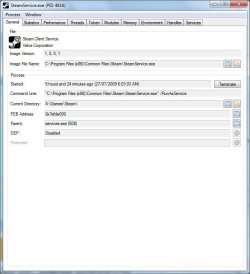
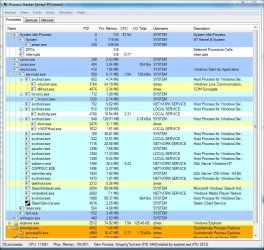
Process Hacker is a feature-packed tool for manipulating processes and services on your computer.

To enable viewing the properties of all processes, goto "Hacker> Show Details for All Processes" on the menu ;)

It supports:

* Running a program as almost any user, including SYSTEM, LOCAL SERVICE and NETWORK SERVICE.
* Viewing, terminating, suspending and resuming processes
* Viewing, controlling and deleting services
* Viewing/enabling/disabling/removing process privileges
* Viewing process groups
* Inspecting PE files (exe/dll/ocx/sys files)
* Viewing, terminating, suspending and resuming threads
* Viewing and closing process handles
* Viewing modules, finding the address of an exported function, changing page protection, reading memory and viewing file properties
* Viewing memory regions, changing page protection and reading and writing
* Searching through process memory, either using literal data or regular expressions
* Scanning for strings inside process memory
* Getting heap information
* Viewing DEP status and other additional information.

Heres just a few screen shots, There is quite a large amount of functionality and features available than whats shown here :p
ProcHx.JPG

procHxNet.JPG

ProcHxProcPro.JPG

If you find any bugs please do let me know ;)

Home - Process Hacker
 
Last edited:
This will come in very handy, thanx for taking the time to do a 64 bit compile and many thanks on the whole for this dmex. :D
 

My Computer

Computer Manufacturer/Model Number
Self Built
OS
XP Pro SP3 x86/Vista SP2 x64/Win7 x64 Triple-boot
CPU
AMD64 X2 AM2 5000+
Motherboard
Asus MSN-X Plus
Memory
Corsair TWX 2Gb (2x1Gb) DDR2 800Mhz
Graphics Card(s)
PCI-X 2.0 Inno3D (NVidia) 9500GT 1Gb DDR2
Sound Card
Onboard Realtec ALC662-GR
Monitor(s) Displays
Relisys 17' CRT (model unknown)
Screen Resolution
1024x768
Hard Drives
750Gb Samsung 7200-3Gb/s 32Mb Cache SATA
PSU
500W
Cooling
Standard AMD CPU Fan, One side, front and rear case fan.
Keyboard
Microsoft Multimedia Keyboard
Mouse
Samsung Optical
Internet Speed
10M
:D;)
 

My Computer

Computer Manufacturer/Model Number
Custom
OS
Win 7 Pro
CPU
Intel Q6600/Quad Core 2.40MHz X 4
Motherboard
Asus Commando
Memory
8 GB DDR 3
Graphics Card(s)
NVidia GeForce GT240 / 1GB PCIe
Sound Card
Integrated HD Digital Audio
Monitor(s) Displays
Sharp LC-30HV4U
Screen Resolution
1280 x 768
Hard Drives
Primary C:\ 1TB SATA II 3.0 GB
Storage E:\ 1TB SATA II 3.0 GB
Terra Stack I:\ 1TB
USB Port N:\ 150GB
PSU
OCZ 700Watt
Case
Antec Ninehundred
Cooling
Cooler Master Hyper Cooler
Keyboard
Logitech Wave Wireless
Mouse
Logitech High Resolution Wireless
A very neat tool. :D
 

My Computer

Computer type
PC/Desktop
Computer Manufacturer/Model Number
Dwarf Dwf/11/2012 r09/2013
OS
Windows 8.1 Pro RTM x64
CPU
Intel Core-i5-3570K 4-core @ 3.4GHz (Ivy Bridge) (OC 4.4GHz)
Motherboard
ASRock Z77 Extreme4-M
Memory
4 x 4GB DDR3-1600 Corsair Vengeance CMZ8GX3M2A1600C9B (16GB)
Graphics Card(s)
MSI GeForce GTX770 Gaming OC 2GB
Sound Card
Realtek High Definition on board solution (ALC 898)
Monitor(s) Displays
ViewSonic VA1912w Widescreen (VGA)
Screen Resolution
1440x900
Hard Drives
OCZ Agility 3 SSD 120GB SATA III x2 (RAID 0)
Samsung HD501LJ 500GB SATA II x2
Hitachi HDS721010CLA332 1TB SATA II
Iomega 1.5TB Ext USB 2.0
WD 2.0TB Ext USB 3.0
PSU
XFX Pro Series 850W Semi-Modular
Case
Gigabyte IF233
Cooling
1 x 120mm Front Inlet 1 x 120mm Rear Exhaust
Keyboard
Microsoft Comfort Curve Keyboard 3000 (USB)
Mouse
Microsoft Comfort Mouse 3000 for Business (USB)
Internet Speed
NetGear DG834Gv3 ADSL Modem/Router (Ethernet) ~4.0 Mb/s (O2)
Antivirus
Avast! 8.0.1497
Browser
IE 11
Other Info
Optical Drive: HL-DT-ST BD-RE BH10LS30 SATA Bluray
Lexmark S305 Printer/Scanner/Copier (USB)
WEI Score: 8.1/8.1/8.5/8.5/8.25
Asus Eee PC 1011PX Netbook (Windows 7 x86 Starter)
This could be useful. Thanks! :) *just noticed this sub-forum*
 

My Computer

Computer Manufacturer/Model Number
Custom | Whitebox
OS
Windows 7 Ultimate, OS X 10.7, Ubuntu 11.04
CPU
Intel E6750 @ 3.80GHz
Motherboard
Gigabyte GA-EP45-UD3L (Revision 1.1)
Memory
2x2GB & 2x1GB (6GB) OCZ Reaper 1066MHz @ 1080MHz
Graphics Card(s)
EVGA nVidia GTX 260 896mb (216 Core) FTW Edition
Sound Card
Realtek ALC888
Monitor(s) Displays
21" VIZIO TV
Screen Resolution
1680x1050 @ 60Hz
Hard Drives
Western Digital WD6401AALS - 640GB
Hitachi HDP725016GLA380 - 160GB
PSU
Corsair 750W
Case
NZXT Nemesis Elite
Cooling
Thermaltake SpinQ
Keyboard
Logitech Wireless S520
Mouse
Logitech Wireless S520 - Microsoft Wireless Arc Mouse
Internet Speed
Download: 20mbps, Upload: 3mbps
Cool tool and I glad somebody compiled this tool for x64 systems but I have small warning for @dmex:

Replacing Task Manger with Process Hacker don't work for x64 systems because it only enter replacing for x32 registry code:

oryginal Process Hacker modifications:

Windows Registry Editor Version 5.00

[HKEY_LOCAL_MACHINE\SOFTWARE\Wow6432Node\Microsoft\Windows NT\CurrentVersion\Image File Execution Options\taskmgr.exe]
"Debugger"="\"H:\\Program Files (x86)\\Process Hacker\\ProcessHacker.exe\""

but should be:

Windows Registry Editor Version 5.00

[HKEY_LOCAL_MACHINE\SOFTWARE\Microsoft\Windows NT\CurrentVersion\Image File Execution Options\taskmgr.exe]
"Debugger"="\"H:\\Program Files (x86)\\Process Hacker\\ProcessHacker.exe\""
If you enter second fix to registry replacing Task Manager with Process Hacker work fine.Neverless this bug should be fix....
 

My Computer

Computer Manufacturer/Model Number
Custom made
OS
Windows 7 Professional x64 PL
CPU
AMD Athlon 4450e
Motherboard
Giga-Byte GA-MA69G-S3H
Memory
GoodRam DDR2 2x2048MB (FSB 800MHz)
Graphics Card(s)
nVidia GeForce 9600GT (G94-300) 1024 MB
Monitor(s) Displays
SAMSUNG SyncMaster HS2P301688
Hard Drives
Seagate ST3750330AS 750GB
PSU
Corsair 550W
Cooling
AeroCool ExtremeEngine 3T
Thanks :) .You have right -in version 1.4 this bug has been solved
 

My Computer

Computer Manufacturer/Model Number
Custom made
OS
Windows 7 Professional x64 PL
CPU
AMD Athlon 4450e
Motherboard
Giga-Byte GA-MA69G-S3H
Memory
GoodRam DDR2 2x2048MB (FSB 800MHz)
Graphics Card(s)
nVidia GeForce 9600GT (G94-300) 1024 MB
Monitor(s) Displays
SAMSUNG SyncMaster HS2P301688
Hard Drives
Seagate ST3750330AS 750GB
PSU
Corsair 550W
Cooling
AeroCool ExtremeEngine 3T
this is such a great tool
thanks dmex
this will accompany my tool-set along with Process Explorer which is what i use....:)
 

My Computer

Computer Manufacturer/Model Number
Tx2500z Tablet Pc/Homemade Server
OS
Windows 7 Ult x64(x2), HomePrem x32(x4), Server 08 (+VM), 08 R2 (VM) , SuSe 11.2 (VM), XP 32 (VM)
CPU
Turion X2 ultra (oh well came with laptop)/P4 @3.2 (yes P4)
Motherboard
IDK HP Motherboard / Intel DG965SS
Memory
OCZ Dual Channel 4GB kit/ 1gb Dual Channel
Graphics Card(s)
HD 3200 graphics /GMA x3100 (yay for intergrated!!)
Sound Card
Realtek HD Audio(mic working, well sort of)/Siig IC-70012
Monitor(s) Displays
built-in Hp 12" laptop screen/ Acer 19"
Screen Resolution
1280x800 /1440x900
Cooling
All Air Cooled
Mouse
Logi MX Rev. /MS Wheel Optical 1.1A /Logitech Optical Mouse
Internet Speed
College baby but its still routed through vpn to 1536k...
Other Info
love my wacom pen and pressure sensitivity...
wished it worked in 7, SUSE for that matter though
I have just released Process Hacker 1.4, available at both SourceForge and Ohloh.
 

My Computer

OS
Windows 7
thanks, works well, nice alternative to process explorer
 

My Computer

OS
Windows 7 Ultimate x64 build 7600
Just some updates for everyone :party:

Version 1.5 was released two days ago with the following changes:
NEW/IMPROVED:
-#2831605: "Add handle count by type to process properties handle tab"
-#2836706: "Signature Column in Processes"
-Improved kernel modules list
-Detects custom kernels
-Performance improvements
-KTM resource manager information
FIXED:
-Windows XP BSODs
-Incorrect drive letter resolving for file handles
-Linked token display on x64

We are currently working on Version 1.6 and have commited the following changes to date:
NEW/IMPROVED:
-Application Update system
FIXED:
-#2845427: "Indicator integer overflow"
-Critical: KProcessHacker denial-of-service security issues fixed affecting 32bit Windows users
-Incorrect menu items for System threads
-Crash when viewing error details in the event of a corrupt configuration file
 
After you pointed out the handles tab to me in the other thread, an idea occurred to me.

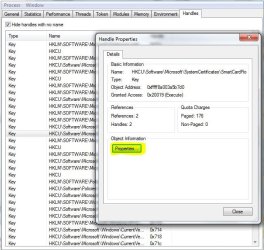
Would it be possible to add a "open with Regedit" to the right-click context menu that allows you go directly to the key entry when selecting a Type>Key?
 

My Computer

Computer type
PC/Desktop
Computer Manufacturer/Model Number
Systems by SmartEyeball
OS
8 Pro x64
CPU
i7 3770K 4.6GHz
Motherboard
ASUS P8Z77 WS
Memory
16GB G.Skill Trident X 2666mhz
Graphics Card(s)
x2 EVGA 780 Ti Superclocked SLI
Sound Card
SB X-FI Surround 5.1 PRO USB / ATH-AD900 Headphones
Monitor(s) Displays
x3 Dell U2410 / 58" Samsung
Screen Resolution
5760*1200/ 1920*1200
Hard Drives
2x Intel 520 240GB (RAID 0) * 2x WD Caviar Blacks 2TB (RAID 0) * 2TB WD Caviar Black * Sony Optirac DVD
PSU
Silverstone Strider Evolution 1200W
Case
Thermaltake Level 10 GT Snow Edition
Cooling
Noctua NH-D14
Keyboard
Topre Realforce // Ducky Shine MX Black // Filco Ninja TKL
Mouse
Thermaltake Theron (Highly Recommended) + Razer Imperator
Antivirus
MSE
Browser
IE, FF, WaterFox
Other Info
GT Extreme V2 Sim Racing Cockpit + 40" LCD and K/B Mouse stand ▼
Fanatec CSR Elite Wheel + Clubsport V1 Pedals + CSR shifter/7G-H ▼Saitek X52 Pro ▼ TrackIR 5 Pro
Buttkicker v2 Seat Rumbler with Dedicated 5.1 and Sub Woofer attached to frame ▼
=
Bloody Big Grin
After you pointed out the handles tab to me in the other thread, an idea occurred to me.

Would it be possible to add a "open with Regedit" to the right-click context menu that allows you go directly to the key entry when selecting a Type>Key?


You already can ;)

When you right-click a entry and go properties on the Handle tab, Click Properties again and it will open Regedit at that key ;)

OpenRegedit.JPG
 
Cool :) I didn't click on properties (obviously) :o

Feature wise, PH is shaping up to make Process explorer feel as limited as Task Manager.

Thanks again :)
 

My Computer

Computer type
PC/Desktop
Computer Manufacturer/Model Number
Systems by SmartEyeball
OS
8 Pro x64
CPU
i7 3770K 4.6GHz
Motherboard
ASUS P8Z77 WS
Memory
16GB G.Skill Trident X 2666mhz
Graphics Card(s)
x2 EVGA 780 Ti Superclocked SLI
Sound Card
SB X-FI Surround 5.1 PRO USB / ATH-AD900 Headphones
Monitor(s) Displays
x3 Dell U2410 / 58" Samsung
Screen Resolution
5760*1200/ 1920*1200
Hard Drives
2x Intel 520 240GB (RAID 0) * 2x WD Caviar Blacks 2TB (RAID 0) * 2TB WD Caviar Black * Sony Optirac DVD
PSU
Silverstone Strider Evolution 1200W
Case
Thermaltake Level 10 GT Snow Edition
Cooling
Noctua NH-D14
Keyboard
Topre Realforce // Ducky Shine MX Black // Filco Ninja TKL
Mouse
Thermaltake Theron (Highly Recommended) + Razer Imperator
Antivirus
MSE
Browser
IE, FF, WaterFox
Other Info
GT Extreme V2 Sim Racing Cockpit + 40" LCD and K/B Mouse stand ▼
Fanatec CSR Elite Wheel + Clubsport V1 Pedals + CSR shifter/7G-H ▼Saitek X52 Pro ▼ TrackIR 5 Pro
Buttkicker v2 Seat Rumbler with Dedicated 5.1 and Sub Woofer attached to frame ▼
=
Bloody Big Grin
Back
Top