
- Local time
- 12:43 PM
- Messages
- 661
I have 16GB of RAM on my PC, just about enough to run X-Plane 11 decently. However, the PC does sometimes use up 95% of this and the page file kicks in - not ideal for performance, so I am looking for ways to reduce unnecessary RAM usage.
By the time things have 'settled down' after a reboot, I generally have a little over 14GBs of free RAM. But the list of active processes in Task Manager is pretty long: I am sure that many of them could be killed off (with a script probably) just before I run X-Plane with no ill effects. (Though Windows doesn't of course always return the RAM used up, just because the process that was using it has stopped).
There used to be standard recommendations for this kind of thing, but I don't seem to be able to find them now (it is several years since I tried this). Anyone any advice?
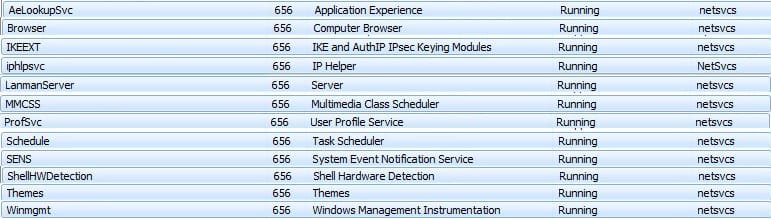
In Task Manager, apart from Explorer.exe, one instance of svchost.exe is the main user of memory. I have attached a condensed screenshot of the services linked to this process.
Thanks.
By the time things have 'settled down' after a reboot, I generally have a little over 14GBs of free RAM. But the list of active processes in Task Manager is pretty long: I am sure that many of them could be killed off (with a script probably) just before I run X-Plane with no ill effects. (Though Windows doesn't of course always return the RAM used up, just because the process that was using it has stopped).
There used to be standard recommendations for this kind of thing, but I don't seem to be able to find them now (it is several years since I tried this). Anyone any advice?
In Task Manager, apart from Explorer.exe, one instance of svchost.exe is the main user of memory. I have attached a condensed screenshot of the services linked to this process.
Thanks.
Attachments
My Computer
At a glance
Windows 7 Home Premium SP1 64-bitIntel Core i7-4790K CPU @ 4.5GHz16GB KINGSTON HYPER-X FURY DUAL-DDR3 1600MHz8GB NVIDIA GEFORCE GTX 1070
- Computer type
- PC/Desktop
- Computer Manufacturer/Model Number
- Custom Build
- OS
- Windows 7 Home Premium SP1 64-bit
- CPU
- Intel Core i7-4790K CPU @ 4.5GHz
- Motherboard
- Asus H97I-PLUS
- Memory
- 16GB KINGSTON HYPER-X FURY DUAL-DDR3 1600MHz
- Graphics Card(s)
- 8GB NVIDIA GEFORCE GTX 1070
- Monitor(s) Displays
- HannsG 28" & Dell 24"
- Screen Resolution
- 1920x1200
- Hard Drives
- 1 x 2TB Samsung Evo 860 SSD
2 x 500GB Samsung Evo 850 SSD
- PSU
- CORSAIR 650W CS SERIES
- Case
- Thermaltake Core V1 Mini ITX Cube
- Cooling
- NOCTUA NH-L12
- Browser
- Firefox
- Other Info
- Custom PC used for X-Plane 11


