
processor power management

EarlThePearl

New member
Member
Local time
2:53 PM
Messages
9
Location
TX
I'm adjusting some power settings in group policy for a special set of tablets (Panasonic H1) in our organization that are in high use. I have a question about one setting in there I'm unfamiliar with, which is processor power management. I've read some white papers from Microsoft, along with Google research, but I'm yet to find a good answer on how to properly adjust these settings to extend battery life. The first thing that looks weird to me is that in the group policy it is represented as a time in minutes, but when you edit the settings it is represented as a percentage. I was wondering if anyone had knowledge on these settings, or another website with some useful information about what to adjust here. The H1 tablets use remote apps for the most part, so I feel like I could reduce CPU power without affecting performance within the remote apps they use. Their biggest problem is battery life right now.
 

Attachments
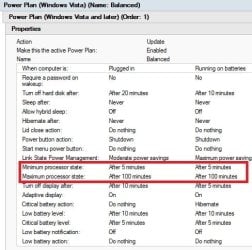
  • group policy.jpg
    group policy.jpg
    40.9 KB · Views: 27
  • edit settings.jpg
    edit settings.jpg
    30.9 KB · Views: 17

My Computer

OS
WinXPPro/Win7Pro
Just set minimum to the lowest it can go and let the computer handle it. I this case, 0. That way the computer will adjust the frequency of the CPU when it needs to. Otherwise it will stay at the minimum.
 

My Computer

Computer type
PC/Desktop
Computer Manufacturer/Model Number
Alienware Aurora ALX R4
OS
Windows 10 Pro (x64)
CPU
Intel Core i7-3930K (3.2GHz - 4.5GHz)
Motherboard
Alienware Aurora-R4 x79
Memory
4x Samsung 4GB PC3-12800 DDR3 (16GB 1600MHz)
Graphics Card(s)
Nvidia Geforce GTX 690
Sound Card
SteelSeries Siberia Elite
Monitor(s) Displays
Dell UltraSharp U3011
Screen Resolution
2560x1600
Hard Drives
Samsung 850 Pro 256 GB, Seagate 1TB Desktop Hybrid HDD, 2x Western Digital 4TB Green HDD
PSU
875W Some Dell PSU <.<
Case
Alienware Aurora ALX
Cooling
Custom Liquid Cooling (EK CPU & GPU blocks) dual EK 480RAD
Keyboard
Logitech G710+ Mechanical
Mouse
Logitech G700s
Internet Speed
Verizon Fios (50 mbps average)
Other Info
Server: Intel NUC D54250WYK: i5-4250U, 16GB, 256 GB mSATA, Windows Server 2012 R2
Back
Top