Product Key Number for Windows 7 - Find and See

How to Find and See the Windows 7 Product Key Number


   Information
The Windows 7 product key number is a sequence of 25 letters and numbers divided into 5 groups of 5 characters each (ex: XXXXX-XXXXX-XXXXX-XXXXX-XXXXX) that is used to activate either the 32-bit or 64-bit Windows 7 edition that you purchased and installed.

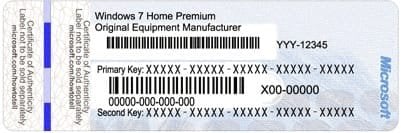
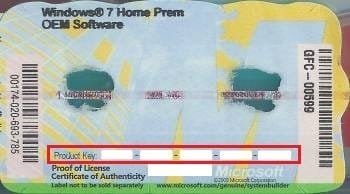
This will show you how to find and see your product key number in Windows 7 or on the retail or OEM product license key Certificate of Authenticity (COA) sticker.
   Note


  • A Windows 7 product key number can only be used to activate the same edition of Windows 7 that it was for, and cannot be used to activate a different edition of Windows 7.
  • A Family Pack Windows 7 product key number can be used to activate the Family Pack Windows 7 copy on up to 3 computers at any one time.
  • A OEM Windows 7 product key number can only be used to activate a OEM Windows 7 copy on the same computer that it was first activated on, and no other computer.
  • A retail Windows 7 product key number can be used to activate a retail Windows 7 copy on any computer, but only on up to one computer at any one time.
For more information on the license terms of Windows 7, see: License Terms

For more information about the product key number authenticity, see: How to Tell

   Tip
A Product Key and Product ID are two completely different things, despite the similarity of the terms.

The 20 character Product ID is created during the installation process and is prominently displayed under the Windows activation section at the bottom of the Control Panel (icons view) -> System window. It is used to obtain/qualify for technical support from Microsoft; it is of no use during the installation process.

The 25 character Product Key is used to "prove" ownership of a legitimate license and is required to perform the installation to activate Windows with.


OPTION ONE

Find Windows 7 Product Key Number on Product Key Sticker


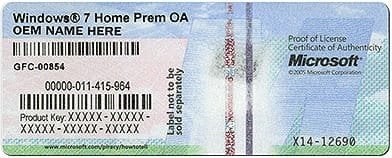
1. For a OEM Product Key on COA Sticker
NOTE: These will be store bought computers that came with Windows 7 preinstalled on them. The product key sticker will usually be on the back of a desktop, and on the bottom or under the battery of a laptop and notebook. The sticker key number may be different than the key number reported in one of the programs below. If so, the key number on the sticker is the one that's unique to your computer, and that's the one you'll need to input should you ever clean install Windows. The different extracted key is just a master key used at the OEM factory.
OEM-1.jpg

OEM-2.jpg

OEM-3.jpg

2. For a Retail Product Key on COA Sticker
NOTE: These will be computers that a retail copy of Windows 7 has been installed on. The product key sticker will be in the included paperwork in the retail Windows 7 box.
Retail.gif


OPTION TWO

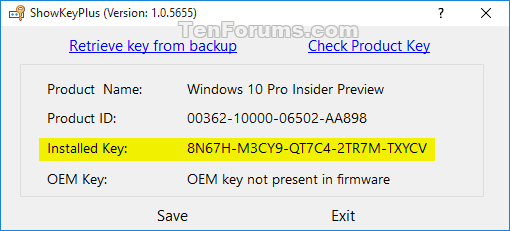
To Use "ShowKeyPlus" to See Product Key Number in Windows 7


   Note
Installed Key = This is the product key that Windows is currently activated with.

OEM Key = This is the key stored in the UEFI firmware chip on the motherboard. This key will not always be the same as the installed key. For example, when the PC came with Windows 8.1 originally installed.


1. Download and run ShowKeyPlus. See: "ShowKeyPlus" Information and Download Page
ShowKeyPlus.png
ShowKeyPlus_enterprise.png


OPTION THREE

To Use "Magical Jelly Bean Keyfinder" to See Product Key Number in Windows 7


   Note
This option shows you how to use the free program Magical Jelly Bean Keyfinder to see what the product key number is from within a Windows 7 that it has already been entered in (ex: activated). Magical Jelly Bean Keyfinder will not show the product key number for Windows 7 Enterprise though.

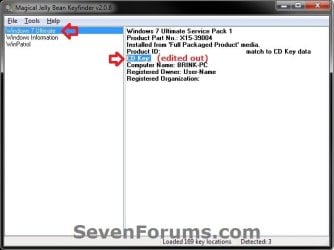
1. Download and run the free Magical Jelly Bean Keyfinderprogram towards the bottom of the link.

2. In the left pane, click on Windows 7 (your edition). You will see CD Key in the right pane displaying the Windows 7 product key number.
Magical_Jelly_Bean.jpg


OPTION FOUR

To Use "Speccy" to See Product Key Number in Windows 7


   Note
This option shows you how to use the free program Speccy to see what the product key number is from within a Windows 7 that it has already been entered in (ex: activated). Speccy will not show the product key number for Windows 7 Enterprise though.

1. Download, install, and run the free Speccy program.

2. In the left pane, click on Operating System. In the right pane, you will see the product key number to the right of Serial Number.
Speccy.JPG


OPTION FIVE

To Use "ProduKey" to See Product Key Number in Windows 7


   Note
This option shows you how to use the free program ProduKey to see what the product key number is from within a Windows 7 that it has already been entered in (ex: activated). ProduKey will not show the product key number for Windows 7 Enterprise though.

1. Download, extract, and run the free ProduKey program.

2. You will now see Windows product key listed.

ProduKey.jpg


OPTION SIX

To Use a VBS Download to See Product Key Number in Windows 7


   Note
This option was provided by our member Konst at this link.

There you can see that the encrypted key is stored in registry key:
HKLM\SOFTWARE\Microsoft\Windows NT\CurrentVersion\DigitalProductId
at Offset = 52

And that the key only includes this letters and numbers
BCDFGHJKMPQRTVWXY2346789
And no "AEILNOSUZ015 allowed.


1. Click on the Download button below to download the file below.
See_Windows_Product_Key.vbs


Download


2. Save the VBS file to your desktop, run it, and approve running it.
NOTE: The .vbs file does not install anything on your computer. You can also right click on the .vbs file and click on Edit to see what the script contains.

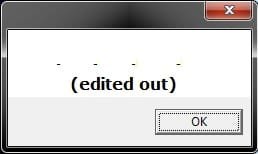
3. You will now get a pop-up dialog box displaying the product key number used to activate your current Windows installation. Click on OK to close the pop-up when ready. (see screenshot below)
VBS-example.jpg


OPTION SEVEN

Find Windows 7 Product Key with "Belarc Advisor"


   Note
You must be signed in as an administrator to run this program. This program will not find the product key of Windows 7 Enterprise since it's a volume license.


1. If you have not already, download and install the free Belarc Advisor program.

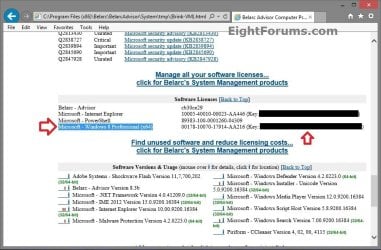
2. Run the program. When it displays the results in your default web browser, scroll down until you see your Windows 8 product key like below.
Belarc_Advisor.jpg


That's it,
Shawn


Attachments

Last edited:
I ran the key finder Showkey Plus and it returned a product key number different from the product key number on the sticker on the side of my desktop unit. I bought the computer new from Best Buy. I tried the Check Product Key option and input the number from the sticker and it returned the correct product.

I'm having problems installing SP1 and in another thread am getting help to resolve that issue. One potential solution appears to be a clean install. Since I'm showing two product keys, will this be an issue? Which should I use if I end up having to re-install Win 7?
 

My Computer My Computer

At a glance

Microsoft Windows 7 Home Premium 64-bit 7600 ...Intel(R) Core(TM) i5 CPU 650 @ 3.20GHz8 GBIntel(R) HD Graphics
Computer type
PC/Desktop
Computer Manufacturer/Model Number
Asus
OS
Microsoft Windows 7 Home Premium 64-bit 7600 Multiprocessor Free
CPU
Intel(R) Core(TM) i5 CPU 650 @ 3.20GHz
Motherboard
ASUSTeK Computer INC. CG5275
Memory
8 GB
Graphics Card(s)
Intel(R) HD Graphics
Sound Card
(1) Realtek High Definition Audio (2) Intel(R) Display Aud
Screen Resolution
1920 x 1080 x 32 bits (4294967296 colors) @ 60 Hz
Hard Drives
ST31000528AS ATA Device, 931.51 GB
Iomega E xternal HD USB Device, 1.36 TB
Antivirus
Web Root
Browser
IE 8, Chrome
I ran the key finder Showkey Plus and it returned a product key number different from the product key number on the sticker on the side of my desktop unit. I bought the computer new from Best Buy. I tried the Check Product Key option and input the number from the sticker and it returned the correct product.

I'm having problems installing SP1 and in another thread am getting help to resolve that issue. One potential solution appears to be a clean install. Since I'm showing two product keys, will this be an issue? Which should I use if I end up having to re-install Win 7?

That's exactly how it should be, the key that isn't the one on the sticker is only used by the manufacturer, you can't use it to do a clean install, it's on thousands of PC's if not more.

If you want or need to do a clean install or even a repair install you need to use the key on the COA sticker, that is unique to your machine and the only one that will activate legally.

You shouldn't have any problems using the key on the COA sticker.
 

My Computer My Computer

At a glance

Win 10 Pro x64Intel I5-2500K @3.3GHz16GB G.Skill Ripjaws X (4x4GB)EVGA GeForce 750 Ti SC 2GB
Computer type
PC/Desktop
Computer Manufacturer/Model Number
Self Built
OS
Win 10 Pro x64
CPU
Intel I5-2500K @3.3GHz
Motherboard
Asrock P67 Extreme4
Memory
16GB G.Skill Ripjaws X (4x4GB)
Graphics Card(s)
EVGA GeForce 750 Ti SC 2GB
Sound Card
ASUS Xonar DG 5.1 Channels 24-bit 96KHz PCI Interface Sound
Monitor(s) Displays
auria eq2367
Screen Resolution
1920 x 1080
Hard Drives
250GB Samsung 850 EVO SSD
1TB WD Blue
1TB Hitachi
PSU
SeaSonic X 650W 80 Plus Gold
Case
Corsair Obsidian 750D
Cooling
Corsair H60, Three 140mm case fans
Keyboard
Logitech Wireless Keyboard K520
Mouse
Logitech Wireless Mouse M310
Internet Speed
Wave Broadband ~ 100 dn 5 up
Antivirus
Windows Defender, Malwarebytes Premium
Browser
Edge, IE11, Chrome
Other Info
Laptop specs: HP g7-1365dx /
CPU: AMD A6-3420M APU with Radeon(tm) HD Graphics /
RAM: Crucial 8Gb (2x4Gb) /
SSD: Crucial M4-CT128M4SSD2 ATA Device/ FW 000F /
GFX: AMD Radeon HD 6520G /
OS: Windows 10 Pro x64
Hmm that is odd Derek as I run the Showkey and MJB and I get the exact code on both and the code I got from the retailer because this machine was a downgrade to 7 from 8.1 - does that make a difference??
 

My Computer My Computer

At a glance

Desk1 7 Home Prem / Desk2 10 Pro / Main lap A...Desk1 i5 3750K / Laptop i7 GTX 860M / Desk2 i...Desk1 8GB (1866) / Desk2 16GB (1333) / Laptop...Desk 1& 2NVidia GTX 650 & Laptops on board Intel
Computer type
PC/Desktop
Computer Manufacturer/Model Number
Own build (new) Desk1 / Asus ROG Win 7 / Desk2 1st build
OS
Desk1 7 Home Prem / Desk2 10 Pro / Main lap Asus ROG 10 Pro 2 laptop Toshiba 7 Pro Asus P2520 7 & 10
CPU
Desk1 i5 3750K / Laptop i7 GTX 860M / Desk2 i5 2500
Motherboard
Desk1 Asus P877-V / Desk2 Gigabyte H67 UD3H / Laptop ?
Memory
Desk1 8GB (1866) / Desk2 16GB (1333) / Laptop 8Gb DDR3
Graphics Card(s)
Desk 1& 2NVidia GTX 650 & Laptops on board Intel
Sound Card
Desk 1 & 2 -XONAR DG Realtek High Def audio Laptop
Monitor(s) Displays
Desk 1 Benq HD 2450 / Desk2 Philips 24" / Laptop 17.5"
Screen Resolution
1920x1080 D1 & D2 & Laptop 1
Hard Drives
Desk1 Samsung 120GB 830 SSD
Asus ROG 256GB 850 Pro SSD
Desk2 Samsung 840 256 SSD
Toshiba 120GB EVO
PSU
Desk 1 Corsair HX 1050/ Laptop ? / Desk 2 Corsair HX 650
Case
Desk 1 Cooler HAF XM ? Toshiba laptop / Desk2 Coolermaster
Cooling
Fans on all Desk1 -2 Desk2 - all Coolermasters 5 Laptop ?
Keyboard
Desk 1 MS Sidewinder X6 Desk 2 MS Sidewinder X 4
Mouse
Desk 1&2 - Gigabyte MS 900 gamer - laptop - Logitec wireless
Internet Speed
ADSL2+
Other Info
One other Desktop (tester) and spare Toshba laptop both with SSD's
Running Kaspersky 2016 ISS on all machines config'd identically
Logitec audio stereo systems on each machine (x3)
Canon MG5250MFC
Router/modem TP-Link running WPA2SK
Hmm that is odd Derek as I run the Showkey and MJB and I get the exact code on both and the code I got from the retailer because this machine was a downgrade to 7 from 8.1 - does that make a difference??

Yes that makes a difference John.
 

My Computer My Computer

At a glance

Win 10 Pro x64Intel I5-2500K @3.3GHz16GB G.Skill Ripjaws X (4x4GB)EVGA GeForce 750 Ti SC 2GB
Computer type
PC/Desktop
Computer Manufacturer/Model Number
Self Built
OS
Win 10 Pro x64
CPU
Intel I5-2500K @3.3GHz
Motherboard
Asrock P67 Extreme4
Memory
16GB G.Skill Ripjaws X (4x4GB)
Graphics Card(s)
EVGA GeForce 750 Ti SC 2GB
Sound Card
ASUS Xonar DG 5.1 Channels 24-bit 96KHz PCI Interface Sound
Monitor(s) Displays
auria eq2367
Screen Resolution
1920 x 1080
Hard Drives
250GB Samsung 850 EVO SSD
1TB WD Blue
1TB Hitachi
PSU
SeaSonic X 650W 80 Plus Gold
Case
Corsair Obsidian 750D
Cooling
Corsair H60, Three 140mm case fans
Keyboard
Logitech Wireless Keyboard K520
Mouse
Logitech Wireless Mouse M310
Internet Speed
Wave Broadband ~ 100 dn 5 up
Antivirus
Windows Defender, Malwarebytes Premium
Browser
Edge, IE11, Chrome
Other Info
Laptop specs: HP g7-1365dx /
CPU: AMD A6-3420M APU with Radeon(tm) HD Graphics /
RAM: Crucial 8Gb (2x4Gb) /
SSD: Crucial M4-CT128M4SSD2 ATA Device/ FW 000F /
GFX: AMD Radeon HD 6520G /
OS: Windows 10 Pro x64
Sorry to revive an old thread, but I just ran both Magical Jelly Bean Finder and ShowKey and they both showed a placeholder for my Win7 key. (BBBBB-BBBBB-...)

Any advice?

I'm looking to do a reinstall and want to make sure I use the right one. I do have a list of keys, but I was a student for several years and got several copies through the MS student program. I kept a folder with all the receipts but am not 100% sure which one I need to use for my main machine. :confused:
 

My Computer My Computer

At a glance

Main - Windows 7 Pro SP1 64-Bit; 2nd - Window...Main - Core i7 2600K; 2nd - Core i7 920Main - 16GB Corsair Vengeance; 2nd - 12GB Cor...Main - XFX Radeon 6870 1GB; 2nd - XFX Radeon ...
Computer Manufacturer/Model Number
Self
OS
Main - Windows 7 Pro SP1 64-Bit; 2nd - Windows Server 2008 R2
CPU
Main - Core i7 2600K; 2nd - Core i7 920
Motherboard
Main - Asus P8Z68-V Pro/Gen3; 2nd - Gigabyte GA-EX58-UDR3
Memory
Main - 16GB Corsair Vengeance; 2nd - 12GB Corsair Vengeance
Graphics Card(s)
Main - XFX Radeon 6870 1GB; 2nd - XFX Radeon 4870 1GB
Sound Card
Both: Onboard Realtek Azalia
Monitor(s) Displays
Main - Hann 25" + I-INC 25" + Acer 23"; 2nd - Upgrading Soon
Screen Resolution
Main - 1920x1080 (All Three Monitors); 2nd - Upgrading Soon
Hard Drives
Main - (1) Crucial M4 128GB (Boot)
Main - (1) Seagate 2TB 64MB Cache (Data)
Main - (1) Seagate 2TB 64MB Cache (Data Backup)
2nd - (1) Intel X25-M SSD 80GB (Boot)
2nd - (3) Seagate 1TB 32MB Cache (Data Backup)
2nd - (1) Seagate 320GB (Because)
PSU
Main - OCZ 600W Modular; 2nd - OCZ 600W
Case
Main - Thermaltake Element G; 2nd - NZXT something or other
Cooling
Main - Corsair H80; 2nd - Prolimatech Megahalems
Keyboard
Main - Razer Reclusa; 2nd - Old MS Keyboard
Mouse
Main - Logitech MX Revolution; 2nd - Old MS Mouse
Internet Speed
20Mbps Time-Warner Cable
Hi ProfDLP,

Thats a MAK key, which makes sense as you got it via your college.
MS had to create these along side volume keys for NON-EUFI installs


Try the MGdiag tool, it may provide the last 3 blocks, then youll know
http://go.microsoft.com/fwlink/?LinkID=52012

If it doesnt PM Superfly on W10, he might have another version that can retrieve the key.


Roy
 

My Computer My Computer

At a glance

W7 home premium 32bit/W7HP 64bit/w10 tp insid...E5300 dual core3gbNvidia Geforce 7100 Nforce 630i
Computer type
PC/Desktop
Computer Manufacturer/Model Number
medionl/Aspire 6930G/acer x55a
OS
W7 home premium 32bit/W7HP 64bit/w10 tp insider ring
CPU
E5300 dual core
Motherboard
medion MS7366
Memory
3gb
Graphics Card(s)
Nvidia Geforce 7100 Nforce 630i
Monitor(s) Displays
avixc
Internet Speed
n (isp resticted to 72)
Antivirus
mse/pands
Browser
palemoon
Other Info
Belkin Fd7050 n USB using Railink RT2870 drivers, more upto date
Thank you, torchwood, that did the trick!

It gave me the last five characters, confirming that my old notes were still accurate. (I graduated five years ago.)

Now I have to make sure I use the right disc. I thought I had marked it but after four moves I may have set it aside and...well, you know how that goes. I have images of all the downloads I got through the student program and had tried to match the keys to them as I got the various software through the program, but apparently not that one. Most of the ones I got were used in various VM's for school projects. One of the programs I tried for the key gave me a product number, so with a little sleuthing I am sure I can figure it out.

MS has (or at least had) a very generous program for bona fide students. During my time in school I got lots of freebies. I had a paid-for copy of W7pro upgrade but the last time I went to use it for a repair install it didn't like it. (Perhaps because I had slipstreamed SP1 in there?) I grabbed a free full version I got cheap through school ($30) and used that. Then over the next few years I found out I could buy another copy. Too much of a good thing can be almost as bad as not enough, I guess. :D
 

My Computer My Computer

At a glance

Main - Windows 7 Pro SP1 64-Bit; 2nd - Window...Main - Core i7 2600K; 2nd - Core i7 920Main - 16GB Corsair Vengeance; 2nd - 12GB Cor...Main - XFX Radeon 6870 1GB; 2nd - XFX Radeon ...
Computer Manufacturer/Model Number
Self
OS
Main - Windows 7 Pro SP1 64-Bit; 2nd - Windows Server 2008 R2
CPU
Main - Core i7 2600K; 2nd - Core i7 920
Motherboard
Main - Asus P8Z68-V Pro/Gen3; 2nd - Gigabyte GA-EX58-UDR3
Memory
Main - 16GB Corsair Vengeance; 2nd - 12GB Corsair Vengeance
Graphics Card(s)
Main - XFX Radeon 6870 1GB; 2nd - XFX Radeon 4870 1GB
Sound Card
Both: Onboard Realtek Azalia
Monitor(s) Displays
Main - Hann 25" + I-INC 25" + Acer 23"; 2nd - Upgrading Soon
Screen Resolution
Main - 1920x1080 (All Three Monitors); 2nd - Upgrading Soon
Hard Drives
Main - (1) Crucial M4 128GB (Boot)
Main - (1) Seagate 2TB 64MB Cache (Data)
Main - (1) Seagate 2TB 64MB Cache (Data Backup)
2nd - (1) Intel X25-M SSD 80GB (Boot)
2nd - (3) Seagate 1TB 32MB Cache (Data Backup)
2nd - (1) Seagate 320GB (Because)
PSU
Main - OCZ 600W Modular; 2nd - OCZ 600W
Case
Main - Thermaltake Element G; 2nd - NZXT something or other
Cooling
Main - Corsair H80; 2nd - Prolimatech Megahalems
Keyboard
Main - Razer Reclusa; 2nd - Old MS Keyboard
Mouse
Main - Logitech MX Revolution; 2nd - Old MS Mouse
Internet Speed
20Mbps Time-Warner Cable
Back
Top