
Product Key Number - Uninstall and Deactivate in Windows

How to Uninstall the Product Key Number and Deactivate Vista, Windows 7, or Windows 8


   Information
This will show you how to uninstall the product key number of a local or remote Vista, Windows 7, or Windows 8 computer so it will no longer be activated by that product key and left in a unactivated (deactivated/unlicensed) state afterwards.

You will only be able to do this tutorial while logged in as an administrator.

For more details and options using the slmgr.vbs command, see: Slmgr.vbs Options

   Note
This will not return the product key to a never before activated state.

This will not permanently deactivate the product key number and prevent it from being able to be used to activate another Windows again later. This only removes the product key from the current computer leaving Windows not activated.

This will not remove the product key from Microsoft activation servers. Microsoft activation servers will still have records of all computers the product key have been activated on.


An OEM product key number is permanently tied to the motherboard of the computer it was first activated on. It can only be used to activate Windows on the exact same computer that it was first activated on.

A retail product key number can be used to activate Windows on any computer as long as the product key has been removed from any other computer first.


If you only wanted to change the product key number instead, then see:

How to Change the Product Key Number in Windows 7


EXAMPLE: Watermark that indicates Windows is not activated
NOTE: This watermark will be at the bottom right corner of your desktop above the taskbar notification area.
Unactivated_Windows_7_Watermark.jpg

Unactivated_Windows_8_Watermark.jpg

Here's How:

1. Open an elevated command prompt.

2. Do either step 3 or 4 for what computer you want to uninstall the product key on and deactivate Windows on.

3. For a Local Computer
NOTE: This would your computer.
A) In the elevated command prompt, copy and paste the command below and press enter. (see screeshot below)
slmgr.vbs /upk

Uninstall-1.jpg
B) Go to step 5.
4. For a Remote Computer
NOTE: This would be doing this from your computer (host) to a remote computer (client) on the network.

   Warning
You will only be able to do this from either a Windows 8 computer to another Windows 8 computer, Windows 7 computer to another Windows 7 computer, OR from a Vista computer to another Vista computer.

You will not be able to do this from say a Window 7 to Vista computer, or Vista to Windows 7 computer.

A) In the elevated command prompt, type the command below and press enter. (see screeshot below)

   Note

  • You would substitute Computer-Name in the command below with the computer name of the remote computer.
  • You would substitute UserName in the command below with a user account's name with required permission on the remote computer.
  • You would substitute Password in the command below with the user account's password of the remote computer.
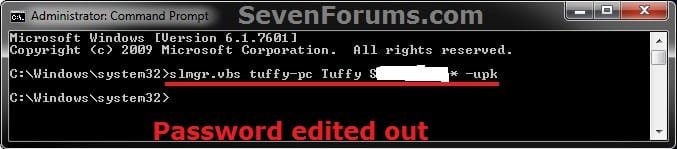
slmgr.vbs Computer-Name UserName Password /upk

Remote.jpg
B) Continue on to step 5.
5. Click on OK. (see screeshot below)
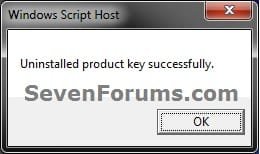
Uninstall-2.jpg
6. The Windows on the selected computer is now in a deactivated unlicensed state with the product key number removed. You will also now have the This copy of Windows is not genuine at the bottom right corner of your desktop until activated again.

7. Every time you restart the selected computer and log in, you will be presented with an option to activate Windows until you do so. (see screeshot below)
Restart-1.jpg


A) If you Click on the Type your product key Option
  • You will be prompted to enter a valid product key number for that edition of Windows. If successful, it will activate Windows. (see screenshots below)
Restart-2.jpg

Restart-3.jpg

B) If you Click on the Ask me later Option
  • Windows will continue to startup into the user account that you logged into, but will still be in a unlicensed state until you activate Windows using step 7A at the next restart or manually activate while still in Windows.
That's it,
Shawn


Last edited:
Hi I had a quick question about this. I currently have a genuine copy of Windows 7 Professional installed on my computer. However, my processor is going out and rather than buy another processor that is the exact same, I've decided to just rebuild my entire computer. I am going to be using the same internal harddrive though. I've been reading online that you can only install windows once on one computer? So I was wondering, if I were to follow this article and deactivate windows/uninstall the product code, could I then turn around and install windows 7 with my previous product code on my new computer?

I'm fairly certain it's a retail version and not an OEM version as I received it through my University.

Microsoft forums weren't any help and apparently I will have to pay $100 just to talk to someone working at Microsoft about this issue.


** Sorry about reposting something that has been answered but I didn't completely understand the answer you gave to Noel - to quote:

"Hello Noel,

I agree that it would be best to just format the compter and not enter a product key number if selling or giving it in a unactivated state.

This is just an option that may be best for if say you were wanting to use your retail product key number on a new self built computer of yours, and didn't want to uninstall/format Windows and all of your programs, settings, and files on the old computer. This way you could legal unactivate the old one to use it on the new one."

My old computer isn't going to be sold, I will probably have it sitting around as a backup minus the harddrive so I wasn't sure if you were saying that deactivating windows from one computer will be easier than reformating the computer. I will have to most likely reinstall all of my programs anyway so I wasn't sure what the best option would be for me to be able to use my same copy of windows and not pay $200 D:
 
Last edited:

My Computer My Computer

At a glance

Windows 7 Professional 64 bitIntel Pentium E6300 Wolfdale 2.8GHzG.skill 4gb DDR2 800XFX GeForce 9800 GT 512mb
Computer Manufacturer/Model Number
Self built
OS
Windows 7 Professional 64 bit
CPU
Intel Pentium E6300 Wolfdale 2.8GHz
Motherboard
Gigabyte P45 ATX Intel Motherboard
Memory
G.skill 4gb DDR2 800
Graphics Card(s)
XFX GeForce 9800 GT 512mb
Case
Raidmax Smilidon Extreme Black
Keyboard
Logitech solar wireless
Mouse
Logitech wireless
Other Info
Computer soon to be updated >_>
If you look at the disk it will tell you what type of install it is - and if you look at the Product ID (in the System page), it will give another clue.
Often, Windows from Uni's are Volume License versions - which are Upgrades, and require a pre-existing license for a valid version of WIndows - again, check the disk and packing for details.
If you're in any doubt, post an MGADiag report of your current installation in a new thread of your own, and I'll check it out (or PM it to me)
 

My Computer My Computer

At a glance

Win 7 x64 Home Premium (and x86 VirtualBox VM...i3 370M/i7 6500U8GB - finally :)/8GBit's an i3, dude!/dual Intel&nVidia
Computer type
Laptop
Computer Manufacturer/Model Number
Asus K52F or Lenovo B51-80
OS
Win 7 x64 Home Premium (and x86 VirtualBox VM)/Win10
CPU
i3 370M/i7 6500U
Motherboard
Asus/Lenovo
Memory
8GB - finally :)/8GB
Graphics Card(s)
it's an i3, dude!/dual Intel&nVidia
Sound Card
onboard
Monitor(s) Displays
15.6" built-in
Screen Resolution
1366x768/1920x1080
Hard Drives
750GB Seagate internal
Sundry external drives attached to other computers on the local network
1TB SSD on the Lenovo
PSU
n/a
Internet Speed
as much as I can get - usually on a dongle/phone, so <1MB/s
Antivirus
MSE/Defender
Browser
IE11/12/Edge/Chrome/FF(if I must)
I'm sorry, I'm not sure how to message you :/ My product ID is in the format of

12345-xxx-1234567-xxxxx. So 5-3-7-5. I'm was under the impression that it's an actual copy of the disc because I had to reformat this computer when I got a virus in my system 32 files and it installed it. I assumed that reformatting meant wiping the system off of it? I don't know how you would update an Os if you reformatted the harddrive but I don't really know much about computers.

Also, I'm not sure how to run an MGADiag report. Sorry for being a newb. Biology is more my subject.
 

My Computer My Computer

At a glance

Windows 7 Professional 64 bitIntel Pentium E6300 Wolfdale 2.8GHzG.skill 4gb DDR2 800XFX GeForce 9800 GT 512mb
Computer Manufacturer/Model Number
Self built
OS
Windows 7 Professional 64 bit
CPU
Intel Pentium E6300 Wolfdale 2.8GHz
Motherboard
Gigabyte P45 ATX Intel Motherboard
Memory
G.skill 4gb DDR2 800
Graphics Card(s)
XFX GeForce 9800 GT 512mb
Case
Raidmax Smilidon Extreme Black
Keyboard
Logitech solar wireless
Mouse
Logitech wireless
Other Info
Computer soon to be updated >_>
The important part of the Product ID is the second group.
If it's -OEM-, then it's an OEM license, and cannot be moved to another motherboard or computer.
If it's three numbers, then that may tell what other type of license it is (but it gets very complicated to try an explain it)
the MGADiag is simple to run - but complex to read. :)
To properly analyse and solve problems with Activation and Validation, we need to see a full copy of the report produced by the MGADiag tool (download and save to desktop - http://go.microsoft.com/fwlink/?linkid=52012 )
Once saved, run the tool.
Click on the Continue button, which will produce the report.
To copy the report to your response, click on the Copy button in the tool (ignore any error messages at this point), and then paste (using either r-click/Paste, or Ctrl+V ) into your response.
- **in your own thread**, please
Please also state the Version and Edition of Windows quoted on your COA sticker (if you have one) on the case of your machine, but do NOT quote the Key on the sticker!
How to Tell - Home
 

My Computer My Computer

At a glance

Win 7 x64 Home Premium (and x86 VirtualBox VM...i3 370M/i7 6500U8GB - finally :)/8GBit's an i3, dude!/dual Intel&nVidia
Computer type
Laptop
Computer Manufacturer/Model Number
Asus K52F or Lenovo B51-80
OS
Win 7 x64 Home Premium (and x86 VirtualBox VM)/Win10
CPU
i3 370M/i7 6500U
Motherboard
Asus/Lenovo
Memory
8GB - finally :)/8GB
Graphics Card(s)
it's an i3, dude!/dual Intel&nVidia
Sound Card
onboard
Monitor(s) Displays
15.6" built-in
Screen Resolution
1366x768/1920x1080
Hard Drives
750GB Seagate internal
Sundry external drives attached to other computers on the local network
1TB SSD on the Lenovo
PSU
n/a
Internet Speed
as much as I can get - usually on a dongle/phone, so <1MB/s
Antivirus
MSE/Defender
Browser
IE11/12/Edge/Chrome/FF(if I must)
Alright. Where would you like me to post the new thread? Also, my computer is custom built. It..most likely does not have a COA sticker.
 

My Computer My Computer

At a glance

Windows 7 Professional 64 bitIntel Pentium E6300 Wolfdale 2.8GHzG.skill 4gb DDR2 800XFX GeForce 9800 GT 512mb
Computer Manufacturer/Model Number
Self built
OS
Windows 7 Professional 64 bit
CPU
Intel Pentium E6300 Wolfdale 2.8GHz
Motherboard
Gigabyte P45 ATX Intel Motherboard
Memory
G.skill 4gb DDR2 800
Graphics Card(s)
XFX GeForce 9800 GT 512mb
Case
Raidmax Smilidon Extreme Black
Keyboard
Logitech solar wireless
Mouse
Logitech wireless
Other Info
Computer soon to be updated >_>
Put it in the Updates and Activation forum - that's the only one I regularly monitor
 

My Computer My Computer

At a glance

Win 7 x64 Home Premium (and x86 VirtualBox VM...i3 370M/i7 6500U8GB - finally :)/8GBit's an i3, dude!/dual Intel&nVidia
Computer type
Laptop
Computer Manufacturer/Model Number
Asus K52F or Lenovo B51-80
OS
Win 7 x64 Home Premium (and x86 VirtualBox VM)/Win10
CPU
i3 370M/i7 6500U
Motherboard
Asus/Lenovo
Memory
8GB - finally :)/8GB
Graphics Card(s)
it's an i3, dude!/dual Intel&nVidia
Sound Card
onboard
Monitor(s) Displays
15.6" built-in
Screen Resolution
1366x768/1920x1080
Hard Drives
750GB Seagate internal
Sundry external drives attached to other computers on the local network
1TB SSD on the Lenovo
PSU
n/a
Internet Speed
as much as I can get - usually on a dongle/phone, so <1MB/s
Antivirus
MSE/Defender
Browser
IE11/12/Edge/Chrome/FF(if I must)
Hello Eremank, and welcome to Seven Forums.

If you have a retail or student copy of Windows 7, and not a OEM copy, then all you will need to do is to format the HDD and reinstall and activate Windows 7 as normal. No need to uninstall the product key number first since the HDD will be formatted. :)
 
Last edited:

My Computer My Computer

At a glance

64-bit Windows 11 Pro for WorkstationsIntel i7-8700K OC'd to 5 GHz64 GB (4x16GB) G.SKILL TridentZ RGB DDR4 3600...ASUS ROG-STRIX-GTX1080TI-O11G-GAMING
Computer type
PC/Desktop
Computer Manufacturer/Model Number
Self built custom
OS
64-bit Windows 11 Pro for Workstations
CPU
Intel i7-8700K OC'd to 5 GHz
Motherboard
ASUS ROG Maximus XI Formula Z390
Memory
64 GB (4x16GB) G.SKILL TridentZ RGB DDR4 3600 MHz
Graphics Card(s)
ASUS ROG-STRIX-GTX1080TI-O11G-GAMING
Sound Card
Integrated
Monitor(s) Displays
2 x Samsung Odyssey G7 27"
Screen Resolution
2560x1440
Hard Drives
1TB Samsung 990 PRO M.2,
4TB Samsung 990 PRO PRO M.2,
TerraMaster F8 SSD Plus NAS
PSU
Seasonic Prime Titanium 850W
Case
Thermaltake Core P3
Cooling
Corsair Hydro H115i
Keyboard
Logitech wireless K800
Mouse
Logitech MX Master 4
Internet Speed
2 Gb/s Download and 100 Mb/s Upload
Antivirus
Malwarebyte Anti-Malware Premium
Browser
Google Chrome
Other Info
Logitech Z625 speaker system,
Logitech BRIO 4K Pro webcam,
HP Color LaserJet Pro MFP M477fdn,
APC SMART-UPS RT 1000 XL - SURT1000XLI,
Galaxy S23 Plus phone
Brink - does this apply if I'm going to be installing it on a new computer? I'm going to use the same harddrive but I just want to make sure :) The other option I was told to do was to activate by phone but I wasn't sure if I also needed to reformat before doing that. I'm just not sure what the best option is in this case haha.
 

My Computer My Computer

At a glance

Windows 7 Professional 64 bitIntel Pentium E6300 Wolfdale 2.8GHzG.skill 4gb DDR2 800XFX GeForce 9800 GT 512mb
Computer Manufacturer/Model Number
Self built
OS
Windows 7 Professional 64 bit
CPU
Intel Pentium E6300 Wolfdale 2.8GHz
Motherboard
Gigabyte P45 ATX Intel Motherboard
Memory
G.skill 4gb DDR2 800
Graphics Card(s)
XFX GeForce 9800 GT 512mb
Case
Raidmax Smilidon Extreme Black
Keyboard
Logitech solar wireless
Mouse
Logitech wireless
Other Info
Computer soon to be updated >_>
Eremank,

Either way, you will need to reinstall Windows 7 on the new computer since it doesn't have the same motherboard as when Windows 7 was originally installed on the HDD.

If it's a retail copy of Windows 7, then you'll probally still be able to activate online as usual. If not, then you could do the phone activation. :)
 

My Computer My Computer

At a glance

64-bit Windows 11 Pro for WorkstationsIntel i7-8700K OC'd to 5 GHz64 GB (4x16GB) G.SKILL TridentZ RGB DDR4 3600...ASUS ROG-STRIX-GTX1080TI-O11G-GAMING
Computer type
PC/Desktop
Computer Manufacturer/Model Number
Self built custom
OS
64-bit Windows 11 Pro for Workstations
CPU
Intel i7-8700K OC'd to 5 GHz
Motherboard
ASUS ROG Maximus XI Formula Z390
Memory
64 GB (4x16GB) G.SKILL TridentZ RGB DDR4 3600 MHz
Graphics Card(s)
ASUS ROG-STRIX-GTX1080TI-O11G-GAMING
Sound Card
Integrated
Monitor(s) Displays
2 x Samsung Odyssey G7 27"
Screen Resolution
2560x1440
Hard Drives
1TB Samsung 990 PRO M.2,
4TB Samsung 990 PRO PRO M.2,
TerraMaster F8 SSD Plus NAS
PSU
Seasonic Prime Titanium 850W
Case
Thermaltake Core P3
Cooling
Corsair Hydro H115i
Keyboard
Logitech wireless K800
Mouse
Logitech MX Master 4
Internet Speed
2 Gb/s Download and 100 Mb/s Upload
Antivirus
Malwarebyte Anti-Malware Premium
Browser
Google Chrome
Other Info
Logitech Z625 speaker system,
Logitech BRIO 4K Pro webcam,
HP Color LaserJet Pro MFP M477fdn,
APC SMART-UPS RT 1000 XL - SURT1000XLI,
Galaxy S23 Plus phone
Product Key now invalid

I recently received a product key from my employer and was asked to change my current product key to the one that was licensed specifically for my laptop. What I didn't do at the time was deactivate the current product key so that I may use it on another of my laptops.

Can the product key in question still be deactivated? (as it is not in use, and cannot be used until the issue is resolved) or have I now lost all chance of ever using it again?

Thx
 

My Computer My Computer

At a glance

Windows 7 Professional 64bit
OS
Windows 7 Professional 64bit
I recently received a product key from my employer and was asked to change my current product key to the one that was licensed specifically for my laptop. What I didn't do at the time was deactivate the current product key so that I may use it on another of my laptops.

Can the product key in question still be deactivated? (as it is not in use, and cannot be used until the issue is resolved) or have I now lost all chance of ever using it again?

Thx

Hello Dayle, and welcome to Seven Forums.

Sorry, but the product key number that came with your laptop is an OEM key number that can only be activated on your specific laptop and never on any other computer. :(
 
Last edited:

My Computer My Computer

At a glance

64-bit Windows 11 Pro for WorkstationsIntel i7-8700K OC'd to 5 GHz64 GB (4x16GB) G.SKILL TridentZ RGB DDR4 3600...ASUS ROG-STRIX-GTX1080TI-O11G-GAMING
Computer type
PC/Desktop
Computer Manufacturer/Model Number
Self built custom
OS
64-bit Windows 11 Pro for Workstations
CPU
Intel i7-8700K OC'd to 5 GHz
Motherboard
ASUS ROG Maximus XI Formula Z390
Memory
64 GB (4x16GB) G.SKILL TridentZ RGB DDR4 3600 MHz
Graphics Card(s)
ASUS ROG-STRIX-GTX1080TI-O11G-GAMING
Sound Card
Integrated
Monitor(s) Displays
2 x Samsung Odyssey G7 27"
Screen Resolution
2560x1440
Hard Drives
1TB Samsung 990 PRO M.2,
4TB Samsung 990 PRO PRO M.2,
TerraMaster F8 SSD Plus NAS
PSU
Seasonic Prime Titanium 850W
Case
Thermaltake Core P3
Cooling
Corsair Hydro H115i
Keyboard
Logitech wireless K800
Mouse
Logitech MX Master 4
Internet Speed
2 Gb/s Download and 100 Mb/s Upload
Antivirus
Malwarebyte Anti-Malware Premium
Browser
Google Chrome
Other Info
Logitech Z625 speaker system,
Logitech BRIO 4K Pro webcam,
HP Color LaserJet Pro MFP M477fdn,
APC SMART-UPS RT 1000 XL - SURT1000XLI,
Galaxy S23 Plus phone
Brink, thanks for the reply.

Could I then, deactivate the current product key I have now. & Reinstall 7 with the previous product key I had with intention to deactivate that... Would this blow my current pk too?
 

My Computer My Computer

At a glance

Windows 7 Professional 64bit
OS
Windows 7 Professional 64bit
It depends on if your current product key is an OEM key or not.

An OEM key can only be activated on the first computer it was activated on and no other computer ever.

If it's a retail (full or upgrade), then you could activate your current key on any other computer so long as it's not activated on any other computer at the same time. If you have trouble with activating online as usual, then you could just do a phone activation.
 

My Computer My Computer

At a glance

64-bit Windows 11 Pro for WorkstationsIntel i7-8700K OC'd to 5 GHz64 GB (4x16GB) G.SKILL TridentZ RGB DDR4 3600...ASUS ROG-STRIX-GTX1080TI-O11G-GAMING
Computer type
PC/Desktop
Computer Manufacturer/Model Number
Self built custom
OS
64-bit Windows 11 Pro for Workstations
CPU
Intel i7-8700K OC'd to 5 GHz
Motherboard
ASUS ROG Maximus XI Formula Z390
Memory
64 GB (4x16GB) G.SKILL TridentZ RGB DDR4 3600 MHz
Graphics Card(s)
ASUS ROG-STRIX-GTX1080TI-O11G-GAMING
Sound Card
Integrated
Monitor(s) Displays
2 x Samsung Odyssey G7 27"
Screen Resolution
2560x1440
Hard Drives
1TB Samsung 990 PRO M.2,
4TB Samsung 990 PRO PRO M.2,
TerraMaster F8 SSD Plus NAS
PSU
Seasonic Prime Titanium 850W
Case
Thermaltake Core P3
Cooling
Corsair Hydro H115i
Keyboard
Logitech wireless K800
Mouse
Logitech MX Master 4
Internet Speed
2 Gb/s Download and 100 Mb/s Upload
Antivirus
Malwarebyte Anti-Malware Premium
Browser
Google Chrome
Other Info
Logitech Z625 speaker system,
Logitech BRIO 4K Pro webcam,
HP Color LaserJet Pro MFP M477fdn,
APC SMART-UPS RT 1000 XL - SURT1000XLI,
Galaxy S23 Plus phone
Neither of the product keys are OEM, they are full licenses. I initially had a Win7 Home Ed 32bit. The OEM that came with it when purchased could not be used when upgrading to Win7 Pro 64bit, hence the reason we purchased full licenses (two). I installed one of the licenses on my work laptop and activated it.... I was later asked to install a particular license on my laptop the original license I had to be installed on an additional laptop I have. When I swapped out the licenses the one I had could not be activated again, simply because I had not uninstalled and deactivate it correctly.

Does this make sense, or does it sound like a ramble. Apologies. Either way, I just need to know how to deactivate it, to then reactivate it on another laptop.
 

My Computer My Computer

At a glance

Windows 7 Professional 64bit
OS
Windows 7 Professional 64bit
There's no need to remove a key and deactivate Windows like in the tutorial on the first page if you are just wanted to change the key numbers.

If they are for the same edition, then you could just use the tutorial below to change the key number to whichever one you want.
http://www.sevenforums.com/tutorials/18630-product-key-number-change.html
If the key doesn't activate online as usual, then you should be able to do a phone activation instead.
 

My Computer My Computer

At a glance

64-bit Windows 11 Pro for WorkstationsIntel i7-8700K OC'd to 5 GHz64 GB (4x16GB) G.SKILL TridentZ RGB DDR4 3600...ASUS ROG-STRIX-GTX1080TI-O11G-GAMING
Computer type
PC/Desktop
Computer Manufacturer/Model Number
Self built custom
OS
64-bit Windows 11 Pro for Workstations
CPU
Intel i7-8700K OC'd to 5 GHz
Motherboard
ASUS ROG Maximus XI Formula Z390
Memory
64 GB (4x16GB) G.SKILL TridentZ RGB DDR4 3600 MHz
Graphics Card(s)
ASUS ROG-STRIX-GTX1080TI-O11G-GAMING
Sound Card
Integrated
Monitor(s) Displays
2 x Samsung Odyssey G7 27"
Screen Resolution
2560x1440
Hard Drives
1TB Samsung 990 PRO M.2,
4TB Samsung 990 PRO PRO M.2,
TerraMaster F8 SSD Plus NAS
PSU
Seasonic Prime Titanium 850W
Case
Thermaltake Core P3
Cooling
Corsair Hydro H115i
Keyboard
Logitech wireless K800
Mouse
Logitech MX Master 4
Internet Speed
2 Gb/s Download and 100 Mb/s Upload
Antivirus
Malwarebyte Anti-Malware Premium
Browser
Google Chrome
Other Info
Logitech Z625 speaker system,
Logitech BRIO 4K Pro webcam,
HP Color LaserJet Pro MFP M477fdn,
APC SMART-UPS RT 1000 XL - SURT1000XLI,
Galaxy S23 Plus phone
Thanks for this! I just reformatted my laptop and put in a retail code, but I hardly use my laptop. My girlfriend wants to use Windows 7 instead so I just deactivated it from mine so I can put it on her computer.
 

My Computer My Computer

At a glance

Windows 7 Professional 64 Bit
Computer type
PC/Desktop
OS
Windows 7 Professional 64 Bit
You're welcome poochop, and welcome to Seven Forums.

Actually, you do not need to deactivate Windows if you uninstall or format it from your PC to be able to use it on her PC. :)

This is mostly for if you wanted to say give someone your old PC with a 30 day trial of Windows 7 until they purchase and install their own copy instead.
 

My Computer My Computer

At a glance

64-bit Windows 11 Pro for WorkstationsIntel i7-8700K OC'd to 5 GHz64 GB (4x16GB) G.SKILL TridentZ RGB DDR4 3600...ASUS ROG-STRIX-GTX1080TI-O11G-GAMING
Computer type
PC/Desktop
Computer Manufacturer/Model Number
Self built custom
OS
64-bit Windows 11 Pro for Workstations
CPU
Intel i7-8700K OC'd to 5 GHz
Motherboard
ASUS ROG Maximus XI Formula Z390
Memory
64 GB (4x16GB) G.SKILL TridentZ RGB DDR4 3600 MHz
Graphics Card(s)
ASUS ROG-STRIX-GTX1080TI-O11G-GAMING
Sound Card
Integrated
Monitor(s) Displays
2 x Samsung Odyssey G7 27"
Screen Resolution
2560x1440
Hard Drives
1TB Samsung 990 PRO M.2,
4TB Samsung 990 PRO PRO M.2,
TerraMaster F8 SSD Plus NAS
PSU
Seasonic Prime Titanium 850W
Case
Thermaltake Core P3
Cooling
Corsair Hydro H115i
Keyboard
Logitech wireless K800
Mouse
Logitech MX Master 4
Internet Speed
2 Gb/s Download and 100 Mb/s Upload
Antivirus
Malwarebyte Anti-Malware Premium
Browser
Google Chrome
Other Info
Logitech Z625 speaker system,
Logitech BRIO 4K Pro webcam,
HP Color LaserJet Pro MFP M477fdn,
APC SMART-UPS RT 1000 XL - SURT1000XLI,
Galaxy S23 Plus phone
Ah yes, but now I still have Windows on my laptop, it's just not activated. I maybe only need my laptop once a month so this works out for me. I understand if this may sound illegal or wrong though, but it isn't meant to be :P. I have a spare Windows 8 key if I really wanted to install that on my laptop anyways. But I just really don't ever use my laptop, it's very weak, and I'm assuming Windows 8 would burn more resources than Windows 7.
You're welcome poochop, and welcome to Seven Forums.

Actually, you do not need to deactivate Windows if you uninstall or format it from your PC to be able to use it on her PC. :)

This is mostly for if you wanted to say give someone your old PC with a 30 day trial of Windows 7 until they purchase and install their own copy instead.
 

My Computer My Computer

At a glance

Windows 7 Professional 64 Bit
Computer type
PC/Desktop
OS
Windows 7 Professional 64 Bit
i am thinking of upgrading from windows 7 home premium (genuine) to Ultimate so if i Deactivate it will work on someone else's pc if i sold it
 

My Computer My Computer

At a glance

Windows 7 Ultimate 64-bit SP1Intel i7-3930K 3.20GHz 6-Core ProcessorG Skill Ripjaws Z 32GB DDR3 1866MHzEVGA Nvidia GeForce GTX 980 4GB
Computer type
PC/Desktop
Computer Manufacturer/Model Number
Custom Build
OS
Windows 7 Ultimate 64-bit SP1
CPU
Intel i7-3930K 3.20GHz 6-Core Processor
Motherboard
Asus Sabertooth X79
Memory
G Skill Ripjaws Z 32GB DDR3 1866MHz
Graphics Card(s)
EVGA Nvidia GeForce GTX 980 4GB
Monitor(s) Displays
29" LG Curved Ultrawide IPS Monitor
Screen Resolution
2560 x 1080
Hard Drives
Samsung 850 Pro 128GB
PSU
Corsair AX760
Case
Aerocool DS200
Cooling
Cooler Master Nepton 240M
Keyboard
Wireless Keyboard
Mouse
Wireless Mouse
Internet Speed
32MB
Antivirus
Bitdefender
Browser
Google Chrome
Other Info
TP-LINK Archer T9E Network adapter
Hello Amaterasu,

The word deactivate can be a bit misleading. All this does is remove the product key from the PC so that the Windows installed on the PC is no longer be activated with that product key.


If you get an upgrade copy of W7 Ultimate instead of a full copy, then you will not legally be able to use the W7 Home Premium since you are replacing it with the upgrade to Ultimate as per the EULA.

If the W7 Home Premium is an OEM copy instead of retail, then you wouldn't be able to use it's product key to activate on any other PC since it's permanently tied to the motherboard of the PC it was first activated on.

If the W7 Home Premium is a full retail copy, then yes you will be able to install and activate it on any other computer you like so long as it's not installed and activated on any other computer. If it doesn't activate online as usual, then you could activate by phone instead.

Hope this helps, :)
Shawn
 

My Computer My Computer

At a glance

64-bit Windows 11 Pro for WorkstationsIntel i7-8700K OC'd to 5 GHz64 GB (4x16GB) G.SKILL TridentZ RGB DDR4 3600...ASUS ROG-STRIX-GTX1080TI-O11G-GAMING
Computer type
PC/Desktop
Computer Manufacturer/Model Number
Self built custom
OS
64-bit Windows 11 Pro for Workstations
CPU
Intel i7-8700K OC'd to 5 GHz
Motherboard
ASUS ROG Maximus XI Formula Z390
Memory
64 GB (4x16GB) G.SKILL TridentZ RGB DDR4 3600 MHz
Graphics Card(s)
ASUS ROG-STRIX-GTX1080TI-O11G-GAMING
Sound Card
Integrated
Monitor(s) Displays
2 x Samsung Odyssey G7 27"
Screen Resolution
2560x1440
Hard Drives
1TB Samsung 990 PRO M.2,
4TB Samsung 990 PRO PRO M.2,
TerraMaster F8 SSD Plus NAS
PSU
Seasonic Prime Titanium 850W
Case
Thermaltake Core P3
Cooling
Corsair Hydro H115i
Keyboard
Logitech wireless K800
Mouse
Logitech MX Master 4
Internet Speed
2 Gb/s Download and 100 Mb/s Upload
Antivirus
Malwarebyte Anti-Malware Premium
Browser
Google Chrome
Other Info
Logitech Z625 speaker system,
Logitech BRIO 4K Pro webcam,
HP Color LaserJet Pro MFP M477fdn,
APC SMART-UPS RT 1000 XL - SURT1000XLI,
Galaxy S23 Plus phone
Back
Top