Solved Programs Missing From Control Panel Programs List

engineco16

New member
Local time
1:37 PM
Messages
25
So yesterday I noticed that programs are missing from my control panels program list. Right now there is only 19 items and I use to have probably over 60. Notable missing are all my AVS4You and Topaz Labs software. Also anything with the name Windows is not listed. I can't think of anything I installed to cause this. All I saw was some Windows updates. I've searched other threads and ran some of recommended programs. I then downloaded and ran Malwarebytes software and it found 55 problems, deleted those but my problem still exists. I also did a system restore back to 3/21. I'm at a loss now. Any ideas? Also I'm using MS Security Essentials for protection.
 

My Computer

Computer type
PC/Desktop
Computer Manufacturer/Model Number
Gateway DX4840
OS
Windows Home Premium 64bit
CPU
Intel i3 3.2Ghz
Memory
8gb
Graphics Card(s)
Intel HD Graphics
Sound Card
Realtek HD
Monitor(s) Displays
Dell 2209WA
Screen Resolution
1680x1050
Antivirus
MS Security Exxentials
Browser
Google Chrome

My Computers

System One System Two

  • Computer type
    PC/Desktop
    Computer Manufacturer/Model Number
    HP Pavilion 6751c
    OS
    Win7, Win10, Win11
    Internet Speed
    100 Mbps
    Antivirus
    Norton 360
    Browser
    IE 11
  • Computer type
    PC/Desktop
    System Manufacturer/Model Number
    HP ENVY 750-514 & Dell XPS 8960
    OS
    Win7, Win10, Win11
    Antivirus
    Norton 360

My Computer

Computer type
PC/Desktop
Computer Manufacturer/Model Number
Gateway DX4840
OS
Windows Home Premium 64bit
CPU
Intel i3 3.2Ghz
Memory
8gb
Graphics Card(s)
Intel HD Graphics
Sound Card
Realtek HD
Monitor(s) Displays
Dell 2209WA
Screen Resolution
1680x1050
Antivirus
MS Security Exxentials
Browser
Google Chrome
Hey, Thanks for the logs, I would highly recommend staying away from Optimizer Pro and programs Alike, The "Fix all PC issues" and similar "Eye Grabbers" are signs that usually mean, they will do more harm than good, They also tend to load computers with bloatware that they say "Optimizes" your PC. Some Registry entries and a few other programs, Nothing much.


RKill is a program that was developed at BleepingComputer.com that attempts to terminate known malware processes
so that your normal security software can then run and clean your computer of infections.
Please download Rkill by Grinler from one of the links below and save it to your desktop.

Link 1
Link 2


  • On Windows XP double-click on the Rkill desktop icon to run the tool.
  • On Windows Vista/Windows 7 or 8, right-click on the Rkill desktop icon and select Run As Administrator
  • A black DOS box will briefly flash and then disappear. This is normal and indicates the tool ran successfully.
  • If not, delete the file, then download and use the one provided in Link 2.
  • If it does not work, repeat the process and attempt to use one of the remaining links until the tool runs.
  • If the tool does not run from any of the links provided, please let me know.
  • Do not reboot the computer, you will need to run the application again.
Please run the Rkill swiftly followed by


Please download RogueKiller and save it to your desktop.

You can check here if you're not sure if your computer is 32-bit or 64-bit


  • RogueKiller 32-bit | RogueKiller 64-bit
  • Quit all running programs.
  • For Windows XP, double-click to start.
  • For Vista,Windows 7/8, Right-click on the program and select Run as Administrator to start and when prompted allow it to run.
  • Read and accept the EULA (End User Licene Agreement)
  • Click Scan to scan the system.
  • Click Delete to delete items found.


Now, download TFC by Old Timer TFC - Temp File Cleaner by OldTimer - Geeks to Go Forums and save it to your desktop.
Save any unsaved work. TFC will close ALL open programs including your browser!
Double-click on TFC.exe to run it. If you are using Vista/Windows 7 right-click on the file and choose Run As Administrator.
Click the Start button to begin the cleaning process and let it run uninterrupted to completion.
Important! If TFC prompts you to reboot, please do so immediately. If not prompted, manually reboot the machine anyway to ensure a complete clean.


Thanks

 

My Computer

Computer type
Laptop
Computer Manufacturer/Model Number
Packard Bell
OS
Windows 7 Home Premium 64Bit
CPU
AMD A6-3420M 1.5GHZ OC - 2.0GHZ
Memory
4GB DDR3 1600MHZ
Graphics Card(s)
AMD RADEON 6520G+AMD RADEON HD7470M 1GB DDR3
Screen Resolution
1366x768
Hard Drives
500GB SATA
Internet Speed
18Mb Unlimited
Antivirus
AVAST!
Browser
MOZILLA FIREFOX
  • Like
Reactions: whs
I'll do all of this in the morning. BTW I've never downloaded Optimizer Pro or any other programs like that. Thanks for the help, so far ;-)
 

My Computer

Computer type
PC/Desktop
Computer Manufacturer/Model Number
Gateway DX4840
OS
Windows Home Premium 64bit
CPU
Intel i3 3.2Ghz
Memory
8gb
Graphics Card(s)
Intel HD Graphics
Sound Card
Realtek HD
Monitor(s) Displays
Dell 2209WA
Screen Resolution
1680x1050
Antivirus
MS Security Exxentials
Browser
Google Chrome
I've seen it in a few logs before, seems suspect, il look into it buddy, Your welcome.
 

My Computer

Computer type
Laptop
Computer Manufacturer/Model Number
Packard Bell
OS
Windows 7 Home Premium 64Bit
CPU
AMD A6-3420M 1.5GHZ OC - 2.0GHZ
Memory
4GB DDR3 1600MHZ
Graphics Card(s)
AMD RADEON 6520G+AMD RADEON HD7470M 1GB DDR3
Screen Resolution
1366x768
Hard Drives
500GB SATA
Internet Speed
18Mb Unlimited
Antivirus
AVAST!
Browser
MOZILLA FIREFOX
Optimizer Pro is a new tag along that is coming with many programs.
PUP.
You may have downloaded it and not know you did so.

It's the new PUP on the block.

A PUP (potentially unwanted program) is a program that may be unwanted, such as spyware, despite the possibility that users consented to download it.
 

My Computer

Computer type
PC/Desktop
Computer Manufacturer/Model Number
Home made Desktop
OS
Windows 10 Pro. 64/ version 1709 Windows 7 Pro/64
CPU
Intel i7-6800K @ 4.3
Motherboard
ASUS X-99 Deluxe II
Memory
Corsair Platinum 16 gig @2400
Graphics Card(s)
EVGA GTX 1070 OC
Monitor(s) Displays
Asus 27" LED LCD/VE278Q
Screen Resolution
1920-1080 or 1280-720 HDMI
Hard Drives
INTEL SSD 730-240 Gb Sata 3.0/
PSU
EVGA Platium 1200W
Case
Phanteks Luxe Tempered Glass 8 fans/ one radiator
Cooling
XSPC/ Water Cooled CPU
Keyboard
Das 4 Professional
Mouse
Logitech M705/MX Anywhere 2-S
Internet Speed
100 mbits
Antivirus
Microsoft Security Essentials/ Malwarebytes Premium 3.0/ SAS
Browser
I.E. 11 default/Firefox/ ISP Time Warner Cable/Spectrum
Other Info
LG BluRay Burner/
Sound system-KLipsch-THX/
Icy Dock ssd Hot Swap bays.
Thanks for the info:) I'd seen it in a few logs posted by other members so i knew it looked familiar.
 

My Computer

Computer type
Laptop
Computer Manufacturer/Model Number
Packard Bell
OS
Windows 7 Home Premium 64Bit
CPU
AMD A6-3420M 1.5GHZ OC - 2.0GHZ
Memory
4GB DDR3 1600MHZ
Graphics Card(s)
AMD RADEON 6520G+AMD RADEON HD7470M 1GB DDR3
Screen Resolution
1366x768
Hard Drives
500GB SATA
Internet Speed
18Mb Unlimited
Antivirus
AVAST!
Browser
MOZILLA FIREFOX
I'll do all of this in the morning. BTW I've never downloaded Optimizer Pro or any other programs like that. Thanks for the help, so far ;-)
Those programs did not appear out of thin air. How do you figure they got there.

I would suspect they came as a byproduct of downloading other programs thru 'shady' download sites. E.g Cnet likes to do that and add junk to downloads if you don't watch out.
 

My Computer

Computer Manufacturer/Model Number
HP, Dell, Gateway, Toshiba - 4 laptops and 2 desktops
OS
Vista, Windows7, Mint Mate, Zorin, Windows 8
CPU
from 1.6GHz Duo to i7
Monitor(s) Displays
2x HP w2207
Hard Drives
5x HDD, 7x SSD, 12x Externals
Keyboard
with trackball - no mices
Mouse
Trackball mice
Internet Speed
DSL 6000
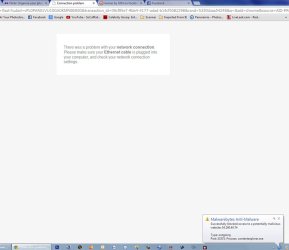
I haven't had a chance to go through everything today, hopefully tomorrow, but this strange thing just happened. I had Chrome open, selected a new tab then clicked on my Flickr link. Another window opened and here's what it showed.

Untitled-1.jpg
 

My Computer

Computer type
PC/Desktop
Computer Manufacturer/Model Number
Gateway DX4840
OS
Windows Home Premium 64bit
CPU
Intel i3 3.2Ghz
Memory
8gb
Graphics Card(s)
Intel HD Graphics
Sound Card
Realtek HD
Monitor(s) Displays
Dell 2209WA
Screen Resolution
1680x1050
Antivirus
MS Security Exxentials
Browser
Google Chrome
Did you run the programs that JohnSmith posted.
 

My Computer

Computer Manufacturer/Model Number
HP, Dell, Gateway, Toshiba - 4 laptops and 2 desktops
OS
Vista, Windows7, Mint Mate, Zorin, Windows 8
CPU
from 1.6GHz Duo to i7
Monitor(s) Displays
2x HP w2207
Hard Drives
5x HDD, 7x SSD, 12x Externals
Keyboard
with trackball - no mices
Mouse
Trackball mice
Internet Speed
DSL 6000
OK I've ran everything as said to above. Here are the txt files from the scans. I'm not seeing anymore weird popups so far. But the original problem with programs missing in CP still exists.

View attachment RKreport[0]_S_03252014_081942.zip
 

My Computer

Computer type
PC/Desktop
Computer Manufacturer/Model Number
Gateway DX4840
OS
Windows Home Premium 64bit
CPU
Intel i3 3.2Ghz
Memory
8gb
Graphics Card(s)
Intel HD Graphics
Sound Card
Realtek HD
Monitor(s) Displays
Dell 2209WA
Screen Resolution
1680x1050
Antivirus
MS Security Exxentials
Browser
Google Chrome
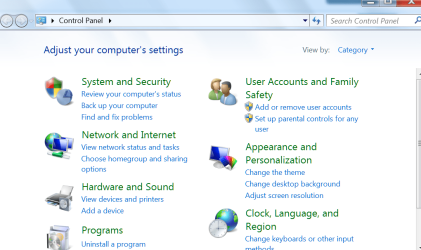
I am not sure I understand what you mean by 'Control Panel'. Below is a picture of the control panel. Can you post a snip where the programs are missing.
 

Attachments

  • 2014-03-25_1151.png
    2014-03-25_1151.png
    51.7 KB · Views: 0

My Computer

Computer Manufacturer/Model Number
HP, Dell, Gateway, Toshiba - 4 laptops and 2 desktops
OS
Vista, Windows7, Mint Mate, Zorin, Windows 8
CPU
from 1.6GHz Duo to i7
Monitor(s) Displays
2x HP w2207
Hard Drives
5x HDD, 7x SSD, 12x Externals
Keyboard
with trackball - no mices
Mouse
Trackball mice
Internet Speed
DSL 6000
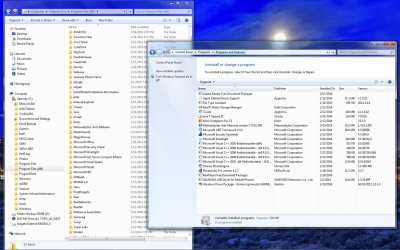
As you can see in the screen capture not all my programs are listed in the programs or features.

Untitled-1.jpg
 

My Computer

Computer type
PC/Desktop
Computer Manufacturer/Model Number
Gateway DX4840
OS
Windows Home Premium 64bit
CPU
Intel i3 3.2Ghz
Memory
8gb
Graphics Card(s)
Intel HD Graphics
Sound Card
Realtek HD
Monitor(s) Displays
Dell 2209WA
Screen Resolution
1680x1050
Antivirus
MS Security Exxentials
Browser
Google Chrome
That is indeed very strange. Are the program still present in the x86 program files or are those just empty folders - e.g. Nero.

One other thing you can check is install the Revo uninstaller (an excellent uninstaller) - download the free version in the left column. See whether Revo shows those programs.
 

My Computer

Computer Manufacturer/Model Number
HP, Dell, Gateway, Toshiba - 4 laptops and 2 desktops
OS
Vista, Windows7, Mint Mate, Zorin, Windows 8
CPU
from 1.6GHz Duo to i7
Monitor(s) Displays
2x HP w2207
Hard Drives
5x HDD, 7x SSD, 12x Externals
Keyboard
with trackball - no mices
Mouse
Trackball mice
Internet Speed
DSL 6000
All my programs are still installed and work fine. Revo shows even less programs LOL
\
Untitled-1.jpg
 

My Computer

Computer type
PC/Desktop
Computer Manufacturer/Model Number
Gateway DX4840
OS
Windows Home Premium 64bit
CPU
Intel i3 3.2Ghz
Memory
8gb
Graphics Card(s)
Intel HD Graphics
Sound Card
Realtek HD
Monitor(s) Displays
Dell 2209WA
Screen Resolution
1680x1050
Antivirus
MS Security Exxentials
Browser
Google Chrome
This is the 'browser add-on' that Malwarebytes' blocked (contentexplorer.exe):
Remove Content Explorer from your computer


The IP 54.200.40.74 is from Amazon 54.200.40.74/ec2-54-200-40-74.us-west-2.compute.amazonaws.com IP Address Whois | DomainTools.com


From the RK report:
¤¤¤ Bad processes : 1 ¤¤¤
[SUSP PATH] ContentExplorer.exe -- C:\Users\Dave\AppData\Roaming\ContentExplorer\ContentExplorer.exe [7] -> KILLED [TermProc]


I'd like you to scan your machine with ESET OnlineScan
  1. Hold down Control and click on the following link to open ESET OnlineScan in a new window.
    ESET OnlineScan
  2. Click the
    esetOnline.png
    button.
  3. For alternate browsers only: (Microsoft Internet Explorer users can skip these steps)
    1. Click on
      esetSmartInstall.png
      to download the ESET Smart Installer. Save it to your desktop.
    2. Double click on the
      esetSmartInstallDesktopIcon.png
      icon on your desktop.
  4. Check
    esetAcceptTerms.png
  5. Click the
    esetStart.png
    button.
  6. Accept any security warnings from your browser.
  7. Check
    esetScanArchives.png
  8. Push the Start button.
  9. ESET will then download updates for itself, install itself, and begin scanning your computer. Please be patient as this can take some time.
  10. When the scan completes, push
    esetListThreats.png
  11. Push
    esetExport.png
    , and save the file to your desktop using a unique name, such as ESETScan. Include the contents of this report in your next reply.
  12. Push the
    esetBack.png
    button.
  13. Push
    esetFinish.png
 

My Computer

Computer type
PC/Desktop
Computer Manufacturer/Model Number
Bruce ... somewhere in his 40's
OS
Windows 7 Ultimate 32bit SP1
CPU
Intel(R) Core(TM)2 Quad CPU @ 2.40GHz, 2400 MHz
Motherboard
INTEL/D975XBX2
Memory
4 GB
Graphics Card(s)
ATI Radeon HD 2600 Pro
Monitor(s) Displays
Samsung SyncMaster 914v
Screen Resolution
1280 x 1024
Hard Drives
2/500GB each ... ST3500630AS ATA Device.
One is not connected
PSU
Rocketfish 700 W
Case
G.Skill Gigabyte Chassis
Keyboard
Standard PS/2 Keyboard
Mouse
Microsoft PS/2 Mouse
Internet Speed
DSL
Antivirus
Avira Internet Security
Browser
IE 11
Other Info
ATI HDMI Audio
All the malware problems have been solved, not it's just the Control Panel problem listed above.
 

My Computer

Computer type
PC/Desktop
Computer Manufacturer/Model Number
Gateway DX4840
OS
Windows Home Premium 64bit
CPU
Intel i3 3.2Ghz
Memory
8gb
Graphics Card(s)
Intel HD Graphics
Sound Card
Realtek HD
Monitor(s) Displays
Dell 2209WA
Screen Resolution
1680x1050
Antivirus
MS Security Exxentials
Browser
Google Chrome

My Computer

Computer Manufacturer/Model Number
HP, Dell, Gateway, Toshiba - 4 laptops and 2 desktops
OS
Vista, Windows7, Mint Mate, Zorin, Windows 8
CPU
from 1.6GHz Duo to i7
Monitor(s) Displays
2x HP w2207
Hard Drives
5x HDD, 7x SSD, 12x Externals
Keyboard
with trackball - no mices
Mouse
Trackball mice
Internet Speed
DSL 6000
Back
Top