Solved Programs

Martin Dendev

Software Lover
Power User
Local time
10:14 AM
Messages
170
Location
Oostkamp
Hi,

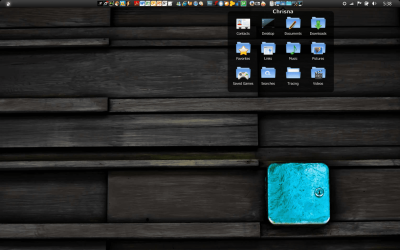
Is there a plugin like in macintosh, where you click on "programs" and a mini box shows all of your programs? I would like to have this in my taskbar.
 

My Computer My Computer

Computer type
Laptop
Computer Manufacturer/Model Number
HP Probook 4710s
OS
Windows 7 Home Premium 32 bit
Hard Drives
Fujitsu
Mouse
Touchpad
Try winpatrol
Make a system restore point first in case you do not like it..
It can be used as malware protection too.
 

My Computer My Computer

Computer type
PC/Desktop
Computer Manufacturer/Model Number
Dell XPS 420
OS
Windows 10, Home Clean Install
CPU
Intel Core2 processsor Q8200(2.33Ghz 1333FSB) Quad Core Tech
Motherboard
Dell
Memory
6 gb
Graphics Card(s)
ATI Radeon 256MB HD3650
Sound Card
Intergrated 7.1 Channel Audio
Monitor(s) Displays
Dell SP2009W 20"
Hard Drives
640 GB Serial ATA Hard drive
Cooling
Fan
Keyboard
Dell USB Keyboard
Mouse
Dell Premium Optical USB
Internet Speed
DSL 2.85
It's not exactly like that but you can right click on the task bar and select toobars and then select links. This will add a "links" button in your notification area. Just drag your program icons there and you'll have instant access to them.
ScreenShot001.jpg

ScreenShot002.jpg
 

My Computer My Computer

Computer Manufacturer/Model Number
Custom Build
OS
Windows 7 Pro/32 Academic. Build 7600
CPU
Intel 2.3 Duo core
Motherboard
EliteGroup G31T-M
Memory
4 GB DDR
Graphics Card(s)
Nvidia GeForce 9500 GT
Sound Card
Built in
Monitor(s) Displays
Viewsonic 15" 4:3
Screen Resolution
1280 x 1024
Hard Drives
WD Caviar Black 750 GB
WD 250 GB External
PSU
Antec 450w
Keyboard
Standard windows
Mouse
Logitech USB
Internet Speed
Bellsouth DSL 6.0
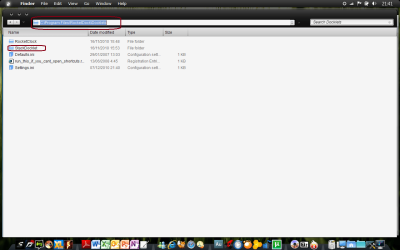
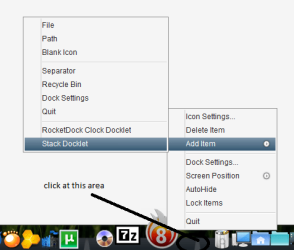
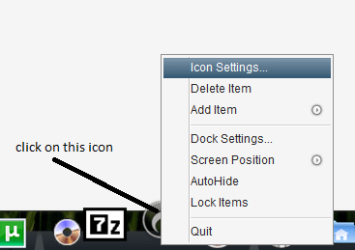
you mean this, right??? first, download rocketdock, install it... then download stack docklet in crystalxp.net , if you finish download stack docklet, copy it at C:\Program Files\RocketDock\Docklets (see at the picture) , next, run rocketdock as admin, left click at rocketdock in desktop(see at the picture), add item, stack docklet(see at the picture), afterwards, configure it..(see at the picture)...
 

Attachments

  • upload 1.png
    upload 1.png
    78.6 KB · Views: 14
  • Untitled3.png
    Untitled3.png
    47.6 KB · Views: 6
  • Untitled4.png
    Untitled4.png
    13.9 KB · Views: 4
  • Untitled5.png
    Untitled5.png
    6.3 KB · Views: 4

My Computer My Computer

Computer Manufacturer/Model Number
Compaq Presario CQ40-419TX Notebook PC
OS
Windows 7 Home Premium 32bit.
CPU
Intel Dual Core 2.0 GHZ
Motherboard
Intergrated Motherboard
Memory
4 GB
Graphics Card(s)
nVidia GeForce 103 M
Sound Card
Intergrated Sound Card
Monitor(s) Displays
Intergrated Monitor
Hard Drives
Fujitsu 250 GB
Segate Portable hard Drive 320 GB
PSU
-
Case
-
Cooling
Fan Cooler
That's the thing I want indeed. But, I want it not in my dock. I want it right in my taskbar.:) is that possible?
 

My Computer My Computer

Computer type
Laptop
Computer Manufacturer/Model Number
HP Probook 4710s
OS
Windows 7 Home Premium 32 bit
Hard Drives
Fujitsu
Mouse
Touchpad
:rolleyes::confused:.... i have no idea... better use it at dock:D...
 

My Computer My Computer

Computer Manufacturer/Model Number
Compaq Presario CQ40-419TX Notebook PC
OS
Windows 7 Home Premium 32bit.
CPU
Intel Dual Core 2.0 GHZ
Motherboard
Intergrated Motherboard
Memory
4 GB
Graphics Card(s)
nVidia GeForce 103 M
Sound Card
Intergrated Sound Card
Monitor(s) Displays
Intergrated Monitor
Hard Drives
Fujitsu 250 GB
Segate Portable hard Drive 320 GB
PSU
-
Case
-
Cooling
Fan Cooler

My Computer My Computer

Computer type
Laptop
Computer Manufacturer/Model Number
HP ENVY 17-1150eg
OS
Windows 10 Pro x64 EN-GB
CPU
1.6 GHz Intel Core i7-720QM Processor
Memory
6 GB
Graphics Card(s)
ATI Mobility Radeon HD 5850 Graphics
Sound Card
Beats sound system with integrated subwoofer
Monitor(s) Displays
17" laptop display, 22" LED and 32" Full HD TV through HDMI
Screen Resolution
1600*900 (1), 1920*1080 (2&3)
Hard Drives
Internal: 2 x 500 GB SATA Hard Disk Drive 7200 rpm
External: 2TB for backups, 3TB USB3 network drive for media
Cooling
As Envy runs a bit warm, I have it on a Cooler Master pad
Keyboard
Logitech diNovo Media Desktop Laser (bluetooth)
Mouse
Logitech Performance Mouse MX
Internet Speed
50/10 Mbps VDSL
Antivirus
Windows Defender 4.3.9431.0
Browser
Maxthon 3.5.2., IE11
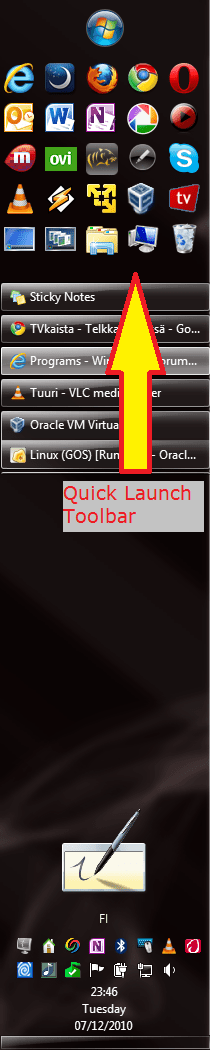
maybe, this is what you want, right?
 

Attachments

  • Untitled6.png
    Untitled6.png
    237.7 KB · Views: 18

My Computer My Computer

Computer Manufacturer/Model Number
Compaq Presario CQ40-419TX Notebook PC
OS
Windows 7 Home Premium 32bit.
CPU
Intel Dual Core 2.0 GHZ
Motherboard
Intergrated Motherboard
Memory
4 GB
Graphics Card(s)
nVidia GeForce 103 M
Sound Card
Intergrated Sound Card
Monitor(s) Displays
Intergrated Monitor
Hard Drives
Fujitsu 250 GB
Segate Portable hard Drive 320 GB
PSU
-
Case
-
Cooling
Fan Cooler
Chrisna, that's EXACTLY what I want!!!! I don't think there's a problem if my taskbar is beneath?
 

My Computer My Computer

Computer type
Laptop
Computer Manufacturer/Model Number
HP Probook 4710s
OS
Windows 7 Home Premium 32 bit
Hard Drives
Fujitsu
Mouse
Touchpad
You could reinstall Windows for Workgroups 3.11 if you want that feature.

You can make custom toolbars, you can pin icons to your taskbar and your start menu is customizable now, too.
 

My Computer My Computer

OS
Windows 7 Ultimate x64 SP1
CPU
Intel Core i7-2600
Motherboard
Gigabyte GA-P67A-UD3P-B3
Memory
12 GB Patriot Extreme DDR3-1333
Graphics Card(s)
Nvidia GTX 470
Monitor(s) Displays
Dell UltraSharp 2209WA
Hard Drives
OCZ Agility3 240 GB, WD5001AALS, WD7501AALS
PSU
OCZ ModStream 700W
Case
CoolerMaster HAF 912 Advanced
Cooling
CoolerMaster Hyper 212 Plus
So you mean complete 'clean' install? I don't think I want that...
 

My Computer My Computer

Computer type
Laptop
Computer Manufacturer/Model Number
HP Probook 4710s
OS
Windows 7 Home Premium 32 bit
Hard Drives
Fujitsu
Mouse
Touchpad

My Computer My Computer

Computer type
Laptop
Computer Manufacturer/Model Number
HP Probook 4710s
OS
Windows 7 Home Premium 32 bit
Hard Drives
Fujitsu
Mouse
Touchpad
Back
Top