Project: The Ultimate Computer Desk

Looks really good so far. Doing great work.

~Lordbob
 

My Computer

Computer Manufacturer/Model Number
Hera
OS
Windows 7 Ultimate x64, Mint 9
CPU
Intel i5-2500k
Motherboard
ASUS P8P67 Pro
Memory
2x 4Gb Corsair VENGEANCE DDR3-1600
Graphics Card(s)
NVidia GeForce N260GTX Twin Frozr
Sound Card
Realtek HD OnBoard Audio
Monitor(s) Displays
ASUS 24" Monitor
Screen Resolution
1920x1080
Hard Drives
G.SKILL Phoenix Series 60GB SATA II MLC Internal Solid State Drive (SSD)
SAMSUNG Spinpoint F3R 1TB 7200 RPM 32MB Cache SATA II
PSU
Cooler Master Real Power Pro 750W
Case
Cooler Master Haf 932
Cooling
Fans
Keyboard
Razer Tarantula
Mouse
Razer Lachesis
Internet Speed
not fast enough
Nice. What sort of wood stain are you going to use? Presumably something that doesn't give off any fumes as the heat builds up inside the drawers with the components in them?
 

My Computer

Computer type
PC/Desktop
Computer Manufacturer/Model Number
Golden Mk. I.4
OS
Windows 10 Pro x64 ; Xubuntu x64
CPU
Intel i7 860 @ 2.80 GHz O/C'ed to 4.0GHz
Motherboard
Gigabyte P55A-UD3R Rev.1. Award BIOS F13
Memory
16GB Corsair Vengance DDR3 @ 661 MHz Dual Channel (9-9-9-24)
Graphics Card(s)
EVGA NVidia GTX 560 1024MB
Sound Card
Realtek Integrated
Monitor(s) Displays
Dual Samsung SyncMaster 2494HS
Screen Resolution
1920*1080 and 1920*1080
Hard Drives
1*Samsung 840 EVO 120GB SSD;
1*OCZ Vertex 2 60GB SSD;
2*Samsung F3 SpinPoint 1TB in RAID0;
1*Samsung F1 SpinPoint 1TB;
2*Western Digital 1TB External USB 3.0
1*Western Digital 500GB External USB 3.0
1*Seagate 500GB External USB 2.0
PSU
Thermaltake ToughPower QFan 750W
Case
Thermaltake Element S VK60001W2Z
Cooling
Corsair H60 Water Cooling, 2*230mm and 2*80mm case fans
Keyboard
Logitech G110
Mouse
Logitech MX518
So forward to see this when it's done. Good luck :thumbsup:
 

My Computer

Computer type
PC/Desktop
Computer Manufacturer/Model Number
Custom built by me.
OS
Windows 10 Pro
CPU
Intel Core i7-4770K (3.5Ghz)
Motherboard
Gigabyte G1 Sniper 5 (F10 Bios)
Memory
32 gig Corsair Dominator Platinum (4x8Gig)
Graphics Card(s)
Sapphire Tri-X R9 Fury
Sound Card
Soundblaster ZXR
Monitor(s) Displays
NEC PA242W 24" LCD Monitor
Screen Resolution
1920 x 1200
Hard Drives
Primary - Samsung 850 Pro (512gig), Samsung 840 Pro (256gig), 2TB WD Caviar Black.
PSU
EVGA Supernova 1000 G2
Case
Cooler Master HAF X
Cooling
Corsair H100i with Corsair Air Series SP120 Quiet Fans
Keyboard
Logitech Wireless Wave
Mouse
Logitech Performance MX
Internet Speed
High Speed Cable
Antivirus
Norton Security
Browser
IE11
Other Info
Memory Timings - 1866MHz @ 9-9-9-27-1T @ 1.5 volts
Amazing i cant wait for the finished product
 

My Computer

Computer Manufacturer/Model Number
Custome Build 1-1-2011
OS
Windows 7 OEM Home Pre. x64
CPU
Phenon II x4 n955 Black Ed.
Motherboard
GA 890FX UD5
Memory
Corsair XMS3 8GB (2x 4GB)
Graphics Card(s)
XFX Radeon HD 6850
Sound Card
On board
Monitor(s) Displays
ASUS 23"
Hard Drives
OCZ Agility 2 90GB SSD
Samsung Spinpoint F3 1TB
PSU
Rosewill 1000w
Case
CM Storm Scout
Cooling
5 case fans + Zalman 9900MAX
2nd Desktop Hole

Nice work, you should put this all together in a book when you're done.
Lots of good pics too. :D
Thanks deremiko, cool idea ;)

Looks really good so far. Doing great work.
~Lordbob
Thanks Lordbob75 :)

Nice. What sort of wood stain are you going to use? Presumably something that doesn't give off any fumes as the heat builds up inside the drawers with the components in them?
That's an interesting comment - I had not considered that the heat from the components may cause the finish to offgas.. I'll have to do some research and get back to you on that one! ;)

So forward to see this when it's done. Good luck :thumbsup:
Amazing i cant wait for the finished product
Thanks sygnus21 and crazyeyeschase! (Lol, it's fun typing out your name, crazyeyeschase!)

Here's a quick, small update for those of you ~waiting in anticipation~ oooooohhh! ;) ;)

I finally got around to putting the second hole in the desk surface area (Since the desk is composed of two sheets of plywood, there are two holes needed, with the "top surface" needing a hole that is .5" larger all the way around, so the "bottom surface" supports the piece of glass which covers the gaming computer).

I took a few more detailed pictures compared to last time.

As with before, I started by cutting out a rough shape with the jigsaw. I was able to get within .5" comfortably of my marked lines. Sometimes if you rush the jigsaw, your cuts can get a little squirrely, so I was playing it safe. This is the top surface, so no screwing up here!!

img4590c.jpg


I then took an extra dose of patience, and went in straight to the corners with the jigsaw. This is a step I did not take last time, and I made a mistake with the router because of this.

img4594ql.jpg


img4593u.jpg


img4595x.jpg


img4599.jpg


I then took the router and pressed the bit right into the corner, and clamped a straight-edge on behind it. This is how I set the distance from the bit to the straight-edge. I repeated the same for the other side.

All it took was a good solid pass from right-to-left and I had a very clean straight edge without having to go all the way into the corners, where mistakes can be made, since it is quite difficult to see where the actual router bit is when the tool is running.

img4602d.jpg


img4605.jpg


img46080.jpg


Unclamp, reset router, reset clamps and straight edge, lather, rinse, and repeat:

img4616u.jpg


img46170.jpg


This hole had a very small margin of error overall, and I am very pleased with the result. The jigsaw is an incredible versatile tool and can be very accurate, as long as you have patience. This one corner is the only one that will need a touch-up with a file and/or sandpaper, and you can see, it's only going to need less than a 16th of material removal!

img4622l.jpg


And that's all I had time for in the shop that day ;) Enjoy some of my mess!

img4614h.jpg


img4623g.jpg


Until next time - I have some images in the queue, but I haven't quite gotten around to resizing them just yet ;)
 

My Computer

OS
Windows 7 Home Premium 64-Bit
Very nice - decent tools too (Dewalt)
 

My Computer

Computer type
PC/Desktop
Computer Manufacturer/Model Number
Golden Mk. I.4
OS
Windows 10 Pro x64 ; Xubuntu x64
CPU
Intel i7 860 @ 2.80 GHz O/C'ed to 4.0GHz
Motherboard
Gigabyte P55A-UD3R Rev.1. Award BIOS F13
Memory
16GB Corsair Vengance DDR3 @ 661 MHz Dual Channel (9-9-9-24)
Graphics Card(s)
EVGA NVidia GTX 560 1024MB
Sound Card
Realtek Integrated
Monitor(s) Displays
Dual Samsung SyncMaster 2494HS
Screen Resolution
1920*1080 and 1920*1080
Hard Drives
1*Samsung 840 EVO 120GB SSD;
1*OCZ Vertex 2 60GB SSD;
2*Samsung F3 SpinPoint 1TB in RAID0;
1*Samsung F1 SpinPoint 1TB;
2*Western Digital 1TB External USB 3.0
1*Western Digital 500GB External USB 3.0
1*Seagate 500GB External USB 2.0
PSU
Thermaltake ToughPower QFan 750W
Case
Thermaltake Element S VK60001W2Z
Cooling
Corsair H60 Water Cooling, 2*230mm and 2*80mm case fans
Keyboard
Logitech G110
Mouse
Logitech MX518
Desktop Chop Shop

Very nice - decent tools too (Dewalt)
Thanks Golden - the guy who owns the shop has been collecting and using tools for something like 20 years. All his "early versions" of his tools are now sitting at the cottage and other relatives place ;) I DO really like the Dewalt stuff a lot myself as well.

Here are a few snapshots. As some of you might know, I've been a little held back in the project due to not having selected my motherboard I/O plates and motherboard trays. Without having the actual items, I couldn't make the appropriate measurements to make cut-outs in the back of the cabinets, and therefore, was unable to make the dado cuts due to worry about everything not fitting properly.

So I scrounged through some old desktop systems I had lying around, emptied their components into my bins, and decided to take apart their chassis in search of some good motherboard tray and I/O parts.

So - off to the spooky basement with a pair of chassis, my trusty drill and dremel.

img4630k.jpg


img4631f.jpg


Having never drilled rivets out of a case before, I wasn't entirely sure what to expect. At first, I started with a bit that was a little bit small, so the rivets came up onto the drill bit itself and got stuck on there pretty good. Eventually, I moved to a bigger bit, and all it took was one good squeeze of the trigger and the rivet would come right out nice and cleanly.

img4632.jpg


img4635zb.jpg


Starting to rack up some parts here

img4638w.jpg


You can see in the image above that the I/O and PCI Plate is built right into the back of the desktop chassis - this is unfortunate, as you'll see in some future photos, my other case actually had a modular I/O plate. I'll have to take the dremel to that part to get what I need.

Time to grab the pliers...

img4640z.jpg


Here is the shot of the back plate of the other desktop chassis - see how the I/O plate was actually riveted in, and not pressed as a whole back sheet like the other one? Soo much easier to deal with.

img4643zk.jpg


That was a pretty fun experience taking apart the cases. I've got a bunch of scrap sheet metal now too - wonder what interesting projects I can come up with to use them...

On to that first I/O plate - I need to dremel out the section that I need

img4649l.jpg


Huh.. that actually didn't work out too well, at least, not the way I would like. I'm going to take these parts to the shop to see if there are any better tools for getting nice clean lines.

Until next time!
 

My Computer

OS
Windows 7 Home Premium 64-Bit
Great work
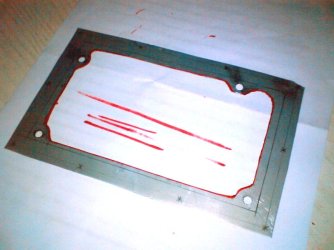
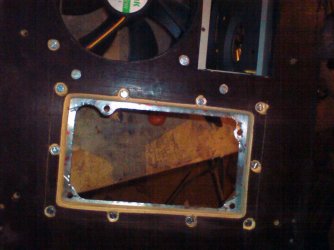
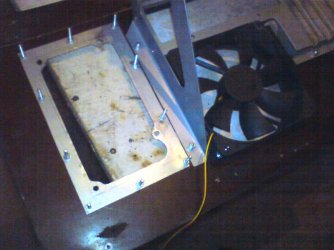
The most difficult part for me was motherboard tray and I/O parts
but one at the time
You can cut from some metal sheet for PSU easiest part
I/O & PCI card used from old case (but it can be re manufactured)
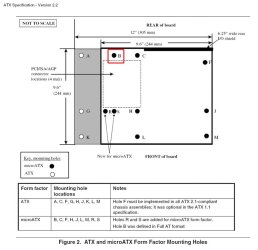
Motherboard tray was made from scratch with a loot of blueprints /photoshop
and old mini atx and atx board so it can be reused if I put another mboard in without need of new holes.
 

Attachments

  • x0-Kuciste-100.jpg
    x0-Kuciste-100.jpg
    54.1 KB · Views: 7
  • x0-Kuciste-102.jpg
    x0-Kuciste-102.jpg
    57.9 KB · Views: 6
  • x0-Kuciste-103.jpg
    x0-Kuciste-103.jpg
    64.4 KB · Views: 7
  • 0 crt 002.png
    0 crt 002.png
    83.1 KB · Views: 8
  • 0 crt 004.png
    0 crt 004.png
    18 KB · Views: 8
  • 0 crt 005.jpg
    0 crt 005.jpg
    45.7 KB · Views: 8

My Computer

Computer type
PC/Desktop
Computer Manufacturer/Model Number
696
OS
7 Ultimate x64 sp1
CPU
Intel i5-4690K
Motherboard
GA Z97X Gaming 5
Memory
16Gb HyperX fury
Graphics Card(s)
R9-270x 2Gb
Sound Card
On Board
Monitor(s) Displays
2443NW
Screen Resolution
1920x1200
Hard Drives
WD5000 -
WD5001 -
WD1002
PSU
Cft-650-14cs
Case
Very Big Case
Cooling
stock
Keyboard
G11
Mouse
Logitech
Internet Speed
Adsl
Browser
FF
Other Info
RWD
Great work
The most difficult part for me was motherboard tray and I/O parts
but one at the time
You can cut from some metal sheet for PSU easiest part
I/O & PCI card used from old case (but it can be re manufactured)
Motherboard tray was made from scratch with a loot of blueprints /photoshop
and old mini atx and atx board so it can be reused if I put another mboard in without need of new holes.
That looks like you did a great job of making those parts from scratch, Six9siX - what tools did you use to cut the sheet metal? You'll see below that I pretty much mangled the pieces - I will likely order ACTUAL I/O Panels and Motherboard trays...

I had some time to take those motherboard tray and I/O Plates to the shop to try out a few tools / techniques for shaping them into something I actually like.

First off, yes, Mike and I tried using the nice Dewalt Jigsaw, but the Mastercraft metal blades we were trying to use just wouldn't stay in the darn clamp. It would cut like butter for maybe 10 seconds and then bam, the blade would fall out of the bottom of the jigsaw onto the ground. Not sure what was going on there.

img4655o.jpg


Next up, we tried this neat little Mastercraft oscillating tool with a metal blade as well, but no such luck. Couldn't figure out a good way to clamp down the metal tray, so it just vibrated it like crazy instead of actually cutting.

img4656j.jpg


img4658r.jpg


Our next contestant was an air compressor powered cutting wheel, which, was ultimately less accurate than the dremel, and just as slow.

img4660j.jpg


So we took out the big gun, the sawzall.

img4653i.jpg


Ha, no, just kidding. It wouldn't work even a tiny bit for a piece like this.

In the end, you know what ultimately worked the best?

img4663mr.jpg


Yeah, a hacksaw. Go figure.

Anyways, here you can see my mangled I/O plate for the motherboard. It's not a pretty sight at all in my opinion.

img4666s.jpg


This is the nice I/O plate that I didn't even have to do anything except drill out a few rivets.

img4668w.jpg


I think I'm going to have to come up with a better solution for this. We'll see shortly ;)

Hope everyone who is getting snow is enjoying it, I know here in Ottawa, it's been a pretty crazy few days!

Stay tuned for more updates, will be spending some time in the shop this week and working with WOOD!
 

My Computer

OS
Windows 7 Home Premium 64-Bit
All I can say is WOW really looking forward to more updates. Looks like you've got everything under control. Very nice
Fabe
 

My Computer

Computer Manufacturer/Model Number
Self Built
OS
Windows 7 ultimate 64 bit / XP Home sp3
CPU
intel Core 2 Duo E8400 3.0ghz
Motherboard
Asus P5ND bios 1401
Memory
8 gigs 1066 OCZ Fata1ty
Graphics Card(s)
EVGA GTX 580 Call of Duty Black Ops Edition
Sound Card
Creative Soundblaster Audigy 2zs
Monitor(s) Displays
Asus 24in LCD's 2MS X2
Screen Resolution
1920x1080p @60Hz
Hard Drives
WD Caviar 500 Black/ WD Caviar 200 Blue
PSU
OCZ 700W GameXtreme
Case
NZXT Apollo
Cooling
Corsair H50 CPU/120mm x3 /60mm x2 /Corsair Dominator Ram
Keyboard
Logitech Bluetooth Wireless MX5000
Mouse
Logitech Bluetooth Wireless MX1000
Internet Speed
Download 19.83 Upload 0.97
Other Info
Logitech Z2300 Speakers/ Bose Noise Cancelling Headphones/Avermedia PCI-e Hybrid TV Bravo/Epson NX415 all in one/ 4 Port Powered USB Hub/ LG 10x Bluray Burner /TSST Corp DVDRW External
If you had access to a plasma cutter that would be great.

One suggestion I do have is go to your local High School. Most high schools offer welding classes now and most have a small plasma cutter along with some oxy acetylene torches.

A lot of the times as long as you supply the material and blueprints the students can do the cutting for you just go talk to a tech teacher.

Should also add most car repair shops have plasma cutters as well. Go talk to an owner and see if they wouldn’t mind doing a small favor for you.
 

My Computer

Computer Manufacturer/Model Number
Custome Build 1-1-2011
OS
Windows 7 OEM Home Pre. x64
CPU
Phenon II x4 n955 Black Ed.
Motherboard
GA 890FX UD5
Memory
Corsair XMS3 8GB (2x 4GB)
Graphics Card(s)
XFX Radeon HD 6850
Sound Card
On board
Monitor(s) Displays
ASUS 23"
Hard Drives
OCZ Agility 2 90GB SSD
Samsung Spinpoint F3 1TB
PSU
Rosewill 1000w
Case
CM Storm Scout
Cooling
5 case fans + Zalman 9900MAX
More Drawer Work

All I can say is WOW really looking forward to more updates. Looks like you've got everything under control. Very nice
Fabe
Thanks thefabe, I appreciate the support!
If you had access to a plasma cutter that would be great.

One suggestion I do have is go to your local High School. Most high schools offer welding classes now and most have a small plasma cutter along with some oxy acetylene torches.

A lot of the times as long as you supply the material and blueprints the students can do the cutting for you just go talk to a tech teacher.

Should also add most car repair shops have plasma cutters as well. Go talk to an owner and see if they wouldn’t mind doing a small favor for you.
Wow, that's a really good idea crazyeyes, I had not thought of that. I've got an eye out to order some stuff from Danger Den, but I'll have to check that out as a possible local solution. Thanks!

I had a bit of time in the shop this week to work on getting my drawers up to speed. I decided to take the advice of a fellow forum member and add "false fronts" to my drawers so that I can attach the "real fronts" using screws by screwing from the inside of the drawer, so I wouldn't have any screw heads to cover up on the outside.

Here they are, with my roughed out false fronts - I happened to have 3 pieces of wood almost exactly the size I needed.

img4671y.jpg


Time to take out 'ol trusty

img4674jx.jpg


A quick test fit, and all 3 fit perfectly

img4675l.jpg


img4677p.jpg


Add a bit of glue, and some trusty clamps, and we've got ourselves the beginnings of some false fronts!

img4678b.jpg


img4681s.jpg


img4683jb.jpg


All 3 of them fit rather nicely. I think they helped square out the drawers overall as well (Even though they were only out of square by around 1/16th of an inch).

So, I've got some time for the glue to dry. I'm not sure if anyone can remember this, but in my original cut sheets, I had planned on cutting out a specific piece of wood using the wood that I jigsawed out of the desk surface.

Here's that piece:

img4686cl.jpg


Not, exactly.... square..


So I take this nice little protractor attached to a table saw slide - it's set at 90, so here we go!

img4691lw.jpg


I do 2 sides, and then use the actual table saw fence to square out the other 2, but something just doesn't seem right..

img4695z.jpg


img4700y.jpg


It's not really square. What's going on here?

img4706ye.jpg


Aha! Looks like the protractor was a little bit off, resulting in a shape one step closer to a diamond as opposed to a square. After a bit of readjustment, I redid that bit and cut it to size - it's the drawer face for the large drawer.

img4707l.jpg


Now that the glue is settled, I decided to throw a few screws into the false fronts.

img4711lq.jpg


img4713.jpg


Awesome. And solid too!

img4717uy.jpg


Now, this is kind of embarrassing, but I had to go back and fix a mistake I made in my initial cuts. This piece of wood was supposed to be 20" x 28", but it ended up being more like 19.8" x 28". It may not seem like much, but this is the back piece to the left-hand cabinet. I would have to adjust the width of all 3 shelves if I were to continue using this, and I've got the space already pretty tightly packed with computer components on the top shelf.

So... don't do this at home, just cut a new piece of wood (I didn't want to cut into a new sheet of 4x8 just for this one piece...)

This piece looks like a good fit...

img4723g.jpg


img4727t.jpg


img4731q.jpg


No one will see it, because it'll be in the back, but you will all know. So... let's just forget that ever happened, ok? ;)
 

My Computer

OS
Windows 7 Home Premium 64-Bit
Wow, that's a really good idea crazyeyes, I had not thought of that. I've got an eye out to order some stuff from Danger Den, but I'll have to check that out as a possible local solution. Thanks!

Not a problem and I only know this because when I was in shop class in high school I did a lot of work for people around town (it was a small town) I made a lot of storage shelves for the elementary we also fixed a lot of trailers and such for some of the farmers. Even built myself a huge dog house and made a sword lol.

When I moved I had some work I needed done on a few car parts (I could of done it but didn’t have the tools) so I went to the school and talked to the teachers and they didn’t have a problem with it. They would also offer oil changes and such for the students in different shop classes.

Really it depends on the size of the school as to what they can and can't do but most of the time its free the only downside is someone is doing the work for you.

That IO metal is thin so it is a tad difficult to cut no matter what you use without punching of forming it.
 

My Computer

Computer Manufacturer/Model Number
Custome Build 1-1-2011
OS
Windows 7 OEM Home Pre. x64
CPU
Phenon II x4 n955 Black Ed.
Motherboard
GA 890FX UD5
Memory
Corsair XMS3 8GB (2x 4GB)
Graphics Card(s)
XFX Radeon HD 6850
Sound Card
On board
Monitor(s) Displays
ASUS 23"
Hard Drives
OCZ Agility 2 90GB SSD
Samsung Spinpoint F3 1TB
PSU
Rosewill 1000w
Case
CM Storm Scout
Cooling
5 case fans + Zalman 9900MAX
Oh I forgot this thing is looking great and the false fronts is a great idea. What do you plan on using as a finish material?

Don’t worry about miss cuts even the best make mistakes.

Just yesterday I was working on my house (it caught on fire 12/8/10) finishing up the electrical and decided that the old crawlspace for the attic was way to small at 12"x12" I had trouble getting in and out with all that little room so I made it larger 24"x22". It isn't quite square its off by 1/8" so when I cut 2 of the 2x4's I needed to make one shorter and not thinking I made it a whole inch shorter (got a little cocky and didn’t cut on the mark)

I had to cut into another 2x4 but it’s the insurance companies money in a since and 2x4's aren't to pricy but those 4x8 sheets can get pricy.
 

My Computer

Computer Manufacturer/Model Number
Custome Build 1-1-2011
OS
Windows 7 OEM Home Pre. x64
CPU
Phenon II x4 n955 Black Ed.
Motherboard
GA 890FX UD5
Memory
Corsair XMS3 8GB (2x 4GB)
Graphics Card(s)
XFX Radeon HD 6850
Sound Card
On board
Monitor(s) Displays
ASUS 23"
Hard Drives
OCZ Agility 2 90GB SSD
Samsung Spinpoint F3 1TB
PSU
Rosewill 1000w
Case
CM Storm Scout
Cooling
5 case fans + Zalman 9900MAX
Desk Gluing Time

Not a problem and I only know this because when I was in shop class in high school I did a lot of work for people around town (it was a small town) I made a lot of storage shelves for the elementary we also fixed...
Good stuff there crazyeyes, sounds like you grew up in a pretty nice community. I'm living downtown Ottawa right now, and I'm pretty sure most of the sharp objects have been removed from the local high schools, haha!

Oh I forgot this thing is looking great and the false fronts is a great idea. What do you plan on using as a finish material...
I've got some solid maple to put around the exposed edges of the plywood, and I'll hopefully be staining the whole thing a nice dark cherry red of some kind.. still working on that. Always nice to be spending insurance money instead of your own, eh? I bought one spare sheet of plywood, but I wasn't about to cut into it when a simple fix like this was available, no matter how ghetto it was ;)

I decided it was time to glue the two surfaces together that would comprise of the actual desk surface and take a break from working on the drawers for a while.

Here it is, the first piece. At first I wanted to lay it face down, so I could evenly distribute screws through the bottom, but in the end, I went face up so I would protect the surface, and it would be a LOT easier to line up the holes.

img4733k.jpg


I threw on the top layer, lined them up, and thought to myself: Hmm, I wonder what it'll look like with the top shelf stacked on:

img4734j.jpg


Pretty cool. This was the first time I had actually pulled a chair up to it to get a real grasp of how big this desk is going to be. I was pretty psyched.

Just a note, the two pieces of wood on each end holding up the shelf will actually be the inner supports (ie, pushed inwards towards the middle of the desk a foot or two), and the cubby holes on the outer ends will support the long shelf. The long shelf also has to be trimmed a couple inches, it won't reach right to the end of the desk.

img4738e.jpg


This next part was really quite a challenge on my own.

I lined it up as best as I could (According to the holes that I cut out, since the edges are easy to trim later), lifted one end with a mighty, strong arm, squirted as much glue as I could with my other arm (And only as far as I could reach!), put it down gently, ran to the other side and repeated.

Let me tell you - with the amount of glue I put down, and the fact that each side weighs 20-30 pounds - it did NOT want to slide around easily to get into perfect position.

In the end, I had to muscle it around a bit to get the holes lined up satisfactorily.

(I spoke with a couple friends about this afterward, and one of them suggested making some pilot holes and screwing in a few screws BEFORE the gluing, and then retracting the screws so that just the tips go through the bottom board. That way after the glue is put down, you shuffle around the top board until the tips of the screws find the pilot holes, thus, eliminating the issue of getting proper alignment before the glue becomes too tacky.)

I then threw some weight on top of the table, attached as many clamps as I could find, and started putting some 1.25" screws through the bottom.

img4739n.jpg


A few clamp shots of the hole - everything lined up pretty much perfect. 1/2" on the left and right, 1/2" at the bottom, and I think just a little under 3/4" at the top. (The size of the lip between the upper and lower holes)

img4741k.jpg


img4743a.jpg


img4745.jpg


img4751x.jpg


I wasn't satisfied with the way the clamping was going on lengthwise on the surface. I didn't have enough clamps to place them every half foot, so luckily, Mike had some of these nice, big, cedar logs lying around that I re-purposed temporarily.

img4753w.jpg


img4755z.jpg


img4761x.jpg


img4762j.jpg


img4766.jpg


The end result turned out quite nicely. The hole was lined up properly. There is only a small overhang / underhang of maybe 2/16's of an inch on two of the edges of the surfaces that should be easy to correct with a flush-bit on the router later.

We'll take a look at them next update! Thanks for staying tuned!

 

My Computer

OS
Windows 7 Home Premium 64-Bit
This is looking great!

And this,
(I spoke with a couple friends about this afterward, and one of them suggested making some pilot holes and screwing in a few screws BEFORE the gluing, and then retracting the screws so that just the tips go through the bottom board. That way after the glue is put down, you shuffle around the top board until the tips of the screws find the pilot holes, thus, eliminating the issue of getting proper alignment before the glue becomes too tacky.)
is a great idea!

I was a cabinet maker for about 10 years, I know assembly can be taxing at times.

Thanks for the updates, this is a great project!
 

My Computer

Computer type
PC/Desktop
Computer Manufacturer/Model Number
Self Built
OS
Win 10 Pro x64
CPU
Intel I5-2500K @3.3GHz
Motherboard
Asrock P67 Extreme4
Memory
16GB G.Skill Ripjaws X (4x4GB)
Graphics Card(s)
EVGA GeForce 750 Ti SC 2GB
Sound Card
ASUS Xonar DG 5.1 Channels 24-bit 96KHz PCI Interface Sound
Monitor(s) Displays
auria eq2367
Screen Resolution
1920 x 1080
Hard Drives
250GB Samsung 850 EVO SSD
1TB WD Blue
1TB Hitachi
PSU
SeaSonic X 650W 80 Plus Gold
Case
Corsair Obsidian 750D
Cooling
Corsair H60, Three 140mm case fans
Keyboard
Logitech Wireless Keyboard K520
Mouse
Logitech Wireless Mouse M310
Internet Speed
Wave Broadband ~ 100 dn 5 up
Antivirus
Windows Defender, Malwarebytes Premium
Browser
Edge, IE11, Chrome
Other Info
Laptop specs: HP g7-1365dx /
CPU: AMD A6-3420M APU with Radeon(tm) HD Graphics /
RAM: Crucial 8Gb (2x4Gb) /
SSD: Crucial M4-CT128M4SSD2 ATA Device/ FW 000F /
GFX: AMD Radeon HD 6520G /
OS: Windows 10 Pro x64
Drawer Trim

This is looking great!

And this,
(I spoke with a couple friends about this afterward, and one of them suggested making some pilot holes and screwing in a few screws BEFORE the gluing, and then retracting the screws so that just the tips go through the bottom board. That way after the glue is put down, you shuffle around the top board until the tips of the screws find the pilot holes, thus, eliminating the issue of getting proper alignment before the glue becomes too tacky.)
is a great idea!

I was a cabinet maker for about 10 years, I know assembly can be taxing at times.

Thanks for the updates, this is a great project!
Thanks derekimo - must have been an interesting job! Assembly is quickly approaching, and I am dreading it a bit.. I just hope everything lines up the way I have planned!

I got a chance to do some work on the drawer face trim - this was my first time doing solid wood trim.

I cut a nice piece of maple into 1/4" strips, glued, and sanded. I only did one piece this time, as I am not totally sure that this is the way I would like to go.

Something about the trim not meshing quite well with the plywood.

First, I set the table saw to the right width:

img4768q.jpg


Measure 3 times, and you get a nice solid cut:

img4774hy.jpg


Made a few strips:

img4780e.jpg


img4777h.jpg


Cut, glued, and clamped on the initial pieces of trim. The trim pieces were about 2/16's of an inch wider than the plywood, which is great, since there will be no voids, though, I'll have to do quite a bit of sanding:

img4788p.jpg


img4789yz.jpg


img4793v.jpg


Took the sander to the top and bottom:

img4794d.jpg


img4795f.jpg


img4796t.jpg


Overall, it looks pretty good. I'm still not 100% certain about it, however. I'm thinking there is a strong possibility I will go with solid maple for the drawer faces.

img4800u.jpg
 

My Computer

OS
Windows 7 Home Premium 64-Bit
It was a very interesting job, I miss it.

False drawer fronts would give you a more professional look if you decide to go that route.

Just make sure you attach them with short screws or nails that don't end up coming through the front.

Looking good though, I like watching this come together.
 

My Computer

Computer type
PC/Desktop
Computer Manufacturer/Model Number
Self Built
OS
Win 10 Pro x64
CPU
Intel I5-2500K @3.3GHz
Motherboard
Asrock P67 Extreme4
Memory
16GB G.Skill Ripjaws X (4x4GB)
Graphics Card(s)
EVGA GeForce 750 Ti SC 2GB
Sound Card
ASUS Xonar DG 5.1 Channels 24-bit 96KHz PCI Interface Sound
Monitor(s) Displays
auria eq2367
Screen Resolution
1920 x 1080
Hard Drives
250GB Samsung 850 EVO SSD
1TB WD Blue
1TB Hitachi
PSU
SeaSonic X 650W 80 Plus Gold
Case
Corsair Obsidian 750D
Cooling
Corsair H60, Three 140mm case fans
Keyboard
Logitech Wireless Keyboard K520
Mouse
Logitech Wireless Mouse M310
Internet Speed
Wave Broadband ~ 100 dn 5 up
Antivirus
Windows Defender, Malwarebytes Premium
Browser
Edge, IE11, Chrome
Other Info
Laptop specs: HP g7-1365dx /
CPU: AMD A6-3420M APU with Radeon(tm) HD Graphics /
RAM: Crucial 8Gb (2x4Gb) /
SSD: Crucial M4-CT128M4SSD2 ATA Device/ FW 000F /
GFX: AMD Radeon HD 6520G /
OS: Windows 10 Pro x64
Looks like a fantastic inbuilt desk pc XD.
 

My Computer

Computer type
PC/Desktop
Computer Manufacturer/Model Number
Me :D
OS
Windows 7
CPU
AMD X6 1090T 4.02Ghz
Motherboard
ASUS Crosshair IV Formula
Memory
16.00GB
Graphics Card(s)
Nvidia Geforce 470
Sound Card
ASUS Xonar DX
Monitor(s) Displays
Dell 24" Monitor
Hard Drives
2TB WD
1TB WD
2TB WD
60 SSD
60 SSD
PSU
700W Crosshair
Case
Antec Three hundred
Cooling
Water Cooling
Looks great so far!
 

My Computer

Computer Manufacturer/Model Number
800D Black Hole
OS
Windows 7 Professional X64
CPU
Intel Core i7 950 @ 4GHz [watercooled]
Motherboard
EVGA X58 Classified 3 [watercooled]
Memory
12GB Corsair Dominator 1600 [Watercooled]
Graphics Card(s)
GTX470 3 way SLI [watercooled]
Monitor(s) Displays
3X Acer X233H 23"
Screen Resolution
5760X1080
Hard Drives
OCZ Vertex 2 60GB
PSU
Silverstone ST1500
Case
Corsair 800D
Cooling
2X 480 Rads|10X 120MM|3X 140mm + AE5
Keyboard
Das Ultimate
Mouse
Razer Mamba
Back
Top