Hello there everyone, I have been downloading every theme/gadget available now for the last two days. So, I have alot. However, once the are installed (copy-pasted into Windows/Resources/Themes folder) I can not remove the ones that I am not thrilled with. Does someone know a way to do this properly?
Do I have to unpatch then remove? End a certain process, I would really like a step by step, so I can retain this info and help friends in the future. Thanks...
Right click on your desktop, navigate to personalize. Then browse to theme you want to delete, right click on it then click "Delete theme". View attachment below.
Attachments
Untitled.png
162.6 KB
· Views: 245
My Computer
Computer Manufacturer/Model Number
D3f's Customs
OS
Win 7 Ultimate SP1 x64
CPU
Intel Pentium Dual Core E5300 OC'd @ 3GHz
Motherboard
Asus P5G41-M LE
Memory
Kingston 2x2GB DDR2-800 Dual Channel SDRAM
Graphics Card(s)
Integrated Intel GMA X4500
Sound Card
Realtek 5.1 HD Audio (ALC887)
Monitor(s) Displays
LG Flatron W1943S @ 60Hz
Screen Resolution
1360 x 768
Hard Drives
Internal - WD Caviar Blue 500GB, External - WD My Passport Essential 500GB
PSU
Headway 450w PSU
Case
Pixxo Slim Black mATX Case
Cooling
Stock Cpu Fan, 1 x Top Case Fan
Keyboard
Logitech K120
Mouse
Logitech LS1 Laser Mouse
Internet Speed
17.66Mb/s Down, 0.82Mb/s Up
Other Info
Creative SBS A300 2.1 Speaker System, LG GH22NS50 22x Internal Super-Multi DVD-RW, 2Wire 5012NV Wireless Modem Router
D3ftOn3Z, I do appreciate the help, However-it does not remove the files from Windows/Resources/Themes folder. My apologies I re-read my post and I did not make that clear enough. I would like them to be removed from the folder as well.
So, while I am testing the Themes, I can only keep the ones I want, and keep the System (folders) as clean as possible.
Thanks....
Also, what is the one you are currently using in the snap-shot?
Where can I get it? Please...
If you want to uninstall the themes via windows/resources/themes folder. Make sure the one you want to delete is not in use. The theme i'm using now is created by MrGRiM. It's called "Midnight Glass". You can it get from the link below. Enjoy. Don't forget to say thanks to him.
Thanks, You helped me out, I wasn't using the actual theme that I was trying to delete, but because it was using a piece of it, I could not delete it.
Some have backgrounds some don't and other misc. data Borders etc... So, I went to a windows default theme (nature) and was able to delete them entirely. I thank you, and will be sure to thank MrGRiM as well.



 View attachment below.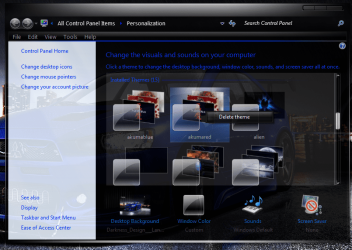
 Enjoy. Don't forget to say thanks to him.


