protected files - how to delete..

salvinorum

New member
Local time
12:09 AM
Messages
52
Here is my situation. I installed Win7 RC a year or so ago on my second drive while running Vista on my main drive, just to test Win7. Since then, I have of course upgraded my main drive to Win7, and no longer need Win7RC on my second drive.

I have removed it from startup options, and deleted all the files I could, from the following folders: program files, program files (x86), users, programdata and windows.

However, in all of these folders, there remain other folders and files that I cannot delete, no matter what I try.

So far, I have tried safe mode, I have tried to load PELoader and access the drive completely without any OS, I have tried the attrib command, and even with the attrib command, it says ACCESS DENIED.

There are about 10GB of folders/files in the Windows folder, so that is quite a bit, and about 1GB in the other folders I mentioned.

If everything else fails, I will format the drive, but I would really like to do this properly so I know how to proceed in the future. I can't believe even attrib won't work, these files are seriously protected, somehow, even tho they have nothing to do with the OS that is currently running. How is that even possible?!?!?!

Can anyone help?
 

My Computer

OS
Windows 7 Ultimate 64bit
CPU
AMD Opteron 165
Motherboard
DFI Ultra-D
Memory
OCZ 3GB
Graphics Card(s)
ATI Radeon HD3870
Sound Card
Onboard
Monitor(s) Displays
2 x Dell 2405fpw
Hard Drives
WD Raptor 150GB OS Drive *
WD 1TB Storage Drive *
Seagate 640GB Backup Drive
PSU
OCZ Powerstream 520
Case
Antec P180
Cooling
2 x 120mm intake, 2 x 120mm exhaust
Keyboard
Logitech Navigator & Gyration Ultra
Mouse
MX1000 & Gyration Ultra
Internet Speed
8Mbit down / 1Mbit up
In properties under security tab, click advanced, then change ownership/permissions to your liking

You should then be able to do with files as you please
 

My Computer

Computer type
PC/Desktop
Computer Manufacturer/Model Number
Pauly Special
OS
Win7 Ultimate X64
CPU
Intel i5 3570K
Motherboard
Gigabyte Z77X-DS3H
Memory
8GB DDR3 1600
Graphics Card(s)
Onboard
Sound Card
Onboard
Screen Resolution
1280x1024
Hard Drives
Samsung 840 Evo SSD (OS)
1TB Spinner (Data)
PSU
800W Arctic
Case
Cooler Master
Cooling
3x120mm Fans
Keyboard
MS Wireless
Mouse
MS Wireless
Internet Speed
20M
Welcome to 7 Forums salvinorum.

Have you tried this: http://www.sevenforums.com/tutorials/1911-take-ownership-shortcut.html

If there is nothing on the drive you want to save, the easiest/fastest way I know of is with disk management.

Rt. click on the partition you want empty, select delete volume. It will become free space. Rt. click on the free space and new simple volume. Click Next at each window.

Hope this helps.

Gary
 

My Computer

Computer Manufacturer/Model Number
Dell XPS420
OS
Vista Ult 64 bit Seven Ult RTM x64
CPU
Intel Core2 Quad Q6600 2.40 gigahertz
Memory
Crucial Ballistix 4x2GB PC2 6400
Graphics Card(s)
NVIDIA GeForce 8600 GTS 256 MB
Sound Card
Creative SB X-Fi audio
Monitor(s) Displays
HP w2207 + HPvs15
Screen Resolution
1680x1050 + 1024x768
Hard Drives
2-WD5000AAKS-500 GB
WD5000AAV-500 GB external
Keyboard
Microsoft Comfort Curve
Mouse
MX Revolution
Other Info
Wacom Intuos 2 Graphics Tablet
Experience Index=5.5
Hello salvinorum.

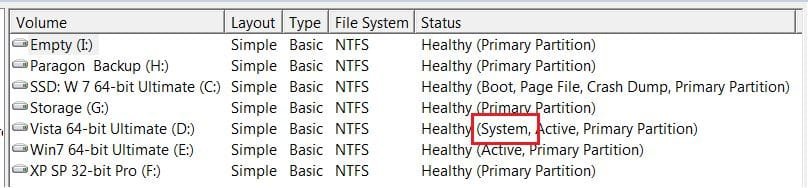
In disk management which OS is listed as "System" that can't be deleted/removed, if that's the case with you mark the OS you want to keep as active and run a http://www.sevenforums.com/tutorials/3413-repair-install.html?ltr=R to see if that will take care of it for you, (it may take a couple maybe three) "repairs" to get it right.

See my pic below.

Boot.JPG
 

My Computer

Computer Manufacturer/Model Number
* BFK Customs *
OS
W 7 64-bit Ultimate
CPU
Intel Q9550 Yorkfield
Motherboard
ASUS P5Q Pro
Memory
8GB Dominator 8500C5D
Graphics Card(s)
ATI : XFX 5870
Sound Card
Realtek HD Audio 7-1
Monitor(s) Displays
1x 47" LCD HDMI & 3x 26" LCD HDMI
Screen Resolution
1920x1080P & 1920x1200
Hard Drives
1x 80GB Intel X25-M G2 SSD : 1x 500GB & 1x 640GB WD Caviar Black(s)
PSU
Corsair 620HX
Case
Cooler Master RC-690
Cooling
Tuniq Tower 120, 2x 140mm and 3x 120mm case fans
Keyboard
Microsoft 500
Mouse
Razer Diamondback 3G
Internet Speed
14 Mb/s
Other Info
1x Koutech 3Gb/s SATA HDD Hot Swap Rack
Thanx for the info, I'll get on it and let you know if I succeeded.
 

My Computer

OS
Windows 7 Ultimate 64bit
CPU
AMD Opteron 165
Motherboard
DFI Ultra-D
Memory
OCZ 3GB
Graphics Card(s)
ATI Radeon HD3870
Sound Card
Onboard
Monitor(s) Displays
2 x Dell 2405fpw
Hard Drives
WD Raptor 150GB OS Drive *
WD 1TB Storage Drive *
Seagate 640GB Backup Drive
PSU
OCZ Powerstream 520
Case
Antec P180
Cooling
2 x 120mm intake, 2 x 120mm exhaust
Keyboard
Logitech Navigator & Gyration Ultra
Mouse
MX1000 & Gyration Ultra
Internet Speed
8Mbit down / 1Mbit up
/off topic
does your name have any relation to salvia divinorum??
 

My Computer

Computer Manufacturer/Model Number
Toshiba
OS
Windoze 7
CPU
AMD Turion x2 x64

My Computer

Computer Manufacturer/Model Number
Cheap $399.00 E-Machine
OS
Windows 7 Pro & Vista Home Premium
CPU
Athlon 64 3800+ (Orleans) 2.40GHz
Motherboard
Winfast
Memory
2GB DDR2 RAM DIMM
Graphics Card(s)
NVIDIA GeForce 8500 GT 512 MB memory HDMI out
Sound Card
creative X-Fi Exteme 7..1 channel
Monitor(s) Displays
Acer V223W 22" widescreen DVI
Screen Resolution
1680x1050
Hard Drives
WDC WD5 500GB
WDC WD25 250GB
PSU
OCZ 550 watt
Case
Gateway
Cooling
2 fans
Keyboard
Dell
Mouse
Sony Vaio
Internet Speed
18MB/s down - .72MB /s up
Just to let you know, nothing worked, not even changing ownership (it was owned by trustedinstaller, i changed it to myself).

I'll try third party software, but really, that shouldn't be an option, there has to be a way.

How is it even possible for these files to be so locked that I can't even delete them when I go to DOS via a third party OS, that has nothing to do with Windows? Unbelievable.
 

My Computer

OS
Windows 7 Ultimate 64bit
CPU
AMD Opteron 165
Motherboard
DFI Ultra-D
Memory
OCZ 3GB
Graphics Card(s)
ATI Radeon HD3870
Sound Card
Onboard
Monitor(s) Displays
2 x Dell 2405fpw
Hard Drives
WD Raptor 150GB OS Drive *
WD 1TB Storage Drive *
Seagate 640GB Backup Drive
PSU
OCZ Powerstream 520
Case
Antec P180
Cooling
2 x 120mm intake, 2 x 120mm exhaust
Keyboard
Logitech Navigator & Gyration Ultra
Mouse
MX1000 & Gyration Ultra
Internet Speed
8Mbit down / 1Mbit up
Oh, and I just tried three different programs, including lockhunter and unlocker, and they couldnt' delete my files/folders.

First they say that nothing is locking the files/folders, but when I try to delete them using the program, the program says it couldnt' delete the files in question even tho they are not locked.
 

My Computer

OS
Windows 7 Ultimate 64bit
CPU
AMD Opteron 165
Motherboard
DFI Ultra-D
Memory
OCZ 3GB
Graphics Card(s)
ATI Radeon HD3870
Sound Card
Onboard
Monitor(s) Displays
2 x Dell 2405fpw
Hard Drives
WD Raptor 150GB OS Drive *
WD 1TB Storage Drive *
Seagate 640GB Backup Drive
PSU
OCZ Powerstream 520
Case
Antec P180
Cooling
2 x 120mm intake, 2 x 120mm exhaust
Keyboard
Logitech Navigator & Gyration Ultra
Mouse
MX1000 & Gyration Ultra
Internet Speed
8Mbit down / 1Mbit up
Maybe I'm missing something, but why wouldn't you just back up your important data from the second drive, and format it through Disk Management?

Upon further reading, you mention wanting to do this the proper way. Formatting it through Disk management is the proper way. You are dealing with a former system volume, with all it's inherent permissions and such. There's no reason to do this by the method you are attempting, unless you have soo much data on the drive, that it can't be copied off anywhere else. If you want to do it properly, back up any important data, clear the drive, format at to be a data drive, and copy your data back.
 

My Computer

OS
Windows 7 Ultimate x64 SP1
CPU
Intel Core i7-2600
Motherboard
Gigabyte GA-P67A-UD3P-B3
Memory
12 GB Patriot Extreme DDR3-1333
Graphics Card(s)
Nvidia GTX 470
Monitor(s) Displays
Dell UltraSharp 2209WA
Hard Drives
OCZ Agility3 240 GB, WD5001AALS, WD7501AALS
PSU
OCZ ModStream 700W
Case
CoolerMaster HAF 912 Advanced
Cooling
CoolerMaster Hyper 212 Plus
Did you try what I suggested?
 

My Computer

Computer Manufacturer/Model Number
* BFK Customs *
OS
W 7 64-bit Ultimate
CPU
Intel Q9550 Yorkfield
Motherboard
ASUS P5Q Pro
Memory
8GB Dominator 8500C5D
Graphics Card(s)
ATI : XFX 5870
Sound Card
Realtek HD Audio 7-1
Monitor(s) Displays
1x 47" LCD HDMI & 3x 26" LCD HDMI
Screen Resolution
1920x1080P & 1920x1200
Hard Drives
1x 80GB Intel X25-M G2 SSD : 1x 500GB & 1x 640GB WD Caviar Black(s)
PSU
Corsair 620HX
Case
Cooler Master RC-690
Cooling
Tuniq Tower 120, 2x 140mm and 3x 120mm case fans
Keyboard
Microsoft 500
Mouse
Razer Diamondback 3G
Internet Speed
14 Mb/s
Other Info
1x Koutech 3Gb/s SATA HDD Hot Swap Rack
Did you try what I suggested?
If his primary disk is booting Windows 7 fine now, chances are there aren't any boot files on the secondary drive that needs to be cleared, so a format would be safe. Disk Management would tell the OP that, however, just to be sure. The OP is doing the ol' "mountain out of a molehill" concept on this one, instead of just making it the simple process that it should be.
 

My Computer

OS
Windows 7 Ultimate x64 SP1
CPU
Intel Core i7-2600
Motherboard
Gigabyte GA-P67A-UD3P-B3
Memory
12 GB Patriot Extreme DDR3-1333
Graphics Card(s)
Nvidia GTX 470
Monitor(s) Displays
Dell UltraSharp 2209WA
Hard Drives
OCZ Agility3 240 GB, WD5001AALS, WD7501AALS
PSU
OCZ ModStream 700W
Case
CoolerMaster HAF 912 Advanced
Cooling
CoolerMaster Hyper 212 Plus
Did you try what I suggested?
If his primary disk is booting Windows 7 fine now, chances are there aren't any boot files on the secondary drive that needs to be cleared, so a format would be safe. Disk Management would tell the OP that, however, just to be sure. The OP is doing the ol' "mountain out of a molehill" concept on this one, instead of just making it the simple process that it should be.


.;)
 

My Computer

Computer Manufacturer/Model Number
* BFK Customs *
OS
W 7 64-bit Ultimate
CPU
Intel Q9550 Yorkfield
Motherboard
ASUS P5Q Pro
Memory
8GB Dominator 8500C5D
Graphics Card(s)
ATI : XFX 5870
Sound Card
Realtek HD Audio 7-1
Monitor(s) Displays
1x 47" LCD HDMI & 3x 26" LCD HDMI
Screen Resolution
1920x1080P & 1920x1200
Hard Drives
1x 80GB Intel X25-M G2 SSD : 1x 500GB & 1x 640GB WD Caviar Black(s)
PSU
Corsair 620HX
Case
Cooler Master RC-690
Cooling
Tuniq Tower 120, 2x 140mm and 3x 120mm case fans
Keyboard
Microsoft 500
Mouse
Razer Diamondback 3G
Internet Speed
14 Mb/s
Other Info
1x Koutech 3Gb/s SATA HDD Hot Swap Rack
I had this happen on an XP system drive that I was trying to copy files onto a new W7 system by installing the drive internal.
I finally connected it via a USB adapter and was able to access all the files/folders.

W7 just doesn't want to access anybody else's files. But via USB it doesn't recognize them as someone else's. Strange, wonder what we will have to do when they figure this one out?
 

My Computer

OS
windows 7
Only my C drive is marked as a boot and system partition (system, boot, page file, active, crash dump, primary partition)
i have two more drives:
x: page file, primary partition, active
y: page file, primary partition

the only difference between the drive with the old win7 files and the pure data drive is the "active", I'm not sure why my y: drive is marked not active and x is, but I'm sure that is not the problem (btw, should I make Y active as well? x is the drive with the problem)
 

My Computer

OS
Windows 7 Ultimate 64bit
CPU
AMD Opteron 165
Motherboard
DFI Ultra-D
Memory
OCZ 3GB
Graphics Card(s)
ATI Radeon HD3870
Sound Card
Onboard
Monitor(s) Displays
2 x Dell 2405fpw
Hard Drives
WD Raptor 150GB OS Drive *
WD 1TB Storage Drive *
Seagate 640GB Backup Drive
PSU
OCZ Powerstream 520
Case
Antec P180
Cooling
2 x 120mm intake, 2 x 120mm exhaust
Keyboard
Logitech Navigator & Gyration Ultra
Mouse
MX1000 & Gyration Ultra
Internet Speed
8Mbit down / 1Mbit up
Copy to files you want to 2nd disk. Then format drive , then copy files back to 1st drive. This is the only way I could do it
 

My Computer

OS
Windows 7 64 bit
Rawer ,this thread was from december 2009.
 

My Computer

Computer Manufacturer/Model Number
Hewlett packard/p6512uk
OS
Microsoft Windows 7 Home Premium 64-bit 7600
CPU
IIx4 amd athelon 635 processor
Motherboard
FOXCONN 2AA9
Memory
2x2gb
Graphics Card(s)
ati radeon HD 5450
Sound Card
(1) Realtek High Definition Audio (2) AMD High Definition
Monitor(s) Displays
samsung lcd tv 32"
Screen Resolution
1360x 768
Hard Drives
(1) WDC WD10 01FAES-60Z2A0 SATA Disk Device (2) Maxtor OneTouch USB Device (3) ST310003 33AS USB Device (4) WD My Book 1111 USB Device
PSU
?
Cooling
air!
Keyboard
wireless hp
Mouse
wireless Hp,optical
Internet Speed
1.10mb/s
Antivirus
MSE
Browser
Firefox
Copy to files you want to 2nd disk. Then format drive , then copy files back to 1st drive. This is the only way I could do it
 

My Computer

OS
Windows 7 64 bit
Back
Top